copilot studio
118 Topics
Copilot Studio + SharePoint: Markdown (.md) Files in Doc Libraries Supported as Knowledge Sources?
Hi all, We’ve been doing some deeper testing with Copilot Studio agents grounded in SharePoint knowledge sources, and I’m hoping to clarify whether what we’re seeing is a known limitation or an undocumented gap. Scenario A Copilot Studio agent uses SharePoint document libraries as a knowledge source The library contains Markdown (.md) files that are intentionally used as canonical design references The same .md files: ✅ Work well when uploaded directly to the agent ❌ Are not retrievable or citable when stored in a SharePoint library and added as a SharePoint knowledge source To help with grounding, we created modern SharePoint index pages that: Explain what the markdown collections are (Patterns, ADRs, Guardrails) Link directly to the canonical folders and files Explicitly state that the .md files are the source of truth The agent can: Discover and summarize the index pages correctly Understand that .md artifacts exist and where they live But it cannot: Read the content of the individual .md files Apply a specific pattern or ADR from those files in a design conversation Cite them as sources, even when permissions and search indexing are confirmed What We’ve Checked Permissions (agent user has access) Folder depth (kept shallow) Search results (markdown files appear in SharePoint search) SharePoint indexing status Work IQ enabled Same content works when attached directly to the agent This behavior also seems consistent with what others have reported here: Markdown works when uploaded directly Markdown retrieval degrades when hosted in SharePoint libraries Questions for the Product Team / Community Are Markdown (.md) files in SharePoint document libraries officially supported as Copilot Studio knowledge sources today? If yes, are there specific constraints (file size, rendering, parsing, indexing) that differ from Word/PDF? If no (or “not yet”), is this a known limitation on the roadmap? Is the recommended pattern to: Convert important markdown files into .aspx pages, or Use thin “index / summary” pages and keep markdown canonical until retrieval improves? We’re happy to adapt our information architecture — just trying to align with the intended platform direction rather than work against it. Thanks in advance for any guidance or clarification. This capability is extremely powerful, and clearer expectations here would help a lot of teams make the right design tradeoffs.4.6KViews15likes9CommentsMore powerful agents and workflows for autonomous business processes: Introducing a new harness for Copilot Studio
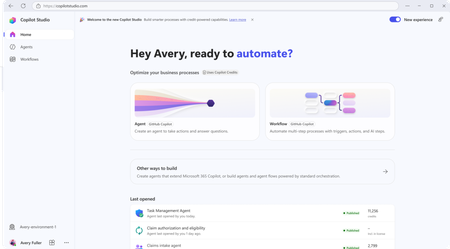
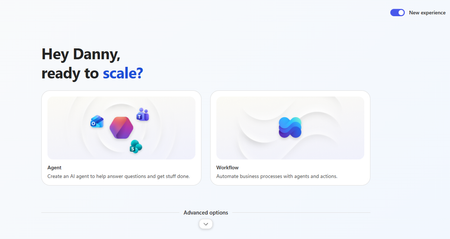
Editors' note: The GitHub Copilot harness is now the Microsoft Copilot harness. Learn more. Over the past two months, we’ve been previewing a new capability within Copilot Studio that lets you build agents capable of taking on more complex business processes. Today, we’re excited to share that this capability is now generally available for production use and to introduce its new name: the GitHub Copilot harness in Copilot Studio. Meet the GitHub Copilot harness The GitHub Copilot harness gives Copilot Studio the coding and reasoning capabilities behind our most advanced agent experiences (like Copilot Cowork and the GitHub Copilot coding agent). This means your agents can now handle work that used to be out of reach, including processes that have many steps, many sources, and ambiguous decision points. The new harness is built for complex, long-horizon work using the latest frontier reasoning models like Opus 5, GPT-5.6 Sol, and Fable 5. It can plan, reason through dynamic problems, run an agentic loop, use skills, integrate workflows, connect to tools and agents in other platforms, and produce rich, multi-part outputs. In our own testing with real world business process evals, Copilot Studio shows significant performance and quality gains when using the GitHub Copilot harness. Improvements in multi-tool use, file analysis, code analysis, and knowledge quality mean these agents are more capable of taking on your most complex business processes. To help you build these more capable agents, we’re also delivering new experiences for makers building agents with the GitHub Copilot harness. The agent designer is more intuitive for authoring, putting the most important tools right within reach to make authoring faster, while retaining full agent lifecycle management features. Then, the workflow designer gives a visual canvas to understand and edit workflows, including adding agent nodes and running workflow evals. And soon, natural language authoring will let you describe your business goal and assemble the right combination of agents and workflows through a multi-turn conversation. Agents running on the GitHub Copilot harness use usage-based billing for all work, regardless of Microsoft 365 Copilot licensing. You pay for your agent’s usage based on the models you choose, the organizational context and tools you add, and runtime used. Certain AI-driven maker experiences, like natural language authoring, evaluations, and testing, will also fall under usage-based billing if building with the GitHub Copilot harness. You can learn more about Copilot Studio usage-based billing here. Continued Support for Copilot Chat and Standard harnesses Adding a new harness does not change the ones you already rely on. Different harnesses can be optimized for different outcomes, so rather than relying on a single one-size-fits-all approach, Copilot Studio now lets you choose the harness that best fits your scenario. This means Copilot Studio supports three harnesses today: The Copilot Chat harness, which uses the same harness as Microsoft 365 Copilot Chat and is ideal for customizing Copilot Chat experiences. The Standard harness, which most agents built in Copilot Studio use today and is great for conversational agents with rules-based topics. The new GitHub Copilot harness, which uses the power of GitHub Copilot SDK to automate complex, agentic business processes. We will continue to support the Copilot Chat and Standard harnesses in Copilot Studio for both existing agents and authoring of new agents. Microsoft 365 Copilot licensed users continue to benefit from fair use of Copilot Chat or Standard harness agents included in their Microsoft 365 Copilot license. For all other usage, the Copilot Chat and Standard harnesses will continue to be billed using the existing fixed rate card. Get started today The GitHub Copilot harness is generally available now, and you can start creating these agents directly from the Copilot Studio homepage. We can’t wait to see what you build. Share your thoughts using the feedback control in the top right corner of the product. Your input directly shapes what we build—and how you build—next. Try Copilot Studio today!49KViews10likes12CommentsFile Uploads Not Passed to Custom Engine Agent in Microsoft 365 Copilot Chat
Hi all, I'm working with a custom agent built in Copilot Studio (full authoring experience — topics, knowledge sources, agent flows) published to both the Microsoft Teams channel and the Microsoft 365 channel. I've noticed a significant UX discrepancy when it comes to file and image attachments, and I want to confirm my understanding and check whether any workaround or roadmap item exists. What works: ✅ File/image uploads work as expected in the Copilot Studio test pane ✅ File/image uploads work in Teams chat when interacting with the agent What doesn't work: ❌ File/image uploads do not reach the agent when interacting via the Microsoft 365 Copilot app (both the desktop app and the web experience at microsoft365.com) The UX problem: The M365 Copilot app presents a "+" button in the chat input area with options including "Upload" and "Take screenshot." Users naturally assume these options work. The file even appears as an attachment in the sent message — but the agent never receives it. There's no warning, error, or indication to the user that the attachment was silently dropped. This creates a misleading experience, particularly for end users who have no visibility into the channel behavior differences. What I've found so far: I'm aware this is documented as a known issue for custom engine agents in the Microsoft 365 Copilot Extensibility Known Issues page: "File attachments — Users can't upload files in agent chats and the agent can't return files for download." I also found a related GitHub issue (OfficeDev/microsoft-365-agents-toolkit #15325) where a Microsoft team member confirmed this is a "Copilot platform shortage" — not an Agents Toolkit issue — with no published ETA. My questions for the community and any Microsoft product team members: Is there any currently supported workaround to enable file/image input for a Copilot Studio agent running in the M365 Copilot app (desktop or web)? For example, any manifest configuration, agent settings, or alternate approach? Is this limitation being actively worked on? Is there a roadmap item or Microsoft 365 feature ID that can be tracked for when file attachment support is extended to custom engine agents in the M365 Copilot chat experience? Is the UI behavior (showing upload options that don't work) being addressed separately? Even if full file processing isn't ready, a visible warning or disabled state in the UI would significantly reduce user confusion. Any insight from others who have hit this — or from Microsoft PMs — is appreciated. Happy to share more configuration details if helpful. Thanks! Brian2.6KViews8likes1CommentWelcome let's get started
Welcome to the Copilot Studio Community on Microsoft Tech Community! We're thrilled to announce that Copilot Studio now has a dedicated home on the Microsoft Tech Community, and we'd love for you to be part of it from day one. Whether you're just getting started with building Agents in Agent Builder or you are a pro building agents and automations with Copilot Studio, this is your space to: Ask questions and get answers from the community and Microsoft experts Share what you've built — show off your agents, flows, and use cases Stay up to date on the latest features, releases, and best practices Connect with peers across industries who are shaping the future of AI-powered work The community is open to everyone, from first-time explorers to seasoned pros. Every question asked and every insight shared makes this a better resource for all of us. We can't wait to see what you build. Welcome!274Views7likes3CommentsIntroducing the customer conversation harness in Microsoft Copilot Studio
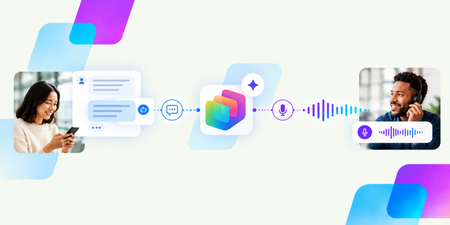
By Omar Aftab, Vice President, Conversational AI The way customers interact with brands is fundamentally changing. More and more interactions are driven by conversational AI, and customers increasingly expect every interaction to be deeply personalized and contextual. With millions of people interacting with sophisticated AI systems every day, consumers are no longer willing to put up with legacy IVRs, restrictive menus, and loss of context. Engaging with customers has been central to Microsoft Copilot Studio from the very start. Copilot Studio customers have created thousands of agents that engage with their customers, whether those customers are chatting on a website, speaking with a voice agent on the phone, or using an AI agent embedded in an app or kiosk. Today we’re announcing the public preview of our new customer conversation harness in Copilot Studio. This is a purpose-built harness and builder specifically designed to create powerful conversational agents for customer engagement. It supports the full arc of a customer interaction in a modern world: connecting to customers across channels, understanding what they need, drawing on the right knowledge and tools, interacting with human representatives as needed, and providing a swift resolution – whether the customer is speaking or typing. To enable this, the harness introduces a set of core new conversational capabilities. These range from teams of agents that work together, more seamless interactions between generative skills and deterministic topics, powerful omnichannel conversations across chat and voice, to better human-agent interactions. The harness also enables integration with third-party contact centers through our new Microsoft Contact Center Intelligence product that we also announced today. Build intelligent conversational agents that work together At the center of the new harness is the new conversational agent builder. Makers can now build state-of-the-art experiences for voice and chat within a single agent. Every agent is omnichannel out of the box and has the skills you’d expect any versatile customer-facing representative to have. They speak conversationally. They understand multiple languages. They are channel-aware. You can move between digital and voice channels without losing context, and the agents maintain memory across them. Connect a team of specialized agents to business knowledge and tools The customer conversation harness makes it easy to orchestrate multiple agents to work together as a team of specialists. Each sub-agent can have its own knowledge and its own tools to hand its own specialized tasks. At GA, each agent will also be able use its own model. This means makers can choose which model is best suited to the kinds of jobs and intents each specialist agent handles. Some tasks call for deep reasoning, while others benefit from models optimized for cost and latency. The harness is designed to orchestrate and combine these agents seamlessly into one customer engagement system. What's more: Microsoft Foundry extensibility is built in. You can create a custom agent with code in Foundry and add it to the team of agents with just a few clicks. The harness handles the complexity and does the heavy lifting, allowing you to build on your existing assets or more easily leverage pro-code capabilities. Finally, Microsoft IQ, which helps ground AI experiences in your organization's work context and business data, is also backed into the harness and available to each agent. With Work IQ, agents can draw on information from the Microsoft 365 apps your team uses every day. For example, an agent helping resolve a billing dispute could reference a refund policy stored in SharePoint and also reference an exception that was agreed to in a Teams thread. The agent accesses this information with its own identity, respecting existing enterprise data access and security policies. Agents can also connect to Foundry IQ for large-scale knowledge sources, such as product manuals, warranty terms, and documents indexed in Azure AI Search; Fabric IQ for reasoning over business data; and more. Combine generative skills with topics Each agent in the team handles multiple jobs - whether it's recommending a credit card, looking up a balance, or taking a payment. And just like when giving a task to an employee, you can provide general instructions for some tasks, and provide specific turn-by-turn directions for others. In the new harness, each agent skill can either be fully generative - you simply provide a prompt and let the model use its own judgment (e.g. “Go and gather the credit card information from the user”) - or fully deterministic, using a topic (commonly used, for example, in IVRs or voice trees where exact, step-by-step instructions are desired). This flexibility is key for large customer engagement systems and has been a recurring customer ask. In the past, an agent could do one or the other. Now, each agent in your team can seamlessly handle a mix of both, depending on the job to be done. Deliver natural experiences across voice and chat Because the harness is natively omnichannel, voice is a first-class experience for both makers and customers. You can choose among speech models and configure rich voice capabilities. These include voice fonts for more natural and customized interactions, speech instructions to guide the agent’s tone and speaking style, DTMF behavior, speech sensitivity settings, and more. When you're ready to publish, you can even acquire phone numbers and deploy your agent to them, making the agent accessible to customers over the phone. And you can test and evaluate all of this right within the experience. Make customer verification easier with voice biometrics Authentication can be one of the most frustrating parts of a customer service call. Traditional verification methods, from security questions to one-time passcodes, can add time and friction before customers can even explain why they're calling. Verifying a customer's identity is essential, but it shouldn't get in the way of a great service experience. The new harness, together with Contact Center Intelligence, supports enterprise grade state-of-the-art voice biometrics that help authenticate customers in real time. Rather than ask a rigid set of questions to validate identity, customers can continue to speak about why they’re calling in while the system validates the caller's identity with a unique voiceprint designed to meet the precision level required by the organization. This also means that if a call drops and the customer calls back, the conversation can seamlessly resume. Connect customer conversations to the enterprise Conversational agents and human representatives work best when they can collaborate to resolve customer needs, and the customer conversation harness in Copilot Studio provides built-in handoff capabilities for different kinds of escalation paths to live representatives. Partner with your human agents in Teams Out of the box, the new harness has better support for partnering with your internal employees in Teams. You can escalate incoming calls to a Teams queue, and very soon directly to Teams chats. Think of a scenario: Oh, that’s an invoice coding issue, it should go to…Sally in accounting. And you can send that call to Sally with just a few clicks, right from within the UX. Or connect to your existing contact center When a full-fledged contact center is needed, connecting to one is simple. The new harness is designed to integrate seamlessly with our new Microsoft Contact Center Intelligence product and is also accessible within it. You can connect to your existing contact center, modernize your existing IVR systems and chat bots, partner with your existing human agents, configure advanced biometrics, score your calls, get insights on how your human-AI partnerships are working, and more - while retaining your existing telephony, routing, and queues. All with a few simple clicks. Govern agents with Microsoft Agent 365 Finally, like all Copilot Studio agents, these conversational agents are fully part of Microsoft’s Agent 365 governance story. Every agent built on the customer conversation harness will show up in Agent 365 upon creation. Admins should immediately see the details of the agent, including owner, channels, Entra agent ID, knowledge, tools, permissions, usage, etc. Centralized governance helps admins apply and update existing policies comprehensively across the enterprise. And, like the rest of Copilot Studio, the customer conversation harness uses Copilot Credits with usage-based billing, so it's easy to get started. Get started with the customer conversation harness With the new customer conversation harness in Copilot Studio, we're helping organizations build more natural, intelligent, and effective customer experiences - wherever they engage with customers. Many of these capabilities are available now in public preview, with more rolling out over the coming weeks. Together with the launch of our new Contact Center Intelligence offering, this is the first step in a journey to transform how everyone on the planet interacts with a brand. Head over to Copilot Studio, click "more ways to build" to try out our new customer conversation harness, and start changing how you engage with your customers today. For more information as you get started, explore the resources below: Learn how to build with the customer conversation harness Read about Microsoft Contact Center Intelligence7KViews4likes1CommentCopilot Studio agent suddenly stopped working in Teams
Hello, I've run into a strange issue with a Copilot Studio agent and I'm trying to understand where to investigate next. The agent is published to the "Teams and Microsoft 365 Copilot" channel and was working normally in Microsoft Teams until recently. The agent still works correctly in Copilot Studio. The agent still works correctly in Microsoft 365 Copilot / Copilot Chat. The issue only occurs in Microsoft Teams. What happens in Teams: Messages can be sent to the agent. No error message is displayed. No response is returned. Most importantly, no session is created in Copilot Studio (Analytics / Observability). Because no session is created, it looks like the message never reaches the agent runtime. What I've already checked: Republished the agent. Reinstalled the Teams app. Verified the Teams and Microsoft 365 Copilot channel configuration. Checked permissions and sharing settings. Checked Teams Admin Center configuration. Tested in both Teams Desktop and Teams Web. Reviewed Microsoft 365 service health. This same tenant has another Copilot Studio agent that works normally in Teams. The affected agent previously worked in Teams for several weeks before the issue appeared. The agent architecture is very simple (single MCP server, no custom connectors, no Power Automate involved in this scenario). At this point, I'm mainly trying to understand why Teams no longer seems to create a conversation/session for this specific agent while the same agent continues to work in Copilot Studio and Microsoft 365 Copilot. Has anyone seen similar behavior or found a way to diagnose why Teams is no longer forwarding requests to a specific agent ? Thank you for help1.1KViews3likes4CommentsWhat is the best file format for an AI agent knowledge base?
This is a best practice sharing the best format for an agent and show you why you should convert your PPT, PDF, WORD into a TXT markdown. I had an issue with my agent, time taken to answer was too long, and usually we spend a lot of time asking: What is the best prompt? Why is my agent slow? Why does retrieval sometimes work and sometimes fail? How can I improve answer quality? But I realised I was asking another question much less often: What is actually the best file format for the knowledge base? PDF? Raw text? Markdown? Pre-chunked text? Semantic sections? Context-enriched text? And more importantly: How much does the format alone affect agent performance? I tried to find a quantified benchmark answering this specific question, with the same agent, same source knowledge and same questions, but different knowledge representations. I couldn't find one that really answered what I wanted to measure. So I decided to run the experiment myself on a real case. My first exploratory tests were already surprising: depending on the representation, the agent could be significantly faster and more accurate, despite working from the exact same source information. So I decided to push the test further. My objective I want to identify, without assumptions and based on actual evaluation data, how a long document should be prepared for an LLM knowledge base so that the agent can retrieve, understand, ground and answer from it as reliably as possible. I focused on five dimensions: Answer quality Retrieval reliability Source grounding / citations Execution time Robustness across single-turn and multi-turn questions The broader question I'm trying to answer is: How should we structure knowledge so that an LLM can retrieve and use it as reliably as possible? The test case I deliberately chose a document that isn't particularly friendly for RAG: a 46-page European regulation, https://eur-lex.europa.eu/eli/reg/2011/1169/oj?locale=fr, on the provision of food information to consumers. The information is distributed across articles, definitions, exceptions, annexes, tables, numerical thresholds and cross-references. That makes it useful for testing retrieval: answering correctly often requires finding a very specific piece of information while preserving enough context to understand how it applies. I used the native PDF as the baseline and created 6 additional knowledge-base representations of the same document: Raw TXT Markdown Chunk-ready TXT RAG-oriented units Semantic TXT Contextual TXT One rule: same knowledge, same agent, same instructions, same questions. Only the knowledge representation changes. The benchmark I used two evaluation sets: 42 single-turn questions testing broad coverage of the document: direct facts, thresholds, exceptions, annexes, lists and cross-references. 5 multi-turn conversations containing 13 questions, to see what happens when a user asks a question and then follows up with things like: "And in this case?" "What are the exceptions?" "And for dietary fibre?" This gave me: 47 evaluated test cases / 55 actual questions per format Across all 7 formats: 329 evaluated conversations 385 user questions executed First results Metric Native PDF Best structured representation Overall pass rate 66.0% 85.1% - Contextual TXT Best single-turn score 69.0% 88.1% - Chunk-ready TXT Multi-turn benchmark 40% 80% - Contextual TXT Multi-turn execution time 14m24 5m54 Total benchmark time 44m31 24m49 The quality gap was already substantial: 66.0% → 85.1% That's +19.1 percentage points while keeping the underlying knowledge unchanged. I also saw a major difference in execution time. On the multi-turn test: 14m24 → 5m54 That's approximately 2.4× faster. Across the complete benchmark: 44m31 → 24m49 Around 44% less execution time. These timings represent the complete agent evaluation pipeline, so they shouldn't be interpreted as pure LLM inference latency. But the difference under identical test conditions is large enough that I want to understand it better. Findings There wasn't one format dominating every benchmark. Chunk-ready TXT scored highest on independent questions: 88.1%, while Contextual TXT performed better across multi-turn conversations and finished with the highest overall score. That may suggest that the way we optimise a document for isolated retrieval isn't exactly the same as the way we should prepare it for conversational retrieval. In the contextual version, I tried to make every section understandable when retrieved independently by keeping useful information around it: Source references Section context Retrieval cues Relevant cross-references For regulatory documents, this seems particularly important. A numerical value retrieved alone can be meaningless without knowing which rule it belongs to, under which conditions it applies, and whether another article contains an exception. Where I am now This remains an exploratory benchmark: One document One domain One agent setup One evaluation framework One run per configuration There are plenty of things I still want to test: repeated runs, retrieval-level evaluation, token consumption, larger knowledge bases, other document types, chunk sizes, overlap, contextual headers, and more. But these first results already convinced me that the preparation of the knowledge base deserves much more attention when evaluating an agent. We often spend hours refining instructions while the same information may behave very differently depending on how it reaches the retrieval layer. Next step I'll share the prompts, knowledge-base formats and evaluation methodology on GitHub so the experiment can be reproduced and challenged. I'll keep enriching the repository as I test new formats, improve the evaluation set and add new results. If people here have ideas, edge cases or formats worth testing, I'd genuinely like to include some of them in the next iteration. What would you test next?1.2KViews3likes3Comments
Copilot Studio agents problems connecting to Sharepoint knowledge source
Hello, Since last week users in my tenant are experimenting issues regarding the connection between copilot studio agents and Sharepoint. The agents are not able to extract information from Sharepoint sites, printing there is not information in the Sharepoint site regarding the user's question when that information is in Sharepoint. These agents used to work well till last week. Does have been any update in Microsoft 365 services that can be affecting these agents ability to retrieve information from Sharepoint?3.6KViews3likes25Comments
All Copilot Studio Workflow Tools Suddenly Returning HTTP 403 Before Execution
Hello Copilot Studio Community, I am experiencing an authorization issue with multiple workflows connected to an agent built using the Copilot Studio new experience and new Workflows experience. These workflows worked successfully for multiple users yesterday. Today, all workflow tools connected to the agent began returning an immediate HTTP 403 authorization error. I did not intentionally change the agent, workflows, environment, or workflow permissions before the issue started. Error message: You don’t have permission to use this tool. You’re signed in, but access to this resource is blocked. Error details: Authorization - 403 Example error information: Status: Failed Error message: Flow returned HTTP 403 Error code: Http403 Inner error code: NotSpecified Tool duration: Approximately 93 milliseconds Configuration: - Copilot Studio new agent experience - Copilot Studio new Workflows experience - Agent and workflows are in the same Power Platform environment - Workflows use the "When an agent calls the workflow" trigger - Each workflow includes a "Respond to the agent" action - Workflows are saved and published - Agent is saved and published Observed behavior: The problem affects several independent workflows, including: - New-request submission - Current-user identity resolution - Approval decisions - Requester justification - Executive decisions - Fulfillment updates For every affected workflow: - The agent fills the workflow inputs correctly. - The tool call fails almost immediately. - No corresponding run appears in the workflow Activity history. - The workflow trigger is never reached. - No workflow actions execute. Because no workflow run is created, the rejection appears to occur before workflow execution, possibly within the Copilot Studio agent-to-workflow authorization or invocation layer. Troubleshooting already completed: - Confirmed that all workflows are published. - Confirmed that the agent is published. - Tested in a completely new conversation. - Removed an affected workflow tool from the agent. - Saved the agent. - Added the same published workflow back to the agent. - Reconfigured and verified the tool inputs. - Republished the agent. - Confirmed that no workflow Activity run is created. - Confirmed that the issue affects multiple workflows rather than one specific workflow. Removing and re-adding the workflow did not resolve the problem. Questions for the community: 1. Is anyone else currently experiencing HTTP 403 errors when Copilot Studio agents invoke workflows? 2. Is this a known issue or regression in the new Workflows experience? 3. Is there an environment-level or tenant-level permission that controls agent-to-workflow invocation? 4. Could a tenant policy, Conditional Access change, service principal, connection reference, or workflow-sharing configuration cause all workflow tools to fail simultaneously? 5. Where can an administrator find detailed authorization logs when the workflow never creates a run? 6. Has anyone found a workaround for this issue? Any guidance or confirmation from others experiencing the same behavior would be appreciated. I can provide screenshots, complete error details, timestamps, and additional configuration information if needed. Thank you.848Views3likes4Comments