configuration
2468 TopicsWindows Error 0x80070002: Sync Update Files and Clear Cache
Sharing a quick troubleshooting note for anyone hitting Windows error 0x80070002 during cumulative updates on Windows 11. Because 0x80070002 indicates a missing patch file, it usually points to either a system clock drift blocking server validation or a damaged download sitting in your update cache. Both steps below resolved 0x80070002 on my Windows 11 test PC: 1. Sync your Windows system clock Right-click the taskbar clock, open Adjust date and time, turn on Set time automatically, and click Sync now under Additional settings. Once the confirmation checkmark appears, check for updates again. 2. Clear the Windows Update Download cache If 0x80070002 still appears, open Command Prompt as administrator and pause the update service by running: net stop wuauserv Next, press Windows Key + R, open C:\Windows\SoftwareDistribution, open the Download folder inside, and delete all the files stored there. Go back to your Command Prompt window and restart the service by running: net start wuauserv Close the terminal and run Windows Update again. I documented the replication notes and CMOS battery check from that test run over at https://syserrorlog.com/windows-error-0x80070002/ if anyone wants the full walkthrough. Let me know which KB update is throwing 0x80070002 on your setup if it still stalls after clearing the cache.46Views1like4CommentsSave the date: Windows Office Hours – November 19, 2026
Bring your questions directly to the experts. The next Windows Office Hours is this Thursday, November 19, from 8:00–9:00 AM PT. Connect with experts across Windows, Microsoft Intune, Configuration Manager, Windows 365, Windows Autopilot, security, public sector, FastTrack, and more for guidance, troubleshooting help, and best-practice discussions. There’s no video or meeting link. The entire event happens live in the comments, so just join the discussion and post your questions. Can’t attend live? Add your questions to the event page in advance and we’ll cover them during the session.68Views0likes1Comment
problems with non-rotating pictures when starting up the computer
I am on a PC with Windows 11. I have installed all the latest updates. Usually there is a picture when I open my computer, before I log in, and a dialog box that asks me if I find it interesting. Usually, once I click one of the answers, a BING window opens with information about the picture. That has completely halted. Right now, I get a really ugly semi-industrial picture that I cannot get rid of. I don't even know what to call this feature. Please help!58Views0likes4CommentsWindows Error 0x80004005: Clear Update and Access Loops
Sharing a quick troubleshooting note for anyone hitting Windows error 0x80004005 during cumulative updates or file transfers on Windows 11. Because 0x80004005 acts as a generic access denied code, it usually means the update engine is stuck reading corrupted cache files or missing script registrations. On my Windows 11 test PC, flushing the update cache cleared 0x80004005 right away. Open Command Prompt as administrator and stop the update services by running: net stop wuauserv net stop bits Next, press Windows Key + R, open C:\Windows\SoftwareDistribution, and delete the contents inside. Once the folder is clear, go back to your Command Prompt window and restart the services by running: net start wuauserv net start bits If Windows Update still stalls on 0x80004005 after clearing that folder, re-register the system script libraries from an elevated Command Prompt by running: regsvr32 jscript.dll regsvr32 vbscript.dll Close the command window and check for updates again. I kept the full replication steps and environment notes from that test run over at https://syserrorlog.com/windows-error-0x80004005/ if anyone wants the complete breakdown. Let me know which Windows 11 build you are running or if 0x80004005 is showing up on a shared network drive instead.58Views0likes3CommentsWhy NVMe Gen 5 RAID 0 on AMD/INTEL Collapses Your Read Speeds (And how Microsoft can fix it !)
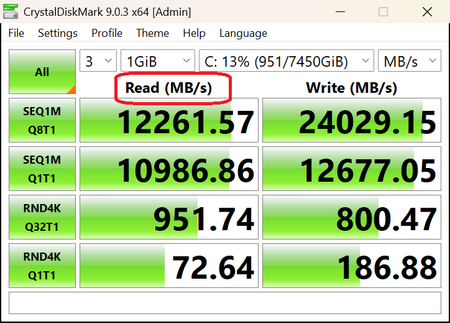
As a preamble, I woud like to clarify that each time I did/do some research on that matter, the suggestions are always the same: if you want the performance, renounce booting, and drop RaiXpert2 in favor of other *existing* RAID 0 sofware implementation; if you want booting, renounce performance, and you are stuck with RaidXpert2; the *ONLY* difference is the software, and this is *NOT* about any hardware bootleneck, even for such high throughput. Look at this guy who fixed it for Linux: https://github.com/joeytroy/amd-raid-driver it is the proof it is perfectly doable. So just like for Resizable BAR (Base Address Register) story, are we going to wait another decade for firmware providers to deliver the real performance that is already sitting in our desktop computers ? Please advise. ======================================================== Here is below the block diagram of the MSI MAG B850M MORTAR WIFI (v1) MicroATX motherboard I bought in early 2025 for (in my opinion) its simple design suitable (optimized ?) for DirectX gaming on Windows 11 thanks to: - direct CPU to DDR5 RAM connection (obvioulsy) - direct CPU to PCIe 5.0 x16 GPU connection - direct CPU to 2 x M.2 NVMe Gen5 x4 allowing RAID 0 configuration - no PCIe lane sharing Lately, more and more motherboards are offering direct CPU to 2 x M.2 NVMe Gen5 x4 allowing RAID 0 configuration. However, I was quickly disappointed when I tested my 2 x M.2 NVMe Gen5 x4 RAID 0 volume performances as sequential reading was and still is shockingly slower than sequential writing ! Back then I opened a ticket directly to AMD customer support, but it went nowhere (I have the ticket # in my e-mails if needed...). Recently, thanks to free Google AI mode that indexed/learned virtuallly all knowledge available on Internet, I investigated again that matter and I found the problem root cause that I am sharing now hoping it will bring someone's attention. If you are running 2 (two) ultra-fast PCIe Gen 5 NVMe SSDs in RAID 0 using motherboard firmware controllers—such as AMD’s RAIDXpert2 or Intel's RST/VROC—on a modern desktop platform, you have likely run into a massive performance defect. Your write speeds scale linearly as expected (~24,000 MB/s), but your sequential read speeds collapse down to half (~10,000 MB/s) as expected, performing worse than a single standalone drive. Here is a quick breakdown of why this happens, and why it is time to demand a software ecosystem overhaul. The Root Cause: Legacy Driver Architecture Bottlenecking Next-Gen Hardware Your motherboard lanes and CPU are perfectly fine. The issue is a severe execution flaw inside the closed-source proprietary driver stacks (Code: rcraid.sys for AMD and Code: iaStorAVC.sys for Intel). [] Why Writes Scale (~2x): Writing is asynchronous. The driver dumps the data straight into your system RAM cache or the SSDs' local DRAM/SLC caches instantly. The driver just acts as a non-blocking traffic cop, firing data to both drives simultaneously, a.k.a 'write and forget'. [] Why Reads Collapse (< 1.0x): Reading is synchronous. The driver must actively calculate exactly where the striped blocks live across both physical drives, pull them, and stitch them back together. The "One Worker, Two Conveyor Belts" Bottleneck Firmware-assisted RAID is not true hardware RAID; it is software RAID running at the CPU level. Kernel profiling reveals that these driver stacks use a single CPU worker thread to process synchronous read I/O routing. The Analogy: Imagine two ultra-fast conveyor belts (your Gen 5 SSDs) dumping packages into a mailroom at a combined 30,000 MB/s. However, there is only one single worker (one CPU thread) tasked with reading the barcodes on every package to sort them in alphabetical order. The worker cannot physically move fast enough. Packages pile up, and the conveyor belts are forced to constantly grind to a halt to prevent an overflow. This stalls your entire PCIe pipeline. When NVMe drives operated at Gen 3 speeds (~3,500 MB/s), a single CPU core was fast enough to hide this inefficiency. At Gen 5 speeds (~14,000+ MB/s), this legacy, single-threaded software design acts as an artificial wall, completely strangling the hardware before it can ever ramp up to its rated line speeds. The Call to Action: AMD, Intel, and Microsoft Need to Fix Their Drivers Consumers are paying premium prices for high-end motherboards and cutting-edge Gen 5 storage, yet the firmware and driver software ecosystem completely castrates the hardware capability under real-world read scenarios. What needs to change: [] AMD & Intel Must Modernize Storage Stacks: The single-threaded architecture of Code: rcraid.sys and Code: iaStorAVC.sys is an outdated relic. Both chipmakers must redesign their proprietary driver engines to natively support multi-threaded polling, modern asynchronous interrupt handling, and modern direct-memory access when available. If modifying the low-level UEFI firmware execution layer presents safety or design challenges, the optimization must be implemented within the Windows kernel-level OS drivers. [] A Joint Effort with Microsoft: Windows already possesses highly optimized, multi-threaded storage schedulers (as seen in Windows Storage Spaces). AMD and Intel need to collaborate directly with Microsoft to allow firmware-initiated RAID volumes to hook cleanly into native, highly parallel Windows Kernel worker pools ( Code: storport.sys multi-queue integration). Hardware engineering has outpaced software design. We shouldn't be forced to abandon motherboard RAID configurations or rely on complex OS-level workarounds just to unlock the storage throughput we already paid for. It is time for AMD, Intel, and Microsoft to patch this multi-generation oversight and deliver true parallel execution for high-bandwidth NVMe arrays.17Views0likes0CommentsWhat happened to the OLD context menu after the latest update?
I had my computer set and ready to exactly how I like to operate, then MS did an update and I lost my context OLD context menu in File Explorer for something that doesn't work for me. There is apparently no way back, even the Regedit code doesn't work anymore. Why does MS think this is better for everyone? Why can't they simply give us BOTH options and let the end user choose? I'm so sick of MS and their sloppy code thinking they know better than anyone else what we need, I'm ready to shift to Linux once an for all...no data tracking, , no age compliance crap, no mandatory MS account crap, etc. This is just another example of Bill's way or the highway from MS. Does anyone have a work-a-round that brings back the OLD context menu system?Solved526Views5likes11Comments
Win11 "Alt + Tab" switcher shows outdated thumbnails for minimized windows
When switching between windows using Alt + Tab, the thumbnail preview of a minimized window displays an outdated image of the window's content rather than its current state. The correct preview appears only after the window is restored and you switch back to it. This issue occurs more frequently in browser windows and applications where content is updated dynamically.81Views0likes3Comments
Sage 50 Application Crashes after Security Update 10-Nov 2026
In case anyone else has recently encountered issues with functions in Sage 50 US crashing suddenly, it is related to compatibility issues in the latest Microsoft Security Update released this week. Having already worked over Sage to no avail, I thought to check for recent Windows Updates. Indeed, the affected user's PC had installed the latest security update the night before (KB5132061, KB5132059, KB5121096). I removed the update and disabled windows updates on all Accounting Department computers as I suspect a 30-day pause won't be enough for a fix to come from Microsoft. After retrieving data from Event Viewer, I went to Sage's support page to send up a notice and discovered they are already aware of the issue. In the meantime, Sage's official answer is to remove the latest security patch and restart. I can confirm that the application does work normally after removal. Note, the application will open normally, but when trying to open database items (Invoices, POs, etc.) it will crash at launch of those functions. Below is the Event Viewer record for the crash, it highlights the affected dll in the Sage application that fails to respond after the security update. Faulting application name: Peachw.exe, version: 2026.0.0.82, time stamp: 0x68ee9cae Faulting module name: Pchctls.dll, version: 2026.0.0.82, time stamp: 0x68ee999a Exception code: 0xc000041d Fault offset: 0x000512ce Faulting process id: 0xECC Faulting application start time: 0x1DD72B6CB4581B8 Faulting application path: Program Files (x86)....Peachw.exe Faulting module path: Program Files (x86)....Pchctls.dll Report Id: 13719643-0442-4a6e-ad55-f15c427591631.4KViews2likes3Comments