conditional access
177 Topics
GSA - Web content filtering - Custom blocked page
Hello everyone, I have a quick question. I just tested the 'Web Content Filtering' of Global Secure Access. However, in Microsoft's documentation, two processes are mentioned for displaying blocked sites (related to HTTP and HTTPS). I wanted to know if it is possible to create a custom page (for example, adding the company logo, indicating the reason for blocking such as the associated web category, etc.). I tried to search, but no documentation related to this is available (or at least I couldn't find it). Thanks in advance for the help!1.2KViews3likes1Comment
Security Info blocked by conditional access
Hello, We have a conditional access policy in place where a specific group can only access Microsoft 365 (deny all apps, except Office 365). The moment a user clicks on Security Info in My Account, the user is blocked by this policy. I cant find a way to exclude the app "My Signins" (AppId 19db86c3-b2b9-44cc-b339-36da233a3be2). Since MFA is forced for this group, they can't change their authenticator app registration. Is there a solution for this? Initial MFA setup works by the way. UPDATE jan 23, 2025: I contacted Microsoft support and this was their answer (in short): " MySignin is a very sensitive resource that is not available in the picker and cannot be excluded in the conditional access policy. Also, the application is calling Microsoft Graph. I understand that this is not the information you are looking to hear at this time, I would have loved to help but the application cannot be excluded from the policy. "9.9KViews3likes15Comments"sign-in frequency" every time not working as expected and described.
We have several PIM managed groups in an Entra ID tenant. Members are added as eligible. For the activation of the memberships an Authentication Context is created which is linked to a conditional access policy. The conditional access policy requires MFA with phishing resistant authentication factors, and "sign in frequency" is set to "every time". When activating membership authentication is required. When activating membership to another group (>5min in between activations) one would expect to request an authentication prompt, as described in Microsoft documentation. In Firefox this works as expected, In Edge and Chrome there is no re-authentication required every time, and sometimes even not for the first activation, not even in an in-private session. The device is not joined to this tenant, and the account used to log on is different from the one used to logon to the Entra ID portal. This is a test tenant with only those CA rules configured, no other policies or rules are in place. Anyone experiencing the same, or knowing the cause?1.8KViews2likes3Comments
Global Secure Access bypass (Internet and web filtering)
Hi, I understand in Global Secure Access "365" I can use a Conditional Access Policy to block access to 365 if not from a "All Compliant Network locations" to prevent a user pausing the Client. But If I want to use Global Secure Access "Internet" and use the web filtering, how do I prevent a user pausing the client and bypassing the restriction. I assume this would be a Conditional access rule, but how would you prevent any/all Internet traffic bypassing the client on pause?1.1KViews2likes0Comments
Prompt users for reauthentication on sensitive apps and high-risk actions with Conditional access
Additional capabilities now available for Conditional Access reauthentication policy scenarios. Reauthentication policy lets you require users to interactively provide their credentials again - typically before accessing critical applications and taking sensitive actions. Combined with Conditional Access session control of Sign-in frequency, you can require reauthentication for users and sign-ins with risk, or for Intune enrollment. With today's public preview, now you can require reauthentication for any resource protected by Conditional Access. Read the full blog update here: Prompt users for reauthentication on sensitive apps and high-risk actions with Conditional Access - Microsoft Community Hub723Views2likes0CommentsBlock access with Conditional Access for Unmanaged Devices
Today, we will discuss nothing new, but it’s still a topic that remains as relevant and important as ever. If you decide to block users working from unmanaged devices, you can securely mitigate various security risks, such as data leaks and successful phishing attacks. For example, we see the rise of Man-in-the-Middle (MitM) phishing attacks, which can easily steal your credentials and access tokens and use these to sign in to your account while completely bypassing multi-factor authentication. Conditional Access can prevent these attacks without relying on phishing-resistant authentication methods such as Hello for Business, FIDO2 hardware keys, or soon Microsoft Authenticator with Passkeys. In this blog, I’ll share seven recommendations to prepare you for a smooth implementation, look at the user experience, and show you how to block access with Conditional Access for Unmanaged devices. https://myronhelgering.com/block-access-with-conditional-access-for-unmanaged-devices/3.4KViews2likes3Comments
'Microsoft App Access Panel' and Conditional Access with SSPR combined registration bug
Currently, enabling self-service password reset (SSPR) registration enforcement causes the app 'Microsoft App Access Panel' to be added to the login flow of users who have SSPR enabled. This app is not able to be excluded from Conditional Access (CA) polices and is caught by 'All cloud apps', which breaks secure zero-trust scenarios and CA policy configurations. Best way to demonstrate this is through examples... ----Example 1---- Environment: CA Policy 1 - 'All cloud apps' requiring hybrid/compliant device, but excluding [App] (for all non-guest accounts) CA Policy 2 - [App] requiring MFA only (for contractor accounts, etc) CA Policy 3 - [App] requiring hybrid/compliant device (for internal accounts, etc) SSPR registration enforcement (Password reset > Registration) - set to 'Yes' MFA registration enforcement (Security > Authentication Methods > Registration campaign) - set to 'Enabled' Scenario: A new user requires access to web [App] on an unenrolled device and is assigned an account that falls under CA Policy 1 and 2, however [App] is excluded from 1 and shouldn't apply to this login. When accessing [App] for the first time, users must register SSPR/MFA. They see the below message, click 'Next' and are directed to https://accounts.activedirectory.windowsazure.com/passwordreset/register.aspx: Then they see this screen, which will block the login and try to get the user to download the Company Portal app: While behind the scenes, the login to [App] is being blocked by 'Microsoft App Access Panel' because it is seemingly added to the login flow and caught in CA Policy 1 in Req 2/3: CA Policy 1 shows as not applied on Req 1, CA Policy 2 shows as successful for Req 1/2/3 and CA Policy 3 shows as not applied for Req 1/2/3. Creating a CA policy for the 'Register security information' user action has no effect on this scenario and also shows as not applied on all the related sign-in logs. ----Example 2---- Environment: Same as above, but SSPR registration enforcement - set to 'No' Scenario: Same as above, but when accessing the [App] for the first time, they see the below message instead, click 'Next' and are directed to https://accounts.activedirectory.windowsazure.com/proofup.aspx: Then they are directed to the combined SSPR/MFA registration experience successfully: The 'Microsoft App Access Panel' doesn't show in the sign-in logs and the sign-in is successful after registration. From the two examples, it seems to be a bug with the SSPR registration enforcement and the combined registration experience. ----Workarounds---- 1 - Prevent using 'All cloud apps' with device based CA policies (difficult, requires redesigning/thinking/testing policies, could introduce new gaps, etc) 2 - Turn off SSPR registration enforcement and turn on MFA registration enforcement like in example 2 (easy, but only enforces MS MFA App registration, doesn't seem to re-trigger registration if the MS MFA App is removed, no other methods are supported for registration, and doesn't remind users to update) 3 - Disable SSPR entirely for affected users (medium depending on available security groups, and doesn't allow for affected users to use SSPR) ----Related links---- https://feedback.azure.com/d365community/idea/d5253b08-d076-ed11-a81b-000d3adb7ffd https://feedback.azure.com/d365community/idea/1365df89-c625-ec11-b6e6-000d3a4f0789 Conditional Access Policies, Guest Access and the "Microsoft Invitation Acceptance Portal" - Microsoft Community Hub MS, please either: 1 - Allow 'Microsoft App Access Panel' to be added to CA policies so it can be excluded 2 - Prevent 'Microsoft App Access Panel' from showing up in the CA login flow when SSPR registration enforcement is enabled23KViews2likes15CommentsProtect your identities from a Token theft using Token Protection in Conditional Access
In this blog post, I will show you the steps required to enable the Token Protection feature using Conditional Access in Entra ID. Along with a brief simulation of the Token Theft and how Token protection will prevent the attacker from stealing the token. https://www.linkedin.com/pulse/protect-your-identities-from-token-theft-using-access-elie-karkafy4.2KViews2likes0CommentsConditional Access | Monitoring (Preview)
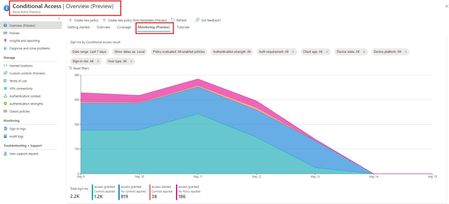
A great dashboard that summarizes the sign-ins by Conditional Access result: Total sign-ins Access granted - Policy controls applied Access granted - No policy controls applied Access denied - Controls applied Access granted - No Policy applied3.5KViews2likes5CommentsAuthenticator App - passwordless - when prompted?
Hi, i'm asking myself when the MS Authenticator App should ask for a passwordless sign-in (presenting of the three numbers)? I've enabled the passwordless signin for my tenant account. This is working, when signin from a foreign device when e.g. in home office. When i'm inside my company and loging in from an incognito session inside my browser i'm still asked for my password. Could this be a an error when using azure conditional access inside our company? Thanks in advance. Patrick 🙂Solved11KViews1like19Comments