compliance
73 Topics
Verification closed, appeals exhausted, duplicate seller account. Need reopen.
We're a Delaware C corp ISV (Evident Systems Inc.) running an AI SaaS platform on Azure, trying to complete AI Cloud Partner Program and Commercial Marketplace verification for ISV Success. Our Partner and Developer verifications are both closed as Rejected with no appeals left. The trouble came from our address. We used a virtual office first, then switched to our Delaware registered agent address to match our incorporation documents. Neither met the requirement that the business exist at the stated address. Our real principal office is in South Carolina, where we hold a municipal business license and a state Certificate of Authority. Re-enrolling in Commercial Marketplace also created a duplicate seller account and extra business locations by mistake. Identity, email, and contact verification all passed. We have a support ticket open #2611040040007807. Could someone from Partner Vetting reopen our case, confirm we should update the legal address to our principal office, and merge the duplicate seller accounts? We will hold all changes until a reviewer confirms, so we don't trigger another automated rejection. Global Partner ID: 7176457 Thank you.
MAICPP Partner roaster synchronization Issue - Technofocus Levelup Campaign Eligibility
Hello Community Team and Moderators, I am posting to seek guidance and visibility regarding an active Partner Operations support request (Case #2610290050004098) regarding campaign roster synchronization for our organization, Belvit Hub (Partner ID: 7157172). Context & Status: Partner Status: Belvit Hub’s Microsoft AI Cloud Partner Program (MAICPP) enrollment is active, and legal entity vetting was authorized on September 24, 2026. Issue: 500+ candidates from our organization participating in the Technofocus LevelUp / Certification Week campaign are receiving an "Ineligible Domain" block when attempting to register for exam vouchers. Vendor Feedback: Technofocus (LevelUp) support confirmed in writing that their portal cannot manually override domain eligibility and that they are waiting for an updated partner eligibility roster refresh from Microsoft Skilling Operations. Partner Support engineer Hesham Ali has initiated an internal consultation to route this to the relevant internal team. We are posting here to ask if community moderators can assist in ensuring this roster update reaches the Skilling Operations team so our candidates can access their exam vouchers. Thank you for your assistance. Reference Details: Partner Name: Belvit Hub Partner ID (MPN): 7157172 Support Ticket: #2610290050004098Identity verification rejected, no Fix now option – ticket 2610230010000294
We’re an Australian MSP enrolling in the CSP Reseller program. Our current verification status is: Contact verification: Verified Identity verification: Not Verified (no Resolve or Fix now button, so we can’t appeal) Business verification: In Progress – Microsoft Action (ETA was 28 Oct, still pending) I opened ticket 2610230010000294 on 23 Oct but haven’t been contacted yet. Could someone please review the ticket and re-trigger identity verification? We’re happy to provide ID and business registration documents that match our account details. We’d also like to know why identity verification failed, so we can fix the cause and avoid another rejection. Thanks in advance.
CSP Program enrollment was DEACTIVATED
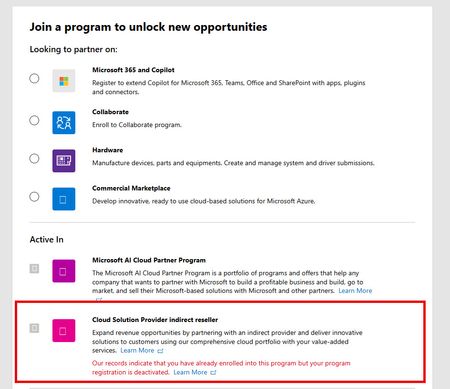
We are an active Microsoft reseller in the AI Cloud Partner Program. We were also enrolled in the CSP Indirect Reseller Program. Last year, our CSP enrollment was DEACTIVATED (not SUSPENDED and not TERMINATED). Of course, we got the typical response on our tickets when asking WHY we were deactivated stating that MS can walk away with no explanation. We BELIEVE it is because we had not sold at least $1000 in the previous 12 month period. Everything I read states that we can re-enroll 12 months after our "onboarding date" which I am not sure what that date is. We were deactivated around October 2025. The "Learn More" link doesn't really help, and focuses mostly on SUSPENSIONS which I believe is different. Even using that link, none of the reasons for a suspension apply to us other than the "program requirements" which is where the $1000 minimum comes from. Can anyone offer some additional guidance here? Thanks!Poor Partner Center Support
I'm trying to register for the Hardware Program and it shows account suspended (we have not subscribed before), because we simply need a driver to be signed. But after many frustrating weeks this is the final answer we got (8+ weeks, TrackingID#2609140040004120): "Thank you so much for your patience while we reviewed the account. During the reinstatement review, it was confirmed that the account was never registered in the Hardware Program and therefore was never active. Because of this, the existing account cannot be reinstated. To move forward, you will need to start a new Hardware Program enrollment using a new tenant. I understand this may not be the outcome you were expecting, but this will allow you to proceed with a new registration rather than continuing with the previous account. As we have now received the final outcome of the reinstatement review and the required next step has been provided, I will proceed with closing this support ticket." How it the world is this a possible solution since it did not work in the first place. We have a our whole company tied to this tenant, and now I have to register a new one, most likely incur some costs again, just because of some buggy software that cannot resolve the issue??
Store company account: employment verification closed after appeal limit
I’m the sole owner of a single-member US LLC (Clumsy’s Lab LLC, Missouri) and I’m trying to open a company account through the new Microsoft Store developer onboarding at storedeveloper.microsoft.com. Status: Email verification: ✅ Verified (on our company domain.) Business verification: ✅ Verified via D-U-N-S Employment verification: ❌ “Verification could not be completed. You’ve reached the limit for verification appeals.” The vetting team’s note says our organization “does not currently meet the requirements to pass verification” and the request is closed. No specific reason was given. What I’ve done since: Updated our Dun & Bradstreet record to list me as owner and contact, with the company email Updated the domain registration so the registrant organization is the LLC, with the company email and business address Emailed mailto:email address removed for privacy reasons with documentation The problem: every “Contact support” and “create a ticket” link sends me to partner.microsoft.com, which requires an existing Partner Center account, so I can’t open a ticket. I’m stuck in a loop. I can provide Articles of Organization (naming me as organizer), our IRS EIN letter, and domain ownership records going back to 2024. Could a moderator help reopen the employment verification, or point me to the right team? For a one-person company, I’m not sure what more “employment” proof is possible. I am the company. Thank you!Verification "Authorized" but Partner Center remains deactivated. No support channel reachable.
We are a company seeking help with a Partner Center account state inconsistency (Seller ID available by direct message to a Community Manager or Microsoft employee). Timeline: - Our Windows Hardware Developer Program enrollment was rejected at the Employment Verification stage. - Microsoft Vetting Operations instructed us in writing to update our profile to a company-owned domain and provide domain registration documentation. We complied fully and same-day: registered and verified a company domain on the enrolling tenant, updated the seller contact and company approver to an address on that domain, and supplied registrar documentation. - The verification pipeline re-ran: Email, Identity, and ultimately all stages completed. Legal Info now shows Verification Status: AUTHORIZED. - However, the Partner Center account itself returns "your Partner Center account has been deactivated" on every workspace — Hardware, Programs, and the support wizard — so we cannot file an in-portal support case from the deactivated account. - Email follow-ups to the Vetting Operations thread and to an assigned Dev Center support engineer have gone unanswered for over a week. We hold multiple correlation IDs (most recent: f4fd02fd-d21f-462f-8765-1ea3d6132ad2, 02 Oct 2026). Our read: the account object was deactivated when the earlier application was closed, and was never re-activated when the verification subsequently authorized — a state inconsistency between the vetting record and the account. Ask: could a Community Manager or Microsoft employee escalate this to the team that can re-activate a verified account? The verification work is complete; only the deactivation flag remains, and it is blocking a driver-signing deliverable. We can provide the Seller ID, case numbers, correlation IDs, and full documentation through any private channel indicated. Thank you. Access restricted We're sorry, you don't have permission to access this page because your Partner Center account has been deactivated. For assistance, please contact your Partner Center administrator or support. Correlation ID: f4fd02fd-d21f-462f-8765-1ea3d6132ad2 Correlation vector: leO3sWI4S0K2fExK.4 Time: 02 Oct 2026 22:36:07 +00:00
Partner Center enrollment blocked – 715-123160 – requesting manual review
Our Microsoft AI Cloud Partner Program enrollment was blocked by the automated trust filter. Reference number: 715-123160. Correlation ID: 60efdff8-0e40-4745-8d33-d7b950000571. Company: Newox Group AB (Sweden), org. no. 559318-6280, trading as Aida Labs (aidalabs.io). Tenant domain: aidalabs.io (verified). We are an ISV building a B2B analytics SaaS with a planned Microsoft Teams integration. Since no workspace was created, we cannot open a ticket in Partner Center, and the Swedish support phone numbers listed in the M365 admin center do not connect. Please route this to the Partner Center vetting team for manual review. We can provide our company registration certificate immediately.
Error 2100 during MAICPP enrollment – Legal info blank
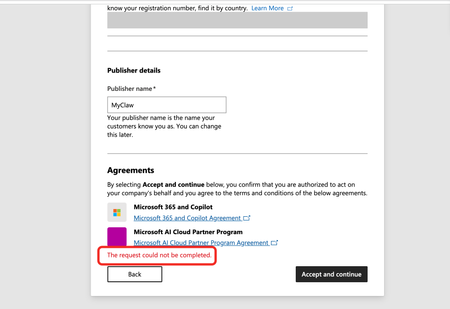
Issue: I'm stuck at the Agreements step of the Microsoft AI Cloud Partner Program (MAICPP) enrollment. When I click Accept and continue, the page displays: The request could not be completed. No further details are provided (no reference number, no transaction ID). Evidence of orphaned legal entity (error 2100): After the failed submission, I navigated to Settings → Account settings → Organization profile → Legal info, and the page renders only the title and description text—no tabs, no form fields, completely blank (screenshot attached). This matches the documented symptom of error 2100 / orphaned legal entity: the backend created a legal entity record during the first submission attempt, but it was never linked to a program enrollment. Subsequent attempts to accept the agreements fail because the system tries to create a duplicate entity. Environment: Tenant ID: 70a418c9-dca7-4bf3-90b0-765294ae60aa Verified domain: http://myclaw.ai/ Publisher name: MyClaw Account type: Company Submitting user role: Global Administrator Target program: Microsoft AI Cloud Partner Program (MAICPP) Goal: Obtain Partner ID → apply for Verified Publisher in Entra ID Already tried: Clearing cache, incognito mode, different browsers – no change Checked Identifiers page – also blank (no Partner ID, no publisher table) Cannot use the standard support form (requires a workspace, which I don't have until enrollment completes) Cannot use the no-login support form (Submit button fails) Request: Please manually clear the orphaned legal entity record or link the existing entity to the MAICPP enrollment, so I can complete the registration. Attached screenshots: "The request could not be completed" error at the Agreements step Legal info page rendering no tabs Thank you.261Views1like3CommentsHardware enrollment blocked — requesting manual review
Hello Microsoft Partner Compliance / Verification team, We are a legitimate and established software development company incorporated in the Qatar Financial Centre (QFC) in September 2022. We hold a valid software development license and operate as a real business with a corporate office, an established website, and a portfolio of software products that can be reviewed on our website. Our company is fully identifiable through its corporate and registration information. We are actively developing and distributing our software products and have a genuine business need for the Microsoft Partner Center Hardware program. We are trying to enroll in the Microsoft Partner Center Hardware program because our software products require Windows driver signing. We have already obtained an EV code signing certificate in preparation for this process. As part of the Partner Center enrollment and verification process, our company was successfully identified using its D-U-N-S number, with the corresponding company information listed in the D&B database. Our enrollment request was immediately blocked with the following message: “Microsoft runs on trust. We engage in a rigorous set of evaluation and certification processes; as a result your request was blocked. If you require further information please reach out to Microsoft Support…” Given the information available about our company and its legitimate business activities, it is absolutely unclear to us why the enrollment request was blocked. In particular, we were not asked to provide any supporting documentation or clarification before the enrollment was blocked, so we were not given an opportunity to address any specific concern that may have arisen during the evaluation. As instructed in the enrollment message, we contacted Microsoft Support. We were provided with troubleshooting recommendations, which we followed, but the enrollment remained blocked with the same result. Microsoft Support subsequently confirmed that the Trust-related block remained in place and that our access could not be reactivated at that time. We then sent follow-up questions asking what specifically had caused the issue and whether there was anything we could provide or correct. We did not receive a further response or any notification confirming that the case had been closed. Following Microsoft's troubleshooting recommendations, we subsequently repeated the enrollment. Unfortunately, the same Trust-related block occurred again. We are also currently unable to obtain further assistance through Partner Center Support. When we try to submit a support request concerning the Hardware enrollment issue, the portal returns: “There is a problem submitting your request, try again!”. We tried multiple times over the course of about a week, using different browsers, but received the same error message each time. This leaves us without a clear path to understand or resolve the issue. We fully understand and respect Microsoft's need to conduct appropriate trust, compliance, and verification checks. However, as a legitimate licensed software company with an established business presence, identifiable corporate operations, a portfolio of products, and a genuine need for the Hardware program, we would very much like to understand what specifically is preventing our enrollment. Could a Microsoft Community Manager please help route this matter to the appropriate Partner Vetting / Trust & Safety or Hardware enrollment team for manual review? If there is a specific concern, requirement, or verification issue affecting our company, we are fully prepared to provide the relevant documentation and clarification. We would simply appreciate the opportunity to understand what needs to be addressed rather than having our enrollment blocked without any specific information being provided to us. We are not asking Microsoft to bypass its verification requirements. We are asking for a fair opportunity to complete the verification process and address any concerns that may have resulted in the Trust evaluation decision. Thank you for your assistance.390Views0likes2Comments