community
3926 Topics
problems with non-rotating pictures when starting up the computer
I am on a PC with Windows 11. I have installed all the latest updates. Usually there is a picture when I open my computer, before I log in, and a dialog box that asks me if I find it interesting. Usually, once I click one of the answers, a BING window opens with information about the picture. That has completely halted. Right now, I get a really ugly semi-industrial picture that I cannot get rid of. I don't even know what to call this feature. Please help!24Views0likes1CommentSave the date: Windows Office Hours – November 19, 2026
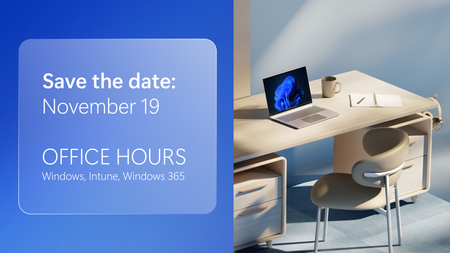
Bring your questions directly to the experts. The next Windows Office Hours is this Thursday, November 19, from 8:00–9:00 AM PT. Connect with experts across Windows, Microsoft Intune, Configuration Manager, Windows 365, Windows Autopilot, security, public sector, FastTrack, and more for guidance, troubleshooting help, and best-practice discussions. There’s no video or meeting link. The entire event happens live in the comments, so just join the discussion and post your questions. Can’t attend live? Add your questions to the event page in advance and we’ll cover them during the session.26Views0likes1Comment
0x80070002 - Windows 11 Update Installation Error
After the update KB5132061 got downloaded and installed, when I restarted my pc to complete the update... it shows update installing at 7%, doesn't move past it, restarts and then says - Something didn't go as planned. After that I see this error code in update settings - Install error - 0x80070002.20Views0likes1Comment
GraphQL Error 400 when submitting a new User Group (GroupHub)
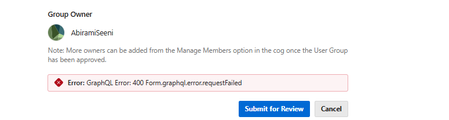
Hi, I’m trying to create a new user group, “India Copilot and AI Agents User Group”, but when I click “Submit for Review” I get: GraphQL Error: 400 Form.graphql.error.requestFailed. I’ve tried shortening the description, removing special characters, and using another browser. Could you please help? Screenshot attached. Thank you!80Views1like2Comments
Institution verification blocked by AVE, and support case form is failing
Hello, I am unable to complete institution verification for Microsoft Learn for Educators, and both documented support channels are currently failing for me. What is happening: 1. My institution verification was rejected with a "Blocked" response from AVE. 2. The in-portal Create a Case form returns "An error has occurred while processing your request. Please try again later" every time I submit, so I cannot raise a ticket through the documented route. I understand at least one other educator has reported this same combination recently, so I am writing directly in the hope this can be routed manually. I believe the AVE block is because our institutional domain is pathfinderfoundation.co.in rather than a .edu or .ac.in domain. In India, a large proportion of accredited private higher education institutions operate on .co.in and .org domains, so the suffix is not an indicator of accreditation status here. AICTE records are the authoritative source. Institution details: Name: Pathfinder Research and Training Foundation (PRTF) Website: https://pathfinderfoundation.co.in/ Accreditation: Approved by the All India Council for Technical Education (AICTE), the statutory national regulator for technical and management education in India, under the Ministry of Education, Government of India. AICTE Permanent Institution ID: 1-43701706366 AISHE Code: C-72792 Programmes offered: 1. Post Graduate Diploma in Management (PGDM), AICTE approved, two-year full-time, 120 students per batch. The programme is AI-centric by design, with Year 2 specialisation tracks in AI and Data Sciences, and Marketing and Finance. 2. Professional certification programmes in cloud and AI, delivered on campus as continuing education alongside the PGDM. Both fall within the Educational Institution Option scope, which covers accredited degree, diploma, certificate, and continuing or further education programmes. Faculty verification: I am Associate Professor in the AI and Data Science department. My profile, showing my institutional email address, is published at https://pathfinderfoundation.co.in/mentor-and-guest-faculty/ Domain ownership: pathfinderfoundation.co.in is owned and operated by the institution.. Intended use: Microsoft Official Curriculum maps onto our existing teaching plan. AI-900 and AI-102 into the AI and Data Sciences track, PL-300 and MB-220 into Marketing and Finance, AZ-900 and DP-900 as core digital foundations. Could someone please complete verification manually, or advise on an alternative route while the case form is unavailable? I am happy to provide any further documentation. Thank you, Aayan Kumar Associate Professor, AI and Data Science Department Pathfinder Research and Training Foundation (PRTF) email address removed for privacy reasonsSolved801Views1like4Comments
Win11 "Alt + Tab" switcher shows outdated thumbnails for minimized windows
When switching between windows using Alt + Tab, the thumbnail preview of a minimized window displays an outdated image of the window's content rather than its current state. The correct preview appears only after the window is restored and you switch back to it. This issue occurs more frequently in browser windows and applications where content is updated dynamically.56Views0likes2Comments
November 2026 update caused boot loop and SrtTrail.txt error on Lenovo Yoga (Late 2019)
Hello, I am reporting a critical boot loop issue caused by the recent November 2026 Windows 11 update on a late 2019 Lenovo Yoga laptop. After the update installed, the system failed to boot, dropping into Automatic Repair with a black screen stating the device could not be repaired. The diagnostic log pointed to: C:\Windows\System32\LogFiles\Srt\SrtTrail.txt. Advanced troubleshooting steps—including System Restore, sfc /scannow, and chkdsk /f /r—failed to bypass the loop. Safe Mode was accessible, but the Windows Update settings page was locked out with a red band error message ("Something went wrong"). Attempting to uninstall the latest quality or feature updates via the Advanced Options recovery menus also failed. The loop was only broken by executing a full "Reset this PC" while preserving personal files. I have currently paused updates for 5 weeks to prevent re-infection, but I am logging this here to alert the engineering teams to a potential compatibility block with this hardware profile. The human is writing this part. I couldn't have solved this without Google AI on my phone, which walked me though all the steps while my computer was severely disabled. I can't give enough credit to the AI that explained everything (Thank you AI LLM models, you are the heroes in this brave new era - AI doesn't have to become more powerful for me, it just needs to be able to hold my hand through things like this. This has been my biggest scare ever, dating back to my first Windows PC in 1986 when Word and Windows and a basic word processor cost $4,000 and came with huge hard cover text books in a heavy box, with all the software on a 3.5 inch floppy drive). Please look into this, it is a horrible experience. Just about every software program has to be sourced and reinstalled. Regards, Tracy369Views1like3Comments
Updates not always necessary
I just wanted to tell Microsoft that Windows 11 don't always need updates. And give us the option not to have any at all. Every time I get updates, it messes up my PC, and or features like on my pictures where I had to manually add "print" because the update turned it off. I've also had the updates mess up my printer.5Views0likes0Comments