cloud security
236 TopicsDefender for Servers Plan 2 now integrates with Defender for Endpoint unified solution
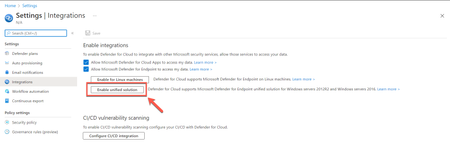
Today, we're excited to announce the release of Microsoft Defender for Endpoint’s unified agent integration with Microsoft Defender for Servers Plan 2. With this release, we align the integration experience between Microsoft Defender for Endpoint and both Microsoft Defender for Servers Plans.39KViews12likes47CommentsAgentless scanning for virtual machines in the cloud – technical deep dive
Over the past three years, a notable shift has unfolded in the realm of cloud security. Increasingly, security vendors are introducing agentless scanning solutions to enhance the protection of their customers. These solutions empower users with visibility into their security posture and the ability to detect threats — all achieved without the need to install any additional software, commonly referred to as an agent, onto their workloads.9.3KViews10likes3Comments
How Microsoft cloud security benchmark (MCSB) helps you succeed in your cloud security journey
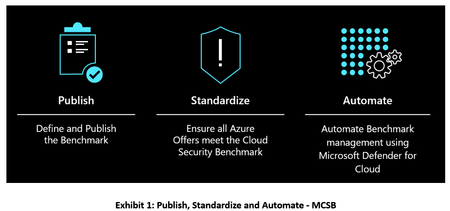
The Microsoft cloud security benchmark (MCSB) includes a collection of high-impact security recommendations you can use to help secure your cloud services in a single or multi-cloud environment.12KViews10likes0CommentsUncover the latest cloud data security capabilities from Microsoft Defender for Cloud
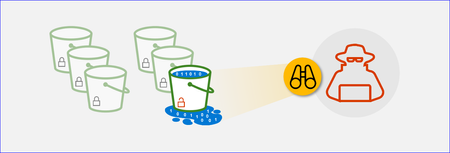
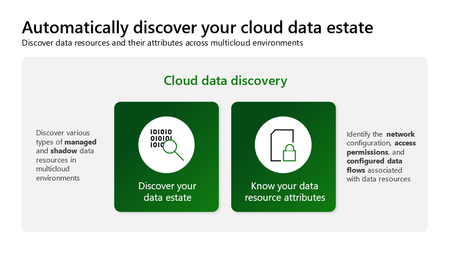
Learn about the latest multicloud data security capabilities from Microsoft Defender for Cloud to strengthen your data security posture and protect your cloud data estate against data breaches and malware distribution.6.8KViews9likes0CommentsManaging Security Center at scale using ARM templates and Azure Policy
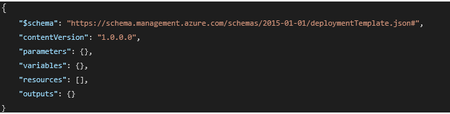
*** Update: This blogpost has been updated with a new ARM template and new Azure Policy definitions which covers the new Security Center bundle pricings. The new ARM template can be found here, the new Azure Policy definitions can be found here *** Recently we have been receiving several customer questions on how to manage Security Center at scale in a continuous integration (CI) and continuous delivery (CD) scenario, better known as CI/CD. How do you make sure that when a new subscription is instantiated, Security Center is configured correctly and is enabled to monitor new and existing resources? How do you manage hundreds of subscriptions within your organizattion? How do you enforce your security policies? This blogpost covers two scenarios: Configure Security Center using an ARM template to support a CI/CD scenario and management at scale Enforce a Security Center configuration within your organization, using Azure Policy Since both ARM templates and Azure Policy talk to the Resource Manager API in Azure, by making a JSON formatted request, you can re-use the deployment section of an ARM template to author an Azure Policy definition. If you are new to ARM templates and are looking for guidance on authoring, go here. In case you want to leverage PowerShell for configuring ASC, go here. The Security Center ARM Template Every ARM template consists of these 7 elements (not all of them have to be used): It’s the “resources” element that we are interested in since the ARM template reference for Security Center hasn’t been documented yet. We are in the process of publishing which makes it easier to find which types and values are allowed and will also provide IntelliSense. I will update this post when that becomes available. In this blogpost I will cover the two most asked questions: How can I make sure that Security Center is configured for the Standard pricing tier, which unlocks all the Security Center features How can I enable auto provisioning, which enables automatic installation of the Microsoft Management Agent (MMA) VM extension for new resources. Please refer to the pricing tier documentation for the difference between the Free and Standard tier. Set the ASC pricing tier in an ARM template The new pricing tier API is fast and efficient to use. We are using the Microsoft.Security/pricings type to set our pricing tier. How does that look in a template? The ARM template can be found here. If you want to deploy this template, please make sure you target the subscription instead of a resource group. This is a common made mistake, since ASC lives at the subscription level, not at the resource group level. A deployment would look like this (using PowerShell): New-AzDeployment -Name myAscDeploy -Location <yourLocation> -TemplateFile ‘<yourTemplateFileAndPathHere>' -Verbose Since you have probably noticed the usage of a parameter, so you can flip it from “Free” to “Standard” or the other way around, you will be prompted for this value. Please note that we are only allowing the two values specified and it is case sensitive. You can verify the deployment in the activity log: Leveraging the ARM template to create an Azure Policy Now that you have a working ARM template, you can use it to create a deployIfNotExists type of Azure policy which allows you to remediate if the policy definition is non-compliant. If you are just starting with Azure Policy, I would recommend to explore our documentation for guidance on different policy definitions. Leveraging the ARM template we just created, you can construct a deployIfNotExists Azure Policy. You first need to create the section that allows you to find the pricingTier field and value (Standard). For this to work, you need to target your Policy at the right scope (subscriptions or higher), then you define the “effect” (deployIfNotExists) and you set the type to Microsoft.Security/pricings, where the field and value lives which we are looking for. If the existenceCondition returns false and you want to remediate it, you need to define a deployment section under the resources section, where you define your target type and properties. You can find the Azure Policy shown above here. Having your ARM Policy defined, you can now create and assign your new Azure Policy. Please note that you need the appropriate permissions to create a managed identity. This ensures that the policy has the appropriate permissions to change the Security Center configuration at the subscription level. It takes around 30 minutes for the policy to take effect as mentioned in the confirmation. Your policy will remain in this state for a while: Then after around 30 minutes, you will notice a non-compliant assignment, as shown below. If you click on the assignment, you can explore which resource is non-compliant. You can click on Create Remediation Task to remediate it. Automatically create a remediation task In case you want to use automation, you can leverage the Policy Insights API to create a remediation task. One of the options you have is to invoke the API using PowerShell. The script below shows an example how to accomplish that. Please note that besides the subscriptionId, you need to pass a remediationName and policyID: You can find the script to create a remediation task here. If you have succesfully executed the script, you should see something similar in your activity log: Your ASC pricing tier should be changed to Standard and after a policy refresh cycle, your compliance state should be updated to compliant. Configure Security Center auto provisioning using a custom workspace The following ARM template enables auto provisioning so that the Microsoft Management Agent VM extension will be deployed automatically to new created virtual machines. You will also configure a custom Log Analytics workspace instead of the default Security Center one. The ARM template for enabling auto provisioning can be found here. Please note that you need to pass specific parameters values for configuring the Log Analytics workspace like workspace name, the resource group of the workspace and the Azure subscriptionID of where the workspace is created. Deployment of the ARM template is straightforward as you have seen before while deploying the pricing tier template and should look like this:Microsoft Defender for Cloud Cost Estimation Dashboard
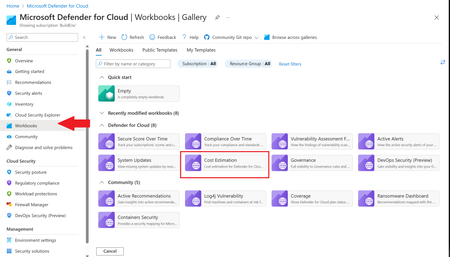
This blog was updated on April 16 th , 2023 to reflect the latest version of the Cost Estimation workbook. Microsoft Defender for Cloud provides advanced threat detection capabilities across your cloud workloads. This includes comprehensive coverage plans for compute, PaaS and data resources in your environment. Before enabling Defender for Cloud across subscriptions, customers are often interested in having a cost estimation to make sure the cost aligns with the team’s budget. We previously released the Microsoft Defender for Storage Price Estimation Workbook, which was widely and positively received by customers. Based on customer feedback, we have extended this offering by creating one comprehensive workbook that covers most Microsoft Defender for Cloud plans. This includes Defender for Containers, App Service, Servers, Storage, Cloud Security Posture Management and Databases. The Cost Estimation workbook is out-of-the box and can be found in the Defender for Cloud portal. After reading this blog and using the workbook, be sure to leave your feedback to be considered for future enhancements. Please remember these numbers are only estimated based on retail prices and do not provide actual billing data. For reference on how these prices are calculated, visit the Pricing—Microsoft Defender | Microsoft Azure. Overview The cost estimation workbook provides a consolidated price estimation for Microsoft Defender for Cloud plans based on the resource telemetry in your organization’s environment. The workbook allows you to select which subscriptions you would like to estimate the price for as well as the Defender Plans. In a single pane of glass, organizations can see the estimated cost per plan on each subscription as well as the grand total for all the selected subscriptions and plans. To see which plans are currently being used on the subscription, consider using the coverage workbook. Defender Cloud Security Posture Management (CSPM) Defender CSPM protects all resources across your subscriptions, but billing only applies to Compute, Databases and Storage accounts. Billable workloads include VMs, Storage accounts, open-source relational databases and SQL PaaS & Servers on machines. See here for more information regarding pricing. On the backend, the workbook checks to see how many billable resources were detected and if any of the above plans are enabled on the subscription. It then takes the number of billable resources and multiplies it by the Defender CSPM price. Defender for App Service The estimation for Defender for App Services is based on the retail price of $14.60 USD per App Service per month. Check out the Defender for App Service Price Estimation Dashboard for a more detailed view on estimated pricing with information such as CPU time and a list of App Services detected. Defender for Containers The estimation for Defender for Containers is calculated based on the average number of worker nodes in the cluster during the past 30 days. For a more detailed view on containers pricing such as average vCores detected and the number of image scans included, consider also viewing the stand-alone Defender for Containers Cost Estimation Workbook. Defender for Databases Pricing for Defender for Databases includes Defender for SQL Databases and Defender for open-source relational databases (OSS DBs). This includes PostgreSQL, MySQL and MariaDB. All estimations are based on the retail price of $15 USD per resource per month. On the backend, the workbook runs a query to find all SQL databases and OSS DBs in the selected subscriptions and multiplies the total amount by 15 to get the estimated monthly cost. Defender for Key Vault Defender for Key Vault cost estimation is not included in the out of the box workbook, however, a stand-alone workbook is available in the Defender for Cloud GitHub. The Defender for Key Vault dashboard considers all Key Vaults with or without Defender for Key Vault enabled on the selected subscriptions. The calculations are based on the retail price of $0.02 USD per 10k transactions. The “Estimated Cost (7 days)” column takes the total Key Vault transactions of the last 7 days, divides them by 10K and multiples them by 0.02. In “Estimated Monthly Price”, the results of “Estimated Cost (7 days)” are multiplied by 4.35 to get the monthly estimate. Defender for Servers Defender for Servers includes two plan options, Plan 1 and Plan 2. The workbook gives you the option to toggle between the two plans to see the difference in how they would effect pricing. Plan 1 is currently charged at $5 per month where as Plan 2 is currently charged at $15. Defender for Storage The Defender for Storage workbook allows you to estimate the cost of the two pricing plans: the legacy per-transaction plan and the new per-storage plan. The workbook looks at historical file and blob transaction data on supported storage types such as Blob Storage, Azure Files, and Azure Data Lake Storage Gen 2. We have released a new version of this workbook, and you can find it here: Microsoft-Defender-for-Cloud/Workbooks/Microsoft Defender for Storage Price Estimation and learn more about the storage workbook in Microsoft Defender for Storage – Price Estimation blog post. Limitations Azure Monitor Metrics data backends have limits and the number of requests to fetch data might time out. To solve this, narrow your scope by reducing the selected subscriptions and Defender plans. The workbook currently only includes Azure resources. Acknowledgements Special thanks to everyone who contributed to different versions of this workbook: Fernanda Vela, Helder Pinto, Lili Davoudian, Sarah Kriwet, Safeena Begum Lepakshi, Tom Janetscheck, Amit Biton, Ahmed Masalha, Keren Damari, Nir Sela, Mark Kendrick, Yaniv Shasha, Mauricio Zaragoza, Kafeel Tahir, Mary Lieb, Chris Tucci, Brian Roosevelt References: What is Microsoft Defender for Cloud? - Microsoft Defender for Cloud | Microsoft Learn Pricing—Microsoft Defender | Microsoft Azure Workbooks gallery in Microsoft Defender for Cloud | Microsoft Docs Pricing Calculator | Microsoft Azure Microsoft Defender for Key Vault Price Estimation Workbook Microsoft Defender for App Services Price Estimation Workbook Microsoft Defender for Containers Cost Estimation Workbook Coverage WorkbookAnnouncing new CNAPP capabilities in Defender for Cloud
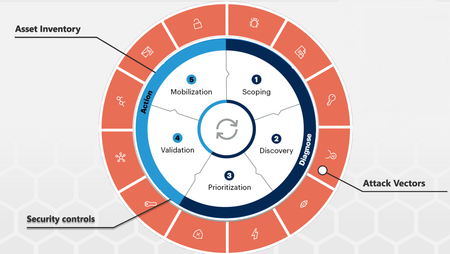
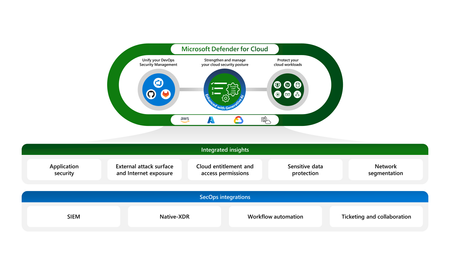
At Ignite 2023, we are excited to announce new innovations in Microsoft Defender for Cloud that will help security admins strengthen their CNAPP deployment, improve the cloud security posture through additional code to cloud insights, and protect cloud-native applications across multicloud environments in a unified solution.