azure
8241 TopicsFrom Purview Data Governance to the Fabric OneLake Catalog
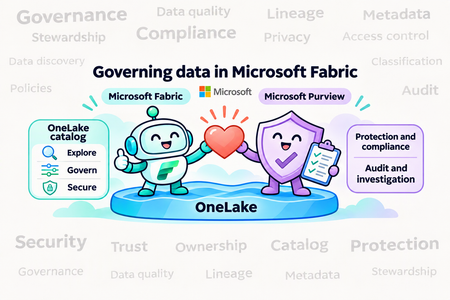
What is changing, What is available today, and How to transition without losing GOVERNANCE outcomes! Microsoft's data governance story is moving closer to the data. In Microsoft Fabric, the OneLake catalog is now the primary experience for discovering and governing Fabric data, while Microsoft Purview continues as the security and compliance layer that protects, audits, and monitors it. For teams that built their governance practice around Purview Data Governance, this is more than a change of screens. It is a change in architecture and operating model. This article explains the shift, what the OneLake catalog offers today, how responsibilities split between Fabric and Purview, and a practical, outcome-first way to transition. The strategic shift: from a separate control plane to governance in the platform The earlier pattern, often described as a "catalog of catalogs," centered governance on scanning metadata from many systems into a separate control plane. The Fabric approach starts from a lake-first foundation instead: make data available through Fabric and OneLake, whether natively or through supported integration patterns such as shortcuts, mirroring, and sharing. Keep governance context next to that data, and surface governance where owners and consumers already work. Microsoft's own guidance states the division of labor plainly. The OneLake catalog remains the primary experience for governing Fabric data, and using Purview does not change where Fabric governance lives. Purview adds protection, audit, risk, and compliance coverage where needs extend beyond Fabric. A simple rule of thumb: Use the OneLake catalog to discover, understand, and govern Fabric data. Use OneLake security and Fabric controls to enforce access on the actual data path. Use Microsoft Purview to classify, protect, monitor, investigate, and demonstrate compliance across supported Fabric experiences. Data reaches OneLake four ways, the catalog governs it through Explore, Govern, and Secure, and Purview protects and audits the whole path. What the OneLake catalog is The OneLake catalog is organized into three experiences: Explore, Govern, and Secure. It is reached from the Fabric navigation pane, is embedded in Microsoft Teams, Excel, and Copilot Studio, and can be queried programmatically through the Catalog Search REST API. Explore: find and understand Explore is the default tab. It provides an items list with an in-context details view, selectors and filters (including by domain), and the ability to work across workspaces side by side. It is permission-trimmed and focused on Fabric items, so it is not automatically an inventory of every external source. Govern: understand health and act Govern is the centralized place to manage and govern the Fabric estate. It combines: Governance Insights, which explain where your data stands, and Recommended Actions, which give concrete next steps. Two views: All data in Fabric for tenant-wide visibility and My items for the data you own. Both can be scoped to a domain or subdomain. Governance capabilities: domains, tags, endorsement, metadata scanning, cross-tenant sharing discovery, and policies. Administrative experiences that are moving in from the Admin portal: capacities, workspaces, tenant configuration, Azure connections, workloads, and more. The estate-level report, reached through View more, is organized into three tabs: manage your data estate, protect/secure/comply (sensitivity label coverage and DLP evaluation), and discover/trust/reuse (freshness, curation, descriptions, endorsement, sharing). Secure: see and manage access Secure gives a unified view of workspace roles and OneLake security roles across items, so admins can audit permissions, see who has access to what, and create, edit, or delete security roles from one place. Fabric Policies: a growing foundation Fabric Policies, managed from the Policies center in Govern, are the newest piece. Administrators define condition-based rules (by workspace, security group, sensitivity label, item type, and similar attributes), activate them for a Tenant or Capacity admin scope, and Fabric records allow/deny decisions in the audit logs. Policies are stored as Fabric items, so they support REST APIs, Git integration, and CI/CD, and they are included with the Fabric license at no extra charge. Today the capability is deliberately narrow, and it is worth being precise about that: The only effect available is Allow. A policy with rules behaves as an allow list: anything that does not match a rule is blocked. Three policies are supported: external data sharing (tenant scope), item creation (capacity scope), and workspace settings editing (tenant scope). Only one policy can be active per scope, rules are capped (100 at tenant scope, 50 at capacity scope), and changes take effect within about 15 minutes of activation. Policies are not currently supported in the West Europe, North Europe, and West US capacity regions. Treat Fabric Policies as a promising foundation for centralized control, not as evidence of universal policy coverage. Where Purview still matters Purview is not removed from the picture. Microsoft documents the following integrations as available today: Information Protection: sensitivity labels can be set on all Fabric items, and data stays protected when exported through supported paths. This requires additional Purview licensing. Data Loss Prevention: policies evaluate labels and sensitive info types for supported structured data (lakehouses, warehouses, databases, semantic models), with policy tips and alerts. This also requires Purview licensing. Audit: Fabric user activities are logged in the Purview audit log. Insider Risk Management: ready-to-use risk indicators for Fabric activities such as Power BI and lakehouse operations. AI governance: risk discovery in prompts and responses, audit coverage for AI interactions, and retention and eDiscovery applicability for AI-generated content in supported Fabric Copilots and agents. There is one more point that matters for existing customers. Purview's organization-wide governance for Fabric, delivered through its live view, is described in Microsoft's documentation as a preview capability that lets consumers see the Fabric workspaces they can access and lets you run manual scans to make item-level metadata available in Purview. If you rely on Purview as the place where Fabric metadata lands, validate this path against your needs. Mapping Purview Data Governance outcomes to Fabric The most useful way to plan is by the job to be done, not by the old product menu. The table below gives a defensible current-state mapping. "Partial" means part of the outcome is covered and part is not; it is not a polite way of saying "equivalent." Purview outcome Target today Transition guidance Catalog search and browse OneLake catalog Explore, item details, filters, Catalog Search API Move Fabric discovery now. Keep separate discovery for external sources not represented in Fabric. Collections, domains, ownership Fabric domains and subdomains, workspace assignment, domain admins, owners Map organizational boundaries and accountabilities. Keep a responsibility matrix for stewardship duties without a dedicated role. Glossary, critical data elements, custom context Tags, descriptions, endorsement Export and preserve terms and ownership. Do not claim full glossary or CDE parity. Data products and publishing Domains, endorsement, sharing, discoverable semantic models Define the product contract, owner, health, lifecycle, and access process outside the catalog where needed. Lineage and impact analysis Fabric lineage and impact analysis for supported items Move supported paths. Retain another method for cross-system, unsupported-workload, or granular lineage. Governance health Governance Insights and Recommended Actions Use as the primary Fabric posture view. Keep business KPIs and issue closure in the systems that own them. Data quality Freshness and curation insights; workload and source tools Governance Health is not a rules, profiling, and scoring engine. Validate a documented capability before presenting it as a replacement. Access requests and workflows Item sharing, semantic-model request access, source controls Keep the request, approval, expiration, revocation, and evidence process where Fabric does not cover it end to end. Classification and sensitive-data protection Purview sensitivity labels and DLP on supported Fabric items Keep Purview here. Validate item types, inheritance, export behavior, and licensing. Access policy and enforcement Fabric Policies (preview); workspace, item, OneLake, and source permissions Enforce on the specific data path now. Do not assume universal policy coverage. External metadata scanning Shortcuts, mirroring, external sharing, scanner/admin APIs Data connectivity is not enterprise metadata scanning. Define a bridge or partner approach for uncovered sources. APIs and extensibility Catalog Search REST API, Fabric metadata/scanner APIs Validate fields, identities, and scale. Do not assume compatibility with existing Purview API integrations. Audit, risk, compliance Purview Audit, DLP, Insider Risk plus Fabric evidence Correlate evidence across identity, data, action, and retention. One Fabric report is not universal proof. AI and agent governance OneLake controls, Purview AI controls, Fabric semantic capabilities Pilot one end-to-end AI path and verify grounding, permissions, actions, and retained evidence. Governing data, access, and AI as layers No single catalog entry, label, or role governs every path. Microsoft's Cloud Adoption Framework guidance offers a helpful way to think about the layers that need to line up: Workspace access. Use workspace roles when someone needs broad capability across a workspace, assign them to Microsoft Entra security groups rather than individuals, and restrict the Admin and Member roles because they can manage and share content. Item access. Use item permissions when someone needs one data product without the rest of the workspace. Sharing an item does not necessarily grant permission to query the underlying OneLake data. Data access. Use OneLake security or an experience-specific control when different audiences need to see different tables or records from the same data product. Workspace isolation. Create separate workspaces when administration, deployment, or network requirements truly differ, not merely to reproduce boundaries that item permissions or OneLake security can enforce. The practical consequence is that control-plane and data-plane permissions are separate. A role that lets someone manage an item is not the same as one that lets them read its data, so test the actual compute and query path. The highlighted layer is the one that governs the data itself; the others govern who can manage, share, or isolate content. For Copilot and agent scenarios, document and test six things for each use case: identity (whose permissions are used), grounding (what items it can retrieve), context (which definitions, labels, and lineage shape answers), action (answer only, or write, share, and trigger), protection (labels, DLP, tenant and network controls), and evidence (which prompts, responses, and actions are audited and retained). A practical transition method The goal is not to copy every Purview object across. It is to preserve each governance outcome, its owner, its control, and its evidence, while taking advantage of Fabric-native capabilities. Move in waves. Step 1: Inventory the current footprint. Capture registered sources, scans and network runtimes, collections and domains, owners and stewards, glossary terms and CDEs, custom attributes, data products, lineage, quality rules, workflows, access policies, APIs, reports, licenses, and evidence-retention requirements. Step 2: Classify every requirement. Place each job in one of four buckets: move now to a documented Fabric capability; coexist temporarily; bridge with an operating process or partner; or redesign because a one-to-one replacement is neither available nor desirable. Step 3: Design the target operating model. Decide on Fabric domains and subdomains, workspace and capacity topology, delegated administrators, item owners, who may certify, the tag taxonomy, OneLake roles, any Fabric Policies you will use, and the handoff to Purview for security and compliance. The Cloud Adoption Framework advises that domain design is led by business and enterprise architects, with Fabric admins implementing it and a center of excellence involved, because carefully defined domains and workspace-to-domain mapping are what make the catalog useful. Step 4: Pilot one end-to-end scenario. Choose one business domain, one critical asset, one producer, one consumer, one denied identity, and one analytics or AI use case. Test discovery, context, lineage, access, labels, DLP, audit evidence, and remediation. The denied identity matters: proving that access is blocked is as important as proving it works. Step 5: Migrate in waves and verify. Move supported metadata and ownership, train users, and run old and new processes in parallel only as long as necessary. Retire a Purview dependency only after documented acceptance criteria pass. Questions to settle early Which governance outcomes are business- or regulatory-critical, and which are convenience features? Which data is already in Fabric, and which sources can be brought in through shortcuts, mirroring, or supported sharing? Which Purview objects or APIs are embedded in production processes? Where is stewardship a formal role, and where can item ownership and domain administration cover the responsibility? Which use cases need a business glossary, CDEs, custom metadata, broad workflows, or cross-estate lineage? Which labels, DLP policies, audit records, retention rules, and investigations must continue unbroken? Which analytics and AI experiences will consume the data, and what actions can they take? Conclusion The move from Purview Data Governance to the OneLake catalog is best understood as governance becoming a property of the platform rather than a layer scanned on top of it. For Fabric data, the catalog already delivers real value in discovery, domains, endorsement, lineage, governance health, and centralized access views. Purview remains essential for labels, DLP, audit, insider risk, and AI protection. The gaps are equally real: external metadata scanning, glossary and CDE depth, data quality workflows, and broad policy coverage are not one-to-one replacements today. The organizations that will transition best are the ones that start from outcomes, state honestly what is available versus in preview, pilot a single end-to-end path, and retire old tooling only when the evidence says it is safe. Sources OneLake catalog overview Govern and manage your Fabric data estate with the OneLake catalog What are Microsoft Fabric policies (preview)? Governance overview and guidance Use Microsoft Purview to protect Microsoft Fabric Fabric governance in a unified data platform (Cloud Adoption Framework)92Views0likes0CommentsAzure NetApp Files: The Data Backbone for NVIDIA AI Model Training, Inference, and Microsoft Foundry
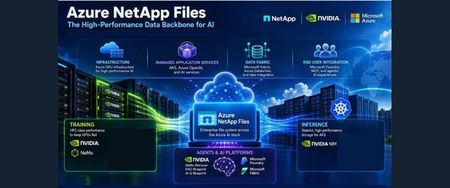
Azure NetApp Files provides a unified data foundation for enterprise AI, connecting data mobility, model training, inference, and agentic workflows. This article explores how caching, replication, high-throughput storage, low-latency checkpointing, and rapid dataset cloning help bring data closer to GPU compute and support efficient experimentation. It also examines persistent storage for containerized inference on Azure Kubernetes Service and integration with NVIDIA’s AI stack, Microsoft Foundry, and Microsoft Fabric. Two reference use cases illustrate its role in supporting domain-specific model training and modernizing AI inference while reducing infrastructure complexity.258Views0likes0CommentsEngineering an Agentic Scheduler
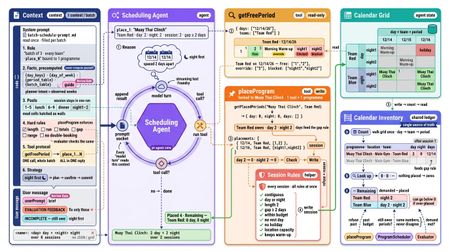
Authors: Gabriel Sze and Weixian Zhang 1. Engineering an Agentic Scheduler Scheduling looks deceptively simple until multiple constraints, shared resources, and partial commitments start interacting. This post walks through how we built an agentic scheduler that lets an LLM reason about placements while keeping the actual scheduling process deterministic and inspectable. Imagine scheduling a training program for a sports team. It needs four hours in total, split into two-hour sessions, with at least two days between them. Other activities already occupy parts of the week. Where should those sessions go? At first glance, this looks like a simple calendar problem. Find four free hours and place the session. So the engineering question is not simply: How do we ask an agent to generate a schedule? It is: How do we give an agent enough freedom to reason about scheduling, while keeping the resulting schedule deterministic, inspectable, and correct? Our application does not ask a model to produce a finished spreadsheet in one call. Instead, we decompose this into small steps. The agent gets a much smaller responsibility: choose candidate dates, inspect available slots through tools, and propose placements. 1.1 Defining the scheduling problem Imagine planning mixed martial arts training for Team Red, Team Blue, and Team Yellow in a shared training facility. We call each martial arts activity a program, and each continuous training block a scheduled session. For example, a Muay Thai program for Team Red might run over three mornings in the same week, with each morning counted as a separate scheduled session. A program typically requires a certain number of hours, divided into sessions of an allowed duration. Team Red might train in striking and pad work, Team Blue in wrestling and submissions, and Team Yellow in conditioning and mobility. Some programs may need scarce evening slots. Others compete for the same mat, ring, or instructor. Programs may also require rest days between sessions. We will follow one fictional example throughout this post. Muay Thai Sparring requires four daytime hours for Team Red, split into two two-hour sessions at least two days apart. Team Blue and Team Yellow already have wrestling and conditioning sessions elsewhere in the shared calendar. Finding four empty hours is therefore not enough: the scheduler must place two valid sparring sessions without creating team, facility, or recovery conflicts. Before scheduling starts, the application converts source data and user-provided requirements into explicit, typed scheduling constraints. An optional review step allows a person to provide additional guidance. The important boundary is that the scheduler operates on structured input rather than interpreting raw source material directly. 1.2 Why involve an agent at all? Not every scheduling preference is naturally expressed as a hard constraint. Historical patterns may suggest preferred timings, while users may provide intent such as to keep Friday relatively light, or try to keep related activities in the same half of the week. These preferences require interpretation rather than simple constraint checking. We therefore use the model where reasoning is useful: interpreting intent, exploring candidate placements, and deciding what to try next. We keep explicit rules: session duration, required hours, spacing, conflicts, and other conditions that can be evaluated deterministically. It gives us a concrete contract: the agent proposes allocations against explicit requirements; the application owns the resulting state and the checks used to assess it. 2. Designing the Software Architecture Code snippets are simplified from the source to show the shape of each component, not exact signatures. 2.1 Components Frontend: a React 19 single-page app (Vite, MUI), authenticated with Entra ID. Talks to the backend through two channels only: REST calls to start or steer a run (program scheduling), and one long-lived SSE stream for everything coming back. Holds no run state of its own. Run status, progress, the live calendar and the finished workbook all arrive as replies on the stream, so a reload rebuilds the view from what the backend sends. Everything from the Gateway onwards is the backend: one Node.js service on Azure Container Apps that the frontend reaches only through REST and SSE. Gateway: a Fastify API, the backend's only entry point. Ingress is REST: POST /api/schedule starts a run; POST /api/steer resumes a paused one with the user's instructions. Egress is SSE: GET /api/events holds one stream per browser tab. Never runs agent code. It authenticates the request, writes the upload to the session's folder, enqueues a command that references that folder and returns at once: Mailroom: the asynchronous boundary between the gateway and the agents, made of two Postgres-backed queues, each drained by its own polling loop. Agents: two LangGraph graphs for Program IQ Agent and Scheduling Agent Session: one scheduling run for one user. Each last cycle training program .xlsx upload starts a new session with its own ID, so a user running three schedules at once has three sessions. Each session has its own dedicated workspace folder structure: /sessions/{username}/{sessionId}/ input/ ← the uploaded last cycle training program .xlsx work/ ← agent scratchpad: extracted-demand-profile.json, raw rows, traces output/ → the scheduled training programs .xlsx A session can hold several agent commands, such as a run plus the user's later answer through /api/steer. Every reply carries a sessionId and a commandId, so the frontend can tell which run and which command it belongs to. Storage: Postgres: the Mailroom's two queue tables, plus LangGraph checkpoints, so a run's graph state survives a restart. Using one database for queues and state removes the need for a separate message broker. Azure Files: On Azure, /sessions lives on an Azure Files share mounted into the container at /mnt /.agent, so session files are present in multiple replicas of Azure Container Apps and can survive a restart . Azure AI Foundry: hosts the model the agents call. Agent Tracer: records every model call and tool call as OpenTelemetry traces in Azure Application Insights, plus a per-session trace file in work/. Identity: Entra ID covers user sign-in and the backend's access to Postgres and Foundry, through managed identity. 2.2 Key Design Considerations Why REST in and SSE out, instead of WebSockets? Our communication pattern is asymmetric: clients submit scheduling requests, while agents produce asynchronous updates over several minutes. We chose REST for incoming requests because it handles multipart Excel uploads, authentication, and request validation through standard HTTP mechanisms. For outgoing updates, Server-Sent Events (SSE) was a better fit than WebSockets. The browser only needs to receive progress and agent responses, not maintain a bidirectional conversation. SSE also avoids the overhead of repeatedly polling for updates that arrive at unpredictable intervals. To handle disconnections, agent replies are persisted in reply_message, allowing the client to retrieve missed updates when it reconnects. The implementation is described further in this post. Why a command queue instead of executing agents directly within HTTP requests? Scheduling runs can take several minutes, making it impractical to execute agents directly within an HTTP request. Instead, we introduced a Postgres-backed command queue to separate request handling from agent execution. When a request arrives, the gateway persists the command and immediately returns 202 Accepted, allowing the agents to continue working independently of the HTTP connection. This separation also improves reliability and gives us greater control over execution. Commands are persisted before processing begins, so they are not silently lost if a worker crashes or restarts. Interrupted runs can be identified, marked as failed, and surfaced to the user. Command loop (inbound): claims the next command from agent_command, runs the agents on it, and settles it as completed, paused or failed. Claims use row locking, so several replicas can drain one queue without running a command twice. // domain/mailroom/command-loop.ts while (!stop.stopping) { if ((await pickAndExecuteCommand(helper)) !== 'idle') { idleWait = IDLE_WAIT_MS; // work arrived: drain greedily continue; } await stop.sleep(idleWait); idleWait = nextIdleWait(idleWait); // empty queue: back off } Reply loop (outbound): delivers rows from reply_message to the SSE streams that its own replica holds. Each replica serves only the users connected to it, so there's no broker and no sticky sessions. Undelivered replies stay queued until the user reconnects. const users = sse.streamingUsernames(); // who is connected to THIS replica for (const reply of await queue.getReplies(users)) { if (sse.send(reply.username, reply) > 0) await queue.clearDelivered(reply); } The loops never call each other. Commands flow in, replies flow out, and the agents write their own replies. The command loop processes one command at a time, limiting concurrent scheduling runs and preventing too many requests from hitting the model at once. Additional commands simply wait in the queue until capacity becomes available. By keeping the execution loop separate from the agent graph, we can replace the real agents with a mock implementation and test the entire flow, from the gateway through the command queue to SSE responses, without making any model calls. // domain/mailroom/agent-run.ts — the one seam: swap the import (and its call) import { runAgentStream } from '../agent/agent-graph.ts'; // import { runMockAgentStream } from '../agent/mock-agent-graph.ts'; // domain/agent/mock-agent-graph.ts — same state, same checkpointer, one node that only talks const graph = new StateGraph(AgentState) .addNode(MOCK_REPLIER, createMockReplier()) .addEdge(START, MOCK_REPLIER) .addEdge(MOCK_REPLIER, END) .compile({ checkpointer: await checkpointer() }); Why Postgres instead of Azure Service Bus or another broker? Rather than introducing a dedicated message broker, we chose to build our command queue on Postgres, which was already serving as the application's primary database. Beyond storing application data, Postgres also manages the command queue, agent replies, execution history, and LangGraph checkpoints. This allows us to consolidate several responsibilities into a single service, reducing the operational overhead of managing, securing, and monitoring additional Azure resources. We also kept the queue implementation behind a light interface (pickNext, complete, pause, fail), allowing us to swap Postgres to a dedicated broker such as Azure Service Bus if throughput requirements grow. Ultimately, we chose to optimize for simplicity at our current scale, while keeping the architecture flexible enough to evolve. 3. From historical schedules to structured demand 3.1 Uploading past programs The workflow begins when the user uploads reference programme workbooks from previous cycles, along with any relevant contextual information that can help ground the scheduler when planning future programmes. Each uploaded .xlsx file is saved to a new session folder, after which the gateway places a lightweight command on the queue containing the user, session Id, and plan start date. The files themselves are not included in the command, keeping the queue payload small. This allows the HTTP request to return immediately while the ingestion process runs asynchronously, without tying up the web server. An optional review: true flag allows users to pause the workflow after ingestion to review the extracted information before proceeding with scheduling. We'll cover this further in the Human-in-the-loop section. // api/rest-api.ts for (const upload of uploads) await writeFile(join(input, upload.filename), upload.content); const command: AgentCommand = { commandId: nextUlid(), username, sessionId, type: 'file-upload', planStart, files, review, }; 3.2 Program IQ: extracting the demand profile and insights Program IQ serves as an intelligence layer that uses historical programmes to understand the scheduling requirements for the upcoming cycle. It starts by analysing the Excel workbooks (or whatever additional context) uploaded by the user, which contain the programmes conducted in previous cycles. Rather than relying entirely on an LLM, we separate interpretation from computation. The LLM interprets the varying structures and layouts of the workbooks, while deterministic code processes the extracted information to build a demand profile for each programme and team. This captures details such as the number of sessions required, their duration, recurrence patterns, preferred time slots, and spacing between sessions. // domain/agent/program-iq/program-iq-agent-graph.ts new StateGraph(IQState) .addNode(NODES.phaseFilesPairing, createPhaseFilesPairing()) // filename → phase .addNode(NODES.extractRawPrograms, createExtractRawProgramsAgent()) // LLM: grid → rows .addNode(NODES.normalizeRawPrograms, extractProgramIQ()) // code: rows → demand .addEdge(START, NODES.phaseFilesPairing) .addEdge(NODES.phaseFilesPairing, NODES.extractRawPrograms) .addEdge(NODES.extractRawPrograms, NODES.normalizeRawPrograms) One pi-agent-core agent per sheet, up to 6 at once. Each agent gets a system prompt (how past programs are laid out, the day's periods, what to ignore), one sheet name and two tools. It loops until every activity on the sheet is reported. Two tools The Program IQ agent has two tools: one to read the spreadsheet and another to report the extracted information. Rather than following a hardcoded sequence, we chose to introduce an LLM that sits between these tools, deciding when to read the workbook and how to interpret and report its contents. read_sheet tool uses exceljs to turn a sheet into text – understands layout, merged cells, colors, column positions, and flattens that layout into plain lines the model can read. report_activities tool records what the model found. The model reports each activity as one line: date, team, program, location, colour, periods, kind. 2024-06-17 Team Red Striking · FF92D050 1,2 training From activities to demand profiles (code) Plain code counts the reported activities into a demand profile per program and team. No LLM is involved, so every number is traceable back to the source files but meant to softly guide future planning. Demand profile What it holds Volume Total day and night periods Session length Shortest and longest session Rhythm How often it recurs, e.g. weekly on Fridays Slot pattern Which periods of the day it used Spacing Fewest days between two sessions The demand profile is the signature. Teams with identical demand profiles are grouped together to avoid duplicating the same scheduling requirements. For example, if Team Red and Team Blue require the same number of sessions, durations, recurrence patterns, and spacing, they can share a single demand profile. This grouping is purely for representation – each team still needs its own sessions scheduled independently. The output: One row per program and matching group of teams: Open Mat [Team Red, Team Blue] 4 hours a week · 4-hour sessions · weekly on Fri · ≥ 7 days apart Sparring [Team Red] 6 hours a week · 2–3-hour sessions · Tue and Thu · ≥ 2 days apart demand profile .xlsx as input to Scheduler Agent Nobody types this demand in; it is read back from what the teams previously trained. It is what the Scheduling Agent places onto next cycle's calendar, and shared rows become shared batches. 4. Human-in-the-loop: review, steer and resume Historical activity tells us what happened before, but not necessarily what should happen next. Users may want lighter Fridays, prefer certain activities earlier in the week, or restrict specific programmes to specific days. Before scheduling begins, users can review the extracted requirements and provide additional instructions through a separate steer command. This command incorporates their preferences into the existing requirements and resumes the scheduling workflow. We currently support two types of steering guides: Overall preferences apply to the scheduling run as a whole: Prefer lighter Friday afternoons where possible. Program-specific apply to a particular programme in “User Steering” column These instructions are propagated to the relevant scheduling agents, with programme-specific instructions attached to the corresponding activities across the scheduling tiers. Where user instructions conflict with historical patterns, current user intent takes precedence. However, steering an LLM is not the same as enforcing a constraint. Natural-language instructions can influence how agents propose and evaluate placements, but only constraints explicitly implemented in code can be deterministically enforced. For example, "Prefer lighter Friday afternoons" may influence which slots an agent considers, while "Sessions must be at least two days apart" can be validated after every placement. 4.1 Extracted Program IQ: pause for human steering and approval Rather than keeping an agent running while waiting for user input, the system persists the paused state in the store and sends a steer-request containing the extracted programmes for review. This allows the agent to process other requests in the meantime. The user can then review the extracted demand profile and choose to either approve it as-is or provide additional instructions: Approve as-is: submit a steer command without steering guides. Steer and approve: submit a steer command with steering guides to influence the scheduling process. In both cases, the steer command resumes the workflow and initiates scheduling using the approved requirements. // domain/agent/agent-graph.ts await writeExtractedPrograms(session, { plan, programs }); if (command.review === true) { await enqueueReply(newSteerRequest(command, steerableProgrammes({ plan, programs }))); return 'paused'; } 4.2 Steer and Resume As shared, steering can take two forms: program-specific (guides[]) and an overall preference that applies to the entire scheduling run. Both are optional and serve as guidance for the scheduling agents rather than automatically enforced constraints. The request creates a new steer command associated with the existing session. Instead of reprocessing the original Excel workbooks, the workflow reloads the saved demand-profile.json, attaches any programme-specific instructions to their corresponding records, and proceeds directly to scheduling. if (command.type === 'steer') { const steered = withSteeringGuides(await readExtractedPrograms(session), command.guides); yield* schedulePhases(command, session, steered, command.brief ?? '', onProgress); } 5. Inside the Scheduling Agent and Harness Engineering Before we dive in, let's establish a few key terms and how they relate to one another: Slot (or Period): A single unit of time, typically 1 hour, but configurable to other durations. Session: A scheduled training instance consisting of one or more slots. Program: A type of training, such as Muay Thai Clinching or Pad Work. Each program can have multiple sessions. Grid (or Calendar): The scheduling interface where slots and sessions are organized and displayed. In short, a program contains sessions, each session occupies one or more slots, and everything is represented on a calendar grid. The LLM's reasoning and tool-calling loop is only one part of the scheduling system. Around it, we need to manage what context the agent receives, which tools it can access, how scheduling state is maintained, how proposed changes are applied, and what happens when the schedule remains incomplete. In our implementation, LangGraph orchestrates the overall scheduling workflow, while pi-agent-core manages the LLM's reasoning and tool-calling interactions within individual stages. Other stages, such as deterministic seeding and schedule evaluation, run entirely through code without invoking an LLM. new StateGraph(AgentState) .addEdge(START, 'HolidaySeeder') // code .addEdge('HolidaySeeder', 'RoutineSeeder') // code .addEdge('RoutineSeeder', 'EventScheduler') // LLM .addEdge('EventScheduler', 'ProgramScheduler') .addEdge('ProgramScheduler', 'Evaluator') // code .addConditionalEdges('Evaluator', (s) => failed(s) && s.round <= 3 ? 'ProgramScheduler' : 'FillerScheduler') .addEdge('FillerScheduler', END) .compile({ checkpointer: new PostgresSaver(pool) }); Before each agentic scheduling phase, the harness prepares the context relevant to the current batch and provides tools scoped to that task. The agent can inspect availability and propose placements, but it does not maintain its own separate version of the schedule. Instead, its tools interact with the same calendar state used by the application, ensuring that scheduling decisions are based on a consistent view. The process begins deterministically. Existing routines, breaks, and recurring activities that can be reliably identified are placed onto the calendar before the agent begins scheduling. The agent then works with this partially populated calendar to find suitable slots for the remaining activities. Once placements are made, deterministic evaluators check the updated schedule for completeness and constraint violations, rather than relying on the LLM to assess its own work. 5.1 What the agent works with (context engineering) An important part of building the scheduling agent is deciding what information the LLM needs, what it can retrieve through tools, and what should remain in application state. Rather than asking the model to work out information the application already knows, we provide stable facts such as available dates, their corresponding weekdays, and the ordering of scheduling periods directly in its context. Our approach to context engineering follows a simple principle: provide stable facts upfront, retrieve changing calendar information through tools, and keep the authoritative scheduling state outside the conversation. Calendar grid (agent state) - The calendar is a nested dictionary held in memory, schedule[day][team][period], where each entry holds what is scheduled in that slot. The agent tools and calendar inventory work on this one object directly, so a write is visible to the next read at once, with no database in between. System prompt - The system prompt is a Markdown template, batch-schedule-prompt.md, read from disk once. Before the first turn, code fills its {placeholders} with this run's values: // domain/training/scheduler.ts systemPrompt: fillPromptTemplate(template, { day_keys: phase.dayKeysJson, // the dates the model may use day_of_week: phase.dayReference, // each date whether is it a weekday so model knows the weekdays period_table: PERIOD_TABLE, // the slots in a day // … }), The filled prompt tells the model: Role: which program to place, and the one write tool bound to it. Facts: dates, weekdays and slot layout, worked out in advance. The prompt says "never compute these yourself", because models get calendar arithmetic wrong. Rules: what a valid session looks like, stated so the model can plan without trial and error. Tool protocol: read once, then send every placement in one reply. Strategy: plan → confirm → commit. User prompt holds what changes from run to run: the user’s steering guide and, on a retry, only the sessions that failed. 5.2 What the scheduling agent does An important part of designing the scheduling agent is deciding what it can read and what it is allowed to change. Rather than giving the agent unrestricted access to the calendar, we expose a set of tools with clearly defined boundaries. Read tools provide the information needed to make scheduling decisions, while write tools constrain how placements can be made. A query specifies candidate days, teams, and an optional slot window. The response distinguishes between: empty slots commitments that may be overridden hard blocks that cannot be changed To minimise unnecessary context, the response is compressed. For example, if an entire day is unavailable, the tool returns a short marker rather than listing every blocked period individually. The prompt encourages a simple search pattern: choose candidate dates → query free slots in candidate dates → propose a placement → inspect alternatives if necessary Agent loop The agent runs a plain loop: model turn → tool call[]? → run each tool → append result → model turn. Each result is the model's only view of the calendar. The loop ends when there is no tool call. 1. Plan - The model chooses candidate days from the facts in its prompt, without calling a tool. The planning is cheap reasoning, so the tools only confirm and commit. 2. Read with getFreePeriod The model pass in the dates as tool parameter for every team it needs, in one call: { "days": ["12/14/26", "12/16/26"], "teams": ["Red"] } It gets back one answer per day and team: { "day": "12/14/26", "team": "Red", "free": ["1", "2"], "override": ["3"], "blocked": ["night1", "night2"] } free is empty, override holds an overridable routine activity (e.g resting) the program may replace, and blocked is off limits. The model picks from these lists rather than reading the calendar, so the context window stays small. 3. Write with placeProgram - The model sends all the program's sessions in one call. The tool runs two checks: 3.1 Work out how many slots the program is left to place - Each programme owes a fixed number of slots per company. The tool subtracts the slots the calendar already holds, and refuses any session that would go over what's left. // domain/agent/tools/place-program.ts const inventory = takeCalendarInventory(plan); for (const team of program.teams) { const placed = getPlacedPeriods(inventory, program, team); remaining.set(team, program.demand - placed.periods); // what it may still place placedDays.set(team, placed.days); // what the spacing rule checks against } The count is read from the calendar grid, not kept in the tool. On a retry, a fresh tool is built over the same grid, so sessions placed in earlier rounds still count against the budget and the spacing rule. 3.2 Check every rule at once - Each rule is a small function that returns a reason, or nothing if the session passes. placeProgram runs them all on every session and keeps every reason. Some examples of the rules: nonContiguousReason() - the slots run back to back with no gaps resolveDayOrNight() - all daytime or all night-time, never both tooCloseReason() - enough days after the program's last session overDayNightPoolBudget() - no more slots than the program still needs Reflection pattern: a session that fails any rule is refused, and all its reasons go back to the model. The model fixes them in one resend instead of one retry per rule. 4. Commit - Valid sessions are written to the grid. The tool replies with placed, refused (with reasons) and still owed. 5. Definition of done - A program is scheduled when it owes zero periods for every team. The model then makes no tool call, and the loop ends with a one-line summary. Anything still owed → the scheduler re-prompts with INCOMPLETE 5.3 Batches, lanes and the agent loop The harness doesn't hand every program to one agent. It splits the work into small batches, each running its own agent loop, then uses planLanes() to decide which batches can run at the same time. const { sharedLane, teamLanes } = planLanes(programs, batchSize=3); Plan Lanes - Plans two kinds of lane by comparing each team's demand profile: rhythm, session length, volume, spacing and slot pattern. We earlier discussed how the demand profile is the team’s signature – it's basically reusing this concept. Several teams with the same demand profile → the shared lane. One team, or a demand profile no other team matches → that team's team lane. The split is by matching demand profile, not by program name, all five parts must be equal. Team Red and Team Blue both do Open Mat, 4 hours a week on Fridays → one row - Open Mat [Team Red, Team Blue], in the shared lane. Team Red does Sparring 6 hours a week, Team Blue 4 → two rows - Sparring [Team Red] and Sparring [Team Blue], each in its own team lane. It then cuts each lane's programs into batches of BATCH_SIZE = 3, and returns a LanePlan (example at the end of this section). 1. Shared lane - It holds programmes that several teams need in the same amounts, such as Open Mat. It runs first, one batch at a time, because its batches write into several teams' calendars and nothing else can safely run alongside them. 2. Team lanes - Each team gets one lane, and a lane runs one agent at a time. A lane's batches run in order. Each batch of up to three programmes gets a new agent, which places them and ends before the next batch starts. Lanes run in parallel. Up to LANE_WIDTH = 4 lanes run at once, and a fifth team's lane starts when one of the first four finishes. All lanes write into one shared calendar, but each writes only its own team's columns, so parallel lanes can't collide. interface LanePlan { shared: TrainingProgram[][]; // batches → programs, same calendar grid lanes: TrainingProgram[][][]; // lanes → batches → programs, same calendar grid } { shared: [ [Open Mat] ], lanes: [ [ [Striking, Grappling, Pad Work], [Clinch Work, Footwork] ], // Team Red: 2 batches [ [Wrestling, Takedowns, Submissions], [Guard Passing] ], // Team Blue: 2 batches [ [Conditioning, Mobility] ], // Team Gold: 1 batch ], } - shared[0] = [Open Mat], the first shared batch, which is one agent. - lanes[0] = Team Red's lane, a list of 2 batches. - lanes[0][0] = [Striking, Grappling, Pad Work], Team Red's batch 1, which is one agent conversation. - lanes[0][1] = [Clinch Work, Footwork], Team Red's batch 2, the next agent. - lanes[0][0][1] = the Grappling TrainingProgram. 6. How we determine correctness The two level evaluators checks five rule families: exact coverage of day and night requirements spacing between scheduled sessions session length valid day/night pools and meal boundaries resource capacity. It reads the accumulated calendar grid after the main scheduling pass, not a summary written by the model. Write-time evaluation and whole-grid evaluation serve different purposes. Two individually acceptable blocks can touch and become one overlong block in the assembled calendar. Likewise, refusing to exceed a budget does not establish that the full budget was placed. 6.1 Whole-grid evaluation Plain code grades the calendar; the model never judges its own work. Five rules run, and only the failing programs go back, up to 3 times. The evaluator gives an objective pass or fail. The model never judges its own work. Five rules. coverage: placed equals demanded. gap: sessions are spaced far enough apart. session-length: each session is the right size. pool: day work in day slots, night work in night slots, nothing in meal times. resource: no location over capacity. Failures. Each failure names its program, team and what broke. On a retry, the scheduler re-runs only the failing programs, each with its own list of what to fix. 6.2 Write-time checks Before a scheduled session is committed, the placeProgram tool checks constraints such as: allowed session length spacing from existing sessions remaining scheduling budget resource capacity If a check fails, the proposed session is rejected before the calendar changes. The tool returns a reason that the agent can use on its next attempt. Suppose Activity A requires two-hour sessions, but the agent proposes only slot 1. That one-hour block fails the session-length check. Nothing is written. The agent can then resubmit slots 1–2. If the new proposal passes the checks, those two hours are committed. The important distinction is that the agent is correcting a rejected proposal, not undoing an already committed placement. 7. Agent's real-time progress The agents report as they work; the browser never polls. Progress status, calendar snapshots and finished workbooks stream in over SSE. A run takes minutes per phase, so the user sees agent working instead of a spinner. Graph nodes post replies onto the reply queue as they go, and the mailroom reply-loop streams them to the browser over SSE. Three reply kinds ephemeral-notice: a progress line, e.g. "Phase 1 — programs to schedule: 42". grid: a snapshot of the calendar, so that frontend gets live calendar updates of programmes’ slots. file-download: Each workbook is saved to output/ as soon as it's finished, then sent straight to the browser as a download over SSE. 8. Tracing agent trajectory pi-agent-core exposes an onPayload hook that intercepts requests before they reach the model, allowing us to trace every prompt, tool call, and final answer. Tool results are also traced but truncated. Each trace goes to three sinks at once: the console, the session's work/ folder and Azure Application Insights. We study the conversation logs to identify excessive conversation turns and tool calls, and to trace incorrect schedules back totheir root cause. const agent = createPiAgent(plan) { onPayload: (payload) => { trace(payload as LLMPayload); } } Example. Each agent writes its own conversation as .jsonl files in session's work/ folder. /sessions/{username}/{sessionId}/work/ program-iq-Wk-1.jsonl ← one file per sheet program-iq-Wk-2.jsonl ProgramSchedulerAgent-Striking-Grappling-Pad-Work.jsonl ← one per batch Each turn in a conversation is one JSON line. {"agent":"program-iq-Wk-2","turn":1,"role":"user","content":"Sheet: Wk 2. Report every activity in it."} {"agent":"program-iq-Wk-2","turn":2,"role":"assistant","tool_calls":[{"name":"read_sheet","arguments":{"sheet":"Wk 2"}}]} {"agent":"program-iq-Wk-2","turn":3,"role":"assistant","tool_calls":[{"name":"report_activities","arguments":{"activities":["2025-04-01 Team Red Striking Main Gym 4,5 training","2025-04-01 Team Blue Wrestling Mat Room 4,5 training","…"]}}]} {"agent":"program-iq-Wk-2","turn":3,"role":"tool","content":"24 activities, 24 so far."} 9. Looking forward: the potential applications and improvements Although this application was designed for training programme scheduling, the underlying engineering tactics and patterns applies to other planning problems that combine structured constraints with less explicit human preferences. Potential domains include workforce rostering, facility and equipment allocation, maintenance planning, logistics coordination, and project scheduling. These domains share similar characteristics: multiple parties compete for limited resources, some requirements must always be satisfied, and other preferences require interpretation and trade-offs. There are also several areas where the scheduler could be improved. Optimizing beyond correctness The current implementation primarily determines whether a schedule is complete and valid. A future version could score multiple valid schedules against objectives such as resource utilization, schedule compactness, adherence to user preferences, or the number of existing activities overridden. This would allow the system to distinguish between a schedule that simply passes validation and one that is operationally preferable. Targeted replanning A user may want to change one programme, unavailable date, or resource constraint after the schedule has been generated. Rather than regenerating the entire calendar, the scheduler could identify the affected placements and replan only that portion of the schedule. Supporting targeted replanning would require the system to preserve dependencies between scheduling decisions so that it can determine which programmes and resources are affected by a change. Clearer explanations for scheduling decisions The current traces make the agent's execution inspectable to developers. A future version could expose model’s reasoning and turn traces into user-facing explanations, such as why a programme was placed on a particular date or which preference could not be satisfied. These explanations should be derived from tool results and evaluator outcomes rather than relying on the model to reconstruct its reasoning after the schedule has been completed. This boundary is what makes the pattern reusable: give the agent room to reason, while keeping the resulting system deterministic, inspectable, and operationally manageable. Libraries and Resources pi-agent-core - https://github.com/earendil-works/pi/tree/main/packages/agent LangGraph - https://github.com/langchain-ai/langgraph exceljs - https://github.com/exceljs/exceljs zod - https://zod.dev/#introduction Azure Database for PostgreSQL - https://learn.microsoft.com/en-us/azure/postgresql/ Azure Container Apps - https://learn.microsoft.com/en-us/azure/container-apps/overview Microsoft Foundry - https://azure.microsoft.com/en-us/products/ai-foundry/models/
From Automation to Intelligence: Logic Apps + Functions + GenAI
Traditional automation excels at “When this happens, do that.” But what if a workflow also needs to interpret context, condense information, or suggest what to do next? That’s where combining Azure Logic Apps, Azure Functions, and generative AI gets interesting. Here’s how I think about their roles: - Logic Apps coordinate Connect services, oversee workflow steps, and determine what happens next. - Azure Functions process Run custom logic, validate data, transform it, and handle specialized tasks. - GenAI interprets and creates Make sense of unstructured information, summarize content, categorize inputs, and offer recommendations. A basic workflow might look like this: Business Event ↓ Logic App ↓ Azure Function ↓ GenAI ↓ Validation / Human Review ↓ Action Example: Smarter Incident Triage Picture an alert from a production system: The Logic App receives the alert and collects relevant context. The Azure Function handles the technical data. GenAI summarizes the problem and proposes potential next steps. The Logic App sends the recommendation for validation or human approval. Once approved, the action is carried out. The key point? AI doesn’t need to take the place of rule-based automation. It can add intelligence to the automation you already have. My straightforward architecture guideline: 🔄 Logic Apps: What comes next? ⚙️ Functions: What needs to be processed? 🧠 GenAI: What does this information tell us? 👤 Human: Is this action the right one to take? 💬 What’s your view? Are you using GenAI to assist with existing Azure workflows, or shifting towards automation that’s more AI-driven?34Views3likes0CommentsPartner Blog | Partner Center Technical Corner: November 2026 edition
Welcome to the November edition of Partner Center Technical Corner, your guide to the latest Partner Center changes for Cloud Solution Provider (CSP) partners. This edition highlights practical ways to identify customer opportunities and increase partner profitability, alongside time-sensitive offer retirements and security updates. New sales recommendations and margin opportunities are key to how sales teams identify and convert customer demand, while offer retirements and security updates require timely action from billing, subscription management, and security teams. Turn insights into growth With CSP sales recommendations, distributors and direct bill partners can uncover more revenue opportunities within their existing customer base. These AI-powered insights have been rolling out in phases since October 5, 2026. Access recommendations through the Customer overview page, Partner Center AI assistant, or API. The insights identify opportunities to upsell, convert free Microsoft Copilot usage to paid licenses, apply promotions, transition Enterprise Agreement customers to CSP, and activate Copilot. For partners serving small and medium-sized businesses (SMBs), these signals give sales teams a way to prioritize customers who are ready for their next step. Growth margin, launched October 1, 2026, gives eligible distributors and direct bill partners a way to increase profitability by earning incremental margin above base margin. Partners can qualify through new-to-offer sales, seat expansion, or strategic product mix growth with customers in Microsoft’s Small Medium Enterprises and Channel (SME&C) segment. Eligible products include Microsoft 365 Copilot, Microsoft 365 E5, Microsoft 365 E7, Microsoft Defender Suite, Microsoft Purview Suite, and Windows 365 Enterprise. Before quoting the price, validate every transaction in Partner Center or through the eligibility API to ensure the transaction is eligible for growth margin. Then download the eligible product identifiers and minimum seat requirements from the Pricing workspace. For qualifying mid-term seat expansions, create a new subscription. Azure consumption promotions are designed to create new sales opportunities through time-bound percentage discounts on eligible pay-as-you-go consumption, Reserved Instances, and pre-purchase plans. They are currently available in sandbox so partners can prepare discovery, eligibility, and purchasing workflows. The promotions affect Microsoft’s price to you, while you set the final customer price. Confirm production availability before quoting. Act now on offer retirements AI Builder capacity add-ons retired from sale on November 1, 2026. To protect customer continuity, identify affected subscriptions now, turn off auto-renew before each customer’s next renewal date, and plan a transition to Copilot Credits before existing AI Builder credits expire. Customers retain their current credits through the existing subscription term, but retirement does not automatically stop renewals. Indirect resellers should coordinate these steps with their distributor. Microsoft is also retiring Azure Partner Shared Services (APSS), offer MS-AZR-159P, which distributors and direct bill partners use for internal Azure workloads. Microsoft is targeting January 4, 2027, to stop creation of new APSS subscriptions; existing subscriptions are no longer supported after June 30, 2027. Inventory APSS subscriptions now, select a supported Azure purchasing path, and move or shut down workloads before June 30. Review the APSS retirement announcement for migration guidance. Strengthen security and operational readiness Based on partner feedback, the Security workspace has been redesigned to simplify actions needed to better secure your ecosystem. This new experience is currently available in an opt-in preview that brings requirements and alerts together as Tasks, grouped by root cause. In the preview, overall status changes from a numerical score to Complete or Incomplete. Tasks include details you need to resolve them, while due dates, lifecycle states, activity history, and automated completion checks make remediation easier to track. You can also take actions in bulk. Roles and permissions remain unchanged, and the current experience will remain available during the transition. Learn more about the new Security workspace experience. Two tools provide additional operational visibility. For account administration, the tenant discovery API lets Account admins retrieve Partner Local Accounts and CSP tenants associated with a Partner Global Account. Separately, direct bill partners can use the Eligibility Dashboard to monitor qualification status, identify unmet requirements, and navigate to the relevant actions. Start with three actions: review sales recommendations and growth margin eligibility for current customers; inventory subscriptions affected by AI Builder and APSS retirements; and opt in to the Security workspace preview to evaluate and track applicable tasks. Assign an owner and target date for each action, then revisit Partner Center announcements regularly for updates. Continue reading here151Views0likes0Comments
Issue enforcing Azure Policy on Azure OpenAI Model Deployments
Hi everyone, Due to strict data residency and compliance regulations within our organization, we need to enforce controls ensuring that global inference deployments (such as GlobalStandard or GlobalProvisioned) cannot be created within our Azure OpenAI environments. Our goal is to mandate the use of Data Zone or Regional deployments (e.g., DataZoneStandard). To achieve this, we created a custom Azure Policy using a whitelisting approach on the resource type Microsoft.CognitiveServices/accounts/deployments. We want to deny any model deployment whose SKU does not match our allowed deployment types. Here is the policy definition we are attempting to use: { "mode": "Indexed", "policyRule": { "if": { "allOf": [ { "field": "type", "equals": "Microsoft.CognitiveServices/accounts/deployments" }, { "field": "Microsoft.CognitiveServices/accounts/deployments/sku.name", "notIn": [ "Standard", "DataZoneStandard", "Provisioned", "DataZoneProvisioned" ] } ] }, "then": { "effect": "deny" } } } The Problem: Despite referencing the fully qualified alias Microsoft.CognitiveServices/accounts/deployments/sku.name (and attempting variation matches with like/notLike), the policy is still not working as expected when creating deployments via the Azure Portal or ARM/Bicep templates. We previously ran into an error stating that sku.name was not a valid field, but after changing it to the full alias, the definition saves—yet the rule fails to block non-compliant deployments during evaluation. Questions for the Community: Is Microsoft.CognitiveServices/accounts/deployments/sku.name the correct alias evaluated during ARM deployment calls for Azure OpenAI model deployments? Does Azure OpenAI store deployment types (GlobalStandard, DataZoneStandard, etc.) under a different property path or alias during validation? Has anyone successfully implemented a policy rule to block Global Token deployments or enforce Data Zone deployments only? Any insights, working policy samples, or alias pointers would be greatly appreciated! Thanks in advance for your help!52Views0likes1CommentFrom Files to Insights: Building a Medallion Architecture with Microsoft Fabric
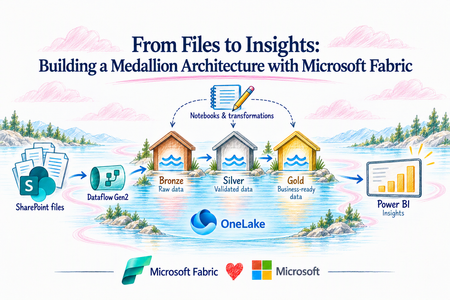
Organizations often receive critical business data through files, spreadsheets, and SharePoint, but turning that information into trusted, analytics-ready insights can quickly become complex. Microsoft Fabric simplifies this journey by bringing ingestion, transformation, governance, and analytics together in a unified data platform. In this article, we’ll explore how a Bronze, Silver, and Gold medallion architecture can transform raw files into clean, trusted, and business-ready data for reporting and insights. Create a dedicated Fabric workspace The SharePoint Documents/fabric-lab/customer-drop folder is created, and the initial baseline Excel workbook is uploaded. This simulates how vendor files can be dropped into a controlled landing area before Fabric processes them. For the initial run, the document specifically starts with: customers_2026-11-01_baseline.xlsx. Flow so far: Vendor Excel file → SharePoint landing folder → Fabric Create the Fabric Lakehouse A Lakehouse called lh_sharepoint_bronze_lab is created inside the workspace. The lab design states that the Dataflow creates the staging table while notebooks are intended to create the Bronze tables. What is happening: We now have a OneLake-backed location where the SharePoint data can land and later progress through the medallion architecture. Connect Fabric Dataflow Gen2 to SharePoint A Dataflow Gen2 is created and connected to the SharePoint folder source. The configuration uses the SharePoint site URL, rather than pointing directly at an individual Excel file. This is important because the design is intended to process files arriving in the folder, rather than building a one-off connection to a single workbook. Apply ingestion logic in Power Query The Dataflow's Advanced Editor contains Power Query logic that: Connects to SharePoint. Filters files to the designated folder. Selects .xlsx files. Ignores temporary Excel files beginning with ~$. Opens each workbook. Finds the tblCustomers table. Extracts its rows. Adds the originating filename as source_file. Adds the SharePoint modified timestamp as source_modified. Combines the rows from the accepted workbooks. This source metadata is very useful later because Vendor Intelligence can retain where a record came from and when its source was modified. Validate the first SharePoint file The Dataflow successfully discovers the November 1 baseline workbook in SharePoint. The binary content shown represents the Excel file that Fabric can open and process. What this proves: Fabric can dynamically discover the staged Excel file from the SharePoint landing location. Transform the Excel data into rows The binary Excel workbook has now been interpreted as structured rows. The screenshot shows fields such as CustomerID, CustomerName, Email, Country, Region, SignupDate, Segment, AnnualRevenueUSD, and IsActive. For the actual Vendor Intelligence scenario, the same pattern can be applied to datasets such as: Vendor master records Contracts Spend Risk/compliance information Assessments and attestations Map the data into the Lakehouse The Dataflow destination configuration maps the incoming columns to the destination Lakehouse table and confirms their target data types. What is happening: The ingestion process is transitioning from simply reading a file to writing structured data into Fabric. Execute the ingestion The Dataflow is saved and executed. The screenshot shows the run completed successfully, including the stg_customers_WriteToDataDestination activity. In simple terms: SharePoint → Dataflow Gen2 → Fabric Lakehouse is now functioning end to end. Confirm the records in the Lakehouse The resulting records are now visible in the Lakehouse staging table. The screenshot shows 10 rows from the first baseline file. This confirms that the data has moved successfully from an external SharePoint-hosted Excel file into Fabric. Simulate the arrival of new vendor data A second workbook, customers_2026-11-02_increment.xlsx, is added alongside the original baseline file. This is an important part of the Vendor Intelligence story because it demonstrates that new source data can continue arriving over time, rather than requiring the original file to be manually replaced. Fabric discovers and processes the additional file When the Dataflow runs again, the ingestion query reads the qualifying workbooks and combines their rows. The resulting view includes the original customer records plus the newly introduced records such as CUST-1011 through CUST-1015. This is where the architecture becomes important: staging can represent the current extraction from SharePoint, while Bronze should preserve the accepted source history rather than treating every incoming file as a completely independent business truth. Move from ingestion into the Medallion architecture The diagram below shows how the ingestion pattern evolves into the production Vendor Intelligence data architecture: Staging Temporary output from the SharePoint read. This layer can be replaced whenever the ingestion process executes. Bronze The raw historical layer. It preserves accepted source data and metadata. Vendor Intelligence examples identified in the design include bronze_vendors_raw, bronze_contracts_raw, bronze_spend_raw, and bronze_risk_raw. Silver The trusted/conformed layer. Here Fabric validates types and keys, resolves vendor aliases, standardizes information, removes duplicates, and retains exceptions. Example tables include silver_vendor, silver_vendor_alias, silver_contract, silver_invoice, and silver_risk. Gold The business-ready layer serving Vendor Intelligence applications and analytics, including the Vendor profile, spend summary, contract expiration information, and risk summary. Creating the Staging-to-Bronze notebook A Fabric notebook named 01_Staging_to_Bronze is created to begin the transformation process. The notebook approach allows Spark-based processing to be applied after Dataflow Gen2 has completed the SharePoint ingestion. The separation is intentional: Dataflow Gen2 handles source ingestion → Notebook handles engineering and medallion transformations. Reading the staging data from the Lakehouse The notebook reads the stg_customers table that was populated by Dataflow Gen2. The resulting dataset contains 15 records and 11 columns, including customer attributes such as CustomerID, CustomerName, Email, geography, segment, annual revenue, and activity status. Source metadata is also retained through source_file and source_modified. This is the handoff between ingestion and engineering: SharePoint → Dataflow Gen2 → stg_customers → Fabric Notebook. At this point, staging represents the current set of records discovered from the SharePoint landing location. Preparing records for Bronze Before writing records to Bronze, the notebook enriches each record with metadata required for historical tracking. A SHA-256 _record_hash is generated from the business attributes. Additional fields identify SharePoint as the source system and capture the Fabric ingestion timestamp. The resulting Bronze-ready record therefore contains: Original business attributes source_file source_modified _record_hash _source_system _ingested_at The record hash becomes particularly useful when determining whether the same version of a source record has already been processed. Creating the Bronze historical table The transformed records are written into the Delta table bronze_customers_raw. The notebook confirms that the initial Bronze table was successfully created with 15 records. Bronze serves a fundamentally different purpose from staging. Staging answers: What does the current source extraction contain? Bronze answers: What source records has the platform historically accepted and observed? For the eventual Vendor Intelligence implementation, equivalent patterns can support raw vendor, contract, spend, and risk entities such as bronze_vendors_raw, bronze_contracts_raw, bronze_spend_raw, and bronze_risk_raw. Validating Bronze history and lineage The Bronze table clearly demonstrates the additional lineage attributes captured during ingestion. Each business record is associated with the source file, source-modified timestamp, unique record hash, source system, and Fabric ingestion timestamp. This metadata provides the foundation for traceability and future change detection. For example, if an existing entity arrives later with different business attributes, the newly calculated hash will differ from the historical hash. Fabric can recognize that observation as a new version rather than blindly duplicating records on every ingestion cycle. Detecting new record versions The next notebook logic compares the hashes calculated from incoming staging records against the hashes already stored in Bronze. A left_anti join identifies only records whose hashes have not previously appeared in Bronze. In the screenshot, the notebook reports zero new record versions detected. This is the expected result because the current staging records were already loaded into Bronze. This is an important behavior: Reprocessing the same SharePoint files does not automatically create duplicate historical observations. When source attributes eventually change, the changed business values generate a different hash and the new version can be appended to Bronze rather than replacing its previous history. Separating Silver and Gold into dedicated Lakehouses The architecture is then separated further by introducing dedicated Silver and Gold Lakehouses. The existing lh_sharepoint_bronze_lab continues to contain the staging and Bronze portions of the lab, while lh_vendor_silver and lh_vendor_gold provide isolated locations for trusted and business-ready data. The implementation now follows: SharePoint Staging and Bronze: lh_sharepoint_bronze_lab Silver: lh_vendor_silver Gold: lh_vendor_gold Analytics and downstream consumption This physical separation also makes the medallion progression much easier to understand visually. Reading Bronze for Silver processing The Silver notebook begins by reading bronze_customers_raw from the Bronze Lakehouse. Before processing continues, the notebook validates that the required business, lineage, and hash columns exist. This validation provides an important quality gate between layers. Silver processing should not silently continue when required fields are missing from the upstream dataset. Standardizing and selecting trusted customer records Silver begins transforming raw historical observations into a cleaner representation of the business entity. The notebook normalizes values such as customer identifiers, customer names, email addresses, countries, regions, and segments. Records without valid customer identifiers are removed from the trusted output. A window operation then groups records by CustomerID and orders observations based on source and ingestion metadata. The notebook retains the latest applicable record for each customer. In this lab, the transformation results in 15 current Silver customers. The distinction is now clear: Bronze = historical observations Silver = standardized current business entities Persisting the Silver customer table The trusted output is persisted as silver_customer in the dedicated Silver Lakehouse. The screenshot shows the customer data stored alongside useful lineage attributes inherited from the Bronze layer. In the eventual Vendor Intelligence implementation, the Silver layer becomes particularly important because this is where vendor identities from different systems can be conformed. The target Vendor Intelligence architecture anticipates Silver entities such as silver_vendor, silver_vendor_alias, silver_contract, silver_invoice, and silver_risk. Silver is also the logical layer for standardization, duplicate resolution, alias handling, and exception management Completing the Silver transformation The completed Silver notebook demonstrates the transition from raw historical ingestion to a current, standardized dataset that downstream workloads can consume. Instead of requiring analytics workloads to understand every SharePoint file, ingestion timestamp, or historical source observation, downstream processing can work against a cleaner representation of the entity. This is an important architectural boundary: Bronze preserves what arrived. Silver establishes what can be trusted and consumed. Moving from Silver to Gold The next stage is Gold, the business-ready layer of the medallion architecture. The target Vendor Intelligence design identifies business-facing outputs such as vendor profiles, spend summaries, contract-expiration information, and risk summaries. For the current lab, which uses customer sample data, Gold should be described as a customer analytics demonstration rather than actual vendor-spend analytics. The Gold notebook reads the trusted Silver customer dataset and aggregates the records into analytics-ready measures such as: Customer count Active customer count Annual customer revenue Customer distribution by region Customer distribution by segment The resulting Gold table can be stored as gold_customer_segment_summary in lh_vendor_gold. Gold therefore answers a different question from the previous layers: Bronze: What records arrived and when? Silver: What is the trusted current representation? Gold: What information should the business consume? The complete lab architecture At this point, the solution demonstrates the complete medallion journey: SharePoint landing Files arrive in a controlled SharePoint folder. Dataflow Gen2 ingestion Fabric dynamically discovers qualifying Excel workbooks and transforms the file content into structured rows. Staging stg_customers represents the current SharePoint extraction. Bronze bronze_customers_raw preserves accepted source observations, lineage metadata, hashes, and ingestion timestamps. Silver silver_customer creates a standardized, current view of customer entities in a dedicated Silver Lakehouse. Gold The Gold layer transforms trusted entities into business-ready aggregations designed for analytics. Create the pipeline Save and Run your pipeline Schedule the pipeline Consuming the Gold Layer Through a Business Dashboard The dashboard surfaces several key metrics: Total Customers provides a consolidated count of customers represented in the Gold layer. Active Customers highlights the portion of those customers currently identified as active. Annual Customer Revenue summarizes the annual revenue values associated with the current customer population. Annual Revenue by Region provides a geographic view of where customer revenue is concentrated. Customers by Segment shows the distribution of customers across the available customer segments. Region × Segment Detail provides a more granular view of customer count, active customers, and annual revenue across the two business dimensions. The dashboard completes the end-to-end data flow demonstrated throughout the lab: SharePoint → Dataflow Gen2 → Staging → Bronze → Silver → Gold → Dashboard279Views0likes0CommentsSecuring the Non-Human Identity Attack Surface
Cybersecurity teams often spend most of their efforts on securing and governing human identities: enforcing Multi-Factor Authentication (MFA), monitoring phishing campaigns, and tightening joiner-mover-leaver processes. Yet, lurking quietly inside every information technology environment is an entirely different population that frequently outnumbers employees: Non-Human Identities (NHI). These workload identities—which encompass applications, service principals, managed identities, CI/CD runners, and automated AI agents—are the connective tissue powering modern IT operations. They run deployment pipelines, automate resource provisioning, and pull data from cloud APIs. Unlike human users, however, they cannot complete an MFA prompt. When an attacker gets their hands on a service principal’s credentials, there is no push notification or phone call standing in the way. The Core Problem: Security & Governance Asymmetry Organizations routinely hold human users to rigorous security standards while letting NHIs operate with sprawling, unmonitored privileges. This disparity turns machine accounts into a high-value attack surface. Once compromised, an identity with broad infrastructure and application permissions grants immediate, high-speed execution capabilities. With AI agents proliferating, automated attacks are evolving. In late 2026, Microsoft published threat intelligence on “Storm-3168: Agentic-driven cloud attacks using compromised service principals” [1]. The immediate danger isn't a science-fiction swarm of sentient rogue AIs. Rather, it is machine-speed execution: scripts and agents performing rapid credential stuffing, instant permission discovery, and automated API reconnaissance through identities that bypass human friction. These modern threats need a modern and comprehensive solution for advanced cyber warfare. The Solution: Microsoft’s multi-layer defense mode: Entra Workload ID Premium + Defender for Cloud (Defender for Resource Manager) + Agent 365 Defending NHIs requires stopping unauthorized access at authentication and monitoring what the identity does once inside. Microsoft tackles this through a multi-layer defense strategy. Layer 1 | Control the Front Door with Microsoft Entra Workload ID Microsoft Entra Workload ID is designed specifically for non-human identities, it focuses on who gets a token and under what conditions: Conditional Access for workload identities — Restricts token issuance to specific public IP ranges and blocks requests when risk thresholds are crossed. Identity Protection for workloads — Detects risky service principals, including leaked credentials, and lets you investigate, confirm compromise, or disable the identity. App Health Recommendations — Flags stale, inactive service principals and expiring secrets before attackers exploit them. Access reviews — Forces scheduled recertification for service principals holding privileged directory roles. Layer 2 | Detect what Non-Human Identities do with Defender for Resource Manager Even with strict front-door checks, a legitimate secret can still be abused. Microsoft Defender for Resource Manager provides a behavioral detection layer for the Azure management plane, analyzing Azure Resource Manager (ARM) operations for suspicious activity that may indicate an identity has been compromised. For Non-Human Identities, Microsoft provides dedicated service-principal behavioral detections that look for suspicious use of high-risk Azure management operations. These detections span the attack lifecycle, including initial access, credential access, execution, persistence, privilege escalation, defense evasion, lateral movement, collection, and impact. This allows Defender to identify scenarios where a service principal may have valid credentials and legitimate Azure RBAC permissions, but begins using those permissions in ways consistent with an attacker. When suspicious behavior is detected, it is surfaced as a Defender for Cloud security alert, providing security teams with information about the detected activity, severity, and associated attack technique. Defender for Resource Manager can also detect surrounding indicators such as activity from suspicious IP addresses or TOR infrastructure, unusual privilege or role changes, abnormal resource creation, persistence activity, and known Azure exploitation techniques. Together, these signals help the SOC move beyond “Was this Non-Human Identity allowed to authenticate?” to the more important question: “After authentication, is this identity behaving like the expected workload or like an attacker?” A full list of the alerts provided by Microsoft Defender for Resource Manager is on the Defender for Cloud alerts reference page. [2] Layer 3 | Give AI agents an identity, governance, and security plane with Microsoft Agent 365 Unlike a traditional application that executes a relatively predictable workflow, an agent can reason, invoke tools, access corporate data, interact with other services, and take actions on behalf of a user or itself. Organizations therefore need controls that extend beyond simply authenticating the underlying application. Microsoft Agent 365 provides a control plane for discovering, governing, and securing agents across the organization: Agent registry and inventory: Establishes centralized visibility into registered agents so security and IT teams can identify agents operating across the environment rather than relying on individual development teams to track them. Connected platforms and the Agent 365 SDK extend visibility and management to agents built outside Microsoft's native agent platforms. Purpose-built agent identity with Microsoft Entra Agent ID: Gives agents a distinct identity foundation instead of treating every agent as an indistinguishable application or service principal. This allows security teams to apply controls to the agent itself and better understand which agent is requesting access. Agent ownership and sponsorship: Associates agents with accountable human sponsors. This creates an ownership model for non-human identities so an agent can be reviewed, governed, and ultimately disabled or removed when its sponsor, business purpose, or lifecycle changes. Lifecycle governance: Applies identity governance controls to agents so access does not have to become permanent simply because an agent was deployed. Organizations can govern the lifecycle from onboarding and access assignment through review and eventual removal. Governed resource access: Microsoft Entra governance capabilities such as access packages can be used to define which resources an agent should receive access to, who can request or approve that access, and how long the entitlement should remain. Conditional Access for agents: Agent-specific Conditional Access gives organizations another policy enforcement point for controlling how agent identities access protected resources. This helps move agent security away from implicit trust toward policy-based access. Agent-aware protection across Microsoft security: Agent 365 integrates the agent into Microsoft's broader security and compliance ecosystem, including Microsoft Defender and Microsoft Purview, so organizations can investigate agent-related threats, apply data security controls, and incorporate agents into existing security operations rather than creating a separate security program for AI. Activity and observability: Centralized agent visibility helps security and operations teams understand which agents exist, who sponsors them, what resources they can reach, and how they are interacting with the enterprise environment. This is critical when autonomous actions occur without a person directly initiating every transaction. Beyond outlining Microsoft's multi-layer defense controls that organizations can implement to protect their NHIs from modern threats, below are practical principles and actionable steps, alongside Microsoft's official mitigation and protection guidance for Storm-3168. Core Principles to Harden Non-Human Identities: Prefer secretless authentication — Use managed identities for Azure workloads, and Workload Identity Federation (OIDC) to swap short-lived tokens instead of storing static credentials. Apply least privilege — Give service principals only the specific roles and scopes they need. Avoid broad Owner or Contributor assignments. Own and review them — Assign clear owners. Regularly review privileged service principals and clean up unused apps and credentials. Watch for risk signals — Use Entra Workload ID Identity Protection features to detect leaked credentials and risky sign-in behavior, and pair that with monitoring of Azure resource operations. Treat them like privileged accounts — Even though they’re not people, high-privilege workload identities deserve the same rigor you apply to admin accounts: inventory, review, and rapid response. Practical Steps to Harden Entra Workload Identities: Secure access with adaptive policies: Apply Conditional Access policies to service principals using Conditional Access for workload identities. Enable real-time enforcement of Conditional Access location and risk policies using Continuous access evaluation for workload identities. Manage custom security attributes for an app Intelligently detect compromised identities: Detect risks (like leaked credentials), contain threats, and reduce risk to workload identities and agents using Microsoft Entra ID Protection. Simplify lifecycle management: Access Microsoft Entra protected resources without needing to manage secrets for workloads that run on Azure using managed identities. Access Microsoft Entra protected resources without needing to manage secrets using workload identity federation for supported scenarios such as GitHub Actions, workloads running on Kubernetes, or workloads running in compute platforms outside of Azure. Review service principals and applications that are assigned to privileged directory roles in Microsoft Entra ID using access reviews for service principals. Mitigation and Protection Guidance for Storm-3168: “Agentic-driven cloud attacks using compromised service principals” Enable appropriate Microsoft Defender for Cloud plans for critical Azure workloads. Consider enabling workload protections relevant to the resources in your environment, including Defender for Resource Manager, Defender for Storage, Defender for Key Vault, Defender for App Service and Defender for Databases. Learn more in the Microsoft Defender for Cloud overview. Protect and continuously assess application credentials and secrets. Avoid storing service principal credentials, storage keys, connection strings, and other secrets in source code, configuration files, public repositories, issues, or other locations where they might be inadvertently exposed. Learn more in the Microsoft Entra Workload ID documentation. Rotate compromised or exposed credentials immediately and establish credential lifecycle practices. Treat credentials that have been publicly exposed as compromised, even if the original location has subsequently been edited or deleted. Removing the content does not invalidate the credential or eliminate copies retained in edit history, caches, archives, logs, or other systems. Immediately revoke or rotate the affected credentials and investigate their historical use. Where supported, organizations should favor mechanisms that reduce reliance on long-lived credentials. Learn more about protecting secrets with Defender for Cloud. Apply least privilege to service principals and other workload identities. Review the Azure RBAC permissions assigned to service principals and restrict their privileges to the resources and operations required by their applications. Learn more about best practices for Azure RBAC. Protect backup and recovery infrastructure as part of ransomware resilience. Restrict access to backup and recovery resources and closely monitor attempts to modify or remove their protection controls. Learn more about Azure Backup security best practices. Scale investigation and response with agentic defenses. Use Project Perception to help defenders deploy AI agents that investigate and respond across large, complex environments at machine speed. Strengthen security posture for AI applications and agentic systems. Use Microsoft Defender for AI Security (codename MDASH) to discover AI assets, identify vulnerabilities and misconfigurations, and reduce exposure to AI-related attack paths. The Bottom Line Non-Human Identities are no longer just “service accounts.” They are first-class identities that attackers actively target. Because they can’t use MFA and often lack strong lifecycle management, a single leaked secret or compromised pipeline can give an attacker lasting, high-impact access. Microsoft provides the multi-layer security controls to inventory, review, risk-assess, and restrict these non-human identities. Combined with least-privilege access, secretless authentication, and monitoring of what NHIs actually do in Azure, organizations can significantly reduce their risk to these identity-based attacks. For additional details or assistance, please reach out to your Microsoft Representative. Learn More: For the latest security research from the Microsoft Threat Intelligence community, check out the Microsoft Threat Intelligence Blog. Review our documentation to learn how to prevent identity attacks, ensure least privilege access, unify access controls, and see how to enable them within your organization. Learn more about securing Copilot Studio agents with Microsoft Defender Evaluate your AI readiness with our latest Zero Trust for AI workshop. Microsoft 365 Copilot AI security documentation How Microsoft discovers and mitigates evolving attacks against AI guardrails Prompt injection protection in Microsoft Defender for Office 365 – official documentation of the prompt injection protection in Microsoft Defender for Office 365. How Microsoft discovers and mitigates evolving attacks against AI guardrails | Microsoft Security Blog Manipulating AI memory for profit: The rise of AI Recommendation Poisoning | Microsoft Security Blog – a related example of an AI-era technique observed in email traffic Defending the inbox against prompt injection attacks | Microsoft Defender for Office 365 Blog – feature announcement introducing prompt injection protection in Microsoft Defender for Office 365. Learn how Microsoft is reimagining the SOC for the agentic era with ISOC in Microsoft Defender Microsoft Entra News and Insights | Microsoft Security Blog Microsoft Entra documentation | Microsoft Learn References: [1] Microsoft Corporation. Storm-3168: Agentic-driven cloud attacks using compromised service principals | Microsoft Security Blog 2 Microsoft Corporation. Alerts for Resource Manager - Microsoft Defender for Cloud | Microsoft Learn
Microsoft Sentinel - switching simple mode to kql mode in sentinel logs
In sentinel, when i go to the alert page and from there i opened the corresponding the events using Link to LA clickable link, it opens the events in simple mode. However i have configured the Logs to open it in KQL mode and every time i have to changed it to KQL mode to do the task93Views0likes1Comment