azure
8261 Topics
Azure Elastic SAN Next Generation public preview: Mission-critical performance & cloud-native scale
Mission-critical applications such as SAP HANA, Epic, and core transactional databases demand consistently high performance and predictable low latency. Cloud-native platforms running stateful applications, vector databases, and fast-growing fleets of AI agent environments need persistent storage that can scale across thousands of volumes. Meeting these growing storage demands without overprovisioning resources or adding operational complexity is a common challenge that organizations face today. To address this challenge, we are announcing the public preview of Azure Elastic SAN Next Generation, bringing together the performance mission-critical applications demand, the scale cloud-native workloads need, and the cost efficiency enabled by Elastic SAN’s storage consolidation model and dynamic performance sharing. Elastic SAN Next Generation expands the workloads that can benefit from Elastic SAN—whether you’re migrating an on-premises SAN estate, modernizing enterprise applications, or building cloud-native applications. At a glance Mission-critical performance. Up to 400,000 IOPS and 10,000 MB/s per volume, with low sub-millisecond latency and noisy-neighbor protection for Business Critical volume groups. Cloud-native scale. Up to 1 PiB of capacity, 4 million IOPS, 160 GB/s of throughput, and 20,000 volumes per SAN. Cost efficiency. Thin provisioning, autoscale, thin cloning (coming soon), and independent scaling of capacity and performance, built on the consolidation economics of Elastic SAN. Data protection and recovery. Instant snapshots with automatic hardening, complemented by application-consistent backups through Commvault and Druva. Elastic SAN Next Generation builds on the Elastic SAN foundation customers already know: a familiar SAN, volume-group, and volume hierarchy; enterprise-grade security, data protection and resiliency; and shared storage infrastructure that lowers storage TCO and simplifies storage management. Mission-critical performance for your most demanding applications For I/O-intensive enterprise applications, storage performance directly affects how quickly transactions complete and how predictably applications respond under load. Consolidation is valuable only when the storage platform can meet those requirements. The new Business Critical tier delivers up to 5× the IOPS and nearly 8× the throughput per volume compared with today’s General Purpose iSCSI volumes, alongside low sub-millisecond latency. Quality of Service (QoS) provides noisy-neighbor protection at the Business Critical volume-group level, protecting configured IOPS and throughput allocations from contention elsewhere on the SAN. For customers migrating an on-premises SAN estate, moving data is only part of the challenge—the destination must also meet the different service levels their applications depend on. Business Critical and General Purpose bring that familiar tiered-storage approach to Azure, with higher performance and noisy-neighbor protection extending Elastic SAN to more demanding applications. This helps customers map workloads across their SAN estate to appropriate storage tiers and plan storage migrations at the SAN level—helping accelerate SAN migrations to Azure during datacenter exits and hardware refreshes. These applications also benefit from the economics of a shared SAN. Customers can reserve performance for critical workloads while sharing available performance across volumes and provisioning capacity to match their needs—helping improve utilization and reduce overprovisioning. For the representative workload configuration evaluated, Elastic SAN Next Generation offers approximately 43% lower monthly storage costs than competing cloud provider. See “Consolidation economics in practice” below for more details. Scale persistent storage for cloud-native and AI workloads Growing SaaS database fleets, distributed vector databases, and persistent agent stores and workspaces can create demand for thousands of volumes. Across these workloads, customers need storage that keeps pace while remaining simple to provision, organize, and manage. Elastic SAN Next Generation supports up to 20,000 volumes per SAN at preview, with higher limits on the roadmap. For database fleets and agent platforms using persistent block storage on Azure, this provides room to expand through a familiar SAN management model. Volumes remain organized into groups, with network and security policies applied centrally rather than configured volume by volume—bringing scale and management simplicity together as application estates grow. Shared performance helps improve utilization as activity varies across databases and agent environments, while thin provisioning and autoscale help align capacity provisioning with growth. Thin cloning (coming soon) will provide space-efficient, instantly mountable volume copies for agent workspaces that start from a common baseline—helping teams expand these environments without making a full data copy for each one. More workloads. Greater control. Better storage economics. Across these workloads, Elastic SAN Next Generation helps customers match performance and connectivity to their applications, provision resources efficiently as demand grows, and protect data with appropriate recovery options. Choose the performance and connectivity that fit your workloads Assign a QoS tier to each volume group: Business Critical offers reserved IOPS and throughput for noisy-neighbor protection and can draw on available shared performance beyond its reservation. General Purpose uses dynamically shared performance without reservations. The new Direct Attach option combines a familiar disk-attachment workflow for supported Azure virtual machines, with SAN-level provisioning and volume group management. Customers don’t need to configure guest-side iSCSI sessions. iSCSI remains available to provide low-cost external storage for bare-metal environments, including Azure VMware Solution (AVS) and Nutanix, and for any workload that needs high volume density per host. Take agent sandboxes as an example. If each agent gets its own isolated volume, a single VM can need 100+ volumes. iSCSI handles that scale and still delivers the raw performance of block storage. QoS tier Connectivity Performance model Max IOPS per volume Max throughput per volume Example workload profiles Business Critical Direct Attach Volume-group performance reservations with noisy-neighbor protection; low sub-millisecond latency 400,000 10,000 MB/s Transaction-heavy databases and demanding enterprise applications General Purpose Direct Attach Shared performance; sub-millisecond latency 80,000 2,000 MB/s Vector databases, open-source databases, persistent application stores General Purpose iSCSI Shared performance 80,000 1,280 MB/s Azure VMware Solution, Nutanix, and other iSCSI-preferred environments Per-volume performance depends on volume capacity, any reservations on the Volume Group and the performance provisioned at the SAN level. Lower storage TCO as your workloads grow Performance sharing improves utilization. Flexible provisioning complements it by helping customers keep capacity and performance spending aligned with what their applications need: Thin provisioning: give applications room to grow without buying all that capacity upfront. The aggregate logical capacity assigned to volumes can be up to 5× the SAN’s provisioned capacity. Capacity charges remain based on the SAN capacity provisioned—not the full logical capacity assigned to volumes. Autoscale: reduce manual capacity management. Automatically grow SAN capacity based on utilization thresholds you define, helping accommodate growth without repeatedly resizing capacity yourself. Independent provisioning: buy capacity and performance according to your needs. Provision capacity, IOPS, and throughput independently at the SAN level, rather than purchasing additional capacity solely to obtain more performance. Thin cloning (coming soon): create new copies without duplicating all the data upfront.Create space-efficient, instantly mountable copies of Business Critical volumes for development, testing, and agent workspaces that start from a common baseline. Consolidation economics in practice Consider a workload portfolio of mission-critical databases, cloud-native workloads and their application servers, requiring 150 TiB of logical volume capacity to accommodate 60 TiB of current data and projected near-term growth. Thin provisioning allows customers to present the full logical capacity to their VMs, while initially provisioning and paying for 66 TiB of SAN capacity: 60 TiB for current data and 6 TiB of headroom with autoscaling enabled. The model also assumes workload peaks do not fully coincide: their combined peak requires 400,000 IOPS & 12.8 GBps, compared with 600,000 IOPS & 19.2 GBps when provisioning each workload independently for its peak. Resources and cost Elastic SAN Next Generation Other Cloud Provider Total logical volume capacity 150 TiB 150 TiB Current data usage 60 TiB 60 TiB Provisioned capacity 66 TiB 150 TiB Provisioned IOPS 400,000 600,000 Provisioned throughput (MBps) 12,800 19,200 Modeled monthly storage cost $25,764.05 $45,536.30 At this initial utilization, the modeled monthly storage cost is approximately 43% lower with Elastic SAN Next Generation. The savings reflect capacity provisioned for current data (including headroom), included baseline performance of 2000 IOPS & 64 MBps per provisioned TiB, and dynamic performance sharing across workloads whose peaks do not fully coincide. As data usage grows, autoscale increases provisioned SAN capacity up to the configured maximum of 150 TiB, with capacity charges increasing accordingly. Enhanced Data Protection and Recovery As more applications rely on shared storage, recovery becomes an essential part of the storage strategy. Elastic SAN Next Generation combines native snapshots with partner-enabled backup and recovery, supporting both rapid volume recovery and application-aware protection. Instant snapshots with automatic hardening. Incremental, crash-consistent snapshots provide instant access and instant restore for five hours after creation. In parallel, each snapshot is automatically hardened to lower-cost storage. Once hardened, its lifecycle is independent of the source volume, preserving a recovery point even if that volume is deleted. Hardened snapshots support standard restores, with an option for faster restores. Application-consistent backups through leading partners. Leading third-party backup partners such as Commvault and Druva build on Elastic SAN snapshots to provide enterprise-grade protection, including application-consistent backups, advanced backup policies and retention management, and recovery workflows ranging from cross-region disaster recovery to granular file and folder restore. Integration with Veeam is on the roadmap - Capabilities and supported scenarios vary by integration. Get started with the public preview Azure Elastic SAN Next Generation is now in public preview with locally redundant storage (LRS) in France Central and Southeast Asia. UK South, East US and West US 2 are coming soon. Start with a representative workload and evaluate the tier, connectivity, and provisioning model that fit your environment. Review the documentation for supported VM configurations, connectivity options, and preview limitations before you begin. Sign up for the preview: aka.ms/esannextgenpreviewsignup Explore the documentation: aka.ms/esannextgendocs Whether you’re modernizing the applications that run your business or building the platforms that come next, Azure Elastic SAN Next Generation expands your storage choices—with performance matched to your workloads, room to grow, and a familiar model for keeping storage efficient and manageable. Mission-critical performance. Cloud-native scale. The consolidation economics of Elastic SAN. We can’t wait to see what you build.48Views0likes0CommentsPetabyte scale and cost flexibility for Linux workloads with Azure Files NFS
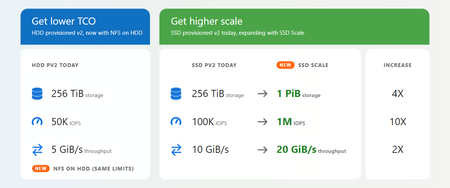
Organizations are increasingly looking to migrate on-premises NFS file storage to the cloud to reduce infrastructure costs, simplify operations, and unlock new opportunities for innovation. However, Linux workloads have diverse storage requirements. Some prioritize cost efficiency, while others demand significantly greater scale and performance, making it challenging to find a cloud file storage solution that meets both needs. At Microsoft Ignite, we're expanding the capabilities of our existing Azure Files HDD and SSD tiers to address both challenges. NFS support on Azure Files HDD provides a more cost-effective path for migrating traditional Linux workloads, helping customers reduce total cost of ownership (TCO). At the same time, scale performance on Azure Files SSD raises the limits of a single NFS share to 1 PiB of capacity, 1 million IOPS, and 20 GiB/s of throughput, enabling larger, more demanding workloads. Together, these enhancements expand the range of on-premises workloads customers can migrate to Azure Files, from traditional enterprise applications to high-performance computing (HPC), scientific computing, and AI/ML. Beyond migration, Azure Files also provides a foundation for unlocking the value of enterprise data through AI-powered experiences and scalable shared storage for AI applications and agents. NFS SSD scale performance: Unlock larger, more demanding workloads Scale and performance have historically been barriers to migrating large, data-intensive workloads from on-premises environments to the cloud. Applications such as HPC, genomics, engineering simulations, and AI/ML often process massive datasets across hundreds or thousands of compute processes simultaneously. Traditional file-share limits can require organizations to partition datasets across multiple file systems, increasing operational complexity and limiting application scalability. With scale performance on Azure Files SSD, we're significantly increasing the capabilities of a single NFS share: Up to 1 PiB of capacity to accommodate massive datasets without splitting data across multiple shares. Up to 1 million IOPS to support highly parallel, I/O-intensive workloads. Up to 20 GiB/s of throughput to accelerate data-intensive processing across distributed compute environments. To get started, complete the scale performance SSD signup survey. High-performance computing: Support larger datasets and parallel processing HPC workloads such as genomics, seismic processing, and scientific computing often involve massive datasets accessed concurrently by hundreds or thousands of compute processes. For example, geoscientists rely on large seismic datasets to understand the Earth's subsurface. Before these datasets can be interpreted, they often undergo intensive processing across hundreds of virtual machines reading and writing data in parallel, making storage throughput critical. With greater capacity, IOPS, and throughput on a single share, Azure Files SSD can support larger datasets and greater processing parallelism. This can help reduce storage bottlenecks in seismic processing, enabling geoscientists to move quickly from raw data to 3D interpretation, where they analyze geological structures, seismic slices, and well data to identify potential carbon storage formations. By enabling larger datasets and greater parallelism without the complexity of managing multiple file shares, Azure Files SSD helps organizations migrate and run a broader range of HPC and data-intensive workloads in Azure. NFS HDD: Reduce TCO and simplify on-premises file migration Not every Linux workload requires the performance of SSD storage. Many traditional enterprise applications rely on NFS file shares for large datasets, application data, and general-purpose storage, where cost efficiency is often more important than high performance. With the introduction of NFS support on Azure Files HDD, we're providing customers with a lower-cost storage option for migrating these workloads to Azure. Organizations can retain familiar NFS access for existing Linux applications while avoiding the additional expense of SSD performance they don't need. By combining cost-effective HDD storage with a fully managed file service, Azure Files helps customers reduce infrastructure costs, simplify storage operations, and optimize TCO when migrating existing NFS workloads to the cloud. To get started, complete the NFS HDD signup survey. AI-ready: Unlock the value of enterprise file data Organizations have accumulated years of valuable data across on-premises file servers and NAS environments, including business documents, research datasets, engineering files, and application data. Bringing this data to Azure provides a foundation for building AI-powered applications and unlock that benefits from that data. Azure Files supports this journey in two ways. Connect enterprise data to AI-powered experiences: Through the Azure File Share Microsoft 365 and Logic Apps connector, organizations can integrate file-based data into AI solutions built with Microsoft Foundry and Microsoft 365 Copilot. These integrations enable enterprises to unlock the value of their existing data by making it discoverable, searchable, and accessible to AI-powered applications and agents. Scaling shared NFS storage for AI applications and agents: Applications running on Azure Kubernetes Service (AKS) already use Azure Files NFS as shared storage. AI applications can store and process shared datasets, while agents can use persistent file storage to retain their working data between runs. With SSD scale performance, a single SSD-backed NFS share can hold more data and handle more reads and writes in parallel as these workloads grow. Get started with Azure Files NFS NFS shares with scale performance on SSD and NFS HDD are available in both the classic and new file share experiences. Both capabilities are supported exclusively with the NFS protocol on the Provisioned v2 billing model. Scale performance is available on SSD, while NFS HDD extends NFS support to the HDD tier. To get started, complete the corresponding surveys to request access, and the Azure Files team will contact you with next steps. For questions, contact azurefiles@microsoft.com. References Scale performance SSD - signup survey NFS HDD - signup survey Learning documentation90Views0likes0CommentsWindows Server 2028: A trusted foundation for an evolving enterprise
Enterprise infrastructure has evolved in response to changing and increasing business demands. Windows Server helped connect the enterprise by bringing people and resources together with Active Directory. As more business processes moved into software, it became a place to run business-critical applications. And when those applications multiplied, Hyper-V helped customers host the infrastructure they depend on more flexibly. Windows Server has evolved and grown with customers through each shift. Now customers are asking where AI should run when it needs to work with those applications and data. The cloud is part of the answer, but so is the local infrastructure they operate themselves. With Windows Server 2028, we’re strengthening the platform across the work it already does—and beginning to enable enterprise hybrid intelligence. Today, we’re introducing Windows Server 2028, in public preview now. This major release raises the security and access bar, accelerates enterprise infrastructure, and simplifies management at scale. It also begins our long term investments extending Microsoft Foundry to bring AI inference to fleets of local token factories, giving customers more choices to put the right intelligence in the right place with the right cost structure. For customers interested in early access to Windows Server 2028 features and direct engagement with Windows Server engineering, consider applying to Windows Server Technology Adoption Program (TAP) at aka.ms/WSTAP Enable enterprise hybrid intelligence AI raises an infrastructure question: where should inference run? A cloud service may be the right choice for one application. Another may need inference close to its data, near a physical operation, or within an environment the customer controls. Customers need to make that choice without building and operating a separate AI stack for every location, and want to scale their local inference servers on the same trusted platform delivering storage, compute, networking, and databases across their enterprise today. With Windows Server 2028, we’re investing across the stack needed to run inference on enterprise infrastructure. At the hardware layer, we’re introducing powerful new AI accelerators with Windows Server 2028. We’re excited to share that AMD’s Instinct MI350P card is in preview starting H1 2027 for in-market supported Windows Servers and Windows Server 2028. At the platform layer, we’re developing capabilities to deploy and configure inference environments, manage accelerated hardware, and direct model requests to the right environment. At the runtime layer, we’re working to support open-weight and custom models across technologies including Foundry Local, Windows ML, vLLM, and Llama.cpp. Running inference in an enterprise also means protecting and governing it. Windows Servers benefit from broad Windows investment in agent security and management, including Microsoft eXecution Containers for isolation, integration with Microsoft Foundry for model catalogs, and Agent 365 for agent identity and governance. Together, these capabilities are intended to help customers run AI close to their applications and data while connecting that work to a broader hybrid AI architecture. Raising the security and access bar The more an organization relies on its servers, the more important it is to keep them secure. Administrators need to protect the operating system and the virtual machines it hosts, maintain the certificates that secure connections, and prepare for threats that will change over the life of the infrastructure. Doing that well should not depend on every team starting from scratch. Windows Server 2028 is designed to give customers a stronger starting point. A hardened Server Core configuration by default and a new security baseline help reduce the work of establishing a secure baseline from day 1. Trusted Launch extends protection to virtual machines, guaranteeing boot integrity across your VM fleet, and Confidential VM support begins a journey to support integrity-protected runtimes on supported CVM hardware. We’re also investing in automatic certificate management and post-quantum cryptography, addressing both the day-to-day task of maintaining secure connections and the longer-term need to modernize them against the threats of tomorrow. Accelerate enterprise infrastructure Applications and data keep placing new demands on the systems beneath them. Customers are adopting faster storage and moving larger volumes of data, but the value of that hardware depends on whether the rest of the infrastructure can keep up. For organizations running critical workloads on Windows Server, performance improvements need to reach the applications they already operate. Windows Server 2028 adds native NVMe storage enabled by default and NVMe over TCP and RDMA transports, along with the ability to boot from ReFS. These technology ingredients combine to deliver high-performance, scalable, resilient storage solutions for Windows Server customers and help customers make better use of modern hardware to give demanding workloads more room to grow. Simplify administration and management at scale Managing a server and managing a server estate are different jobs. Across datacenters, clouds, and remote sites, teams need ways to apply policy, manage updates, and see what is running across the estate across an extraordinary diversity of Windows workloads. We hear regularly from customers who want to use proven Windows management processes and manage Clients and Servers as one fleet. We are proud to build on our recognition as a leader in Server Virtualization to help customers manage Windows Servers at scale. For teams that already manage Windows clients with Microsoft Intune, we are excited to announce Intune management for Windows Servers is now in Preview. Intune support for Windows Server brings familiar endpoint-management workflows including configuration, compliance, applications, and updates to eligible, persistent servers. Azure and Azure Arc continue to provide cloud-native management workflows for production and business-critical servers wherever they run. When a workload needs attention or a virtualization host needs troubleshooting, administrators need to get close to the machine and understand what is happening. Enterprise customers around the world run Windows Server VM fleets at scale, and need modern management tools to keep up. Windows Admin Center Virtualization Mode gives administrators the depth to work with individual servers and virtualized infrastructure as one fabric, and we are pleased to announce that WAC vMode is now in GA. These Cloud and On-Premises approaches complement one another. Customers can start with the workflows that fit their environment today, and grow into tomorrow with a consistent toolset that meets them where they are with the best of Azure and Windows management all together. Bringing Windows Server 2028 to enterprise infrastructure Bringing this vision to life takes an ecosystem spanning software, silicon, and systems integrators. We’re working closely with hardware partners to bring accelerated computing to the enterprise infrastructure customers already rely on. The strength of Windows and the strength of our ecosystem go hand in hand, and we thank our fantastic partners for their work scaling with us to support the needs of today’s enterprises. “Windows Server 2028’s advancements in security, virtualization, and modern infrastructure align naturally with AMD’s technology investments. Together, these technologies can help organizations protect data in use, modernize virtualized estates, and build efficient platforms for the next generation of mission-critical and AI-enabled workloads.” Kumaran Siva, Corporate Vice President of Business Development, AMD "Security for the AI era must be engineered across the platform—from firmware and the operating system through the full server lifecycle. Dell and Microsoft are working together so Dell PowerEdge customers can maximize the value of Windows Server 2028, including advances supporting the transition to post-quantum cryptography, with the reliability, automated protection and operational confidence they expect for their most critical workloads.” Anita Henry, Vice President of Infrastructure Solutions Group Engineering, Dell Technologies “As customers modernize distributed IT estates, they need security rooted in the server, reliability and simpler operations across edge, datacenter, and cloud. HPE ProLiant Compute, supported by Windows Server 2028’s security and hybrid-management, creates a strong foundation for resilient infrastructure that can adapt as business-critical workloads evolve.” Lauren Engebretson, Head of Compute Solutions and Enablement, Hewlett Packard Enterprise “The transition to post quantum cryptography is a major initiative for governments and enterprises. Intel’s PQC transition is well underway and, through deep co-engineering with Microsoft, we anticipate the Intel Xeon platform and Windows Server 2028 together will offer a strong PQC-capable foundation for our customers to build upon.” Srini Krishna, Distinguished Engineer, GM of Data Center Products, Intel Corporation “Customers want to bring AI closer to their data and decisions while building on the enterprise infrastructure they already rely on. Windows Server 2028, together with Lenovo Hybrid AI Advantage™ and Lenovo ThinkSystem and ThinkEdge servers, can help customers extend that foundation for trusted AI—from the edge to the data center and cloud—with greater choice, control and speed.” Scott Patti, Vice President of Infrastructure Solutions Group, Lenovo Going forward Windows Server 2028 is part of a bigger picture: intelligence across the cloud, enterprise infrastructure, and personal devices. As AI-accelerated workloads diffuse across the enterprise, different workloads have different needs. Some call for the breadth and scale of the cloud. Others need to run close to business-critical applications and data, on infrastructure customers control. Still others belong on the devices people use every day. Cost, latency, IP protection, data residency, and regulatory requirements all shape that decision. Our vision is to extend Microsoft Foundry across these environments, so teams can build with familiar tools and run each workload where it makes the most sense, from client, to cloud, to powerful Windows Server token factories running in corporate datacenters. As we move toward general availability, we’ll keep working with customers to learn where running inference on their own infrastructure makes the greatest difference—and to shape how Windows Server fits into a broader hybrid AI architecture. We’re excited about what Windows Server 2028 makes possible, and we look forward to sharing more as these capabilities develop. Explore Windows Server 2028 Security, performance, and management features are available in preview through the Windows Server Insider Program, and the Server team is looking forward to your feedback on the Windows Server Insiders Forum. Hybrid intelligence capabilities are available to a limited number of customers through an early access program, and hardware requirements apply. Thank you for the trust you’ve placed in Windows Server. Windows Server 2028 is our commitment to keep earning it: by strengthening the foundation you rely on and helping you put it to work in new ways.Prepare with confidence for your specialization audit
Microsoft requires periodic audits for select specializations, and in FY27, we expanded requirements to several Security-aligned specializations and the Microsoft 365 Copilot specialization. To make preparation for this process easier, we’re hosting audit prep workshops for key Security specializations. Sessions will include an overview of the process, an in-depth review of applicable controls and requirements, and best practices for documenting evidence required for your audit. If you’re preparing for a Microsoft specialization audit, join one of these online sessions: November 19: Audit Infra and Database Migration to Microsoft Azure November 26: AI Apps on Microsoft Azure December 3: Analytics on Microsoft Azure There will also be a Q&A session at the end of each event so you can receive guidance directly from a Microsoft expert. Register today so you can gain clear insights into how to meet the mandatory requirements for each control, ensuring you're fully prepared to comply with Microsoft’s standards.29Views0likes0CommentsWhat's new in Azure API Management at Microsoft Ignite 2026
As organizations scale AI adoption, applications increasingly rely on models across providers, while agents access enterprise APIs and tools. Developers need the flexibility to build with these resources, but securing access, enforcing policies, and managing consumption across them introduces new complexity. At Microsoft Ignite 2026, we're announcing the general availability of Azure AI Gateway and new capabilities in Azure API Management to help organizations accelerate development, extend enterprise governance to AI interactions, and scale with confidence. Azure AI Gateway is now generally available Get AI applications and agents to production faster with Azure AI Gateway. This fully managed Azure service gives developers the flexibility to build with models and MCP tools across providers, while platform teams centrally govern access, policies, and AI spend without managing gateway infrastructure. Previously available in public preview as the AI Gateway tier of Azure API Management, it's now a standalone Azure service. With Azure AI Gateway, organizations can: Accelerate AI development: Connect to models and MCP tools across providers using stable aliases, flexible routing, and automatic failover. Model Router (preview) can also select models based on cost or quality objectives. Govern and observe AI interactions: Centralize identity, access policies, content safety, and observability across model and tool calls. Control AI spend: Track and attribute token usage and estimated costs across users, teams, applications, and agents, and enforce cost limits, quotas, and rate limits. Read more about the GA announcement here. Get started with Azure AI Gateway with 10,000 free gateway requests per Azure subscription each month. Extend governance to AI agents and tools As agents increasingly access enterprise systems through MCP tools, organizations need to control which tools they can use and enforce policies when agents act. The Microsoft Agent 365 integration with Azure API Management and Azure AI Gateway is now generally available, connecting centralized agent governance with runtime enforcement. Organizations can discover supported gateways and MCP servers, manage access policies, enforce supported tool restrictions, and monitor interactions for security and auditing. This gives security and platform teams consistent control over agent access to enterprise tools, while allowing developers to focus on building agents. Simplify development and API consumptio We're also advancing Azure API Management to make APIs and AI models easier to consume while maintaining enterprise security and control. Simplify multi-model development: The Unified Model API, now generally available in Azure API Management v2 SKUs, lets developers use a consistent API format across supported providers, including OpenAI and Anthropic. Azure API Management handles provider-specific transformations, making it easier to switch or fail over between models without changing client code. Learn more about the Unified Model API. Simplify application onboarding: The Applications feature, now available in public preview to all customers on supported Azure API Management tiers, lets API providers register consuming applications, associate them with API products, and manage identity-based access through Microsoft Entra ID. This simplifies onboarding and API authorization. To get started, see the Applications documentation. Scale enterprise APIs across more regions Azure API Management Premium v2 is now available in 35 Azure regions, giving organizations greater flexibility to deploy enterprise APIs closer to applications and users while meeting regional deployment requirements. Customers can provision Premium v2 instances through the Azure portal, REST APIs, Bicep, or Azure Resource Manager templates. See the full list of supported regions. Building the future of enterprise API and AI governance With the innovations announced at Microsoft Ignite 2026, we're helping organizations build AI applications faster, extend governance across APIs and AI interactions, and scale enterprise workloads with the security, visibility, and control their businesses require. Join us at Microsoft Ignite 2026 If you're attending Microsoft Ignite in San Francisco, join our sessions to explore the latest innovations, see demos, and connect with our product experts. BRK425: Secure and manage AI workloads at enterprise scale with AI Gateway THR902: Take control of runaway AI costs with AI Gateway TT1697: How are you governing AI and agent access with AI Gateway? LTG1285: Operationalize MCP with enterprise governance controls Stop by the Serverless Apps and Agents booth to meet our product team, see the latest capabilities, and share what you're building. We look forward to seeing you there!Microsoft Physical AI Partner Guide: Choosing the Right Data Expertise for Every Stage
As organizations scale Physical AI, the challenge shifts from technology selection to deciding who should lead which part of the journey -- and when. Which partners should establish secure connectivity? Who enables production grade, AI ready industrial data? When do systems integrators step in to scale globally? This Partner Guide helps customers navigate these decisions with clarity and confidence: Identify which partners align to their current digital transformation and Physical AI scenarios leveraging Azure IoT and Azure IoT Operations Confidently combine partners over time as they evolve from connectivity to intelligence to autonomous operations This guide focuses on the data foundation for Physical AI, highlighting the partners and capabilities that connect industrial systems, contextualize operational data, and make it available to AI-powered applications. It does not attempt to catalog every Physical AI solution. Instead, it helps customers understand how specialized partners establish the trusted data and operational context needed for AI systems to move from insight toward informed, responsible action in the physical world. Common Customer Journey Steps 1. Modernize Connectivity & Edge Foundations The industrial transformation journey starts with securely accessing operational data without touching deterministic control loops. Customers connect automation systems to a scalable, standards-based data foundation that modernizes operations while preserving safety, uptime and control. Outcomes customers realize Standardized OT data access across plants and sites Faster onboarding of legacy and new assets Clear OT–IT boundaries that protect safety and uptime Partner strengths at this stage Industrial hardware and edge infrastructure providers Protocol translation and OT connectivity Automation and edge platforms aligned with Azure IoT Operations 2. Turn Operational Data into Intelligence With a consistent edge-to-cloud data foundation in place, customers can move beyond dashboards to build repeatable, production-ready intelligence into their industrial operations. Expert partners help transform operational data into contextualized signals that support analytics, intelligent applications, and increasingly sophisticated Physical AI scenarios across assets, lines, and sites. Outcomes customers realize Improved Operational efficiency and performance Adaptive facilities and production quality intelligence Energy, safety, and defect detection at scale Partner strengths at this stage Industrial data services that contextualize and standardize OT signals for AI consumption Domain-specific acceleration for common Industrial AI scenarios Data pipelines integrated with Azure IoT Operations and Microsoft Fabric 3. Prepare for Intelligent, Governed Action As organizations move from insights toward intelligent action, the focus shifts to safely connecting operational intelligence with real-world processes. Partners help align data, infrastructure, and operational interfaces while supporting the governance, monitoring, and lifecycle management needed for increasingly automated operations. Outcomes customers realize Proven reference architectures deployed across plants AI‑ready data foundations that adapt as operations scale Coordinated interaction between OT systems, AI models, and cloud intelligence Partner strengths at this stage Industrial automation leadership and control system expertise AI-ready edge infrastructure designed to support industrial intelligence and Physical AI workloads Systems integrators enabling end‑to‑end implementation and repeatability Partner Ecosystem: Building the Data Foundation for Physical AI This matrix highlights partners with specialized expertise in accessing, contextualizing, and operationalizing industrial data to support Physical AI solutions at scale. The matrix is not a catalog of end‑to‑end Physical AI applications; each partner contributes specialized capabilities that customers can combine to connect operational systems, establish trusted context, and support increasingly intelligent applications. How to use this matrix: Start with your scenario → identify primary partner types → layer complementary partners as you scale. Partner Type Adaptive Cloud Primary Solution Example Scenarios Geography Advantech Industrial Hardware, Industrial Connectivity LoRaWAN gateway integration + Azure IoT Operations Industrial edge platforms with built in connectivity, industrial compute, LoRaWAN, sensor networks Global Accenture GSI Industrial AI, Digital Transformation, Modernization OEE, predictive maintenance, real-time defect detection, optimize supply chains, intelligent automation and robotics, energy efficiency Global Avanade GSI Factory Agents and Analytics based on Manufacturing Data Solutions Yield / Quality optimization, OEE, Agentic Root Cause Analysis and process optimization; Unified ISA-95 Manufacturing Data estate on MS Fabric Global Belden Industrial Connectivity, Networking, Security Belden Horizon Data Operations (BHDO) + LioN-X with Azure IoT Operations OT-IT convergence, network orchestration and monitoring, ruggedized ethernet and switching, industrial WiFi, multi-vendor protocol connectivity, OT security, OPC UA Global Capgemini GSI The new AI imperative in manufacturing OEE, maintenance, defect detection, energy, robotics Global DXC GSI Intelligent Boost AI and IoT Analytics Platform 5G Industrial Connectivity, Defect detection, OEE, safety, energy monitoring Global Helin Industrial Data Services, Edge-to-Cloud IoT Platform RedZone Vision AI solution, Helin Platform built on Azure IoT Hub Renewable energy monitoring, maritime fleet monitoring, oil & gas vision/hazard detection, Azure IoT Central migration Global Innominds SI Intelligent Connected Edge Platform Predictive maintenance, AI on edge, asset tracking North America, EMEA Litmus Automation Industrial Connectivity, Industrial Data Ops Litmus Edge + Azure IoT Operations Edge Data, Smart manufacturing, IIoT deployments at scale Global, North America Mesh Systems GSI & ISV Azure IoT & Azure IoT Operations implementation services and solutions (including Azure IoT Operations-aligned connector patterns) Device connectivity and management, data platforms, visualization, AI agents, and security North America, EMEA Nortal GSI Data-driven Industry Solutions IT/OT Connectivity, Unified Namespace, Digital Twins, Optimization, Edge, Industrial Data, Real‑Time Analytics & AI EMEA, North America & LATAM NVIDIA Technology Partner Accelerated AI Infrastructure; Open libraries, models, frameworks, and blueprints for AI development and deployment. Cross industry digitalization and AI development and deployment: Generative AI, Agentic AI, Physical AI, Robotics Global Oracle ISV Oracle Fusion Cloud SCM + Azure IoT Operations Real-time manufacturing Intelligence, AI powered insights, and automated production workflows Global Rockwell Automation Industrial Automation FactoryTalk Optix + Azure IoT Operations Factory modernization, visualization, edge orchestration, DataOps with connectivity context at scale, AI ops and services, physical equipment, MES Global Schneider Electric Industrial Automation Industrial Edge Physical equipment, Device modernization, energy, grid Global Siemens Industrial Automation & Software Industrial Edge + Azure IoT Operations reference architecture Industrial edge infrastructure at scale, OT/IT convergence, DataOps, Industrial AI suite, virtualized automation. Global Sight Machine ISV Integrated Industrial AI Stack Industrial AI, bottling, process optimization Global Softing Industrial Industrial Connectivity edgeConnector + Azure IoT Operations OT connectivity, multi-vendor PLC- and machine data integration, OPC UA information model deployment EMEA, Global TCS GSI Sensor to cloud intelligence Operations optimization, healthcare digital twin experiences, supply chain monitoring Global This Ecosystem Model enables Physical AI solutions to scale through clear roles, respected boundaries and composable systems: Control systems continue to be driven by automation leaders Safety‑critical, deterministic control stays with industrial automation partners who manage real‑time operations and plant safety. Customers modernize analytics and AI while preserving uptime, reliability, and operational integrity. Data, AI, and analytics scale independently A consistent edge to cloud data plane supports cloud scale analytics and AI, accelerating insight delivery without entangling control systems or slowing operational change. This separation allows customers and software providers to build AI solutions on top of a stable, industrial‑grade data foundation without redefining control system responsibilities. Specialized partners align solutions across the estate Partners contribute focused expertise across connectivity, analytics, security, and operations, assembling solutions that reduce integration risk, shorten deployment cycles, and speed time to value across the operational estate. From Data to Physical Intelligence Physical AI starts with a reliable understanding of the physical world. By connecting industrial systems, contextualizing operational data, and bringing together the right partner expertise, organizations can build a foundation for intelligence that goes beyond insights to support better decisions and responsible action. Use this guide to identify the partners and capabilities that can help you take the next step on your Physical AI journey with Microsoft Azure.2.3KViews4likes0CommentsWhat's new in Azure Logic Apps at Microsoft Ignite 2026
Organizations are exploring how AI can make their business processes more intelligent, but many still rely on legacy integration infrastructure that makes innovation difficult. Bringing AI into enterprise operations requires more than connecting a model or deploying an agent. It requires reliable access to business systems and data, orchestration across applications and people, and the ability to act securely and predictably. Azure Logic Apps brings enterprise connectivity and orchestration together, helping organizations connect applications and data, automate processes across systems, and bring AI into business workflows with the reliability and control their operations require. At Microsoft Ignite 2026, we're advancing Azure Logic Apps across three priorities: modernize legacy integrations, build automation faster, and bring AI into business processes. Modernize the integrations your business depends on Legacy integration infrastructure continues to support critical business processes, but it can make adopting AI more complex. Organizations need to modernize without disrupting the systems they depend on. At Ignite, we're introducing new capabilities that help organizations modernize legacy integrations, connect more enterprise systems, and manage integrations across cloud and hybrid environments. Connect more enterprise systems: The HL7 connector is now generally available, while new MLLP and MSMQ connectors in public preview extend support for healthcare messaging and legacy applications. Data Mapper enhancements simplify transformations across applications and message formats, reducing custom integration work. Modernize across cloud and hybrid environments: Hybrid Logic Apps continues to expand with support for additional Kubernetes environments, including RKE2 and Red Hat OpenShift, alongside DevOps deployment capabilities and Integration Account support in semi-connected environments. Organizations gain greater flexibility to modernize integrations where their systems and data reside. Improve operational visibility: A new unified dashboard, available in public preview for individual Logic Apps, helps teams monitor workflow execution and troubleshoot integrations through a consolidated experience. These capabilities help organizations modernize at their own pace while maintaining the connectivity and reliability their businesses depend on. The Kentucky Cabinet for Health and Family Services (CHFS) shows what this can look like in practice. CHFS modernized its legacy on-premises BizTalk infrastructure to Azure Integration Services, including Azure Logic Apps, Azure API Management, and Azure Functions. The modernization improved scalability, reliability, and operational efficiency. Today, its integration environment processes approximately 7 million transactions daily, supports more than 1,800 APIs, and connects over 60 partners helping CHFS focus more on delivering essential public services and less on maintaining legacy infrastructure. Read the customer story here. Build automation faster Developers need the flexibility to build integrations and automations using familiar tools without maintaining custom integration infrastructure. At Ignite, we're expanding development options across managed connectivity and reusable automation experiences. Bring managed connectivity into application code: Azure Connector Namespace gives developers access to enterprise systems through .NET, Node.js, and Python SDKs or HTTP APIs without building and maintaining custom integration code. It also supports exposing connectors as MCP tools for AI agents. Explore Connector Namespace. Start faster and reuse proven patterns: Logic Apps Automation (preview) introduces a refreshed workflow designer and ready-to-use templates for integration, Azure operations, and AI-powered automation. Teams can also turn successful workflow runs into reusable templates and share them across projects and organizations. Together, these capabilities help teams reduce development overhead, accelerate delivery, and build integrations and automations using the tools and approaches that work best for them. Make business processes intelligent with AI As organizations introduce AI into business processes, they need to combine predictable workflows with AI-powered decisions, agent reasoning, and human involvement. At Ignite, we're expanding Logic Apps Automation (preview) to help organizations bring these capabilities together while maintaining enterprise reliability and control. Orchestrate workflows and agents: Logic Apps Automation brings workflows, enterprise systems, agents, and people together within business processes. Through integration with Microsoft Foundry, organizations can bring agents built in Foundry into workflows orchestrated by Logic Apps, connecting AI-powered reasoning and actions to enterprise systems and human approvals. Apply AI where an agent isn't required: Decision actions, now in public preview, use Microsoft-Decision-1 to perform focused judgments such as classifying requests, routing tickets, and assessing urgency. Yes/No, Choice, and Score actions return structured results that workflows can act on directly. Bring AI into workflows without managing models: Managed AI Models in Logic Apps Automation (preview) provide ready-to-use AI capabilities without requiring developers to provision or manage model infrastructure. Together, these capabilities help organizations apply the right intelligence to each business process using workflows for predictable tasks, AI for focused decisions, and agents for more complex reasoning and action. Enterprise-ready automation, built for scale As automation expands across business systems, organizations need secure connectivity and reliable operations. At Ignite, we're enhancing Logic Apps Automation with built-in connectors for GitHub, Azure DevOps, Azure Monitor Logs, Azure Resource Graph, and Azure Advisor, along with virtual network integration for access to private enterprise resources. Learn more about these new capabilities in Logic Apps Automation. Building the future of intelligent enterprise automation The next generation of enterprise automation will bring workflows, AI agents, enterprise systems, and people together connecting applications and data while coordinating how work gets done. With the innovations announced at Microsoft Ignite 2026, Azure Logic Apps is helping organizations move from traditional integration and automation toward more intelligent business processes, built on the connectivity, reliability, and control enterprises depend on. Join us at Microsoft Ignite 2026 If you're attending Microsoft Ignite in San Francisco, join us to explore the latest Azure Logic Apps innovations, see demos, and connect with our product experts. Modernize legacy integration with Azure Logic Apps Reimagine agentic business processes with Logic Apps Automation How are you reimagining business processes with Logic Apps Automation? Give your agent a thousand tools: Connectors as MCP for AI Your agent wrote the workflow. Who watches it run? Stop by the Serverless Apps and Agents booth to meet our product team, see the latest capabilities in action, ask questions, and share what you're building. We look forward to seeing you there!
What's new with Web IQ: Ignite 2026 edition
Web IQ’s Ignite 2026 updates bring broader Azure availability, lower pricing, and new ways to ground AI agents. Auto and Auto Advanced simplify retrieval with cited evidence, while Weather, Places, Commerce in private preview, and health-aware ranking support real-world tasks. Scopes and Zero Query Logging give enterprises more control over sources and query privacy.Azure IoT Operations 2610 is now available: Scaling the foundation for Physical AI
AI is moving out of dashboards and onto factory floors, oil fields, and production lines, where it can sense, reason, and act in the physical world. Most industrial organizations are only beginning to make that shift, and they need a platform that lets them start with confidence and keep going as their ambitions grow. Azure IoT Operations 2610 is built for exactly that. For the first time, Azure IoT Operations ships on two channels at once. The generally available (GA) release delivers production-ready capabilities that help organizations understand their operations across many more sites, at lower cost. A new public preview channel gives customers hands-on access to the capabilities that are coming next, including governed access to operations for AI agents and AI inference running directly inside edge data pipelines. Taken together, the two channels show where the platform is today and where it is heading. This release is part of a broader set of Physical AI announcements at Microsoft Ignite. Microsoft's Ignite Physical AI announcement (https://aka.ms/Ignite2026/PhysicalAIBlog) describes how IoT, Industrial AI, and Physical AI connect data, decisions, and action: IoT helps organizations understand their operations, Industrial AI helps them reason, and Physical AI helps them act, together forming a continuous learning loop. Within Microsoft's adaptive cloud approach, Azure IoT Operations is the on-site foundation for that loop. This post goes one level deeper into what 2610 delivers and what it makes possible. Physical AI and where Azure IoT Operations fits Physical AI is AI that works in the physical world. It perceives what is happening across an operation, reasons about what it means, and acts to improve the outcome. Getting there is a journey rather than a single leap, and customers should not feel they have to take on everything at once. Azure IoT Operations is designed to make that journey practical, so organizations can start simply, prove value, and evolve toward far more sophisticated applications of AI and agents at their own pace. The journey begins with easy integration into the physical operation customers already run. Many start with perception: connecting equipment, bringing in data from sensors and cameras, and seeing what is happening in real time. From there, they move into reasoning, with AI models and agents that diagnose issues and recommend improvements. Ultimately, they move into action, where approved decisions reach equipment through partner control systems. Each step builds on the one before it, on the same platform. Azure IoT Operations is also designed from the ground up to protect each customer's proprietary operational data. Customers decide who can access which data and how, and that applies to AI agents as much as to people and applications. They also decide what data leaves the site, if any at all. That control lets customers choose the deployment model that fits their operation: cloud-first deployments that rely on AI in the cloud, hybrid deployments that combine cloud AI with local AI models and agents, and fully local deployments where AI and agents run only on site and data never leaves it. Whichever path and deployment model a customer chooses, the role of Azure IoT Operations comes down to three core functions and two key intersections with the systems around it. Three core functions Understand the operation. Azure IoT Operations keeps trusted operational context close to the process: what each asset is, what its data means, how equipment relates, its current and historical state, observations from cameras and other sensors, and the capabilities and constraints of the process. Standards such as OPC UA and W3C Web of Things are the tools. The outcome is context that people and AI can rely on. Optimize the operation. AI models and agents run at the edge, next to the operational data and the process, where they can perceive, diagnose, recommend, optimize, and coordinate. Microsoft Foundry supplies the models and agent development capabilities. Azure IoT Operations supplies the operational environment in which those agents become useful. Govern action. When an agent proposes an action, Azure IoT Operations turns it into an authorized, bounded, and observable operation. It authenticates the actor, evaluates policy and current conditions, obtains approval where required, invokes an authoritative command path, records the decision, and verifies the result. Two key intersections Where AI meets control: Azure IoT Operations optimizes, partners actuate. Azure IoT Operations decides, predicts, and recommends, sometimes in the form of a control input such as a new setpoint, and issues that intent through governed interfaces. Partner control systems and robots run the deterministic real-time loop and own safety, for people and machines, at all times. As a simple example, Azure IoT Operations can set the thermostat, but the thermostat and the HVAC system get the room to the correct temperature. Partners are already proving this pattern. Azure IoT Operations integrates with Rockwell Automation's FactoryTalk Optix and is part of Schneider Electric's EcoStruxure Automation Expert. In Schneider's green-hydrogen pilot with H2E Power, AI agents validated control logic in simulation before deploying it to hardware; the system ran for more than 6,000 hours autonomously and cut the levelized cost of hydrogen by roughly 10%. Where edge meets cloud: local intelligence at the edge, enterprise intelligence in the cloud. Azure IoT Operations integrates local operational intelligence at each site. Microsoft Fabric integrates enterprise-wide and cross-site intelligence. The two are federated, so when customers choose to share data beyond the site, the context created at the edge flows to the cloud without being rebuilt. These three core functions follow the same path customers take into Physical AI: understanding the operation turns raw data into trusted context, optimizing it is where AI reasons over that context, and governing action is how decisions safely reach the physical world. Clear roles at each intersection are what make AI credible to the people who run plants. Customers get AI that is useful on the floor without trading away the control systems, certifications, and safety practices they already trust. What 2610 delivers Azure IoT Operations already provides the foundation many industrial customers run in production today: governed cloud-to-edge management actions, no-code data flow graphs, broad industrial connectivity, and unified health reporting. Release 2610 builds on that foundation in two directions. The GA release deepens the first core function, understanding the operation, and makes it practical at fleet scale. It also strengthens the intersection where edge meets cloud by landing edge data directly in the lakehouse. The preview release takes the first concrete steps into the second and third core functions: running AI against live operational data at the edge, and giving AI agents governed, auditable access to operations. Core function Generally available in 2610 In preview with 2610 Understand the operation Essentials SKU for large fleets, ODBC-based connector for SQL Server, smarter OPC UA collection, leaner data flow writes to the lakehouse Asset context with Web of Things and the edge registry, type-based OPC UA discovery, live data in the operations experience, Azure Marketplace connectors and the Akri Connector Builder, Microsoft Fabric integration Optimize the operation Service calls from custom WebAssembly modules, AI-assisted data flow authoring in VS Code Inference connector with Foundry Local and Azure Machine Learning, file-backed graph processing Govern action Management actions for HTTP/REST assets MCP server with policy-governed tool access, data-driven management actions, application lifecycle for agents and MCP servers Two release channels: what you can run today, and what is coming next Starting with 2610, every Azure IoT Operations release ships on two channels. GA (stable) is production-ready and fully supported. This is what you run on the factory floor. Preview includes everything in GA plus new capabilities that are ready for hands-on feedback. Use it in test or pilot environments to evaluate what is coming and help shape it before it reaches GA. You choose a channel when you deploy, through the Azure portal deployment wizard or the Azure CLI, and you upgrade within that channel. Switching an existing instance between GA and preview is not supported, so production deployments stay on a predictable, stable path. Connector and transform versions follow the same rule: GA instances see only GA versions, while preview instances see both. For technology leaders, the second channel changes how you can plan. You no longer have to wait for GA to evaluate a major capability or sign up for a one-off private preview. The preview channel is a working view of the roadmap, available every release, that your teams can put in front of real equipment and real operators while production keeps running. Generally available: understanding operations at scale Physical AI is only as good as the operational context beneath it, and that context has to exist at every site, not just at the flagship plant. The GA capabilities in 2610 turn on-site data into actionable intelligence: they make operational context cheaper to establish, broader in what it covers, and easier to hand up to enterprise analytics. Bring Physical AI to more sites: Azure IoT Operations Essentials A new Essentials SKU sits alongside the full-featured offering, now called Standard. Essentials delivers the core of Azure IoT Operations, the edge MQTT broker, Akri connectors, and data flows, on single-node clusters at a lower price point. Many organizations need a reliable edge data layer at hundreds or thousands of small sites, such as stores, substations, wind turbines, or remote equipment, that do not need the full industrial feature set. Essentials makes those fleet-wide rollouts cost-effective. Standard remains the choice for full industrial deployments that need OPC UA connectivity or multi-node clusters. You choose the SKU when you create an instance, and moving to Essentials requires a new deployment. Together with ARM64 support, generally available since release 2607, Essentials lowers both the cost and the hardware bar for line-level and pilot deployments. Data flow graphs that land data directly in your lakehouse Data flow graphs write directly to Azure Data Lake Storage Gen2 in Delta or Parquet, Microsoft Fabric OneLake tables in Delta, and Azure Data Explorer or local storage in Parquet. Teams can branch, window, filter, and run custom WebAssembly transforms at the edge, then write the result straight into analytics-ready tables with no extra messaging hop and no second pipeline to maintain. In 2610, Delta Lake writes use less memory and carry less transaction-log overhead, with checkpoints running in the background. Less, cleaner data goes to the cloud, which lowers storage and ingestion costs. This is where edge meets cloud, in practice: the edge does the local work, and Fabric receives context it can use for cross-site analysis. More of the plant, connected The new ODBC-based connector for SQL Server brings data from the databases behind MES, quality, batch, and historian systems into the same pipelines as OPC UA and MQTT telemetry. Teams configure a SQL Server connection and its assets in the operations experience and define datasets with SQL queries, with no custom extraction code. Management actions now extend to assets connected through the HTTP/REST connector as well, so teams can collect data from and act on REST-connected equipment alongside everything else. That brings governed management actions to more of the plant. Smarter OPC UA data collection OPC UA is a widely used open standard that lets industrial machines share their data, and 2610 makes the Azure IoT Operations connector for it smarter about what it collects and sends. It can now ignore values that barely change, drop readings the equipment itself flags as unreliable, and sample data at a fixed interval. Filtering out noise and bad readings at the source means less data to move and store, lower cloud costs, and cleaner input for analytics and AI. When a machine restarts or the network drops, applications can request a complete snapshot of the machine's current state, or receive one automatically when a key value changes, instead of waiting for values to trickle back in. Optional health signals confirm that the connection is alive and that data has been delivered, and an optional fast failover gets data flowing again sooner when a connection fails. Faster to build, easier to operate Several GA capabilities shorten the path from idea to running pipeline. Developers can describe a data flow in plain language to GitHub Copilot in VS Code, validate it locally, and deploy it. Custom WebAssembly modules in data flow graphs can now call request-response services over MQTT while processing a message, for enrichment, lookups, routing decisions, or asset management actions. The edge state store now supports paged key scans and multi-key reads, so applications can discover and retrieve the context available to them. Live data views in the Azure IoT Operations Data Flow extension for VS Code speed up commissioning and troubleshooting, and an updated navigation layout in the operations experience makes instances and their resources easier to find. Public preview: AI that reasons over operations, with action that stays governed The preview channel is where 2610 reaches furthest toward Physical AI. These capabilities put agentic AI to work on live plant data at the edge, within the governance controls the customer sets, and give agents a governed path into operations. Customers can evaluate them now in test and pilot environments. Connect AI agents to edge operations, with guardrails Azure IoT Operations now includes a Model Context Protocol (MCP) server that gives compatible AI agents and assistants authenticated, authorized access to live MQTT telemetry and state store data at the edge. A single endpoint aggregates supported first-party and third-party MCP tools, so teams can register their own MCP servers behind the same entry point instead of managing separate client connections. Authentication and authorization policies that you control govern access to every registered tool, so each agent gets only the tools its role allows, and publishing MQTT messages requires Admin permissions. New application lifecycle capabilities also let teams deploy and manage agents and MCP servers on the cluster, alongside connectors. This is the third core function, govern action, taking shape. Teams want AI copilots that can answer "why is line 3 down?" or "which assets are unhealthy?" without giving AI broad access to production systems. With a single governed entry point, organizations bring the agent they already use and decide exactly what that agent can see and do. Run predictive AI models in the data pipeline The new Inference connector runs registered machine learning models, using predictive models served by Foundry Local on the cluster or models hosted in Azure Machine Learning, with multiple models running concurrently. Large inputs such as high-resolution images are read from files rather than passed through the message broker, and new graph-level file stores let custom WebAssembly transforms read and write those files on persistent cluster storage. Moving a model from a notebook onto a live production line usually means custom integration code for every model. With the Inference transform, a model becomes another step in the pipeline, and its results can feed downstream transforms or trigger management actions on connected assets, closing the loop from perception through reasoning to action. This is the second core function, optimize the operation, running where the data is. Give data meaning: asset context and the edge registry Raw tag values are not enough for analytics or AI to reason about an operation. A new WoT Enrich transform uses Web of Things mappings to give asset messages a consistent structure and add context such as what a value means and its units, and a new Microsoft Fabric integration formats and batches that telemetry for Eventhouse or Lakehouse. The new edge registry stores JSON Schemas and Web of Things Thing Models and Thing Descriptions on the cluster, where local workloads can reach them, and keeps them in sync with the cloud registry. Type-based OPC UA discovery finds assets and event groups from OPC UA type information, and assets such as Modbus pumps or S7 PLCs can be onboarded through OPC UA servers that implement the OPC UA Web of Things Connectivity API. When context travels with the data from the source, both Fabric reports and AI agents understand what they are looking at, even when cloud connectivity is interrupted. See data as it flows, and connect more sources Live data in the operations experience lets authorized users inspect incoming asset messages and validate data as it moves through transforms, WebAssembly modules, and data flow graphs, which answers the first question in every rollout: is the data arriving, and does it look right? To broaden connectivity, customers on the preview channel can discover and deploy supported third-party connectors from Azure Marketplace through the Azure portal or Azure CLI. For protocols that no connector covers yet, the Akri Connector Builder, a GitHub Copilot agent plugin, turns protocol specifications into connector code, tests, and documentation, and validates the result against a generated protocol simulator and a local Azure IoT Operations environment. Azure IoT Operations in Azure Government Azure IoT Operations is now in public preview in Azure Government (US Gov Virginia), running the 2610 GA feature set. US government agencies and their partners can evaluate edge data collection and processing in a government cloud, deploying through Azure CLI and using the operations experience. The preview channel is not available in Azure Government. Physical AI in action Customers are already putting this foundation to work. Unilever, working with Microsoft, NVIDIA, and Accenture, has built an advanced digital twin that captures the behavior of a whole factory as a connected system. The solution uses Azure IoT Operations to ingest and integrate sensor data, contextualize it at the edge, and feed it to edge and cloud AI services. By identifying bottlenecks, testing interventions, and recommending actions before issues affect production, it helps unlock greater efficiency, faster changeovers, and reduced waste, while giving engineers and factory teams AI-powered insight to make faster, better-informed decisions. What comes next Each Azure IoT Operations release now shows two things: what is ready for production, and what is coming next. Over the coming releases, the platform will keep moving from perceiving and informing, to reasoning and recommending, to orchestrating action through partner control systems. As it does, the human role shifts from approving every step to overseeing the system with the ability to intervene, and the platform's two key intersections, with partner control systems and with the cloud, stay the same throughout. Get started Deploy Azure IoT Operations 2610 with the Azure portal deployment wizard, Azure CLI, or Bicep, and choose the GA or preview channel and the Essentials or Standard SKU at deployment. Upgrade existing instances with Azure CLI, following the release-specific upgrade instructions. To try preview capabilities, deploy a new instance on the preview channel in a test or pilot environment. Review the public documentation (https://aka.ms/aiodocs) and release notes (https://github.com/Azure/azure-iot-operations/releases) for full details. Read Microsoft's Ignite Physical AI announcement (https://aka.ms/Ignite2026/PhysicalAIBlog) for the full picture across Azure IoT Hub, Azure Device Registry, Azure Local, Microsoft Fabric, and our partner ecosystem. Azure IoT Operations 2610 strengthens the foundation that is in production today and shows where Physical AI is heading. Wherever your organization is starting from, we look forward to building the next era of Physical AI with you.143Views3likes0Comments