azure
8242 Topics
Databricks connect with Azure SQL Database
While following a Data Engineering hands-on tutorial on a YouTube channel, I ran into a JDBC connection failure in a Medallion architecture (Bronze to Silver pipeline). Interestingly, my initial connection configuration code runs successfully, but the actual read operation using spark.read.jdbc throws an error. Both connections use the same personal account login. Error: [FAILED_JDBC.CONNECTION] Failed JDBC jdbc:sqlserver:*********(redacted) on the operation: SQLSTATE: HV000 Why is spark.read.jdbc throwing a [FAILED_JDBC.CONNECTION] error with SQLSTATE: HV000 when the basic connection details are correct and working elsewhere? Any help to resolve this is greatly appreciated.174Views0likes2Comments
Azure CLI to create the budget Alert
Hello All, I am new to Azure CLI and trying to create the Budget alert. While using below commands i am keep getting the error. Please assist me to fix the issue. Syntax- az consumption budget create --budget-name "MonthlyAlert" --amount 10.0 --time-grain "Monthly" --start-date "2026-11-01" --end-date "2027-11-01" --resource-group "LearnRG" --category "cost" I also tried az consumption budget create --budget-name MonthlyAlert --amount 10.0 --time-grain Monthly -s 2026-11-01 -e 2027-11-01 --resource-group LearnRG --category cost Command group 'consumption' is in preview and under development. Reference and support levels: https://aka.ms/CLI_refstatus (400) Invalid budget configuration, please use filter interface with 2019-05-01-preview version (Request ID: 8726e67e-4c5b-4830-8318-0da1c5a688fb) Code: 400 Message: Invalid budget configuration, please use filter interface with 2019-05-01-preview version (Request ID: 8726e67e-4c5b-4830-8318-0da1c5a688fb)82Views0likes2CommentsHow to maintain and update Azure Function Connector deployed via WEBSITE_RUN_FROM_PACKAGE?
Background We recently completed a migration from the legacy Microsoft Sentinel Box connector to the newer Box Events (CCP) connector. During the migration we discovered that the legacy Box connector was implemented using: Azure Functions JWT authentication WEBSITE_RUN_FROM_PACKAGE The Function App is configured as: WEBSITE_RUN_FROM_PACKAGE=https://aka.ms/sentinel-BoxDataConnector-functionapp and the Azure Function therefore operates in read-only mode because it is running directly from the package referenced by that URL. The migration to the new Box Events (CCP) connector has been successful and is now ingesting data into BoxEventsV2_CL using Client Credentials Grant (CCG) authentication. What prompted the question While reviewing the legacy Azure Function deployment, we noticed that: The Box Solution GitHub repository has received updates over time. The Box Solution itself has been updated (currently v3.16 in our environment). Analytics, parsers, and connector components have evolved. The legacy Azure Function deployment still appears to be tied to the original package referenced by WEBSITE_RUN_FROM_PACKAGE. This raised a broader lifecycle and maintenance question: Questions 1. Is the package referenced by: https://aka.ms/sentinel-BoxDataConnector-functionapp still actively maintained and republished by Microsoft? 2. If updates are made to the Box Solution source code or supporting files in the GitHub repository, are those updates expected to flow automatically to existing Azure Function deployments that use WEBSITE_RUN_FROM_PACKAGE? 3. If updates do not automatically flow to existing deployments, what was the intended maintenance model for customers using the legacy Azure Function connector? For example, were customers expected to: Continue using the Microsoft-hosted package URL indefinitely? Periodically redeploy using updated templates? Download and self-maintain the Function App package? Modify the Function App to stop using WEBSITE_RUN_FROM_PACKAGE? 4. Prior to the introduction of the Box Events (CCP) connector, how were customers expected to apply updates, dependency changes, security fixes, and other improvements to existing Box Azure Function deployments? 5. Is migration to the Box Events (CCP) connector now considered the only supported path for customers wishing to remain current with Microsoft Sentinel Box integrations? Reason for asking The goal is not to troubleshoot the new CCP connector. Rather, we are trying to better understand the support and maintenance lifecycle of the legacy Azure Function-based Box connector and how Microsoft intended customers to remain current when deployments were originally made using a Microsoft-hosted WEBSITE_RUN_FROM_PACKAGE endpoint. Any clarification from the Box Solution maintainers or Microsoft Sentinel team would be appreciated. NB I came across this notice after following some links from the Box Solution listed in Azure. https://github.com/Azure/Azure-Sentinel/blob/master/Solutions/known_issues.md#known-issue-2--solution-re-deployment-or-update That seems to indicate that somehow we are meant to Redeploy the entire package when there is an update and then somehow copy / update all the Custom Analytics Rules and Automations. Is there no way to merge the new modules and updates without basically having to start over with a side-by-side deployment?126Views0likes1CommentEnabling the Compliance Security Profile (CSP) for HIPAA on Azure Databricks
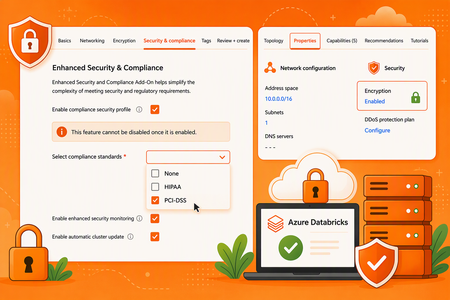
Microsoft Architect's: Aladdin Alchalabi AladdinAlchalabi, Kiran Raja KiranRaja, Peter Lenges PeterLenges, Jessica Reece jareece, Benjamin Coughtry bcoughtry, Anishek Kamal anishekkamal, Tayo Akigbogun takigbogun, Eric Kwashie ekwashie, Peter Lo PeterLo and Rafia Aqil Rafia_Aqil Peer Reviewed: Ted Kim tedkim and Arvind Periyasamy ArvindPeriyasamy Purpose and WHY Azure Databricks has put in place controls to meet the unique compliance needs of highly regulated industries. The requirement for the compliance security profile (CSP) is a joint effort between Microsoft and Databricks for Azure-Databricks workspaces. The value proposition of the compliance security profile is that it provides Customers significantly more hardening and security features. Mandatory Deadline: The Compliance Security Profile (CSP) becomes mandatory for processing HIPAA, HITRUST, and IRAP regulated data on Azure-Databricks by September 1, 2026. Key Dates: Enable the Compliance Security Profile and select HIPAA by September 1, 2026. Prepare for Azure Virtual Network encryption enforcement beginning June 1, 2027. Compliance Responsibility: Enabling CSP supports applicable technical controls but does not, by itself, establish HIPAA compliance. Compliance is a shared responsibility among the customer, Microsoft, and Databricks. Customers must evaluate their administrative, physical, and technical safeguards and confirm that an applicable Microsoft Business Associate Agreement is in place. Enabling CSP on Workspaces These requirements are checked and enforced on new workspaces today, with enforcement on existing workspaces expected in the future; where prerequisites are missing, clusters may fail to start. Prerequisite Requirement Costs There is a 10% cost of the Azure Databricks product spend within each workspace where CSP is enabled. **Review with your account team for any grace period during which the Enhanced Security & Compliance (ESC) add-on is available at no charge. After the grace period ends, a 10% DBU upcharge applies. Enhanced Security & Compliance add-on For existing workspaces: From Azure portal, click the Settings > Security & compliance on an existing Azure Databricks workspace: **Review Note #2 below Azure VNet encryption Azure Virtual Network encryption must be enabled on the Azure Databricks workspace VNet. Infrastructure as code: Update the encryption block on your VNet resource. In Terraform, that's azurerm_virtual_network. Azure portal: Toggle encryption on the VNet (Overview → Properties → Encryption). Command line: Enable it with the Azure CLI or PowerShell. **Review Note #4 below Supported VM instance types Use a VM series that supports VNet encryption and verify compatibility before enabling the profile. **This does not apply to serverless compute. NOTE: Confirm your workspace is using Premium Pricing tier. The profile can be enabled when a workspace is created or on an existing workspace, through the Azure portal, the Azure CLI, PowerShell, an ARM template, or Terraform. Only the Public Preview, Private Preview, and Beta features listed in this section are supported for workspaces with the compliance security profile enabled: Compliance security profile - Azure Databricks | Microsoft Learn Currently, the compliance security profile checks and enforces only the use of specific VM instance types, not the enablement of Azure Virtual Network encryption. Enforcement of the Azure Virtual Network encryption requirement begins on June 1, 2027, including on workspaces that already have the compliance security profile enabled. This flexibility shall allow customers more time to set up VNET encryption. This has been updated in documentation today (See ‘Important’ box). Regarding rollback, CSP can be reversed via a support ticket, if no regulated data has been processed on a particular workspace. Plan for possible effects on cluster startup, networking, feature availability, maintenance operations, and cost. A closer look at VNet encryption CSP is enabled per Databricks workspace, but VNet encryption is applied at the VNet level. Enabling it for a Databricks workload therefore affects every resource within that VNet, not just the workspace. A common approach in a hub-and-spoke design is to leave the hub VNet unencrypted and encrypt only the spoke VNet. The hub typically holds shared services such as the DNS resolver, while the spoke hosts the Databricks workspaces that require CSP. What does it mean for a VNet to be encrypted? An encrypted VNet is a security measure that protects VM-to-VM traffic. Data is encrypted in transit through a DTLS tunnel. This is platform-level encryption, applied automatically to traffic within your VNet and across peered VNets. It requires no changes to your operating system or applications. What happens to my VM-to-VM traffic? Qualifying VM-to-VM traffic is encrypted. Traffic involving unqualified instances simply keeps flowing unencrypted. The only enforcement available today is AllowUnencrypted. Important clarifications Encrypting the VNet does not guarantee all traffic within it will be encrypted. The only traffic that gets encrypted is VM-to-VM traffic where both the source and destination VMs are (1) on a supported SKU and (2) have Accelerated Networking enabled on the network interface. Encrypting the VNet does not drop or break traffic from unsupported SKUs. The only supported GA setting today is to allow unencrypted traffic, so non-qualifying traffic is still permitted; it just isn't encrypted. A future DropUnencrypted setting will drop that traffic instead for further hardening. It isn't available yet, and it's currently unknown whether it will become a required setting for CSP. Review the following recommended steps The steps below represent a validated implementation pattern. The exact network design can vary by environment, but the same prerequisite, isolation, and end-to-end validation principles should be applied. Validated implementation step Recommended approach and expected outcome Isolated sandbox workspace Enable CSP first in a representative non-production workspace. This avoids irreversible changes to DEV or production while the network topology, dependencies, VM compatibility, and operational behavior are validated. Enable CSP and select HIPAA Enable the Compliance Security Profile and select HIPAA under Settings > Security & compliance before processing PHI after September 1, 2026. Enable VNet encryption Enable VNet encryption. **Review Azure Virtual Network encryption limitations: What is Azure Virtual Network encryption? - Azure Virtual Network | Microsoft Learn Start a classic cluster Confirm that a classic cluster starts successfully after CSP and VNet encryption prerequisites are applied. This validates that the selected compute path and VM types remain operational. Validate storage connectivity Confirm storage connectivity continue to work. Confirm rollout readiness Proceed to DEV and production only after the complete private connectivity path, cluster startup, storage access, DNS resolution, data pipelines, and performance have been validated from end to end. Things to Review Enablement is permanent Enabling the compliance security profile, or adding a compliance standard, is intended to be a permanent change. You cannot remove the profile or an individual standard from a workspace that has ever processed regulated data; to revert, you must delete the workspace and create a new one. Validate the configuration in an isolated, representative non-production workspace before enabling DEV or production. Inventory and Assessment Identify Regulated Workspaces: Catalogue all existing Azure-Databricks workspaces. Determine which ones currently process, or are planned to process, data subject to HIPAA, HITRUST, or IRAP. Review Data Pipelines: Map out all data ingress and egress points for these identified workspaces, including connections to on-premises data sources, other cloud services, and external APIs. This helps identify potential network impacts. Verify Prerequisites Before Rollout: Confirm that selected VM instance types support VNet encryption and that every required CSP and networking setting is in place, because missing prerequisites can prevent clusters from starting. Enablement Method: Choose the appropriate tooling for enablement of Azure Portal, Azure CLI, PowerShell, ARM templates, or Terraform to ensure consistency and automation. Keep sensitive data out of customer-defined fields You are solely responsible for ensuring that PHI or other sensitive information is never entered into customer-defined input fields. These include workspace names, compute and resource names, tags, job names, job run names, network names, credential names, storage account names, and Git repository IDs or URLs, all of which may be stored, processed, or accessed outside the compliance boundary. What Changes After Enabling Compliance Security Profile On CSP-enabled workspaces, Partner-powered AI features are disabled by default and some assistive features such as Genie Code are also disabled; a workspace admin can re-enable them if required. In addition, only the specific preview features listed in the compliance security profile documentation are supported. No other Public Preview, Private Preview, or Beta feature may be used to process regulated data. Compliance Security Profile (CSP) enhances the security posture of Azure Databricks by enabling a hardened compute image, enhanced security monitoring, and automatic cluster updates. With automatic cluster updates enabled, classic compute resources are periodically updated and may restart during configured maintenance windows, so production schedules should be planned accordingly. Enhanced security monitoring deploys security monitoring agents on supported compute resources and generates logs that security teams can ingest and analyze. When deploying through ARM templates, CSP, enhancedSecurityMonitoring, and automaticClusterUpdate are configurable security and compliance settings that can be specified as part of the workspace deployment. Why GPU-accelerated compute may be affected Azure Databricks supports several GPU families, but Azure VNet encryption currently documents a narrower GPU list. Please review the list here: What is Azure Virtual Network encryption? - Azure Virtual Network | Microsoft Learn. Note: Please review the important section for any GPU The use of GPU-based VMs that support VNet encryption is required but not yet enforced. What happens if a customer does not enable Azure Databricks CSP? Azure Databricks has implemented additional controls to support the security and compliance requirements of highly regulated industries. CSP should not be characterized solely as a Microsoft initiative; it is part of the Azure Databricks security and compliance offering delivered by Microsoft and Databricks. CSP provides additional platform hardening and security capabilities, including a CIS Level 1 hardened compute image, automatic cluster updates, enhanced security monitoring, and TLS 1.2 or higher for relevant communications. Beginning September 1, 2026, CSP is required for Azure Databricks workspaces processing data subject to applicable standards, including HIPAA, HITRUST, and IRAP. If a customer chooses not to enable CSP while processing data subject to one of these standards, the workspace would not meet the documented Azure Databricks configuration requirements for that regulated workload. This does not, by itself, determine the customer's overall legal or regulatory compliance; customers should assess their obligations with their legal, compliance, and audit teams. References Compliance security profile: https://learn.microsoft.com/en-us/azure/databricks/security/privacy/security-profile Configure enhanced security and compliance settings: https://learn.microsoft.com/en-us/azure/databricks/security/privacy/enhanced-security-compliance HIPAA, Azure Databricks, Microsoft Learn: https://learn.microsoft.com/en-us/azure/databricks/security/privacy/hipaa What is Azure Virtual Network encryption: https://learn.microsoft.com/en-us/azure/virtual-network/virtual-network-encryption-overview Create a Virtual Network with encryption: https://learn.microsoft.com/en-us/azure/virtual-network/how-to-create-encryption?tabs Hashicorp azurerm_virtual_network: azurerm_virtual_network | Resources | hashicorp/azurerm | Terraform | Terraform Registry2.1KViews2likes0CommentsChecking for additional charges before sending a multiparty private offer
Hi everyone, how are other resellers checking for recurring or usage-based charges outside a multiparty private offer’s main upfront or installment payments? Before sending an offer to the customer, I want to confirm whether the vendor’s setup allows any additional charges, such as monthly fees, usage charges, or overages, even when there’s a fixed payment schedule. Is this clearly visible somewhere in Partner Center, or do you need the vendor to confirm it separately? Are there specific fields or pricing details you always check Curious how others handle this so everyone knows what to expect before the customer accepts.
Optimize selective analytics reads in Azure Data Lake Storage with ABFS Vectored Read
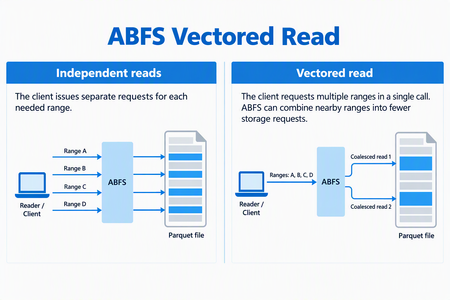
ABFS Vectored Read helps compatible analytics engines reduce request overhead when reading selected portions of columnar files in Azure Data Lake Storage. By coordinating multiple noncontiguous byte ranges through the Azure Blob File System (ABFS) driver, it can combine nearby ranges into fewer storage requests and execute those requests asynchronously. For data engineers working with selective Parquet queries, this brings the storage read pattern closer to what the query needs: a coordinated set of ranges rather than a collection of independent small reads. When the Parquet reader supports vectored I/O and the runtime includes a compatible ABFS client, Spark workloads that use higher-level APIs can enable this capability through configuration - without rewriting queries, changing application logic, or migrating data. Why selective reads need coordinated I/O Consider a query that selects a few columns from a Parquet dataset and filters out most row groups. The reader can skip much of the data the query doesn't need, but the data it needs may be spread across different parts of the file. Reading each range independently can create many small storage requests. Each request carries network and processing overhead, so selecting less data doesn't necessarily remove the cost of coordinating those reads. Vectored Read lets a compatible reader provide the ranges together, giving the client an opportunity to plan the I/O as a group. How ABFS Vectored Read works A compatible reader submits the file ranges it needs together. ABFS validates and sorts the ranges, combines nearby ranges when appropriate, and divides the resulting work to fit its read buffers. It then queues the storage requests asynchronously and returns the requested bytes to the corresponding range buffers. Illustrative request pattern, not a benchmark. Actual grouping depends on range layout and client configuration; coalesced storage requests can include bytes between the requested ranges. This is a client-side optimization. It does not change the file format or rewrite your stored data. The engine still receives the data for the ranges it requested. What this means for your workloads For compatible selective-read workloads, Vectored Read offers: Less request overhead: Combining nearby ranges can reduce separate storage requests and network round trips. Coordinated I/O: Asynchronous reads allow the client to work on multiple requested ranges without treating every range as an isolated operation. Configuration-based adoption: Compatible Spark workloads using the Hadoop Parquet and ABFS path can use the feature without rewriting their queries. The best starting point is a workload that reads selected portions of Parquet files through abfs:// or abfss://. Full sequential scans may see less benefit, and engines that bypass the Hadoop/ABFS path do not use this capability. Support depends on the Hadoop, hadoop-azure, and parquet-hadoop libraries included in the runtime, not only on the Spark version. See Availability and resources for the minimum versions and verification guidance. The benefit depends on the number, size, and spacing of requested ranges, the coalescing configuration, storage and network latency, concurrency and caching. Combining ranges can reduce requests and round trips, but it can also read additional bytes between noncontiguous requested ranges. Compare query duration, storage transactions, bytes read, and resource utilization against a controlled baseline using representative data and concurrency. Get started First, verify that your runtime contains Apache Hadoop 3.3.5 or later, including the hadoop-azure module, and parquet-hadoop 1.12.3 or later. The presence of an ABFS URI alone does not establish that the optimized implementation is installed. For Spark, enable the Parquet setting before the application starts, using the spark.hadoop. prefix: spark-submit \ --conf spark.hadoop.parquet.hadoop.vectored.io.enabled=true \ <other-options> \ <application> Replace the command placeholders with your normal submission options and application. Set the property explicitly rather than relying on a default, which can vary by packaged Parquet version. For managed services, use the service's supported cluster or session configuration mechanism. Availability and resources Azure Databricks does not currently support ABFS Vectored Read because its runtime ships an ABFS version that does not include this capability. In addition, Photon does not use the ABFS driver for data access, even when a workload uses an abfs:// or abfss:// URI. Therefore, the presence of an ABFS URI alone does not indicate that Vectored Read is available. For other packaged or managed runtimes, verify that the environment includes Apache Hadoop 3.3.5 or later with the hadoop-azure module, and parquet-hadoop 1.12.3 or later. Start with one representative selective-read workload and compare it with your baseline. For background, see the ABFS driver overview.382Views2likes0CommentsHardening Azure Container Registry: Soft Delete & Retention Policies
Hi everyone, We are planning to enable soft delete on our Azure Container Registries (ACR), set to the maximum retention of 90 days. In addition, we want to introduce a retention policy for images and artifacts within the repositories, so that old or orphaned images with potential security vulnerabilities can no longer find their way into circulation. Ideally, we would also like to validate the whole setup safely via a dry run before applying it to production registries. Before we roll this out, I would like to share our approach and get feedback from the community. Goals Protect against accidental deletion (restore window of up to 90 days) Automatically clean up stale, untagged or orphaned images and artifacts Reduce the attack surface caused by outdated images with known CVEs Keep storage costs and registry sprawl under control Test every cleanup rule risk-free before enforcing it Step 1: Enable soft delete (90 days) az acr config soft-delete update \ --registry <registryName> \ --status enabled \ --days 90 Deleted manifests and tags can be listed and restored within the retention window: az acr manifest list-deleted --registry <registryName> --name <repo> az acr manifest restore --registry <registryName> --name <repo>:<tag> Step 2: Retention policy for untagged manifests az acr config retention update \ --registry <registryName> \ --status enabled \ --days 30 \ --type UntaggedManifests Step 3: Scheduled purge for old tagged images (dry run first) The built-in retention policy only covers untagged manifests. For old tagged images, acr purge via an ACR Task is the right tool, and it supports --dry-run: az acr run --registry <registryName> \ --cmd "acr purge --filter '<repo>:.*' --ago 60d --keep 5 --untagged --dry-run" \ /dev/null Review the output, and only when you are happy, remove --dry-run and schedule the command as a recurring ACR Task (az acr task create --schedule "0 2 * * Sun"). Best practices we are considering Test with dry run first: run acr purge --dry-run against non-production registries and review the list of affected images before enforcing anything. Always use --keep: retain the last N tags per repository so rollbacks stay possible. Protect important tags: use --filter patterns to exclude release/production tags, or lock critical images with az acr repository update --write-enabled false. Combine with vulnerability scanning: use Microsoft Defender for Containers to identify vulnerable images and drive purge criteria, rather than relying on age alone. Align retention with your deployment cadence: make sure no running workload (AKS, Container Apps, App Service) still references an image that would be purged. Use consistent tagging: avoid reusing latest; use immutable, versioned tags (e.g. semantic version plus commit SHA). Roll out via IaC: manage the settings through Bicep or Terraform and Azure Policy so every new registry gets the same baseline. Monitor and audit: send ACR diagnostic logs to Log Analytics and alert on unexpected delete operations. Mind the cost: soft-deleted data still counts toward storage until the retention window expires. Open questions for the community Are you running soft delete with 90 days in production? Any pitfalls? How do you combine retention policies with acr purge in practice? Do you use vulnerability findings (e.g. from Defender) as a trigger for image cleanup? Are there known limitations (SKU, geo-replication, preview status) we should consider? Looking forward to your experiences and feedback!67Views0likes2CommentsVerifying private network paths before you deploy: a what-if for Azure private endpoints
A common Azure scenario: public access is disabled on a PaaS resource, a private endpoint is created, and the connection shows as Approved. The application still times out. Resource-level checks such as what-if report nothing wrong, because every resource is configured. What they do not verify is whether the name the application uses resolves to the private address from the application's VNet. In my experience, most private connectivity failures come from DNS configuration, not from firewall rules. What must be true For a workload in a VNet to reach a PaaS service privately: The private endpoint connection is Approved. The matching privatelink private DNS zone exists. The zone is linked to the VNet that performs the lookup. The zone contains an A record for the resource. If the VNet uses custom DNS servers, they forward privatelink zones to Azure DNS (168.63.129.16) or to an Azure DNS Private Resolver. The third point is the one that is easy to miss: the zone and the record exist, but the VNet performing the lookup cannot see the zone, so the name resolves to the public address. An approach: check the whole path in one command I wrote a small, read-only script that takes a target resource and a source VNet, then reports PASS, WARN, or FAIL for each requirement above, with a suggested fix. It uses the Azure CLI and needs only Reader access. Checks performed: publicNetworkAccess on the target resource Private endpoint connections and their approval state Expected privatelink zone for the endpoint's group id Whether the zone is linked to the source VNet Whether the zone has an A record for the resource Whether the source VNet uses custom DNS servers (reported as a warning for manual review) It exits with code 1 on any failure, so it can run as a pipeline gate after a Dev deployment. Limitations It does not test the network path itself (NSGs, firewalls, routing, ports). Azure Network Watcher covers that. It reads configuration and does not resolve DNS from inside the VNet. A real lookup from a VM in the VNet remains the final proof. In hub-and-spoke designs, the hub VNet may need to be passed as the source. The built-in zone table covers a few services (storage, Key Vault, SQL, Databricks) and needs extending for others. Why I think this matters for AI-assisted infrastructure Script and sample pipeline: Ping me or message me When infrastructure code is generated by an AI assistant, a private endpoint without its DNS zone link is a plausible output: the code is valid and the deployment succeeds. Independent, read-only checks like this one are the kind of gate that lets teams review generated changes with confidence. Questions for the community Which private endpoint failure costs your team the most troubleshooting time? How do you manage DNS in hub-and-spoke networks: Private Resolver, DNS forwarders, or another pattern? Would a check like this be more useful as an Azure Policy, a Network Watcher feature, or a pipeline step? Which services should be added to the DNS zone table first? Shivanna Gundanavar301Views2likes2CommentsMicrosoft Sentinel - switching simple mode to kql mode in sentinel logs
In sentinel, when i go to the alert page and from there i opened the corresponding the events using Link to LA clickable link, it opens the events in simple mode. However i have configured the Logs to open it in KQL mode and every time i have to changed it to KQL mode to do the task27Views0likes0CommentsCan Fabric Copilot Run on a Separate Capacity?
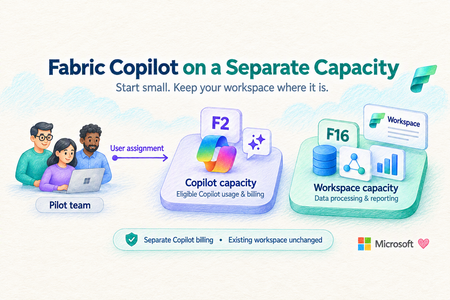
Microsoft Cloud Architects: Yassine El Ouardi and Rafia Aqil Customer question: Can we bill our team’s Fabric Copilot usage to a separate capacity while keeping data processing and reporting on our existing capacity? Answer: Yes. An organization can designate a Fabric capacity for Copilot usage and assign specific users or groups to it. Eligible Copilot usage from those users is then billed to the designated capacity rather than the capacity hosting their content. The workspace can remain on its existing capacity for its underlying workloads. The minimum Fabric SKU for a designated Copilot capacity is F2. That makes F2 a starting point for a small team, not a guarantee that it will be large enough for every usage pattern. Monitor consumption as adoption grows and scale the capacity if needed. LAB: In this lab, I created an F2 capacity for Copilot and kept the Adventure Works workspace on a separate F16 capacity. The setup illustrates the key architectural choice: assign users to the Copilot capacity, rather than moving their workspace to it. F2 capacity created: The Azure overview shows the new, active F2 Fabric capacity intended for the Copilot test. Both capacities visible: The admin portal lists the existing F16 capacity alongside the new F2 capacity. Copilot assignment setting under the capacity: The F2 capacity settings show where an administrator can designate the capacity for Copilot and select users or groups. Original workspace stays on F16: Workspace settings show that the Adventure Works workspace remains assigned to the F16 capacity. Semantic model opened: The Adventure Works model provides a practical workload for testing Copilot’s modeling assistance. Question submitted: The test asks Copilot to help fix the data model; the screenshot captures it processing the request. Recommendations returned: Copilot proposes specific model changes and says it has not applied them without confirmation. Capacity health checked: Fabric Capacity Metrics displays both capacities for comparison; this view shows 8 successful operations completed successfully for the Copilot Capacity. Takeaway: A separate Copilot capacity gives a small team a way to consolidate Copilot billing without relocating its workspace. Start with F2 where the feature’s requirements are met, then size from observed usage.143Views0likes0Comments