app
36 Topics
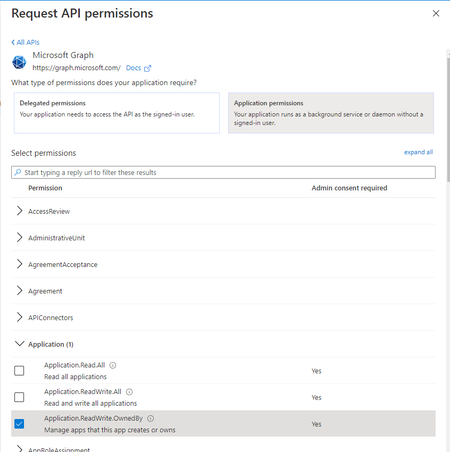
Application.ReadWrite.OwnedBy: List all applications owned by the calling application
Hi, I am trying to get only the applications that my app owns using Graph, and on the documentation it shows that I should be able to only list the applications where my app is owner. (This is to limit the content I have access to with my app) https://docs.microsoft.com/en-us/graph/permissions-reference Application Application.Read.All: List all applications (GET /beta/applications) Application.ReadWrite.All: Delete a service principal (DELETE /beta/servicePrincipals/{id}) Application.ReadWrite.OwnedBy: Create an application (POST /beta/applications) Application.ReadWrite.OwnedBy: List all applications owned by the calling application (GET /beta/servicePrincipals/{id}/ownedObjects) Application.ReadWrite.OwnedBy: Add another owner to an owned application (POST /applications/{id}/owners/$ref). NOTE: This may require additional permissions. However, if I create an app that has owner permissions on another app and I query against the Graph API "Applications" I am still able to list all applications in the tenant. I thought having me added as owner, on an application and having only that permission on my app, would limit my result ? Am I missing something here? Adding the app as an owner in the following way: Connect-AzureAD $objectIdOfApplicationToChange = Get-AzureADApplication -objectId "6929067b-b9ab-4bf6-bb17-81be5eb31ba1" $objectIdOfApplicationThatNeedsToBeAdded = Get-AzureADApplication -ObjectId "21780578-3035-47c1-8096-a1641ab3123d" Add-AzureAdApplicationOwner -ObjectId $objectIdOfApplicationToChange.ObjectId -RefObjectId (get-azureadserviceprincipal -all $true | where-object {$_.AppId -like $objectIdOfApplicationThatNeedsToBeAdded.AppId}).ObjectId When I query the Graph through PowerShell, I was hoping to get a 403 when querying all applications... Anyone tried to limit the result you get back using this permission ? It is not a wanted solution to give permissions to read all applications for this app, therefor we need to limit the access...8.9KViews0likes1CommentVariable in Graph Request Body (PowerShell)
Working off the following URL: https://nam04.safelinks.protection.outlook.com/?url=https%3A%2F%2Fdocs.microsoft.com%2Fen-us%2Fgraph%2Fapi%2Fpasswordauthenticationmethod-resetpassword%3Fview%3Dgraph-rest-beta%26tabs%3Dhttp&data=04%7C01%7CJonesL%40duvalschools.org%7C997660b94b6e446de25508d9370bfc97%7C8deb1d4dd0a44d0489aef7076cbaa9fb%7C1%7C0%7C637601346885178418%7CUnknown%7CTWFpbGZsb3d8eyJWIjoiMC4wLjAwMDAiLCJQIjoiV2luMzIiLCJBTiI6Ik1haWwiLCJXVCI6Mn0%3D%7C1000&sdata=ZVLJ3SH%2FHpLXNgV1uJAZqdCpLfvKqy%2Bb3kn7epZeUDA%3D&reserved=0 When I execute the following command in my PowerShell script it works flawlessly $PWCBody = '{ "newPassword" : "ssd$$FGW!!", "forceChangePasswordNextSignIn" : true }' $PWCURI = "https://graph.microsoft.com/beta/users/XXXXXXXXX-XXXX-XXXX-XXXX-XXXXXXXXXXXX/authentication/passwordMethods/XXXXXXXXX-XXXX-XXXX-XXXX-XXXXXXXXXXXX/resetPassword" $PWChange = Invoke-RestMethod -Uri $PWCURI -Headers $HeaderDelegate -body $PWCbody -Method POST -ContentType "application/json" However, when I change the Request Body newPassword to variable I get a (403) Bad Request. $PWCBody = '{ "newPassword" : $password, "forceChangePasswordNextSignIn" : true }' How can i handle a variable in a Requested Body that's surrounded by single quotes? Thank You, -LarrySolved6.6KViews0likes7CommentsOffice Graph Disabled, Office Delve features have been enabled automatically
Customer O365 Production is configured to disable Office Graph, hence Delve is not available. However in recent days we are seeing content, that was not showing up for the users on desktop browsers and mobile apps. In browser we can see News from sites on the /sharepoint.aspx page Following Suggested sites From iOS Mobile SharePoint app we can see Frequent From a SharePoint Site on the app, we can see Activity Content in the News Tab What has changed in recent days to exhibit such behaviour? Office Graph is definitely disabled in SharePoint admin center. Any one seen or experienced this? From end user perspective it means that SharePoint App (mobile) is now not showing Office Graph is required messages, but from security and compliance perspective we do need to understand, how/why this content is visible even when Office Graph is disabled.4.7KViews0likes1CommentI can't find the DRIVE-ITEM-ID
Hello how are you? I managed the most complicated steps that would be authentication, but what I believed to be the easiest became an even greater challenge. When I access the graph developer https://developer.microsoft.com/en-us/graph/graph-explorer. I can't get to a specific excel sheet. I tried in several ways, I got the driveId,l driveItem, but the Drive-Item-Id I can't find at all. Even the file that I actually need to work I can't reach, only when I go to the "My recent files" endpoint. Would anyone have a suggestion on how to get the DRIVE-ITEM-ID of an excel sheet? I created an application, because the objective is to develop a web application in Python to connect our automations and this also involves connecting several APIs. Can anyone give me some help?3.9KViews0likes2Comments
API Graph Python: Get Calendar Events - ODataError
Hello, for an application I would like to extract the calendar events for the upcoming 10 days of specific calendars within my company. Therefore I followed the Tutorial "Build Python app with Microsoft Graph and app-only authentication. https://learn.microsoft.com/de-de/graph/tutorials/python-app-only?tabs=aad The example code is working - I get an access token and also the users are listed. However - when I integrate my own API call I get the error: msgraph.generated.models.o_data_errors.o_data_error.ODataError Our Admin provided the Application Permissions: Calendars.Read, Calendars.ReadBasic.All To extract the Events from a specific calender I use an adapted version of the last example of the following page: https://learn.microsoft.com/en-us/graph/sdks/create-requests?tabs=Python The code (which causes the error in line 12) in the graph.py is the following: from msgraph.generated.users.item.calendar.calendar_view.calendar_view_request_builder import CalendarViewRequestBuilder import datetime as dt async def get_calendar_events(self): start_date = dt.date.today() end_date = dt.date.today() + dt.timedelta(days=1) query_params = CalendarViewRequestBuilder.CalendarViewRequestBuilderGetQueryParameters( start_date_time=str(start_date), end_date_time=str(end_date), ) request_config = CalendarViewRequestBuilder.CalendarViewRequestBuilderGetRequestConfiguration( query_parameters=query_params, ) calendar = await self.app_client.users_by_id('email address removed for privacy reasons').calendar_view.get(request_configuration=request_config) print(calendar) return calendar The code in the main.py is the following: async def list_calendar_events(graph: Graph): calendar = await graph.get_calendar_events() print(calendar) for event in calendar.value: print("Event ID: ", event.id) print("Start: ", event.start) return What is the error and how can I correct it? Thank you!1.8KViews0likes0CommentsNeed assistance with uploading background image
Hello all, I'm researching a PoC to upload background images to the Azure sign in page using a delegated application. I've successfully been able to change the sign-in text and the background color but unable to determine how to upload a background image or banner logo via PowerShell or the Resource Graph Explorer. The cmdlets I'm attempting is "update-mgorganizationalbranding". References I'm using: https://docs.microsoft.com/en-us/graph/api/resources/organizationalbrandingproperties?view=graph-rest-1.0#methods https://docs.microsoft.com/en-us/powershell/module/microsoft.graph.identity.directorymanagement/update-mgorganizationbranding?view=graph-powershell-beta1KViews0likes0Comments
How to increase the limits of permissions requested per application - Azure AD signInAudience
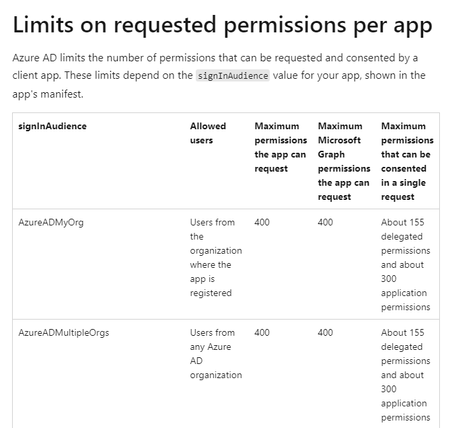
I am currently developing an app that allows different operations with Microsoft SharePoint, I am using Microsoft Graph and I have registered the App in Azure AD, and it works fine. But my wish is that the App is public and thousands of people can use it, using their Microsoft account. But reading the documentation of Microsoft Graph I find an article that says that it has Limits of permissions requested by application. The limit indicated by the documentation is a maximum of 400 for a signInAudience= AzureADMultipleOrgs but I want and aspire to have more users, perhaps thousands of users. What do you recommend I do in this case? I want thousands of users to access the app with their Microsoft account and be able to do different activities. In the app when a user logs in, the app requests permission to access API Graph and performs the desired query, this process has to do with "Limits on requested permissions per app"??? For more information https://docs.microsoft.com/en-us/graph/permissions-referenceSolved909Views0likes1CommentDelve not displaying strikethough on Word docs
Hi, Just wondering if other people have a problem in Delve mobile apps where the strikethrough does not display on text in a Word document. We have a key document that uses this. We open in word with Edit pencil to work around it at the moment.829Views0likes0CommentsDelve on Windows 10 Mobile
There is an issue with Delve not working with DUO Security MFA? This is particularly problematic on Windows 10 Mobile. The second authentication page presented by DUO Security is not rendered. Microsoft staff believe DUO Security is not up to date on Modern Authentication. Yet, the same expected rendering works with Office 365 apps but not all of them. The same issue is present in Skype for Business and PowerApps. However, Teams, SharePoint, and Yammer work fine with this issue.827Views0likes0Comments