app management
13 Topics
SCCM Application Model: Which WMI Properties and Classes Correspond to Software Center Tab Fields?
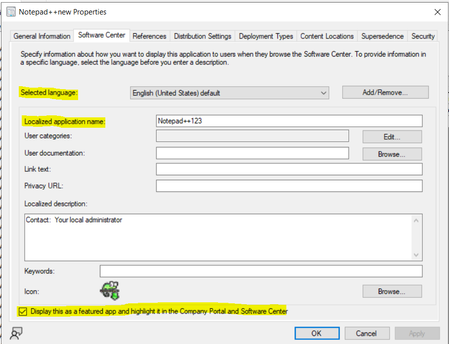
Service: Microsoft Configuration Manager (SCCM / MECM) Scenario: I am working with the Application Model and need to identify the underlying SCCM/WMI property names and associated class names for several fields displayed on the Software Center tab of an Application. Specifically, I am looking for the properties and classes corresponding to the following fields: Selected Language Localized Application Name Display this as a featured app and highlight it in the Company Portal and Software Center Environment: Microsoft Configuration Manager (Current Branch) Application Model What I am looking for: The SCCM/WMI property name associated with each field. The SCCM class name (SMS Provider class) where each property is stored. If applicable, the related SDK object path or SQL view that exposes these values. Troubleshooting Performed: I reviewed the Configuration Manager SDK documentation and application-related classes but could not determine the exact property-to-UI mapping for these Software Center settings. Supporting Material: A screenshot of the Software Center tab highlighting the fields is attached. Could someone help identify the corresponding WMI properties and classes for these settings?149Views0likes0CommentsExisting required application deployments policy is not sent to devices
I have couple hundred applications in SCCM/MCM that are set to required and whenever there is a new device is built, all these required applications automatically get installed. I am on 2503 and 5 days ago i started seeing this issue. But if modify that deployment with current date and time then the application gets deployed right away if i run Application Deployment evaluation cycle. I also tested by deleting the existing deployment and created a new required deployment and run Application Deployment evaluation cycle then the application installs right away. The problem seems like the Primary server is not sending the policy to the client for existing deployments. The application compliance that we see for every deployment under Monitoring for all the devices moved to Error with Success. Not sure why this is happening. All these changes i noticed in the last one week. A week ago all these Already Compliant and Success status device count is under Success tab. Let me know if you have any suggestions.955Views0likes6Comments
Application auto upgrade not working
Hello, I'm trying to deploy applications with auto upgrade but nothing happens. Let me explain what I'm doing : App_V1 is deployed as available to a user collection I install the app, nothing special here App_V2 is set to supersede App_V1 with uninstall checkbox (I need that in my environment) I deploy App_V2 as available to the same user collection with the checkbox "Automatically upgrade any superseded versions of the application" In the software center, I can see App_V2 with the install button (App_V1 is hidden, expected), but nothing else happens If I check the logs, I can see in PolicyAgent.log : A line starting with "Compiling policy <deploymentID>/supersedence..." Then a line starting with "Raising event: instance of CCM_PolicyAgent_AssignmentDisabled...<some assignment info> Nothing else I don't know how to further troubleshoot that situation. Can someone give me some clues ? Thanks726Views0likes5Comments
Issues with OSD in secondary MCM 2509 site
Hi, having upgraded primary and secondary MCM site to version 2509 I cannot perform OSD anymore on secondary site location - errors: Failed to query Management Point locator QueryMPLocator: no valid MP locations are received Boundary Group in secondary site does have assigned MP and that is secondary MCM site server - however I get this as well: <MPLocation SiteCode="" AssignedSiteCode="" MP="" MPCertificatesEx="" x86UnknownMachineGUID="" x64UnknownMachineGUID=""/> Any help would be highly appreciated.181Views1like0Comments[SOLVED] SCCM - Application auto upgrade not working
Hello, I'm trying to deploy applications with auto upgrade but nothing happens. Let me explain what I'm doing : App_V1 is deployed as available to a user collection I install the app, nothing special here App_V2 is set to supersede App_V1 with uninstall checkbox (I need that in my environment) I deploy App_V2 as available to the same user collection with the checkbox "Automatically upgrade any superseded versions of the application" In the software center, I can see App_V2 with the install button (App_V1 is hidden, expected), but nothing else happens If I check the logs, I can see in PolicyAgent.log (only) : A line starting with "Compiling policy <deploymentID>/supersedence..." Then a line starting with "Raising event: instance of CCM_PolicyAgent_AssignmentDisabled...<some assignment info> Nothing else I don't know how to further troubleshoot that situation. Can someone give me some clues ? Thanks408Views0likes1CommentPublish Software to users Software Center but only on a Group of Machines
Using MECM Current on 2309 build. I have the following requirement: Publish an application into software center as available software for a group of users but only when they are on Windows 10 desktops (not servers etc.)299Views0likes0Comments
Block or Prevent user for installing any software without administration permission
Hi, I want to block user permission for installing any software without administrator permission. How do I implement this policy via Intune? Users have M365 E3 license and joined Azure AD I need an appropriate solution.Solved22KViews0likes3Comments
PKI certificate - Management Points IIS
Hi There I'm currently setting up PKI and was wondering in regards to the Configuration Manager IIS Certificate. I have two management points one on the Primary Server (e.g CMPrimary01.contoso.com) and another management point on another server (e.g. CMMP01). I do the following: On CMPrimary01 Expand Personal > Certificates Right Click Certificates > All Tasks > Request New Certificates Before you begin > Click Next Click "Active Directory Enrollment Policy" > Next Select CM DP Certificate and CM IIS Servers Certificate Under CM IIS Server Certificate click - More information required to enroll for this certificate. Click here to configure settings Under Alternative name, select Type = DNS, Value = CMPrimary01.contoso.com and CMPrimary01 and click add. Do I add in the DNS value as well CMMP01 and CMMP01.contoso.com> Do I need to add the certificates as well on CMMP01? THanks1KViews0likes0Comments
Local administrator created during OSD doesn't get administrator access
This is an issue at the intersection between application deployment (via task sequence) and operating-system deployment. I have a setup.exe installer (actually, several of them, all part of the same collection - but the issue can be illustrated by talking about just one) which works fine when run as an ordinary local administrator, but fails with error 1619 when run as SYSTEM. As best I've been able to determine, the installer detects that the embedded MSI would be extracted to a location under the Windows folder, decides that's a security violation, and intentionally does things in a way that will result in this error. To work around this, I have created a task sequence (without a boot image) to run the installation as a temporary local administrator account. Specifically, this task sequence has the following series of actions: * A Run Command Line action to create a new local user account, by running 'net user TEMPORARYUSERNAME PASSWORD /add'. * A Run Command Line action to add that user to the local Administrators group, by running 'net localgroup Administrators TEMPORARYUSERNAME /add'. * A Run Command Line action to invoke the setup.exe from its package, with the "run this step from the following account" box checked, the username set to '%computername%\TEMPORARYUSERNAME', and the password entered accordingly. * A Run Command Line action to delete the temporary local user, by running 'net user TEMPORARYUSERNAME /delete'. If I create a deployment of this task sequence to a collection, and invoke it manually from the Software Center, it works; the program is installed as intended, and the user is created and cleaned up along the way. Event Viewer does log a warning (or perhaps an error) indicating having failed to load the user profile for this account, but that doesn't seem to do any harm, and I haven't yet found any way to avoid having it happen. If I then go to an OSD task sequence and add a Run Task Sequence action (after rebooting out of Windows PE and into Windows proper) which invokes the above task sequence, and then deploy that OSD task sequence to a computer, the embedded task sequence fails. More specifically, it gets as far as the action which invokes setup.exe, and then records that the installation failed with error 1603. As best I can determine based on analyzing the logs, the 1603 in this case is a simple "access denied" error, and means that the account which is being used to run the program does not have write access to the install location. However, because the user has been added to the local Administrators group, that user should have Administrator-level access to the entire system - including the install location. The fact that this install succeeds when invoked from Software Center seems to indicate that this user *does* in fact get such access in that environment - but in the post-WinPE OSD environment, it apparently does not. I have gone so far as to add a reboot step in between the step which adds the temporary account to the local Administrators group and the step which invokes setup.exe, in the hopes that the reboot would lead the system to recognize that the temporary account is a member of that group. However, this did not appear to produce any change in the behavior of the setup.exe step. My first question is: How can I get Windows to properly grant local Administrator access (and, as a consequence, write access to the install location) to this user no matter which environment the "inner" task sequence is run from? If there's no apparent way to do that, my second question is: How else can I get this install to run as a non-SYSTEM user with local administrator access? Running as the built-in administrator account itself is not really an option. We manage that account's password with LAPS, so while I know what that password is at Windows install time, as soon as we join the domain (which, for various reasons, will have happened by this point in the task sequence) there's a possibility that the password will have changed; as a result, I can't specify that password in the Run Command Line action.5.5KViews0likes2CommentsShortcut icons to Homescreen
Hello everyone! I have the following problem: some iPads are registered in my company via Microsoft Endpoint Manager. They have access to our servers via the file manager. But to make it easy for the employees, I would like to create a shortcut directly on the main screen using Apple's Shortcuts app, which will take them directly to the desired file with one click and open it. That's not really a problem, but I can't display the individual shortcut on the screen. I ask for help! Very dear thanks Marius3KViews0likes1Comment