ai
1550 TopicsCopilot, Microsoft 365 & Power Platform Community call
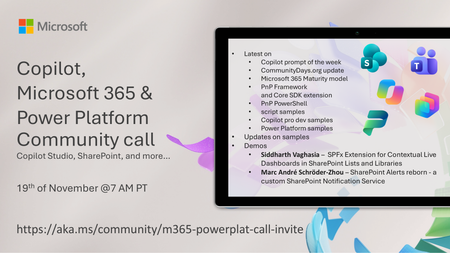
💡 Copilot, Microsoft 365 & Power Platform weekly community call focuses on different use cases and features within the Microsoft 365 and Power Platform - across Microsoft 365 Copilot, Copilot Studio, SharePoint, Power Apps and more. Demos in this call are presented by the community members. 👏 Looking to catch up on the latest news and updates, including cool community demos, this call is for you! 📅 On 19th of November we'll have following agenda: Latest news and events from Microsoft Latest on Copilot prompt of the week CommunityDays.org update Microsoft 365 Maturity model PnP Framework and Core SDK extension PnP PowerShell Script samples Copilot pro dev samples Power Platform samples Demos this time Siddharth Vaghasia – SPFx Extension for Contextual Live Dashboards in SharePoint Lists and Libraries Marc André Schröder-Zhou – SharePoint Alerts reborn - a custom SharePoint Notification Service 📅 Download recurrent invite from https://aka.ms/community/m365-powerplat-dev-call-invite 📞 & 📺 Join the Microsoft Teams meeting live at https://aka.ms/community/m365-powerplat-dev-call-join 💡 Building something cool for Microsoft 365 or Power Platform (Copilot, SharePoint, Power Apps, etc)? We are always looking for presenters - Volunteer for a community call demo at https://aka.ms/community/request/demo 👋 See you in the call! 📖 Resources: Previous community call recordings and demos from the Microsoft Community Learning YouTube channel at https://aka.ms/community/youtube Microsoft 365 & Power Platform samples from Microsoft and community - https://aka.ms/community/samples Microsoft 365 & Power Platform community details - https://aka.ms/community/home 🧡 Sharing is caring!29Views0likes0CommentsMicrosoft Copilot Studio & Power Platform community call - November 2026
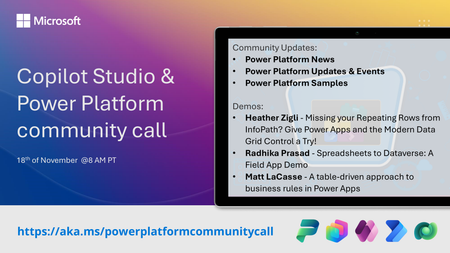
💡 Power Platform monthly community call focuses on different extensibility options for builders, makers and developers within the Power Platform. Typically demos are from our awesome community members who showcase the art of possible within the Power Platform capabilities. 👏 Looking to catch up on the latest news and updates, including cool community demos, this call is for you! 📅 On 18th of November we'll have following agenda: Power Platform Updates & Events Latest on Power Platform samples Heather Zigli - Missing your Repeating Rows from InfoPath? Give Power Apps and the Modern Data Grid Control a Try! Radhika Prasad - Spreadsheets to Dataverse: A Field App Demo Matt LaCasse - A table-driven approach to business rules in Power Apps 📅 Download recurrent invite from https://aka.ms/powerplatformcommunitycall 📞 & 📺 Join the Microsoft Teams meeting live at https://aka.ms/PowerPlatformMonthlyCall 💡 Building something cool for Microsoft 365 or Power Platform (Copilot, SharePoint, Power Apps, etc)? We are always looking for presenters - Volunteer for a community call demo at https://aka.ms/community/request/demo 👋 See you in the call! 📖 Resources: Previous community call recordings and demos from the Microsoft 365 & Power Platform community YouTube channel at https://aka.ms/community/videos Microsoft 365 & Power Platform samples from Microsoft and community - https://aka.ms/community/samples Microsoft 365 & Power Platform community details - https://aka.ms/community/home27Views0likes0CommentsCopilot, Microsoft 365 & Power Platform product updates call
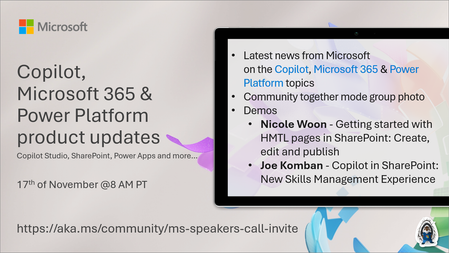
💡Copilot, Microsoft 365 & Power Platform product updates call concentrates on the different use cases and features within the Microsoft 365 and in Power Platform. Call includes topics like Microsoft 365 Copilot, Copilot Studio, Microsoft Teams, Power Platform, Microsoft Graph, Microsoft Viva, Microsoft Search, Microsoft Lists, SharePoint, Power Automate, Power Apps and more. 👏 Weekly Tuesday call is for all community members to see Microsoft PMs, engineering and Cloud Advocates showcasing the art of possible with Copilot, Microsoft 365 and Power Platform. 📅 On the 17th of November we'll have following agenda: News and updates from Microsoft Together mode group photo Nicole Woon - Getting started with HMTL pages in SharePoint: Create, edit and publish Joe Komban - Copilot in SharePoint: New Skills Management Experience 📞 & 📺 Join the Microsoft Teams meeting live at https://aka.ms/community/ms-speakers-call-join 🗓️ Download recurrent invite for this weekly call from https://aka.ms/community/ms-speakers-call-invite 👋 See you in the call! 💡 Building something cool for Copilot, Microsoft 365 or Power Platform (Copilot Studio, SharePoint, Power Apps, etc)? We are always looking for presenters - Volunteer for a community call demo at https://aka.ms/community/request/demo 📖 Resources: Previous community call recordings and demos from the Microsoft Community Learning YouTube channel at https://aka.ms/community/youtube Microsoft 365 & Power Platform samples from Microsoft and community - https://aka.ms/community/samples Microsoft 365 & Power Platform community details - https://aka.ms/community/home 🧡 Sharing is caring!20Views0likes0CommentsMicrosoft palkitsi kumppaneitaan Partner of the Year 2026 -tunnustuksilla
Microsoft on julkistanut vuoden 2026 Partner of the Year -tunnustusten voittajat ja finalistit. Tunnustukset myönnetään kumppaneille, jotka ovat tuottaneet asiakkailleen erityistä arvoa Microsoftin pilvi- ja tekoälyteknologioilla. Suomen Country Partner of the Year -tunnustuksen sai tänä vuonna Nordcloud, an IBM Company. ”Suomessa on vahva ja osaava Microsoft-kumppaniverkosto. Kumppanimme tuntevat asiakkaidensa liiketoiminnan, ja yhdessä rakennamme ratkaisuja, jotka tuovat suomalaisille organisaatioille mitattavaa hyötyä. Partner of the Year -tunnustukset nostavat esiin juuri tätä työtä. Onnittelut Nordcloudille sekä kaikille globaalien kategorioiden voittajille ja finalisteille!” sanoo Microsoftin kumppaniliiketoiminnasta vastaava johtaja Tarja Jernström. Nordcloud, an IBM Company, on Suomen Microsoft Country Partner of the Year 2026 Nordcloud on pilvipalveluihin erikoistunut Microsoft-kumppani. Se auttaa asiakkaitaan modernisoimaan pilviympäristönsä ja viemään tekoälyratkaisut tuotantoon turvallisesti ja skaalautuvasti. ”Olemme todella iloisia ja kiitollisia tästä Microsoftin tunnustuksesta. Se kertoo pitkästä ja tiiviistä kumppanuudestamme Microsoftin kanssa sekä luottamuksesta, jota asiakkaamme ovat meille osoittaneet. Tunnustus on hieno merkkipaalu myös siksi, että se osuu uuden luvun alkuun: Nordcloud liitettiin IBM:ään 1.10.2026. Yhdistämme nyt Nordcloudin syvän Microsoft-pilviosaamisen IBM:n globaaliin konsultointi-, data- ja tekoälyosaamiseen sekä vahvaan toimialatuntemukseen. Siksi voimme palvella asiakkaitamme entistä kokonaisvaltaisemmin: strategiasta ja pilviympäristöjen modernisoinnista aina tekoälyratkaisujen tuotantokäyttöön asti”, sanoo Sari Aumo, Vice President Partners - Microsoft, Nordcloud, an IBM Company, ja jatkaa: ”Tekoälyn aikakaudella asiakkaamme odottavat ratkaisuja, jotka tuovat mitattavaa liiketoimintahyötyä ja ovat samalla turvallisia, vastuullisia ja skaalautuvia. Hyvä esimerkki on yhteistyömme suuren suomalaisen julkisen sektorin organisaation kanssa. Olemme rakentaneet Microsoftin teknologialle turvallisen ja skaalautuvan alustan, joka tukee yhteiskunnan kannalta kriittisiä palveluita ja luo pohjan tekoälyn vastuulliselle hyödyntämiselle. Yhdessä Microsoftin kanssa autamme suomalaisia organisaatioita siirtymään tekoälykokeiluista todelliseen liiketoiminta-arvoon. Suurin kiitos kuuluu asiantuntijoillemme, jotka tekevät tätä työtä joka päivä yhdessä asiakkaidemme ja Microsoftin tiimien kanssa.” Globaalien kategorioiden voittajat ja finalistit Cloud & AI Platforms Innovate with Azure AI Apps and Agents: ZEN Architects (finalistit: Ema, Simform LLC, Thoughtworks) Migrate & Modernize Your Estate: Accenture / Avanade (finalistit: Accion Labs, RSM, Tata Consultancy Services) Unified Data Platform: Quadrasystems.net India Private Limited (finalistit: Accenture and Avanade, Cognizant, Ernst and Young LLP) Security Data Security & Governance: BDO USA (finalistit: Cyclotron, Inc., Increment, Quorum) Secure Access: Slalom Consulting (finalistit: Campana & Schott GmbH, Logicalis Singapore Pte Ltd, MajorKey Technologies) Security: Data#3 Limited (finalistit: Accenture and Avanade, Maureen Data Systems, Planet Technologies) AI Business Solutions Agentic Business Operations with Business Central: Volt Technologies (finalistit: Fellowmind Company B.V., PrenticeWorx, Winspire Solutions) Agentic ERP: HSO (finalistit: Argano LLC, MCA Connect, a Grant Thornton US Company, PwC) Agentic Sales & CRM: PwC (finalistit: HSO, KPMG, MCA Connect, a Grant Thornton US Company) Agentic Services & Contact Center: Capgemini (finalistit: Accenture and Avanade, Hitachi Solutions, KPMG LLP) Cloud and AI Endpoints: Netrix Global (finalistit: Phoenix Software, Quorum, SCSK Corporation) Copilot & Agents at Work: Accenture / Avanade (finalistit: Ernst and Young LLP, PwC, Valorem Reply) Low Code Agentic Apps: KPMG (finalistit: Accenture and Avanade, Slalom Consulting, Velrada Capital Pty Ltd) Secure AI Productivity: Invoke (finalistit: Inovasys, Quadrasystems.net India Private Limited, VNEXT Group) Industry Defense and Intelligence: CloudFit Software, LLC (finalistit: Accenture Federal Services, IFS, MajorKey Technologies) Education: Cloudforce (finalistit: Avanade Japan K.K., Inovasys, MSP Operational Corp) Energy and Resources: IFS (finalistit: Cegal, Everstar Inc., Logic20/20) Financial Services: Cognizant (finalistit: Capgemini, IBM, SymphonyAI) Government: IBM (finalistit: Best.Projects, Kainos, RSM) Healthcare and Life Sciences: Accenture and Avanade (finalistit: Globant, KPMG LLP, Telefónica Tech) Manufacturing & Mobility: PTC Inc. (finalistit: Accenture and Avanade, Blue Yonder, Tata Consultancy Services) Nonprofit: Phoenix Software (finalistit: Engage Squared, KPMG, ONGC Systems) Retail & Consumer Goods: Accenture and Avanade (finalistit: EPAM Systems, IBM Consulting, Sigmoid) Telco and Media: Tech Mahindra (finalistit: Cognizant, Infosys Ltd, PwC) Partner Innovation Commercial Device Channel: TD SYNNEX Device: Wortmann AG (finalistit: Dell Technologies, Lenovo Group Ltd) Distributor: ARROW (finalistit: ALSO Group, Lenovo Baiying (Tianjin) Technology Co., Ltd., TD SYNNEX) Global Advisory and Consulting Services: PwC (finalistit: Boston Consulting Group, Ernst and Young LLP, KPMG LLP) Global ISV: Celonis (finalistit: Blue Yonder, MongoDB, ServiceNow) Global SI: Accenture and Avanade (finalistit: HCLTech, Infosys Limited, NTT DATA) Global SI Growth Champion: Cognizant (finalistit: LTM, Tata Consultancy Services, Wipro Limited) ISV Innovation: Icertis (finalistit: Darktrace, Snowflake, Wolters Kluwer) Microsoft for Startups: Replit (finalistit: BlinkOps, Ema, Raapid Inc.) Scale Solutions: Insight Enterprises (finalisti: Softchoice) Surface: Dicker Data (finalistit: Insight, OTSUKA CORPORATION) Telco: Telefônica Cloud e Tecnologia do Brasil S.A (finalistit: KPN, SoftBank Corp.) Training Services: Founderz AI, S.L. (finalistit: CloudThat, Sulava Oy, Xebia Academy) Business Transformation Agents: Druid AI (finalistit: atQor, EPAM Systems, Nimble Gravity) Frontier Transformation: Ernst & Young LLP (finalistit: Accenture and Avanade, IBM, Tata Consultancy Services) Marketplace: Cisco (finalistit: Quest Software Inc, Siemens, Zscaler) Social Impact Community Response: Simpson Associates (finalistit: Gadali, iNBest, RSM) Inclusion Changemaker: EY (finalistit: Accelerate Tech, NOVENTIQ, Walkerscott (Klevr Fundraising & Grants)) Sustainability Changemaker: Red Innovations (finalistit: AVEVA, Ernst and Young LLP) Alue- ja maakohtaiset voittajat löydät täältä: Partner of the Year Awards Winners Lokaali Vuoden Kumppani 2027 - kilpailu Suomen paikallisten Vuoden kumppani -kategorioiden voittajat julkaistaan tammikuussa 2027. Ilmoittautumisohjeet ja hakukriteerit löydät täältä: Lokaali Vuoden Kumppani 2026- kilpailu käynnistyy! | Microsoft Community Hub171Views1like0CommentsBest practices for building agentic AI applications with Foundry Agent Service
This blog was co-authored by Maira Ladeira Tanke, Mark Roy and Vivek Bhadauria Building an agent has become surprisingly easy. Building an agentic application that is reliable, secure, scalable, and doesn't cost a fortune is still hard. Over the last couple of years, agents have moved very quickly from prototypes to real applications. At the same time, the definition of an agent has expanded considerably. We now have agents that use tools, skills, maintain memory, communicate with other agents, execute code, interact with enterprise systems, and take actions on behalf of users. All these capabilities are useful, but they also make it easier to over-engineer an application. This is the first post in a series about building agentic applications with Microsoft Foundry. Foundry Agent Service brings together the tools to build agents, run them in production, and deliver them to users through channels such as Microsoft Teams and Microsoft 365 Copilot. We will cover topics such as evaluation and optimization, security, context management, and scale in much more detail in future posts. For this first post, however, we step back and look at some of the basic engineering principles that we believe are important regardless of the use case. Some of them sound obvious. In practice, they are also very easy to get wrong. Start with the business problem Agentic AI is very popular at the moment, but an agent is only as useful as the challenge it is solving. Before creating an agent, define the problem you are trying to solve. Agentic AI allows applications to deal with situations where the steps required to accomplish a task cannot necessarily be defined in advance. An agent can reason about the information available to it, decide which tools it needs, use their results to determine what to do next, and adapt its behavior along the way. However, flexibility comes at a cost. Every time you introduce reasoning where deterministic application logic would have been enough, you are adding latency, cost, and nondeterminism. Sometimes that is exactly the tradeoff you want to make. Sometimes it isn't. Math is a simple example. LLMs have become much better at math, but if your application already has all the inputs necessary to calculate a value, there is very little reason to spend tokens asking a model to calculate it. Code is faster, cheaper, and deterministic. The same is true for many validation rules, transformations, authorization checks, and predefined business logic. This doesn't mean those operations can't be part of an agentic workflow. They absolutely can. It means the agent can orchestrate them instead of replacing them. A principle we like to use is: if no reasoning is required, an agent is probably not required either. Microsoft Foundry gives us a lot of flexibility in how to build agents. We can define prompt agents through instructions and tools, use the Microsoft Copilot harness (currently in preview) for more complex, multi-step work, or bring our own code and orchestration with hosted agents, while leveraging any agent framework (LangGraph, Microsoft Agent Framework, and more). If you need to bring voice interactions to your application, voice agents for prompt and hosted agents make it simple. Toolbox lets us share tools across agents, and the choice of models means we can pick one that fits the task rather than design everything around a single model. This flexibility is valuable precisely because not every workload should have the same architecture. The objective shouldn't be to build the most agentic solution possible. It should be to build the simplest solution that solves the problem well. Define success early This is another step that is surprisingly easy to skip, especially during a proof of concept. Before spending too much time optimizing prompts, tools, models, or architecture, define what a successful agent means for your use case. For a customer support scenario, success could mean reducing the average time it takes to resolve a case. It could mean increasing case deflection without negatively affecting customer satisfaction. For an insurance claim resolution agent, it might mean reducing the amount of manual work required to complete a process. Those are very different goals, and they result in very different evaluation strategies. Technical metrics are important as well. We want to understand latency, token consumption, tool failures, answer quality, groundedness, and many other characteristics of the system. But a technically impressive agent is not necessarily a useful one. Those same success criteria should guide model selection. Compare candidate models on representative tasks from your application: can they produce grounded answers, choose the right tools, and complete the task within your latency and cost constraints? Choose the model that meets those requirements, rather than defaulting to the most capable model for every task. Re-run those evaluations before switching models. This becomes especially important when we try to calculate ROI. If we didn't establish the baseline and what we expected the agent to improve, it becomes very difficult to demonstrate later that the application created value. Define these measures early and keep them close to the application throughout its lifecycle. They will eventually become the foundation for your evaluations and production monitoring. Don't build it alone There is another tool available to us that we think developers sometimes forget about when building agents: other agents. Coding agents have become extremely capable. Whether you use Github Copilot, OpenAI Codex, Anthropic Claude Code, or one of the many other tools available today, they can help with a significant part of the work involved in building an agentic application. And you should use them. We don't mean asking a coding agent to blindly build your entire application from a one-line description and hoping for the best. The engineering principles in this post still apply. You need to understand the problem you are solving, make architectural decisions, define your success criteria, and validate what gets built. But there is very little value in manually writing every piece of boilerplate when a coding agent can help you scaffold the project, integrate APIs, create tests, troubleshoot an authentication issue, or iterate on your agent implementation. This gets particularly interesting when the coding agent understands your target platform. Bring Foundry into the workflow you already use. Foundry Toolkit for VS Code, Azure Developer CLI, and GitHub Copilot integrations support local development, scaffolding, debugging, and deployment. These tools give coding agents platform-specific guidance and give developers ways to work with Foundry from their terminal and development environment, carrying the same agent implementation toward production. The important part for us is that coding agents should not be treated as fancy autocomplete anymore. Give them the context they need and access to the appropriate skills and developer tools. Let them help you inspect your project, implement changes, run tests, evaluate results, and iterate. Interestingly, many of the recommendations in this post apply to your coding agent too. Give it vague instructions and little context, and you will probably spend your afternoon correcting it. Give it clear requirements, the right tools, platform-specific guidance, and a way to validate its work, and the experience is very different. You are building agents. You might as well use agents to help you do it. If you want to get started, Microsoft's guide for setting up the Microsoft Foundry development environment covers the Foundry developer tooling and how to configure your environment. Be very clear about what you expect from an agent Ever seen an agent get things completely wrong? It happens often. Not because the underlying models aren't capable, but because we tend to expect them to understand information that we never actually supplied, like you would do with your co-worker. The difference is your co-worker has months, if not years of context working with you. An agent only has the context available to it. If the instructions are ambiguous, the agent has to resolve that ambiguity. If two instructions conflict, it must decide which one to follow. If a tool has a vague description, the LLM model has to guess when that tool should be used. The more guessing we introduce, the less predictable the application becomes. Take a tool described simply as: def get_customer_data(): # Gets customer information. ... There is technically nothing wrong with that description, but there is a lot the model needs to figure out. What customer information does it return? When should it be called? What identifier does it expect? Should it be used for transactions as well? What about support cases? We can remove most of that uncertainty ourselves: def get_customer_profile(customer_id): """Returns the customer's account profile, including: - name, - account tier, - region and - account creation date. Use this tool when account profile information is required. Do not use it to retrieve transactions or support cases. """ ... This is a small example, but the same idea applies across a complete agentic application. Instructions, tool definitions, knowledge sources, memory, skills, and even descriptions of other agents are ultimately information we are providing to a model so that it can make a decision. The clearer that information is, the less work the model has to do figuring out what we intended. Longer isn't automatically better either. Adding another three pages to the system prompt every time the agent makes a mistake will eventually create other problems. That leads us directly into context management. Pay attention to what goes into the context When an agent invokes an LLM, a surprising amount of information can end up contributing to that request. There are the agent instructions and the user's input, but potentially also conversation history, tool definitions, retrieved documents, memory, skills, previous tool results, and information coming from other agents. All of that competes for context. Too little context and the model doesn't have enough information to do the job. Too much context and you are paying to process information that might not even be relevant to the current task. Worse, useful information can become harder to identify among everything else you provided. This is also why simply adding more tools isn't always an improvement. Each tool needs a description and input schema that the model can understand, so a growing toolset gives the agent more information to navigate. In Foundry, tool search retrieves relevant tools instead of loading every definition into each request, while skills supply reusable procedures when needed. A toolbox provides a shared, governed endpoint; tool search is what addresses the context cost of presenting the whole catalog. The same applies to conversation history and memory. Persisting something doesn't automatically mean it should be provided to the model on every subsequent request. This is why we think context management needs to be treated as an architectural concern, not just a prompt engineering problem. You need to understand what information is reaching the model, why it is there, how often it is being sent, and whether it is actually improving the outcome. And once applications become more complex, understanding this by looking at the final response becomes almost impossible. Doing it by hand gets tedious quickly, which is where insights and optimization come in later in this post. Which brings us to one of our favorite topics. Make your agent observable from day one Agentic applications can fail in many creative ways. Maybe the model picked the wrong tool. Maybe it picked the correct tool but passed the wrong parameters. Perhaps retrieval returned poor information. Perhaps retrieval returned too much information. Maybe the system prompt contains two instructions that made perfect sense independently but contradict each other when combined. From the user's perspective, all of those problems often look exactly the same: The agent gave me a bad answer. And good luck debugging that from the output alone. This is why we strongly recommend investing in tracing and observability early, including during development. When you can inspect the actual execution of the agent, the conversation changes considerably. Instead of guessing why the agent failed, you can see which tools were called, what was retrieved, where time was spent, and what happened throughout the execution. OpenTelemetry (OTEL) traces are particularly useful here because agentic applications are still distributed applications. The model invocation is important, but so are the tool calls, retrieval operations, downstream services, and other agents involved in completing the request. A trace can show that an answer was bad because retrieval introduced irrelevant context, that latency increased because the agent made five unnecessary calls, or that a tool description caused the model to choose the wrong operation. These are all things we can fix, but only when we can see what the agent is doing. Foundry's tracing helps developers inspect this behavior and understand what happens inside their agentic applications. Insights in Foundry (currently in preview) goes a step further: it analyzes production traces and groups recurring behavior into insights, each with representative traces and a likely cause, so you aren't reading traces one at a time. Once you can observe the behavior, you can start systematically measuring whether it is getting better. Build evaluation into the development lifecycle Evaluations shouldn't be something you run once before going to production. Every meaningful change to an agent has the potential to change its behavior. Change the system instructions and something else might regress. Add a tool and the agent now has another possible choice. Change the model and assumptions you made during development might no longer hold. Change retrieval and the model receives different information. This means you want an evaluation dataset early in development. It doesn't have to contain thousands of examples. Start with representative scenarios that are important to the application. Include the happy paths, but also include ambiguity, unusual phrasing, expected tool calls, cases where the agent should ask for clarification, and cases where it should not take an action at all. You don't have to build that first dataset by hand. If your agent already emits traces, Foundry can convert them into an evaluation dataset using intelligent sampling, which picks a representative set instead of a random slice. The same traces can also seed a rubric evaluator. If you don't have production traces yet, Foundry can also generate a synthetic dataset from your agent's instructions, a prompt, or a reference document such as a policy or spec, which covers prelaunch scenarios and edge cases. The two complement each other: traces show real user behavior, synthetic data covers what users haven't asked yet. The success criteria we defined earlier become useful here. Some evaluations will be technical, such as task completion, tool selection, groundedness, latency, or token consumption. Others can be much closer to the business outcome. Foundry gives us a few ways to turn those criteria into evaluations. The built-in evaluators cover common measures such as relevance, groundedness, task completion, tool call accuracy, and safety risks, so you get a first signal without writing anything. For criteria specific to your application, rubric evaluators use an LLM as the judge to score responses against weighted criteria you define, and you can auto-generate the first version of the rubric from your agent's instructions. Custom evaluators cover the rest: code-based (a Python function for deterministic checks such as format or length), prompt-based (your own judge prompt), and endpoint-based (an HTTP endpoint you host, useful when scoring logic lives in your own infrastructure). Rubric and custom evaluators are currently in preview. As the application evolves, the dataset should evolve with it. Production failures that matter are particularly good candidates for future regression tests. Evaluation also has a practical limitation: it costs money. Running every evaluator against every interaction in production can quickly become expensive. This is why an evaluation strategy matters just as much as having evaluations. Match the evaluation scope to the stage of development. During development, run smaller benchmarks frequently. Before important releases, run larger test sets through your CI/CD pipelines. In production, evaluate representative samples. The aim is enough data to understand behavior and identify regressions, not every evaluator on every request. Foundry brings evaluation into the same development lifecycle as the agent. Combined with agent insights, that gives us a way to move from diagnosing behavior to testing improvements. The agent optimizer uses that evaluation evidence to generate and rank candidate instructions, skills, tool descriptions, and model selections for prompt and hosted agents, which takes over much of the manual tuning that context management otherwise needs. We still need to assess quality, latency, and token consumption together: a version that scores better does not automatically cost less to run. There is enough here for an entire post, so we will explore evaluation and agent optimization separately in this series. Be deliberate about identity and isolation Personalization is important, but it comes with an equally important requirement: my experience with an agent can be different from yours, but my data should never accidentally become part of yours. That sounds obvious. Implementing it correctly requires thinking about several different concepts. Conversation state, session isolation, memory, user identity, agent identity, and authorization are related, but they aren't interchangeable. Memory, for example, can make an agent much more useful. The agent might remember preferences or information that allows it to provide a better experience over time. Foundry's managed memory, currently in preview, provides persistence without requiring developers to provision an external memory database. But managing the infrastructure doesn't answer the governance questions: whose information is it, where is it stored, how is it scoped, when should it be retrieved, and how long should it be retained? Those decisions still belong in the application design. Sessions introduce another boundary. In hosted agent architectures in Foundry, session isolation provides an execution boundary for a workload. Prompt-based experiences have their own mechanisms for maintaining conversation state. In either case, developers need to be deliberate about where state lives and what is shared (and can't be shared) between interactions. Identity becomes especially important when agents start using tools. Suppose we ask an agent to retrieve a document from a system we use at work. The easiest implementation might be to give the agent a highly privileged application identity capable of reading everything. It is probably not the implementation we want. Microsoft Entra ID gives us the capabilities to do this differently. One pattern you will encounter is On-Behalf-Of, usually shortened to OBO. At a very high level, OBO allows an application to call another service using the user's delegated identity. If you are using an agent to access information on your behalf, the downstream system can still make an authorization decision based on who you are and what you are allowed to access. Foundry supports this through user delegation, and the configuration guide shows how to set it up. You don't need to understand every OAuth detail to appreciate why that matters. If you cannot access a document, adding an LLM between you and the document shouldn't suddenly give you access to it. Foundry provides security building blocks, but they still need to be configured for the application. Microsoft Entra Agent ID gives agents an enterprise identity, and the Foundry runtime honors Agent 365 governance actions. Private connectivity, tool authentication and runtime guardrails help control access and behavior, with support varying by component and configuration. Security, identity, memory, and isolation get complicated quickly, so we will examine those boundaries and tradeoffs in a follow-on post. Until then, the identity and access overview is a good map of where each decision sits, and agent identity concepts explains how Foundry uses Entra Agent ID. Keep application logic in your application Earlier we mentioned math as an example of something that doesn't necessarily belong inside an LLM invocation. The same principle extends much further. Validation, transformations, deterministic routing, permission checks, sorting, filtering, and established business rules are operations that traditional software is very good at. Use it. An agent is part of an application. It doesn't replace the application. If a user asks an ambiguous question that requires interpreting intent and deciding which system can answer it, that's a good place for reasoning. Once the system knows exactly which API to invoke and has received structured data back, many subsequent operations are better handled by code. This distinction is useful for reliability, but it can also have a significant impact on latency and cost. A few unnecessary LLM calls probably won't matter during a demo. At production volume, they matter a lot. There is one nuance here. Telling an LLM not to calculate something directly doesn't mean an LLM can't help solve the problem. LLMs are also very good at generating code. For some workloads, generating code and executing it in an appropriate controlled environment can be a much better architecture than asking the model to reason through every intermediate calculation in tokens. This is especially interesting for data analysis and tasks where the requested computation itself is dynamic. Foundry gives us an off-the-shelf Code Interpreter tool that acts as a secure sandbox for this approach. The decision is not whether the model is capable of doing something. In many cases, it is. The more useful engineering question is whether a model invocation is the right component of the application to do it. Plan for scale: within an agent, and across your organization A successful proof of concept eventually faces two different scale problems: one agent serving thousands of users, and an organization creating thousands of agents. The first is about production capacity and reliability. The second is about reuse, ownership, and governance. An agent that works very well for ten people needs to continue working when thousands of users invoke it concurrently. At that point you start thinking about throughput, latency, quotas, model capacity, downstream dependencies, rate limits, connection management, resiliency, and cost. Agent runtimes can help with part of that problem, but your agent is only one component in the architecture. Its models, tools, data sources, APIs, and other dependencies all need to support the level of traffic you expect. This is also where capabilities such as AI Gateway become interesting. As AI usage grows, organizations need mechanisms for managing access to models, controlling and observing traffic, enforcing policies, and understanding consumption across applications. Cost governance needs explicit ownership and limits: set budgets for each application or team, track consumption against them, and define who responds when spending approaches those limits. Azure Cost Management remains the system of record for spend. AI Gateway provides project-scoped tokens-per-minute limits and total token quotas; those are token controls, not native dollar-budget enforcement in Agent Service. Decide in advance how budget alerts and request controls will work together, including when to alert, throttle, or stop requests, rather than waiting for the bill to reveal a problem. And there is another kind of scale that we find equally important: what happens when the problem isn't one agent serving thousands of users, but an organization creating thousands of agents? The requirements change. Different teams may independently create similar tools. Every agent might implement authentication differently. Tool integrations get duplicated. Agents need owners and lifecycle management. Developers need ways to discover capabilities that already exist. Organizations need governance without preventing teams from moving quickly. Tools should become reusable building blocks rather than implementations hidden inside individual agents. This is one of the reasons we find approaches such as reusable Foundry tooling and MCP particularly interesting. A well-designed capability can be exposed once and consumed by multiple agents instead of every team independently rebuilding the same integration. The agents themselves can also become reusable. A specialized agent built by one team might provide useful capabilities to another agent or application. Multi-agent communication makes it possible to compose those capabilities instead of creating one enormous agent that knows how to do everything. Distribution is another part of this problem. Users shouldn't necessarily need to visit a separate application for every agent an organization creates. Depending on the use case, agents may need to appear in applications, websites, Microsoft Teams, Microsoft 365 Copilot, or other channels users already work in. Foundry Agent Service provides a publishing path into Microsoft Teams and Microsoft 365 Copilot, with Agent 365 integration for tenant-wide governance. That connects the engineering decision about where an agent runs with the adoption question of where people will actually use it. Once organizations reach this point, the problem is no longer how to build an agent. The problem is how to provide an agentic platform that allows many teams to build agents without every team independently solving identity, tooling, observability, evaluation, governance, integration, and deployment. We are going to spend much more time on that problem later in the series. And this is just the start The goal isn’t to add more AI at every step. It’s to build applications that solve real problems and keep improving them as we learn. These principles are a starting point; their value comes from putting them into practice. In subsequent posts, we’ll get hands-on with evaluation and optimization, security and identity, context management, and scaling, exploring what Microsoft Foundry provides, the architectural tradeoffs, and how to turn what we learn into better applications, and more business value. Authors Maira Ladeira Tanke Maira is a Principal Software Engineer for Agentic AI at Microsoft Core AI, focused on helping customers successfully adopt Microsoft Foundry Agents. Mark Roy Mark Roy is a Principal Software Engineer at Microsoft working on Microsoft Foundry and AI agents, passionate about helping developers get agents out of the demo stage and into production. Vivek Bhadauria Vivek Bhadauria is a Partner Software Engineer at Microsoft focused on building AI agents, platforms, and optimization loops.971Views5likes0CommentsAzure NetApp Files: The Data Backbone for NVIDIA AI Model Training, Inference, and Microsoft Foundry
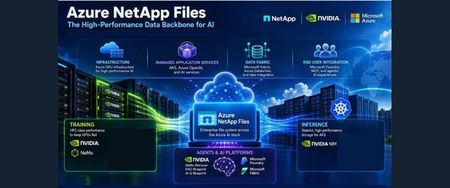
Azure NetApp Files provides a unified data foundation for enterprise AI, connecting data mobility, model training, inference, and agentic workflows. This article explores how caching, replication, high-throughput storage, low-latency checkpointing, and rapid dataset cloning help bring data closer to GPU compute and support efficient experimentation. It also examines persistent storage for containerized inference on Azure Kubernetes Service and integration with NVIDIA’s AI stack, Microsoft Foundry, and Microsoft Fabric. Two reference use cases illustrate its role in supporting domain-specific model training and modernizing AI inference while reducing infrastructure complexity.261Views0likes0CommentsEngineering an Agentic Scheduler
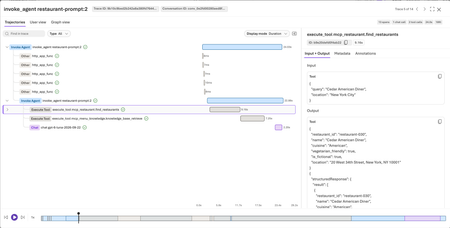
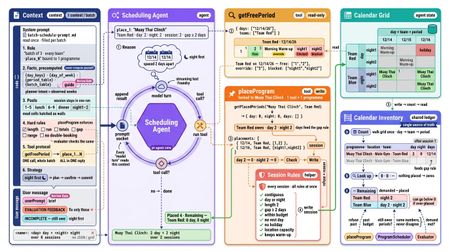
Authors: Gabriel Sze and Weixian Zhang 1. Engineering an Agentic Scheduler Scheduling looks deceptively simple until multiple constraints, shared resources, and partial commitments start interacting. This post walks through how we built an agentic scheduler that lets an LLM reason about placements while keeping the actual scheduling process deterministic and inspectable. Imagine scheduling a training program for a sports team. It needs four hours in total, split into two-hour sessions, with at least two days between them. Other activities already occupy parts of the week. Where should those sessions go? At first glance, this looks like a simple calendar problem. Find four free hours and place the session. So the engineering question is not simply: How do we ask an agent to generate a schedule? It is: How do we give an agent enough freedom to reason about scheduling, while keeping the resulting schedule deterministic, inspectable, and correct? Our application does not ask a model to produce a finished spreadsheet in one call. Instead, we decompose this into small steps. The agent gets a much smaller responsibility: choose candidate dates, inspect available slots through tools, and propose placements. 1.1 Defining the scheduling problem Imagine planning mixed martial arts training for Team Red, Team Blue, and Team Yellow in a shared training facility. We call each martial arts activity a program, and each continuous training block a scheduled session. For example, a Muay Thai program for Team Red might run over three mornings in the same week, with each morning counted as a separate scheduled session. A program typically requires a certain number of hours, divided into sessions of an allowed duration. Team Red might train in striking and pad work, Team Blue in wrestling and submissions, and Team Yellow in conditioning and mobility. Some programs may need scarce evening slots. Others compete for the same mat, ring, or instructor. Programs may also require rest days between sessions. We will follow one fictional example throughout this post. Muay Thai Sparring requires four daytime hours for Team Red, split into two two-hour sessions at least two days apart. Team Blue and Team Yellow already have wrestling and conditioning sessions elsewhere in the shared calendar. Finding four empty hours is therefore not enough: the scheduler must place two valid sparring sessions without creating team, facility, or recovery conflicts. Before scheduling starts, the application converts source data and user-provided requirements into explicit, typed scheduling constraints. An optional review step allows a person to provide additional guidance. The important boundary is that the scheduler operates on structured input rather than interpreting raw source material directly. 1.2 Why involve an agent at all? Not every scheduling preference is naturally expressed as a hard constraint. Historical patterns may suggest preferred timings, while users may provide intent such as to keep Friday relatively light, or try to keep related activities in the same half of the week. These preferences require interpretation rather than simple constraint checking. We therefore use the model where reasoning is useful: interpreting intent, exploring candidate placements, and deciding what to try next. We keep explicit rules: session duration, required hours, spacing, conflicts, and other conditions that can be evaluated deterministically. It gives us a concrete contract: the agent proposes allocations against explicit requirements; the application owns the resulting state and the checks used to assess it. 2. Designing the Software Architecture Code snippets are simplified from the source to show the shape of each component, not exact signatures. 2.1 Components Frontend: a React 19 single-page app (Vite, MUI), authenticated with Entra ID. Talks to the backend through two channels only: REST calls to start or steer a run (program scheduling), and one long-lived SSE stream for everything coming back. Holds no run state of its own. Run status, progress, the live calendar and the finished workbook all arrive as replies on the stream, so a reload rebuilds the view from what the backend sends. Everything from the Gateway onwards is the backend: one Node.js service on Azure Container Apps that the frontend reaches only through REST and SSE. Gateway: a Fastify API, the backend's only entry point. Ingress is REST: POST /api/schedule starts a run; POST /api/steer resumes a paused one with the user's instructions. Egress is SSE: GET /api/events holds one stream per browser tab. Never runs agent code. It authenticates the request, writes the upload to the session's folder, enqueues a command that references that folder and returns at once: Mailroom: the asynchronous boundary between the gateway and the agents, made of two Postgres-backed queues, each drained by its own polling loop. Agents: two LangGraph graphs for Program IQ Agent and Scheduling Agent Session: one scheduling run for one user. Each last cycle training program .xlsx upload starts a new session with its own ID, so a user running three schedules at once has three sessions. Each session has its own dedicated workspace folder structure: /sessions/{username}/{sessionId}/ input/ ← the uploaded last cycle training program .xlsx work/ ← agent scratchpad: extracted-demand-profile.json, raw rows, traces output/ → the scheduled training programs .xlsx A session can hold several agent commands, such as a run plus the user's later answer through /api/steer. Every reply carries a sessionId and a commandId, so the frontend can tell which run and which command it belongs to. Storage: Postgres: the Mailroom's two queue tables, plus LangGraph checkpoints, so a run's graph state survives a restart. Using one database for queues and state removes the need for a separate message broker. Azure Files: On Azure, /sessions lives on an Azure Files share mounted into the container at /mnt /.agent, so session files are present in multiple replicas of Azure Container Apps and can survive a restart . Azure AI Foundry: hosts the model the agents call. Agent Tracer: records every model call and tool call as OpenTelemetry traces in Azure Application Insights, plus a per-session trace file in work/. Identity: Entra ID covers user sign-in and the backend's access to Postgres and Foundry, through managed identity. 2.2 Key Design Considerations Why REST in and SSE out, instead of WebSockets? Our communication pattern is asymmetric: clients submit scheduling requests, while agents produce asynchronous updates over several minutes. We chose REST for incoming requests because it handles multipart Excel uploads, authentication, and request validation through standard HTTP mechanisms. For outgoing updates, Server-Sent Events (SSE) was a better fit than WebSockets. The browser only needs to receive progress and agent responses, not maintain a bidirectional conversation. SSE also avoids the overhead of repeatedly polling for updates that arrive at unpredictable intervals. To handle disconnections, agent replies are persisted in reply_message, allowing the client to retrieve missed updates when it reconnects. The implementation is described further in this post. Why a command queue instead of executing agents directly within HTTP requests? Scheduling runs can take several minutes, making it impractical to execute agents directly within an HTTP request. Instead, we introduced a Postgres-backed command queue to separate request handling from agent execution. When a request arrives, the gateway persists the command and immediately returns 202 Accepted, allowing the agents to continue working independently of the HTTP connection. This separation also improves reliability and gives us greater control over execution. Commands are persisted before processing begins, so they are not silently lost if a worker crashes or restarts. Interrupted runs can be identified, marked as failed, and surfaced to the user. Command loop (inbound): claims the next command from agent_command, runs the agents on it, and settles it as completed, paused or failed. Claims use row locking, so several replicas can drain one queue without running a command twice. // domain/mailroom/command-loop.ts while (!stop.stopping) { if ((await pickAndExecuteCommand(helper)) !== 'idle') { idleWait = IDLE_WAIT_MS; // work arrived: drain greedily continue; } await stop.sleep(idleWait); idleWait = nextIdleWait(idleWait); // empty queue: back off } Reply loop (outbound): delivers rows from reply_message to the SSE streams that its own replica holds. Each replica serves only the users connected to it, so there's no broker and no sticky sessions. Undelivered replies stay queued until the user reconnects. const users = sse.streamingUsernames(); // who is connected to THIS replica for (const reply of await queue.getReplies(users)) { if (sse.send(reply.username, reply) > 0) await queue.clearDelivered(reply); } The loops never call each other. Commands flow in, replies flow out, and the agents write their own replies. The command loop processes one command at a time, limiting concurrent scheduling runs and preventing too many requests from hitting the model at once. Additional commands simply wait in the queue until capacity becomes available. By keeping the execution loop separate from the agent graph, we can replace the real agents with a mock implementation and test the entire flow, from the gateway through the command queue to SSE responses, without making any model calls. // domain/mailroom/agent-run.ts — the one seam: swap the import (and its call) import { runAgentStream } from '../agent/agent-graph.ts'; // import { runMockAgentStream } from '../agent/mock-agent-graph.ts'; // domain/agent/mock-agent-graph.ts — same state, same checkpointer, one node that only talks const graph = new StateGraph(AgentState) .addNode(MOCK_REPLIER, createMockReplier()) .addEdge(START, MOCK_REPLIER) .addEdge(MOCK_REPLIER, END) .compile({ checkpointer: await checkpointer() }); Why Postgres instead of Azure Service Bus or another broker? Rather than introducing a dedicated message broker, we chose to build our command queue on Postgres, which was already serving as the application's primary database. Beyond storing application data, Postgres also manages the command queue, agent replies, execution history, and LangGraph checkpoints. This allows us to consolidate several responsibilities into a single service, reducing the operational overhead of managing, securing, and monitoring additional Azure resources. We also kept the queue implementation behind a light interface (pickNext, complete, pause, fail), allowing us to swap Postgres to a dedicated broker such as Azure Service Bus if throughput requirements grow. Ultimately, we chose to optimize for simplicity at our current scale, while keeping the architecture flexible enough to evolve. 3. From historical schedules to structured demand 3.1 Uploading past programs The workflow begins when the user uploads reference programme workbooks from previous cycles, along with any relevant contextual information that can help ground the scheduler when planning future programmes. Each uploaded .xlsx file is saved to a new session folder, after which the gateway places a lightweight command on the queue containing the user, session Id, and plan start date. The files themselves are not included in the command, keeping the queue payload small. This allows the HTTP request to return immediately while the ingestion process runs asynchronously, without tying up the web server. An optional review: true flag allows users to pause the workflow after ingestion to review the extracted information before proceeding with scheduling. We'll cover this further in the Human-in-the-loop section. // api/rest-api.ts for (const upload of uploads) await writeFile(join(input, upload.filename), upload.content); const command: AgentCommand = { commandId: nextUlid(), username, sessionId, type: 'file-upload', planStart, files, review, }; 3.2 Program IQ: extracting the demand profile and insights Program IQ serves as an intelligence layer that uses historical programmes to understand the scheduling requirements for the upcoming cycle. It starts by analysing the Excel workbooks (or whatever additional context) uploaded by the user, which contain the programmes conducted in previous cycles. Rather than relying entirely on an LLM, we separate interpretation from computation. The LLM interprets the varying structures and layouts of the workbooks, while deterministic code processes the extracted information to build a demand profile for each programme and team. This captures details such as the number of sessions required, their duration, recurrence patterns, preferred time slots, and spacing between sessions. // domain/agent/program-iq/program-iq-agent-graph.ts new StateGraph(IQState) .addNode(NODES.phaseFilesPairing, createPhaseFilesPairing()) // filename → phase .addNode(NODES.extractRawPrograms, createExtractRawProgramsAgent()) // LLM: grid → rows .addNode(NODES.normalizeRawPrograms, extractProgramIQ()) // code: rows → demand .addEdge(START, NODES.phaseFilesPairing) .addEdge(NODES.phaseFilesPairing, NODES.extractRawPrograms) .addEdge(NODES.extractRawPrograms, NODES.normalizeRawPrograms) One pi-agent-core agent per sheet, up to 6 at once. Each agent gets a system prompt (how past programs are laid out, the day's periods, what to ignore), one sheet name and two tools. It loops until every activity on the sheet is reported. Two tools The Program IQ agent has two tools: one to read the spreadsheet and another to report the extracted information. Rather than following a hardcoded sequence, we chose to introduce an LLM that sits between these tools, deciding when to read the workbook and how to interpret and report its contents. read_sheet tool uses exceljs to turn a sheet into text – understands layout, merged cells, colors, column positions, and flattens that layout into plain lines the model can read. report_activities tool records what the model found. The model reports each activity as one line: date, team, program, location, colour, periods, kind. 2024-06-17 Team Red Striking · FF92D050 1,2 training From activities to demand profiles (code) Plain code counts the reported activities into a demand profile per program and team. No LLM is involved, so every number is traceable back to the source files but meant to softly guide future planning. Demand profile What it holds Volume Total day and night periods Session length Shortest and longest session Rhythm How often it recurs, e.g. weekly on Fridays Slot pattern Which periods of the day it used Spacing Fewest days between two sessions The demand profile is the signature. Teams with identical demand profiles are grouped together to avoid duplicating the same scheduling requirements. For example, if Team Red and Team Blue require the same number of sessions, durations, recurrence patterns, and spacing, they can share a single demand profile. This grouping is purely for representation – each team still needs its own sessions scheduled independently. The output: One row per program and matching group of teams: Open Mat [Team Red, Team Blue] 4 hours a week · 4-hour sessions · weekly on Fri · ≥ 7 days apart Sparring [Team Red] 6 hours a week · 2–3-hour sessions · Tue and Thu · ≥ 2 days apart demand profile .xlsx as input to Scheduler Agent Nobody types this demand in; it is read back from what the teams previously trained. It is what the Scheduling Agent places onto next cycle's calendar, and shared rows become shared batches. 4. Human-in-the-loop: review, steer and resume Historical activity tells us what happened before, but not necessarily what should happen next. Users may want lighter Fridays, prefer certain activities earlier in the week, or restrict specific programmes to specific days. Before scheduling begins, users can review the extracted requirements and provide additional instructions through a separate steer command. This command incorporates their preferences into the existing requirements and resumes the scheduling workflow. We currently support two types of steering guides: Overall preferences apply to the scheduling run as a whole: Prefer lighter Friday afternoons where possible. Program-specific apply to a particular programme in “User Steering” column These instructions are propagated to the relevant scheduling agents, with programme-specific instructions attached to the corresponding activities across the scheduling tiers. Where user instructions conflict with historical patterns, current user intent takes precedence. However, steering an LLM is not the same as enforcing a constraint. Natural-language instructions can influence how agents propose and evaluate placements, but only constraints explicitly implemented in code can be deterministically enforced. For example, "Prefer lighter Friday afternoons" may influence which slots an agent considers, while "Sessions must be at least two days apart" can be validated after every placement. 4.1 Extracted Program IQ: pause for human steering and approval Rather than keeping an agent running while waiting for user input, the system persists the paused state in the store and sends a steer-request containing the extracted programmes for review. This allows the agent to process other requests in the meantime. The user can then review the extracted demand profile and choose to either approve it as-is or provide additional instructions: Approve as-is: submit a steer command without steering guides. Steer and approve: submit a steer command with steering guides to influence the scheduling process. In both cases, the steer command resumes the workflow and initiates scheduling using the approved requirements. // domain/agent/agent-graph.ts await writeExtractedPrograms(session, { plan, programs }); if (command.review === true) { await enqueueReply(newSteerRequest(command, steerableProgrammes({ plan, programs }))); return 'paused'; } 4.2 Steer and Resume As shared, steering can take two forms: program-specific (guides[]) and an overall preference that applies to the entire scheduling run. Both are optional and serve as guidance for the scheduling agents rather than automatically enforced constraints. The request creates a new steer command associated with the existing session. Instead of reprocessing the original Excel workbooks, the workflow reloads the saved demand-profile.json, attaches any programme-specific instructions to their corresponding records, and proceeds directly to scheduling. if (command.type === 'steer') { const steered = withSteeringGuides(await readExtractedPrograms(session), command.guides); yield* schedulePhases(command, session, steered, command.brief ?? '', onProgress); } 5. Inside the Scheduling Agent and Harness Engineering Before we dive in, let's establish a few key terms and how they relate to one another: Slot (or Period): A single unit of time, typically 1 hour, but configurable to other durations. Session: A scheduled training instance consisting of one or more slots. Program: A type of training, such as Muay Thai Clinching or Pad Work. Each program can have multiple sessions. Grid (or Calendar): The scheduling interface where slots and sessions are organized and displayed. In short, a program contains sessions, each session occupies one or more slots, and everything is represented on a calendar grid. The LLM's reasoning and tool-calling loop is only one part of the scheduling system. Around it, we need to manage what context the agent receives, which tools it can access, how scheduling state is maintained, how proposed changes are applied, and what happens when the schedule remains incomplete. In our implementation, LangGraph orchestrates the overall scheduling workflow, while pi-agent-core manages the LLM's reasoning and tool-calling interactions within individual stages. Other stages, such as deterministic seeding and schedule evaluation, run entirely through code without invoking an LLM. new StateGraph(AgentState) .addEdge(START, 'HolidaySeeder') // code .addEdge('HolidaySeeder', 'RoutineSeeder') // code .addEdge('RoutineSeeder', 'EventScheduler') // LLM .addEdge('EventScheduler', 'ProgramScheduler') .addEdge('ProgramScheduler', 'Evaluator') // code .addConditionalEdges('Evaluator', (s) => failed(s) && s.round <= 3 ? 'ProgramScheduler' : 'FillerScheduler') .addEdge('FillerScheduler', END) .compile({ checkpointer: new PostgresSaver(pool) }); Before each agentic scheduling phase, the harness prepares the context relevant to the current batch and provides tools scoped to that task. The agent can inspect availability and propose placements, but it does not maintain its own separate version of the schedule. Instead, its tools interact with the same calendar state used by the application, ensuring that scheduling decisions are based on a consistent view. The process begins deterministically. Existing routines, breaks, and recurring activities that can be reliably identified are placed onto the calendar before the agent begins scheduling. The agent then works with this partially populated calendar to find suitable slots for the remaining activities. Once placements are made, deterministic evaluators check the updated schedule for completeness and constraint violations, rather than relying on the LLM to assess its own work. 5.1 What the agent works with (context engineering) An important part of building the scheduling agent is deciding what information the LLM needs, what it can retrieve through tools, and what should remain in application state. Rather than asking the model to work out information the application already knows, we provide stable facts such as available dates, their corresponding weekdays, and the ordering of scheduling periods directly in its context. Our approach to context engineering follows a simple principle: provide stable facts upfront, retrieve changing calendar information through tools, and keep the authoritative scheduling state outside the conversation. Calendar grid (agent state) - The calendar is a nested dictionary held in memory, schedule[day][team][period], where each entry holds what is scheduled in that slot. The agent tools and calendar inventory work on this one object directly, so a write is visible to the next read at once, with no database in between. System prompt - The system prompt is a Markdown template, batch-schedule-prompt.md, read from disk once. Before the first turn, code fills its {placeholders} with this run's values: // domain/training/scheduler.ts systemPrompt: fillPromptTemplate(template, { day_keys: phase.dayKeysJson, // the dates the model may use day_of_week: phase.dayReference, // each date whether is it a weekday so model knows the weekdays period_table: PERIOD_TABLE, // the slots in a day // … }), The filled prompt tells the model: Role: which program to place, and the one write tool bound to it. Facts: dates, weekdays and slot layout, worked out in advance. The prompt says "never compute these yourself", because models get calendar arithmetic wrong. Rules: what a valid session looks like, stated so the model can plan without trial and error. Tool protocol: read once, then send every placement in one reply. Strategy: plan → confirm → commit. User prompt holds what changes from run to run: the user’s steering guide and, on a retry, only the sessions that failed. 5.2 What the scheduling agent does An important part of designing the scheduling agent is deciding what it can read and what it is allowed to change. Rather than giving the agent unrestricted access to the calendar, we expose a set of tools with clearly defined boundaries. Read tools provide the information needed to make scheduling decisions, while write tools constrain how placements can be made. A query specifies candidate days, teams, and an optional slot window. The response distinguishes between: empty slots commitments that may be overridden hard blocks that cannot be changed To minimise unnecessary context, the response is compressed. For example, if an entire day is unavailable, the tool returns a short marker rather than listing every blocked period individually. The prompt encourages a simple search pattern: choose candidate dates → query free slots in candidate dates → propose a placement → inspect alternatives if necessary Agent loop The agent runs a plain loop: model turn → tool call[]? → run each tool → append result → model turn. Each result is the model's only view of the calendar. The loop ends when there is no tool call. 1. Plan - The model chooses candidate days from the facts in its prompt, without calling a tool. The planning is cheap reasoning, so the tools only confirm and commit. 2. Read with getFreePeriod The model pass in the dates as tool parameter for every team it needs, in one call: { "days": ["12/14/26", "12/16/26"], "teams": ["Red"] } It gets back one answer per day and team: { "day": "12/14/26", "team": "Red", "free": ["1", "2"], "override": ["3"], "blocked": ["night1", "night2"] } free is empty, override holds an overridable routine activity (e.g resting) the program may replace, and blocked is off limits. The model picks from these lists rather than reading the calendar, so the context window stays small. 3. Write with placeProgram - The model sends all the program's sessions in one call. The tool runs two checks: 3.1 Work out how many slots the program is left to place - Each programme owes a fixed number of slots per company. The tool subtracts the slots the calendar already holds, and refuses any session that would go over what's left. // domain/agent/tools/place-program.ts const inventory = takeCalendarInventory(plan); for (const team of program.teams) { const placed = getPlacedPeriods(inventory, program, team); remaining.set(team, program.demand - placed.periods); // what it may still place placedDays.set(team, placed.days); // what the spacing rule checks against } The count is read from the calendar grid, not kept in the tool. On a retry, a fresh tool is built over the same grid, so sessions placed in earlier rounds still count against the budget and the spacing rule. 3.2 Check every rule at once - Each rule is a small function that returns a reason, or nothing if the session passes. placeProgram runs them all on every session and keeps every reason. Some examples of the rules: nonContiguousReason() - the slots run back to back with no gaps resolveDayOrNight() - all daytime or all night-time, never both tooCloseReason() - enough days after the program's last session overDayNightPoolBudget() - no more slots than the program still needs Reflection pattern: a session that fails any rule is refused, and all its reasons go back to the model. The model fixes them in one resend instead of one retry per rule. 4. Commit - Valid sessions are written to the grid. The tool replies with placed, refused (with reasons) and still owed. 5. Definition of done - A program is scheduled when it owes zero periods for every team. The model then makes no tool call, and the loop ends with a one-line summary. Anything still owed → the scheduler re-prompts with INCOMPLETE 5.3 Batches, lanes and the agent loop The harness doesn't hand every program to one agent. It splits the work into small batches, each running its own agent loop, then uses planLanes() to decide which batches can run at the same time. const { sharedLane, teamLanes } = planLanes(programs, batchSize=3); Plan Lanes - Plans two kinds of lane by comparing each team's demand profile: rhythm, session length, volume, spacing and slot pattern. We earlier discussed how the demand profile is the team’s signature – it's basically reusing this concept. Several teams with the same demand profile → the shared lane. One team, or a demand profile no other team matches → that team's team lane. The split is by matching demand profile, not by program name, all five parts must be equal. Team Red and Team Blue both do Open Mat, 4 hours a week on Fridays → one row - Open Mat [Team Red, Team Blue], in the shared lane. Team Red does Sparring 6 hours a week, Team Blue 4 → two rows - Sparring [Team Red] and Sparring [Team Blue], each in its own team lane. It then cuts each lane's programs into batches of BATCH_SIZE = 3, and returns a LanePlan (example at the end of this section). 1. Shared lane - It holds programmes that several teams need in the same amounts, such as Open Mat. It runs first, one batch at a time, because its batches write into several teams' calendars and nothing else can safely run alongside them. 2. Team lanes - Each team gets one lane, and a lane runs one agent at a time. A lane's batches run in order. Each batch of up to three programmes gets a new agent, which places them and ends before the next batch starts. Lanes run in parallel. Up to LANE_WIDTH = 4 lanes run at once, and a fifth team's lane starts when one of the first four finishes. All lanes write into one shared calendar, but each writes only its own team's columns, so parallel lanes can't collide. interface LanePlan { shared: TrainingProgram[][]; // batches → programs, same calendar grid lanes: TrainingProgram[][][]; // lanes → batches → programs, same calendar grid } { shared: [ [Open Mat] ], lanes: [ [ [Striking, Grappling, Pad Work], [Clinch Work, Footwork] ], // Team Red: 2 batches [ [Wrestling, Takedowns, Submissions], [Guard Passing] ], // Team Blue: 2 batches [ [Conditioning, Mobility] ], // Team Gold: 1 batch ], } - shared[0] = [Open Mat], the first shared batch, which is one agent. - lanes[0] = Team Red's lane, a list of 2 batches. - lanes[0][0] = [Striking, Grappling, Pad Work], Team Red's batch 1, which is one agent conversation. - lanes[0][1] = [Clinch Work, Footwork], Team Red's batch 2, the next agent. - lanes[0][0][1] = the Grappling TrainingProgram. 6. How we determine correctness The two level evaluators checks five rule families: exact coverage of day and night requirements spacing between scheduled sessions session length valid day/night pools and meal boundaries resource capacity. It reads the accumulated calendar grid after the main scheduling pass, not a summary written by the model. Write-time evaluation and whole-grid evaluation serve different purposes. Two individually acceptable blocks can touch and become one overlong block in the assembled calendar. Likewise, refusing to exceed a budget does not establish that the full budget was placed. 6.1 Whole-grid evaluation Plain code grades the calendar; the model never judges its own work. Five rules run, and only the failing programs go back, up to 3 times. The evaluator gives an objective pass or fail. The model never judges its own work. Five rules. coverage: placed equals demanded. gap: sessions are spaced far enough apart. session-length: each session is the right size. pool: day work in day slots, night work in night slots, nothing in meal times. resource: no location over capacity. Failures. Each failure names its program, team and what broke. On a retry, the scheduler re-runs only the failing programs, each with its own list of what to fix. 6.2 Write-time checks Before a scheduled session is committed, the placeProgram tool checks constraints such as: allowed session length spacing from existing sessions remaining scheduling budget resource capacity If a check fails, the proposed session is rejected before the calendar changes. The tool returns a reason that the agent can use on its next attempt. Suppose Activity A requires two-hour sessions, but the agent proposes only slot 1. That one-hour block fails the session-length check. Nothing is written. The agent can then resubmit slots 1–2. If the new proposal passes the checks, those two hours are committed. The important distinction is that the agent is correcting a rejected proposal, not undoing an already committed placement. 7. Agent's real-time progress The agents report as they work; the browser never polls. Progress status, calendar snapshots and finished workbooks stream in over SSE. A run takes minutes per phase, so the user sees agent working instead of a spinner. Graph nodes post replies onto the reply queue as they go, and the mailroom reply-loop streams them to the browser over SSE. Three reply kinds ephemeral-notice: a progress line, e.g. "Phase 1 — programs to schedule: 42". grid: a snapshot of the calendar, so that frontend gets live calendar updates of programmes’ slots. file-download: Each workbook is saved to output/ as soon as it's finished, then sent straight to the browser as a download over SSE. 8. Tracing agent trajectory pi-agent-core exposes an onPayload hook that intercepts requests before they reach the model, allowing us to trace every prompt, tool call, and final answer. Tool results are also traced but truncated. Each trace goes to three sinks at once: the console, the session's work/ folder and Azure Application Insights. We study the conversation logs to identify excessive conversation turns and tool calls, and to trace incorrect schedules back totheir root cause. const agent = createPiAgent(plan) { onPayload: (payload) => { trace(payload as LLMPayload); } } Example. Each agent writes its own conversation as .jsonl files in session's work/ folder. /sessions/{username}/{sessionId}/work/ program-iq-Wk-1.jsonl ← one file per sheet program-iq-Wk-2.jsonl ProgramSchedulerAgent-Striking-Grappling-Pad-Work.jsonl ← one per batch Each turn in a conversation is one JSON line. {"agent":"program-iq-Wk-2","turn":1,"role":"user","content":"Sheet: Wk 2. Report every activity in it."} {"agent":"program-iq-Wk-2","turn":2,"role":"assistant","tool_calls":[{"name":"read_sheet","arguments":{"sheet":"Wk 2"}}]} {"agent":"program-iq-Wk-2","turn":3,"role":"assistant","tool_calls":[{"name":"report_activities","arguments":{"activities":["2025-04-01 Team Red Striking Main Gym 4,5 training","2025-04-01 Team Blue Wrestling Mat Room 4,5 training","…"]}}]} {"agent":"program-iq-Wk-2","turn":3,"role":"tool","content":"24 activities, 24 so far."} 9. Looking forward: the potential applications and improvements Although this application was designed for training programme scheduling, the underlying engineering tactics and patterns applies to other planning problems that combine structured constraints with less explicit human preferences. Potential domains include workforce rostering, facility and equipment allocation, maintenance planning, logistics coordination, and project scheduling. These domains share similar characteristics: multiple parties compete for limited resources, some requirements must always be satisfied, and other preferences require interpretation and trade-offs. There are also several areas where the scheduler could be improved. Optimizing beyond correctness The current implementation primarily determines whether a schedule is complete and valid. A future version could score multiple valid schedules against objectives such as resource utilization, schedule compactness, adherence to user preferences, or the number of existing activities overridden. This would allow the system to distinguish between a schedule that simply passes validation and one that is operationally preferable. Targeted replanning A user may want to change one programme, unavailable date, or resource constraint after the schedule has been generated. Rather than regenerating the entire calendar, the scheduler could identify the affected placements and replan only that portion of the schedule. Supporting targeted replanning would require the system to preserve dependencies between scheduling decisions so that it can determine which programmes and resources are affected by a change. Clearer explanations for scheduling decisions The current traces make the agent's execution inspectable to developers. A future version could expose model’s reasoning and turn traces into user-facing explanations, such as why a programme was placed on a particular date or which preference could not be satisfied. These explanations should be derived from tool results and evaluator outcomes rather than relying on the model to reconstruct its reasoning after the schedule has been completed. This boundary is what makes the pattern reusable: give the agent room to reason, while keeping the resulting system deterministic, inspectable, and operationally manageable. Libraries and Resources pi-agent-core - https://github.com/earendil-works/pi/tree/main/packages/agent LangGraph - https://github.com/langchain-ai/langgraph exceljs - https://github.com/exceljs/exceljs zod - https://zod.dev/#introduction Azure Database for PostgreSQL - https://learn.microsoft.com/en-us/azure/postgresql/ Azure Container Apps - https://learn.microsoft.com/en-us/azure/container-apps/overview Microsoft Foundry - https://azure.microsoft.com/en-us/products/ai-foundry/models/
Marketplace search for transactible offers
Hi community! We have a transactable offer published in the Microsoft Marketplace, consisting of a Teams app and a SaaS offer. Both are live, and we've recently achieved two important milestones: Microsoft 365 Certification for our Teams app and Azure IP Co-sell status for our SaaS offer. From a technical perspective, I understand that these are two separate Marketplace listings. However, from the customer's perspective, they are components of one and the same transactable solution. We've recently had clients trying to find Youkeeps by applying the Microsoft 365 Certified and Azure benefits filters, but unfortunately, neither of our listings appears in the search results. This creates a rather confusing situation: we've done the work to obtain the certifications and benefits that customers are specifically looking for, but they still can't discover our solution using those filters. Is there a way to link these two listings or make sure that customers can discover the complete solution when searching by either of these criteria? I believe this is an important discoverability issue, not just for us, but potentially for other ISVs offering solutions through multiple Marketplace components. Would appreciate any insights or suggestions from the community! #MarketplaceChampions #Sponsored #MicrosoftMarketplace #MicrosoftPartner #AIAgentsBuild a dual-mode voice agent in Microsoft Foundry with native subagents
Voice agents are changing how companies interact with customers. From service questions to technical support, the expectation is the same: a natural conversation that leads to useful, reliable answers. But responding quickly and resolving a complex request are not always the same task. Some questions can be answered directly. Others require information from backend systems, specialized analysis, or several steps to determine what should happen next. The challenge is to support that deeper work without putting the conversation on hold, or giving an answer before the necessary information is available. In this blog, I will walk through a dual-mode voice-agent pattern in Microsoft Foundry. A frontline agent manages the real-time conversation, while a backend agent handles specialized work. We will explore how these responsibilities work together, how the frontline can continue interacting while backend processing runs, and how to configure and verify the experience. The pattern is broadly applicable, with particular relevance to telecom customer service and support. You will learn how to: Separate real-time conversation from specialized backend work. Configure a native voice subagent Understand how Voice Agents build on Voice Live Test delayed responses, interruptions, missing information, and backend failures. How voice agents work Before we look at our full workflow. Lets have a look at the voice experience in Microsoft Foundry. A voice application needs to carry audio, manage the conversation, and connect that conversation to useful information or actions. Those responsibilities work together, but they are not the same layer. A browser or contact-center connector handles audio capture and playback The voice runtime manages streaming and turn-taking Instructions, knowledge, and authorized tools determine what the agent can say and do. In Microsoft Foundry, Voice Live provides the real-time speech foundation. Voice Agents build on it with a named, versioned agent definition and capabilities such as tools, tracing, and evaluation. The diagram below shows the underlying voice pipeline. Audio arrives from the client Before anything else, Voice Live cleans up that audio. It uses conversational enhancements that can reduce background noise and echo and help detect when a speaker has finished a turn. The exact combination depends on the selected model, pipeline, and audio settings; not every session uses all the processing stages shown The conversation can then either follow a native speech-to-speech path. A model in the GPT Realtime family processes spoken input directly and produces a spoken response. Supported configurations can also use Azure Speech voices for output, so choosing a realtime model does not mean we must use its native output voice. Alternatively, a cascaded pipeline converts speech to text, sends that text to a language model or agent, and synthesizes the response as speech. This separates the recognition, conversation model, and voice choices. Voice Live can manage that pipeline without us writing the streaming and turn-taking loop ourselves. In either path, useful answers may also require knowledge sources or external tools. These connections give the agent access to information and actions beyond the conversation itself. Configure the required permissions and safety controls for the selected model and application; a tool or content-safety box in the diagram is not a substitute for those decisions. On the return path, speech streams back to the client for playback. Where supported, Azure Speech provides standard and HD voices, with custom voice subject to access requirements. These choices describe how the spoken conversation runs. The dual-mode pattern adds a different separation: the frontline owns that conversation, while a backend agent handles a focused task. It does not require two speech-to-speech models, and the backend does not speak directly to the caller. How the frontline and backend work together To keep the conversation responsive while specialized work runs, we separate the caller-facing interaction from the backend task. Each agent has a clear responsibility: The frontline agent is responsible for the interaction. It listens, takes turns, answers supported questions, and explains what happens next. The backend agent has a different job: work through a focused task, such as reviewing incident evidence or recommending a troubleshooting sequence. The important part is that delegation does not have to take the caller out of the conversation. The frontline can remain active while the backend works. In the native subagent pattern, this behavior is configured through the agent definitions, instructions, and response policy rather than a separate routing model The following diagram shows how those responsibilities fit together: The voice client captures and streams the caller’s audio: The client connects the caller to the frontline voice agent, sends microphone audio, and plays returned speech. It can also display transcripts and runtime events. The client can send audio and receive events concurrently. The frontline voice agent decides whether to answer directly or delegate: The frontline owns the live conversation. It handles straightforward requests within its configured knowledge and permissions without invoking the backend. When a request needs specialized work, the frontline uses its instructions and the configured subagent’s description to determine when to delegate. Direct answers return through the voice client without a backend invocation. Foundry invokes the configured backend subagent. The voice agent’s subagent_config references a backend in the same Foundry project by name. Foundry invokes that backend for the delegated task. The frontline retains ownership of the voice conversation; the caller is not transferred to the backend. The backend performs the task and uses its tools. A prompt or hosted agent follows its own instructions and can retrieve data, call APIs, or execute supported functions. Access to service information, incident records, or diagnostics must be explicitly configured and authorized. Meanwhile, the frontline keeps the voice interaction active. Its response_policy controls an immediate acknowledgment, gap-filling speech, and supported progress updates. The basic sample enables only immediate_ack=True; additional behavior requires configuration. The frontline can receive further caller input, but it must not invent backend findings while waiting. Further caller input does not automatically update an in-flight backend task. Results and supported progress return through Foundry. The backend returns its output to the frontline through managed delegation. Where supported and enabled, progress can also inform the conversation before completion. The diagram’s return arrow does not mean every backend automatically streams intermediate findings. The frontline presents the result to the caller. Following its instructions, it explains the findings, communicates uncertainty, and identifies appropriate next actions. Speech streams back through the client for playback. The backend does not speak directly to the caller, and its output is not necessarily identical to the spoken response. Note: The GPT Live samples demonstrate an alternative implementation of the conversation/backend split. They use VoiceAgentLiveDefinition and live.connect(), with direct Responses or managed prompt-agent delegation. The design goal is responsiveness without sacrificing depth. A fast acknowledgment improves perceived waiting time; it does not shorten the underlying investigation or guarantee an accurate answer. Measure conversational responsiveness and backend task quality separately. Decide when the frontline should ask for help With the flow in place, the next question is when the frontline should ask for help. Define clear boundaries in the frontline agent’s instructions and the subagent’s capability description. Rule 1: Answer directly when the frontline has sufficient grounded information and permission to respond. Rule 2: Delegate when the backend owns the required capability. This might include combining information from several systems, assessing service impact, investigating symptoms, or developing a troubleshooting plan. Rule 3: Escalate when the request exceeds the automated workflow’s boundaries. Define what should happen when an action requires human approval, evidence remains insufficient, or a tool failure prevents progress. Implement and test the human-handoff or failure path; instructions alone do not provide it. From the caller’s perspective, this should feel like one conversation, not a handoff between agents. The frontline listens, clarifies the request, and brings in specialized help when needed. The caller does not need to understand which backend agent or tool is doing the work. When backend processing begins, an enabled acknowledgment can make that transition clear: “Let me check that for you.” If gap-filling speech or supported progress updates are configured, the frontline can keep the caller informed while the task runs. Those updates should reflect what is actually known, without implying that a check has completed or a result has been confirmed. Once the backend returns, the frontline explains the outcome in language suited to the conversation. That might be a confirmed finding, a recommended next step, or a clear statement that more information is needed. The goal is not to fill every pause with speech. It is to keep the caller oriented while specialized work happens in the background, and to make the eventual answer useful, understandable, and grounded in evidence. Build the native voice-subagent workflow Now that we have defined the conversation flow, let’s configure the agents behind it. We will use native voice subagents throughout this walkthrough: a VoiceAgentDefinition for the frontline, a prompt agent for the backend, and subagent_config to connect them. Voice subagents are currently in preview. Microsoft does not recommend features in preview for production workloads. Step 1: Give the backend one focused responsibility Start with the work the frontline should delegate. A useful backend has a clear responsibility. The subagent can be a Foundry prompt agent or a hosted agent in the same project. For our example here we will create a prompt agent that can analyze information supplied to it. It can be connected to knowledge bases and different tools to help. You can also create a subagent in the Microsoft Foundry portal or deploy a code-based hosted agent. Keep the instructions specific to the backend’s actual capabilities. If it can only analyze supplied information, say so. If you later add an incident lookup, update the instructions and capability description to reflect that change. Instructions guide model behavior; they do not enforce permissions or guarantee an output schema. Restrict access in the tools and services themselves, and validate any structured fields your application relies on. Separate read-only investigation from actions that change a customer account or service. Step 2: Connect the backend to the frontline Next, we can create the caller-facing voice-based agent. We can create this using the SDK. In its instructions we should explain when to delegate to the backend agent and we should add the backend agent to its subagent_config. In the subagent_config, you identify the backend agent by name and describe when the voice-based agent should delegate a request to it in the agent_capabilities, which describes the specialist’s responsibility. You can use the following code to spin up such an agent (Also see: Use a subagent in a Voice-based agent - Microsoft Foundry | Microsoft Learn) import os from azure.ai.projects import AIProjectClient from azure.ai.projects.models import ( RealtimeAudioFormatsAudioPcm, VoiceAgentAudioConfig, VoiceAgentAudioInputConfig, VoiceAgentAudioOutputConfig, VoiceAgentDefinition, VoiceAgentInputTranscription, VoiceAgentServerVadTurnDetection, VoiceAgentSubagent, VoiceAgentSubagentConfig, VoiceAgentSubagentResponsePolicy, ) from azure.identity import DefaultAzureCredential endpoint = os.environ["FOUNDRY_PROJECT_ENDPOINT"] model = os.environ.get("FOUNDRY_VOICE_MODEL", "gpt-realtime-2.1") definition = VoiceAgentDefinition( model_type="managed", model=model, instructions=( "You are a real-time customer support assistant for service incidents. " "Handle straightforward factual and support-process questions directly. " "For complex troubleshooting, SLA-risk triage, root-cause hypotheses, " "or multi-step remediation planning, call forward_to_subagent for " "the configured telco support agent. " "After the subagent returns, provide a concise, customer-safe summary " "and next actions. " "Do not present uncertain reasoning as confirmed fact." ), store=True, output_modalities=["audio"], audio=VoiceAgentAudioConfig( input=VoiceAgentAudioInputConfig( format=RealtimeAudioFormatsAudioPcm(rate=24000), turn_detection=VoiceAgentServerVadTurnDetection( threshold=0.5, prefix_padding_ms=300, silence_duration_ms=1000, ), transcription=VoiceAgentInputTranscription( model="azure-speech", ), ), output=VoiceAgentAudioOutputConfig( format=RealtimeAudioFormatsAudioPcm(rate=24000), voice="en-US-JennyNeural", voice_type="azure-standard", ), ), subagent_config=VoiceAgentSubagentConfig( subagents=[ VoiceAgentSubagent( agent_name="[BACKEND AGENT NAME]", agent_capabilities=( "Performs deeper SLA-risk triage and troubleshooting " "reasoning, including structured cause hypotheses " "and remediation planning." ), response_policy=VoiceAgentSubagentResponsePolicy( immediate_ack=True, ), ) ], ), ) with ( DefaultAzureCredential() as credential, AIProjectClient( endpoint=endpoint, credential=credential, allow_preview=True, ) as project_client, ): voice_agent = project_client.agents.create_version( agent_name="frontline-voice-agent", definition=definition, description="Voice frontline with subagent delegation", ) print( f"Created voice agent '{voice_agent.name}', " f"version {voice_agent.version}" ) While you currently can't link these subagents through the portal You can see the subagents linked and its instructions in the portal by clicking on the YAML button. Step 3: Configure what the caller hears while waiting With the basic connection in place, we can decide how the frontline should support the caller during backend work. Use the optional response_policy object to control what the voice agent says while it waits for a subagent: immediate_ack: Specifies whether the voice agent immediately acknowledges that it forwarded the request. ack_instructions Provides instructions for generating the immediate acknowledgment. enable_delta_progress Emits progress incrementally instead of waiting for the subagent invocation to finish. The default is false. gap_filling_interval Sets the period without subagent content or user input before a gap-filling response. Use a value from 5 through 120 seconds. gap_filling_instructions Provides instructions for speech generated while the voice agent waits for progress. progress_instructions Provides instructions for summarizing streamed subagent progress as speech. progress_update_interval Sets the minimum time between spoken progress updates. Use a value from 5 through 300 seconds. Step 4: Start a conversation with the voice agent With the frontline and its subagent configured, we can now test the spoken experience. The quickest starting point is the Foundry playground: open the project containing both agents, go to Build → Agents, select frontline-voice-agent, and open it in the playground. Start a voice session and allow microphone access. This tests the saved agent configuration without building a local audio client. For a custom application, we can use the shared native microphone client linked here (Native voice client: dependencies, launch commands, and event handling) or the complete client in the Microsoft Learn walkthrough. Configure it with the same Foundry project endpoint and the name created in Step 2: frontline-voice-agent. The client connects through beta.voice_agents.realtime.connect(), sends microphone audio, and receives speech and events concurrently. The example uses 24 kHz PCM audio and plays the returned audio chunks as they arrive. Follow the setup and readiness sequence of the client we choose rather than combining snippets from different clients. Voice activity detection identifies speech boundaries; the frontline instructions and subagent configuration still determine when to delegate. Start with a general support question, then ask for analysis that should use the backend. Check the execution evidence as well as the spoken answer: an acknowledgment alone does not prove that the subagent ran. In our current configuration, only immediate_ack is enabled, so additional gap filling or progress narration should not be assumed. Use headphones to prevent speaker audio from feeding back into the microphone. Then introduce a delayed response, a caller correction, missing evidence, and a backend failure. Check how the frontline responds and what the execution trace shows. Test interruptions separately: stopping audio playback does not prove that the backend task was canceled. From a microphone to a contact-center call The microphone client helps us validate the agent. Connecting it to a contact center adds another layer: a channel integration that bridges call audio and call-control events to the voice runtime. The division between frontline and backend remains useful, but a working local conversation does not automatically provide telephony routing or human transfer. The Azure-Samples Call Center Voice Agent Accelerator documents browser testing and multiple telephony providers, including Genesys Cloud, Azure Communication Services, and Twilio. It provides a reference for the channel-integration layer. There are also call-center-specific accelerators e.g. This Genesys Voice Live Connector sample. This integration option uses Genesys Cloud AudioConnector and a connector service between Genesys and Azure Voice Live. The connector handles the channel protocol and audio conversion; the agent handles the conversation and its configured tools. Conclusion A dual-mode voice agent separates responsibilities that operate on different timelines. The frontline keeps the conversation clear and responsive; the backend performs specialized work. Native subagent delegation connects them without handing the caller over to another speaking agent. The value is not constant speech or an instant answer to every request. It is an interaction that stays understandable while the necessary work happens, then delivers a response grounded in what that work actually established. Next Steps Ready to go deeper? Use a subagent in a Voice-based agent (preview) – Follow the end-to-end walkthrough to create a backend subagent, configure delegation, and test the spoken experience. Configure a voice agent – Explore model selection, audio settings, turn detection, voices, and agent behavior. Native voice-subagent samples – Explore working examples that connect a frontline voice agent to prompt or hosted backend agents. Voice Live overview – Learn about the underlying speech capabilities, supported models, and regional availability. Genesys Cloud Voice Live Connector – Explore a sample audio bridge between Genesys Cloud and Azure Voice Live, with a simulator for local testing. Call Center Voice Agent Accelerator – Explore deployment guidance and reference integrations for browser-based conversations and supported telephony providers.168Views0likes0Comments