ai
52 Topics
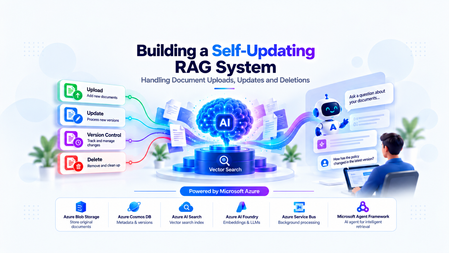
Building a Self-Updating RAG System: Handling Document Uploads, Updates and Deletions
The Hidden Challenge of Production RAG Imagine your organization has deployed an AI assistant to answer questions about employee policies. An employee asks, “How many days of annual leave am I entitled to?” The assistant responds confidently: “15 days.” There is just one problem. The company updated its policy last week. Employees are now entitled to 20 days. The updated PDF was uploaded successfully. The storage service is healthy. The search index is responding. The language model is generating answers without errors. Yet the answer is wrong. This is a different kind of production failure. Nothing appears to be broken at the infrastructure level. The failure lies in the relationship between the source document and the information the AI retrieves. Retrieval-Augmented Generation (RAG) systems depend on external knowledge to ground their responses. But that knowledge is not static. Policies change, contracts get revised, product documentation evolves, and outdated documents are removed. When the underlying documents change, the associated chunks, embeddings, metadata, and search-index entries must be managed accordingly. Otherwise, the system can continue generating plausible answers from information that is no longer valid. Building a RAG pipeline is a retrieval problem. Keeping it correct as data changes is a data lifecycle engineering problem. In this article, we will design a self-updating RAG system that handles document creation, updates, and deletion while addressing asynchronous processing, version consistency, failed jobs, and stale retrieval results. The goal is not simply to index documents automatically. It is to make sure that the right version of the right document is available to the right user when a query is executed. Understand the Problem Before Designing the Architecture A basic RAG pipeline is relatively straightforward: Load a document. Extract its text. Split the text into smaller chunks. Generate an embedding for each chunk. Store the chunks and embeddings in a searchable index. Retrieve relevant chunks when a user asks a question. Pass the retrieved context to a language model to generate an answer. This works well when the document collection is relatively static. The difficulty begins when the source data changes after indexing. Consider three common scenarios. Scenario A: A document is uploaded A new policy is added to the knowledge base. The system must process it and make its content searchable. Until indexing finishes, the document may not be available to the chatbot. Scenario B: A document is updated The original policy allows 15 days of annual leave. A revised policy allows 20 days. If the new version is indexed without correctly deactivating the old version, both versions may appear in search results. The language model may then select the wrong passage or combine conflicting information. Scenario C: A document is deleted An administrator removes a document from the application. However, deleting the original PDF from storage does not automatically delete the corresponding records from Azure AI Search. The content may remain searchable until its indexed chunks are removed. Azure AI Search document deletion itself can also take time to be reflected in index statistics. Microsoft Learn: Delete documents in Azure AI Search These scenarios reveal an important design principle: The source document, its metadata, the background processing jobs, and the search index must be treated as parts of one logical lifecycle—even though they are separate systems. We need a design that can handle failures between these systems without exposing outdated or unauthorized content. Design the System Around Clear Responsibilities Rather than making the upload API responsible for every operation, we can separate the system into a document management path, an asynchronous processing path, and a query path. The Proposed Architecture The design uses the following components: Component Responsibility Azure Blob Storage Stores the original document files Azure Cosmos DB Maintains document metadata, versions, and lifecycle state Azure Service Bus Queues ingestion and deletion jobs Background worker Extracts text, creates chunks, generates embeddings, and updates the index Microsoft Foundry Provides the models used for embedding generation and response generation Azure AI Search Stores searchable document chunks, metadata, and vectors FastAPI Exposes document management and chat APIs Microsoft Agent Framework Supports agentic query workflows when multi-step reasoning or tool use is required The background worker can be implemented as a separate Python service or another suitable compute component. It does not have to be part of the FastAPI process. Why separate these responsibilities? Suppose a user uploads a 100-page contract. The application may need to extract text, split thousands of characters into chunks, generate embeddings, and send multiple indexing requests. Performing all of that synchronously inside the upload request increases latency and makes the API vulnerable to timeouts. Instead, FastAPI accepts the request, persists the document and its metadata, and arranges for the work to be processed asynchronously. The worker performs the expensive operations independently. This allows ingestion to scale separately from query traffic and makes retries easier to manage. The query path remains separate: it retrieves eligible, relevant chunks and uses them to ground the model's response. Establish a source of truth Azure Cosmos DB should hold the authoritative lifecycle metadata in this design. Azure AI Search is the retrieval index, not the authority on whether a document is currently active. For example, a document record might look like this: { "id": "policy-123", "documentId": "policy-123", "currentVersion": 2, "indexedVersion": 1, "status": "PROCESSING", "blobPath": "policies/leave-policy.pdf" } Here, version 2 is the desired version, but version 1 is still the last successfully indexed version. The application must not assume that the latest upload has already become searchable simply because the metadata record has been updated. This distinction between the desired version and the indexed version is central to reliable lifecycle management. Implementing Document Uploads A reliable upload operation involves more than storing a file and sending a message to a queue. It must establish a durable record of the document, identify the version being processed, and ensure that background processing can be retried safely. Step 1: Accept and persist the document When a client uploads a document, FastAPI validates the request, checks the user's permissions, and stores the original file in Azure Blob Storage. The application then creates or updates the document metadata in Cosmos DB. At this stage, the document can be marked as PROCESSING until the ingestion pipeline completes. Step 2: Schedule background processing The system creates an ingestion job containing enough information for the worker to locate the source and determine exactly which version to process. For example: { "operationId": "op-789", "operation": "INGEST", "documentId": "policy-123", "documentVersion": 2, "blobPath": "policies/leave-policy-v2.pdf" } The worker should process the specified version rather than blindly reading whatever file happens to exist at a mutable storage path. For systems that overwrite the same blob path, use blob versioning, an immutable version-specific path, or another mechanism that ensures the worker reads the intended content. Step 3: Extract, chunk, and embed The worker downloads the appropriate document and extracts its text. The extracted text is divided into chunks. Each chunk should carry identifiers that connect it to its parent document and version. For example: { "id": "policy-123-v2-chunk-001", "documentId": "policy-123", "documentVersion": 2, "chunkNumber": 1, "content": "Employees are entitled to 20 days of annual leave." } The worker generates an embedding for each chunk and writes the chunk, its metadata, and its vector to Azure AI Search. The exact index schema depends on the retrieval strategy, embedding dimensions, filtering requirements, and whether hybrid search is used. Step 4: Mark the version as indexed After the worker confirms that all required indexing operations succeeded, it updates the document metadata to record the indexed version and processing status. For example: { "id": "policy-123", "currentVersion": 2, "indexedVersion": 2, "status": "ACTIVE" } This update must be conditional on the document still being at version 2. If a newer version has already been uploaded, the older job must not mark itself as the current version. Why idempotency matters Distributed systems can deliver the same job more than once. A worker may finish indexing but fail before acknowledging the queue message. The message can then be delivered again. If every attempt creates new chunk IDs, duplicate content may accumulate in the index. A practical solution is to derive chunk IDs deterministically from the document ID, version, and chunk identifier. Reprocessing the same version then targets the same index records instead of creating a new set each time. This does not eliminate every failure mode, but it makes repeated indexing much safer. Azure Service Bus supports duplicate detection for eligible tiers, but queue-level duplicate detection is not a substitute for idempotent worker logic. Microsoft Learn: Duplicate detection Updating Documents Without Serving Stale Content Document updates are the most interesting part of the lifecycle because they introduce a consistency problem. Imagine the current leave policy is version 1, allowing 15 days. An administrator uploads version 2, allowing 20 days. The worker starts processing version 2, but embedding generation takes time. Meanwhile, users continue querying the application. What should those users see? There are two common strategies. The right choice depends on whether the system prioritizes availability or strict freshness. Strategy A: Make the new version active after indexing succeeds In this approach, the existing active version remains available while the new version is processed. The workflow is: Create version 2 and mark it as processing. Extract text and generate embeddings for version 2. Index all required version 2 chunks. Verify indexing success. Atomically update the authoritative metadata to make version 2 active. Clean up version 1's indexed chunks asynchronously. This minimizes the time during which the document is unavailable. However, it means that version 1 can remain available while version 2 is being processed. That may be acceptable for some knowledge bases but inappropriate for policies that must become effective immediately. Strategy B: Disable the old version as soon as an update is accepted For high-sensitivity documents, the application can immediately mark the old version as ineligible for retrieval. It then processes the new version and activates it only after successful indexing. The trade-off is that the document may temporarily have no eligible version. The application should return a clear message or use an approved fallback rather than silently serving obsolete information. Prevent old jobs from overwriting new versions Consider this sequence: Version 2 starts processing. Version 3 is uploaded before version 2 finishes. Version 3 finishes indexing first. Version 2 finishes later and attempts to update the metadata. Without version checks, the late version 2 job could incorrectly reactivate stale content. The worker must therefore use conditional updates or optimistic concurrency checks against the authoritative document version. A job may complete its indexing work, but it must not activate its version unless it is still eligible to do so. Handle the lack of a cross-service transaction Cosmos DB and Azure AI Search do not participate in a single distributed transaction in this architecture. A metadata update can succeed while an indexing request fails. An indexing request can succeed while the subsequent metadata update fails. The system should account for these partial failures using: Explicit lifecycle states. Conditional version updates. Retryable and idempotent operations. Periodic reconciliation between metadata and indexed records. The important engineering principle is to make incomplete operations detectable and recoverable, rather than assuming every multi-step workflow succeeds atomically. Deleting Documents Safely Deletion requires special treatment because removing a document from the source does not automatically remove its indexed content. More importantly, waiting for physical index cleanup before preventing retrieval creates a window in which content that should no longer be available may still be returned. Step 1: Make the document ineligible for retrieval When an authorized deletion request arrives, the application updates the authoritative metadata to indicate that the document is being deleted or has been logically deleted. The retrieval path must check that status before using retrieved content. For sensitive documents, this check must happen before the content is added to the LLM context. Merely hiding a document in the user interface is insufficient. Step 2: Schedule physical cleanup The application enqueues a deletion job that identifies the document and all indexed records associated with it. The worker queries or otherwise identifies the corresponding chunk keys and deletes those records from Azure AI Search. The deletion operation should be idempotent. Retrying a deletion for an already-removed chunk should not cause the workflow to fail unnecessarily. Step 3: Verify cleanup The worker checks whether the targeted records have been removed and records the cleanup result. If an operation fails, the job should be retried according to a defined policy. Jobs that continue failing should be sent to a dead-letter queue for investigation and controlled recovery. Azure AI Search supports deleting indexed documents by their document keys. Its documentation also describes how to verify deletion and why index statistics may not update immediately. Microsoft Learn: Delete documents A simplified FastAPI deletion endpoint The following example illustrates the API boundary. The helper functions represent application-specific implementations. from fastapi import FastAPI, HTTPException app = FastAPI() @app.delete("/documents/{document_id}") async def delete_document(document_id: str): document = await get_document_metadata(document_id) if document is None: raise HTTPException( status_code=404, detail="Document not found" ) # Must enforce authorization and use a # concurrency-safe lifecycle transition. await mark_document_deleting(document_id) # The job must be published reliably. await enqueue_deletion_job( document_id=document_id, document_version=document["currentVersion"] ) return { "documentId": document_id, "status": "DELETING" } This is an illustrative example, not a complete production implementation. In particular, the metadata transition and message publication must be coordinated reliably. One approach is the transactional outbox pattern: write the lifecycle change and an outbox event in the same Cosmos DB transactional batch when the data model and partitioning allow it, then publish the event asynchronously. The publisher can retry without losing the intent to schedule cleanup. Deletion must also account for in-flight queries Suppose a query retrieves a document's chunks just before the deletion request is processed. The query might still hold those chunks in memory even after the document is marked deleted. For stricter deletion guarantees, the application needs a defined policy for in-flight requests, cache invalidation, and authorization checks immediately before content is sent to the model. If the requirement is that no response may contain content after a deletion takes effect, that guarantee must explicitly cover requests already in progress. Physical cleanup and retrieval eligibility are separate responsibilities. Both matter. Coordinate Lifecycle Changes Reliably Once ingestion and deletion run asynchronously, the queue becomes part of the system's correctness model. A production worker should not assume that each message is delivered exactly once or that messages for a particular document always finish in order. Design for at-least-once processing A practical worker lifecycle is: Receive a message using a lock-based delivery mode. Validate the document ID, version, and operation. Check whether the operation is still eligible to run. Perform idempotent indexing or deletion. Update lifecycle metadata conditionally. Acknowledge the message only after successful processing. If the worker fails before acknowledging the message, the message may be delivered again. That is expected behavior and should be handled by the design. Add retry and dead-letter policies Not all failures should be treated equally. Transient network errors or throttling may succeed after a delay. Invalid documents, unsupported file formats, and persistent schema mismatches may require manual investigation. The system should use bounded retries with appropriate backoff, record meaningful failure details, and route repeatedly failing messages to a dead-letter queue. Use reconciliation as a safety net Even with retries, the system needs a way to detect inconsistencies that escaped the normal workflow. A reconciliation job can compare authoritative metadata against indexed document versions and lifecycle states. It can identify cases such as: A document marked active whose current version is not fully indexed. Chunks belonging to an obsolete version. Search records for a logically deleted document. An operation that remained in a processing state beyond its expected duration. Reconciliation should repair only states it can safely determine. It should not reactivate a version simply because its chunks exist in the index. For applications using Azure Cosmos DB change feed, document metadata changes can also drive incremental background processing. The change feed captures inserts and updates in its standard latest-version mode; capturing deletions requires selecting and configuring an appropriate supported mode or using explicit lifecycle events. Microsoft Learn: Cosmos DB change feed Where Microsoft Agent Framework Fits A common mistake is to assume that every part of an agentic RAG application should be implemented as an AI agent. Document uploads, version transitions, embedding generation, and index deletion are predictable operations with explicit success and failure conditions. These are generally best implemented with conventional application logic and background workers. Microsoft Agent Framework becomes useful when the query itself requires multi-step reasoning, tool selection, or orchestration. For example, a user might ask: “Compare the current leave policy with the previous version and explain the changes that affect employees.” An agent could use approved tools to retrieve the current policy and the permitted historical version, compare the relevant passages, and generate an evidence-based explanation. The application must still control which documents and versions are eligible for retrieval. The agent should not independently decide whether a deleted document is authorized for use. This distinction is important: deterministic workflows protect data integrity; agentic workflows help solve tasks that benefit from reasoning and tool use. Microsoft Agent Framework provides both agent and workflow capabilities, allowing developers to choose an appropriate orchestration model for the task. Microsoft Agent Framework documentation Production Readiness: What Should We Measure? A pipeline that successfully indexes a document once is not necessarily production-ready. The system needs observable lifecycle states and measurable recovery behavior. Area What to validate Ingestion Can a failed upload or indexing job be retried safely? Idempotency Does processing the same document version twice create duplicate records? Version consistency Can a delayed job reactivate an older version? Deletion Can logically deleted content enter the LLM context? Authorization Are tenant and document-level permissions enforced during retrieval? Recovery Can reconciliation detect and repair partial failures? Observability Can operators identify stuck jobs, indexing failures, and cleanup delays? Performance How long does it take for an accepted update to become searchable? Useful operational metrics include ingestion success rate, queue age, indexing latency, retry counts, dead-letter queue depth, time spent in each lifecycle state, and deletion cleanup latency. Also test race conditions deliberately. Upload a new version while an earlier job is still running. Delete a document while a query is in flight. Simulate an indexing failure after metadata has been updated. Restart a worker after it has indexed content but before it acknowledges the message. These tests expose the problems that a happy-path demonstration will not reveal. Bringing It All Together Keeping a RAG system accurate is not simply a matter of re-running embeddings whenever a file changes. It requires a deliberate lifecycle design that connects source documents, versioned metadata, asynchronous processing, search-index operations, and retrieval-time authorization. Azure Blob Storage can preserve the source documents, Cosmos DB can track authoritative lifecycle state, Service Bus can distribute background work, and Azure AI Search can provide retrieval. Microsoft Foundry supplies the models, while Microsoft Agent Framework can support the parts of the application that genuinely benefit from agentic orchestration. The architecture becomes reliable when it assumes that failures will happen: messages may be repeated, jobs may finish out of order, index operations may partially succeed, and cleanup may take time. Version checks, idempotent operations, explicit lifecycle states, reliable event publication, and reconciliation turn those failure modes into manageable engineering problems. The objective is not merely to keep the index populated. It is to ensure that every answer is grounded in information that is current, eligible, and authorized for the user who asked the question. Further Reading Azure AI Search: Delete documents Azure Cosmos DB: Change feed Azure Service Bus: Duplicate detection Microsoft Agent Framework I'd be interested to hear from engineers building production RAG systems: how do you coordinate document updates and deletions across your source of truth and search index?683Views4likes2CommentsFoundry IQ: Improve recall by up to 54% with knowledge bases
Foundry IQ: Improve recall by up to 54% with knowledge bases. Foundry IQ (Azure AI Search) has improved its agentic retrieval engine resulting in better answer quality and improved token cost savings. We compared standalone retrieval tools to knowledge bases using the challenging BrowseComp-Plus benchmark and found: Replacing single-shot RAG with a knowledge base improves evidence recall by up to 46%. Combining a smaller agent model with agentic retrieval improves evidence recall by up to 54% while controlling costs and increasing agent responsiveness. In both cases, the amount of retrieval tool calls your agent makes is reduced, resulting in 34% token cost savings.4.3KViews4likes1CommentGPT Capability in Understanding Coordinates: How GPT-5.4 Transforms Spatial Precision
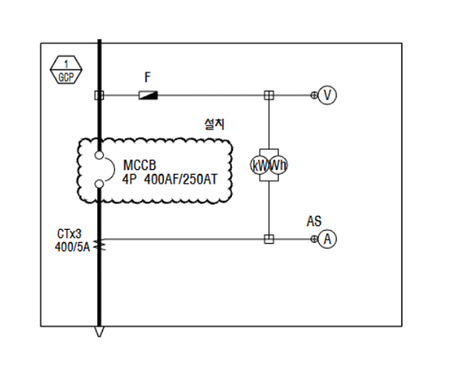
Why I Ran This Experiment This work started not as a benchmarking exercise, but as a practical problem: I needed to automatically extract panel regions from PDF-format electrical Single-Line Diagram (SLD) drawings using OpenAI models . All experiments were conducted using OpenAI models in Microsoft Foundry- Microsoft's unified platform for building generative AI applications. The downstream goal was a pipeline that combines GPT model with Azure Document Intelligence to generate Bills of Materials (BOMs) — a project I wrote about separately in Extracting BOMs from Electrical Drawings with AI: Azure OpenAI GPT-5 + Azure Document Intelligence Pipeline. Before building that pipeline, I needed a clear-eyed answer to a deceptively simple question: how well can GPT actually understand and return pixel-level coordinates from an image? If the model can't reliably locate a panel bounding box, the rest of the pipeline doesn't matter. When I first ran these tests against GPT-5.2, the results were mixed — good enough to be promising, but inconsistent enough to leave clear room for improvement. I tried many workarounds: feeding image dimensions explicitly, overlaying coordinate grids, enabling extended reasoning, and building iterative self-correction loops. Each helped, but required deliberate engineering effort. Then GPT-5.4 was released. Re-running the same benchmark revealed that most of those workarounds were no longer necessary. Context: All experiments use a fixed CAD-style test image (847 × 783 px) with a known ground-truth bounding box at [135, 165, 687, 619] . Accuracy is measured by Intersection over Union (IoU) — a score of 1.0 is a perfect match. Every test was run 5 times and averaged. for all coordinate experiments. The Experiment Design I designed experiments across two axes: prompt strategy (how spatial information is presented to the model) and reasoning mode (standard vs. extended reasoning). Each combination was tested across both GPT-5.2 and GPT-5.4, producing 4 conditions per test. GPT-5.2 and GPT-5.4 were each tested under two reasoning modes (None vs. High), resulting in four conditions in total. Single-Shot Strategies (Tests 1–5) These tests have no iterative validation loop — the model gets one prompt and returns its answer. Each test was run 5 times and the results averaged, so the scores reflect consistency, not a single lucky attempt. The differences between tests lie in how spatial information is framed in the prompt. Test 1 is a simple sanity check: can the model understand percentage-based coordinates at all? The model receives the clean image (no overlay) and is asked: "return the pixel coordinate at 30% width, 50% height." The expected answer is (254, 392). GPT-5.2 gets the X coordinate roughly right (~254–260), but the Y coordinate scatters wildly — predictions range from 260 to 322, consistently 100+ pixels above the correct position. GPT-5.4 returns (254, 392) on every single run, essentially pixel-perfect. Even on this simple sanity check, the gap is stark: GPT-5.4 is pixel-perfect from the start, while GPT-5.2 shows a clear Y-axis bias. But a single-point test doesn't tell us how well the models handle real spatial tasks. The next question: can they detect a full bounding box? Tests 2–5: Bounding Box Detection with Increasing Prompt Richness Tests 2–5 move to the real task: detecting a bounding box drawn on the image. Each test sends a different version of the same base image, with progressively richer spatial context in the prompt: Feedback Loop Strategies (Tests 6A–7B) These tests add an iterative validation loop: the model's predicted bounding box is overlaid on the image and sent back for self-correction — up to 5 iterations (early stop at IoU ≥ 0.99). All feedback tests share the same two-phase structure: an init step (first prediction) and a validation loop (iterative correction). All feedback tests use the same two images (init + validation overlay), but differ in prompt strategy and color assignment. Image-wise, they fall into two groups: Group A — Orange GT (Tests 6A, 6C, 7A) Group B — Color Bias / Blue GT (Tests 6B, 6D, 7B) Figure 4b — Feedback loop input images. Group B (bottom): colors swapped to test color-role priors. What differs between tests in the same group: The images are identical, but the prompt changes. 6A/6B use holistic comparison ("compare and correct"). 6C/6D additionally send the full history of past predictions as multi-image input. 7A/7B ask for per-edge directional judgments ("move left/right/up/down/none" for each edge independently). Results 1. Model version is the single biggest factor Across every test, GPT-5.4 dramatically outperforms GPT-5.2. The gap is not incremental — it's the difference between a bounding box that roughly overlaps the target and one that is essentially pixel-perfect. GPT-5.4 achieved an IoU of 0.99 or above on its very first attempt on tests where GPT-5.2 had only scored between 0.76 and 0.88. GPT-5.4 (green bars) consistently hits ≥0.99 regardless of prompt strategy or reasoning mode. GPT-5.2 (blue bars) ranges from 0.76 to 0.92. 2. GPT-5.2 is inconsistent; GPT-5.4 locks in Raw averages only tell half the story. GPT-5.2 is unpredictable: on the exact same test with the exact same prompt and image, results fluctuate wildly between runs. The standard deviation on Test 2 is ±0.084 — meaning a single run could land anywhere from 0.66 to 0.88. GPT-5.4 stays within ±0.003. The scatter plots below make this viscerally clear. Each dot is one API call — notice how GPT-5.2 dots spray across the IoU range while GPT-5.4 dots stack on top of each other: Wide scatter on simpler prompts (Test 2: 0.66–0.88); reasoning mode (orange) provides a lift that shrinks with richer prompts (Δmean shown below each panel). Production implication: With GPT-5.2, you couldn't rely on a single inference call — building a reliable pipeline would require multiple calls and majority voting, multiplying latency and cost. With GPT-5.4, a single call is sufficient. 3. Reasoning mode reduced variance for GPT-5.2; GPT-5.4 didn't need it For GPT-5.2, enabling extended reasoning ( reasoning: high ) provided a meaningful boost — especially when the prompt was sparse. On Test 2 (bare image, no spatial context), reasoning added +0.076 IoU and visibly tightened the spread of results across runs. As prompts got richer, the benefit shrank: with a grid overlay (Test 4), reasoning added only +0.007. In other words, reasoning mode acted as a compensating mechanism — filling in the gaps when the prompt alone didn't provide enough spatial scaffolding. For GPT-5.4, reasoning mode offered no additional benefit on this class of task. The base model already achieves 0.99+ IoU, so there was simply no room for improvement. In a few cases the reasoning runs showed marginal regressions (−0.005 to −0.015), likely within noise. The takeaway isn't that reasoning mode is harmful in general, but rather that a spatial-coordinate task at this complexity level doesn't require it when the underlying model already has strong coordinate understanding. Figure 7 — Effect of reasoning mode: GPT-5.2 gains +0.04–0.08 from reasoning (blue bars), largest on sparse prompts. GPT-5.4 shows no meaningful gain (green bars near zero). 4. Richer prompts close the gap (but only for GPT-5.2) For GPT-5.2, providing more spatial context in the prompt made a big difference: from 0.765 (Test 2, no info) to 0.910 (Test 4, grid overlay) — a +0.145 IoU gain just from adding visual reference rulers to the image. Telling the model the image dimensions (Test 3) was a "free win" that cost nothing. For GPT-5.4, all prompt variants produce essentially the same result (0.989–0.997). The model already understands spatial coordinates well enough that extra scaffolding adds no value. ided. GPT-5.4 is flat at ≥0.99 regardless. If you're still on GPT-5.2: Always inject image dimensions into the prompt (free). Use grid overlays for the biggest single-shot gain (+0.145 IoU). With GPT-5.4, none of this is needed. 5. Validation loops: essential for GPT-5.2, Option for GPT-5.4 The feedback loop tests (6A–7B) showed that iterative self-correction genuinely helped GPT-5.2 improve from its initial prediction. For example, in Test 7A (directional feedback), GPT-5.2 improved from an init IoU of 0.926 to a best of 0.969 over 5 iterations. For GPT-5.4, every single run hit IoU ≥ 0.99 on iteration 1 and early-stopped immediately. There was nothing left to correct. The validation loop infrastructure — overlay rendering, multi-turn prompting, iteration logic — becomes dead code you can remove from your pipeline. GPT-5.4 (green) starts at ≥0.99 and early-stops at iteration 1. 6. Prompt instruction matters: holistic vs directional feedback Comparing 6A/6B (holistic: "compare the two boxes and correct") with 7A/7B (directional: "for each edge, decide which direction to move"), the directional approach consistently reached higher best IoU for GPT-5.2. The per-edge structured output forced the model to reason about each boundary independently rather than making a holistic guess. Separately, the color bias tests (6B, 7B — GT drawn in blue instead of orange) revealed that swapping GT/prediction colors drops the initial accuracy significantly. In 6A (orange GT) the init IoU was 0.937, but in 6B (blue GT) it dropped to 0.850. This suggests GPT models have learned color-role priors — orange is "expected" as the ground truth color. However, the validation loop largely recovers this gap: after 5 iterations, 6A and 6B converge to similar best IoU (~0.96). The directional variants (7A, 7B) show the same pattern but converge faster. Left: initial accuracy drops when GT is drawn in blue. Right: after the validation loop, the gap closes. Directional feedback (7A/7B) shows the same pattern. For GPT-5.4: Color bias has no measurable effect. All variants (6A/6B/7A/7B) hit 0.994–0.998 IoU on iteration 1 regardless of color assignment. Summary: What Changed from GPT-5.2 to GPT-5.4 The story of this benchmark is really about engineering workarounds that became unnecessary. Here's what we built for GPT-5.2 and whether you still need it: Grid overlays & image dimensions in prompt — Gave +0.05–0.15 IoU for GPT-5.2. Not needed for GPT-5.4 (already ≥0.99 without it). Extended reasoning mode — Gave +0.04–0.08 IoU for GPT-5.2. No benefit for GPT-5.4 on this task (already at ceiling without it). Validation loops (iterative self-correction) — Improved GPT-5.2 by +0.02–0.10 IoU over 5 iterations. Unnecessary for GPT-5.4 (early-stops at iteration 1). Multiple runs & voting — Required for GPT-5.2 due to ±0.08 variance. Not needed for GPT-5.4 (±0.003 variance, single call sufficient). Color convention management — GPT-5.2 showed color bias (−0.09 IoU when colors swapped). No effect on GPT-5.4. GPT-5.4 doesn't just perform better — it makes entire categories of pipeline engineering unnecessary. For clean, CAD-style images like the ones tested here, GPT-5.4 dramatically reduces prompt engineering overhead: grid overlays, image dimension injection, reasoning mode, and validation loops — all of which required deliberate effort with GPT-5.2 — are no longer necessary. This translates directly to simpler pipelines, lower latency, and lower cost. That said, for more complex scenarios — multiple overlapping panels, cluttered backgrounds, or ambiguous region boundaries — iterative validation loops could still prove valuable, and we plan to explore this in future work. This benchmark started as a sanity check and turned into a clear signal: GPT-5.4 represents a genuine leap in spatial coordinate understanding, not just a marginal iteration. The gap between 0.765 and 0.997 IoU on an identical task is the difference between a prototype experiment and a production-ready component. Try It Yourself Ready to explore GPT-5.4's spatial precision capabilities? Here are ways to get started: Sample notebooks for bounding box extraction test : github Read the companion post: Extracting BOMs from Electrical Drawings with AI: Azure OpenAI GPT-5 + Azure Document Intelligence — See how this benchmark informed a production pipeline903Views4likes0CommentsUnified AI Weather Forecasting Pipeline thru Aurora, Foundry, and Microsoft Planetary Computer Pro
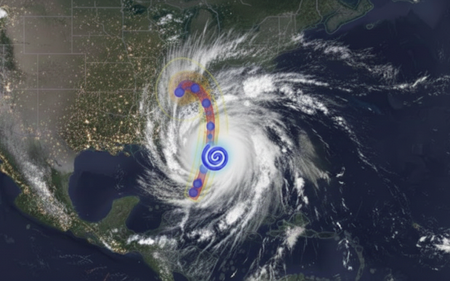
Weather shapes some of the most critical decisions we make, from protecting our critical infrastructure and global supply chains, to keeping communities safe during extreme events. As climate variability becomes more volatile, an organization’s ability to predict, assess, and plan their response to extreme weather is a defining capability for modern infrastructure owners & operators. This is especially true for the energy and utility sector — even small delays in preparations and response can cascade into massive operational risk and financial impacts, including widespread outages and millions in recovery costs. Operators of critical power infrastructure are increasingly turning to AI-powered solutions to reduce their operational and service delivery risk. “As the physical risks to our grid systems grow, so too does our technological capacity to anticipate them. Artificial intelligence has quietly reached a maturity point in utility operations-not just as a tool for optimization, about as a strategic foresight engine. The opportunity is clear: with the right data, infrastructure, and operational alignment, AI outage prediction utility grid strategies can now forecast vulnerabilities with precision and help utilities transition from reactive to preventive risk models.” – Article by Think Power Solutions Providing direct control of their data and AI analytics allows providers to make better, more actionable insights for their operations. Today, we’ll demonstrate and explore how organizations can use the state-of-the-art Aurora weather model in Microsoft Foundry with weather data provided by Microsoft Planetary Computer (MPC), an Azure based geospatial data management platform, to develop a utility industry-specific impact prediction capability. Taking Control of your Weather Prediction Microsoft Research first announced Aurora in June 2024, a cutting-edge AI foundation model enabling locally executed, on-demand, global weather forecasting, and storm-trajectory prediction generated from publicly available weather data. Two months later, Aurora became available on Microsoft Foundry elevating on-demand weather forecasting from a self-hosted experience to managed deployments, readying Aurora for broader enterprise and public adoption. Aurora’s scientific foundations and forecasting performance were peer‑reviewed and published in Nature, providing independent validation across global benchmarks. Its evolution continues with a strong commitment to openness and interoperability: In November 2025, Microsoft announced plans to open-source Aurora to accelerate innovation across the global research and developer community. Building upon the innovation and continued development of Aurora, today we are showcasing how organizations can operationalize this state-of-the-art capability with Microsoft Planetary Computer and Microsoft Planetary Computer Pro. By bringing together the vast public geospatial data stores in Planetary Computer, with the private data managed by Planetary Computer Pro, organizations can unify their weather prediction and geospatial data in a single platform, simplifying data processing pipelines and data management. This advancement allows enterprise customers to take control of their own weather forecasting on their own timeline. A Unified Weather Prediction Data Pipeline In addition, a key pain-point for energy and utility companies is the inability to reliably ingest, store, and operationalize high-volume weather data. Model inputs and outputs often sit scattered across fragmented pipelines and platforms, making decisions difficult to trace, reproduce, and reference over time. For example, referenced in articles, many utility companies have to pull public data from various silos, maintain GIS layers in another, and run operational planning in a separate environment—forcing teams to manually stitch together forecasts, assets, and risk assessments, introducing delays exactly when rapid decisions matter most. With the MPC Pro + Microsoft Foundry pipeline, utility companies transition from fragmented, manual workflows to a single operating platform – where the value lies in a seamless end-to-end data-to-model pipeline. Users can leverage Aurora on Microsoft Foundry alongside Microsoft Planetary Computer Pro’s geospatial data platform to unlock the following unified workflow: Source near real time weather data from Planetary Computer Run Aurora in Microsoft Foundry Fuse weather prediction results with geospatial data in Planetary Computer Pro for rapid assessment and post processing A Ready-to-use reference architecture This reference architecture provides a reusable pattern for operationalizing frontier weather models with Microsoft Planetary Computer Pro and Microsoft Foundry. Our architecture feeds updated global weather data, hosted by Microsoft Planetary Computer, to the Microsoft Foundry hosted model, then fuses those prediction results with enterprise geospatial context for analysis, decision-making, and action. Each component plays a distinct role in ensuring forecasts are timely, scalable, and directly usable within operational workflows. Near Real-Time Weather Data Microsoft Planetary Computer automatically ingests, indexes, and distributes up-to-date global weather data from the European Centre for Medium-Range Weather Forecasts (ECMWF) four times per day. This fully managed data pipeline ensures that the latest atmospheric datasets are continuously refreshed, standardized, and readily accessible, eliminating the need for manual data acquisition or preprocessing. Storing and Centralizing Public and Private Geospatial Data on Microsoft Planetary Computer Pro Microsoft Planetary Computer Pro enables utility operators to store, manage, and access both public and private geospatial datasets within a single Azure platform. With a Microsoft Planetary Computer Pro GeoCatalog, organizations can centralize ECMWF weather data alongside infrastructure and location data to support downstream analyses. Microsoft Foundry Hosts and Runs Weather Prediction Model on Demand Microsoft Foundry provides model access and the infrastructure required to support execution of Aurora and other weather forecasting models. Users can provision Aurora inference endpoints on their own dedicated compute. After provisioned, the user would be able to open the python notebook and run the model to execute weather forecasts on demand. Weather Forecast Outputs are Fused with Existing Data Sources on Microsoft Planetary Computer Pro Aurora’s weather prediction outputs are seamlessly integrated back into Microsoft Planetary Computer Pro, where they are fused with existing public or private geospatial datasets. This makes forecast results immediately accessible for visualization, post-processing, and analysis—such as identifying assets at risk, estimating localized impact, informing operational response plans, or pre-positioning needed assets for quick recovery. By combining AI-driven forecasts with geospatial context, organizations can move from raw predictions to actionable insights in a single workflow. This solution also provides organizations with a centralized platform to store and catalog geospatial data for future traceability. Unified Weather Prediction Demonstration This demonstration visualizes the forecast storm track (Figure 2), along with projected damage impact along the storm path and associated coastal surge areas (Figure 3 & 4). This enables users to assess asset exposure, anticipate damage due to winds, pre-position crews, and proactively protect critical infrastructure—helping reduce outage duration, lower operational costs, and improve grid resilience. & Powerplants) Getting Started The python notebook supports tracking of historical storm events, forecasting real-time storm trajectories, and overlaying critical power infrastructure structure data from OpenStreetMap to visualize overlap. To get started, deploy this solution in your Azure environment to begin generating weather forecasts and storm-track predictions. The code and documentation for running this notebook are available in the linked GitHub Repo. Sample output for you to explore are linked within this HTML. For additional resources, visit the following MS Learn pages: Microsoft Planetary Computer Pro Microsoft Foundry The interoperability between ‘GeoAI models + data platform’ extends far beyond weather prediction. It empowers organizations to take control of their geospatial data; to generate actionable insights on their own timeline, and to meet their own specific needs. With Microsoft Planetary Computer and Microsoft Foundry together, organizations will unify their enterprise geospatial data, and unlock its value with powerful, and state of the art AI solutions.2.1KViews4likes0CommentsClosing the AI Agent Governance Gap with Microsoft Foundry
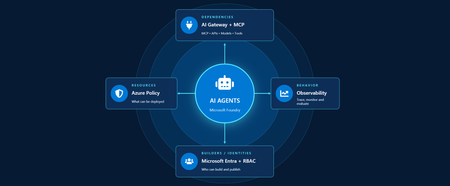
Developers are shipping agents faster than security teams can catalog them. As organizations move beyond pilots and begin operating dozens or hundreds of agents, one question keeps coming up: how do we actually get visibility into our AI agents across our environment? In this article, we'll walk through how Azure services can help establish visibility, guardrails, and cost accountability across your AI estate. Governance for AI happens across four layers: Resources – who can create new AI resources Builders – who can develop and publish agents in a certain scope Behavior – how agent outputs are evaluated, monitored, and governed Dependencies – what models, tools, APIs, and MCP servers agents can interact with Most organizations already have governance controls for identities, networking, and compliance. The challenge isn't creating new controls. It's connecting existing controls into an operating model that works for AI agents. Below we walk through each area and go a bit deeper on how to close the gap. Setting up boundaries with Azure Policy First, let's start in the Azure portal with Azure Policy. Azure Policy lets you set guardrails on what can be deployed in your environment and flags or blocks anything that doesn't comply. For AI workloads, the built-in definitions range from limiting models that people in your organization can deploy to locking down the network through enabling private endpoints. Some policies you get started with: Foundry model deployments should only use approved models: Restricts deployments to models or publishers your organization has explicitly approved Foundry model deployments should meet eligibility requirements (preview): Applies rules based on model attributes like preview vs. GA status and distribution source Azure AI Services resources should have key access disabled: Makes Microsoft Entra ID the only entry point The full list of policies related to Azure AI Services are available here: List of built-in policy definitions - Azure Policy | Microsoft Learn Why this comes first: Policy checks resources before they are created, so it proactively keeps your environment aligned with your standards. Implementing role-based access control (RBAC) Once these boundaries are in place, the next step is RBAC. Setting RBAC up early ensures that people and identities building agents have the right scope for what they actually need to do. Foundry roles only apply when you authenticate using Microsoft Entra ID. If you're using key-based authentication instead, the key grants full access with without role restrictions. API keys are convenient for quick development usage but when moving towards production, Microsoft Entra ID is the preferred method. Roles can be assigned at three scopes: the Foundry resource, a Foundry project, or an individual agent itself. Below is an example of how different personas within organization can map to a certain scope for creating and building agents with Foundry. Here's how each role in the diagram compares, from least to most privileged: Role Privilege Level What it does in Microsoft Foundry Foundry Agent Consumer Least Interact with agent endpoints in a project. This is your least-privilege role for people who only need to use agents. Foundry User Low Grants reader access to the Foundry project, the Foundry resource, and data actions for your Foundry project. Least-privilege access role for developers building and testing agents. Foundry Project Manager Medium This role lets you perform management actions on Foundry projects, build and develop with projects, and conditionally assign the Foundry User role to other user principals. Foundry Account Owner Higher Grants full access to manage Foundry projects and resources, and lets you assign the Foundry User role to other user principals. Foundry Owner Highest Grants full access to manage Foundry projects and resources to build and develop with projects. This role can also assign the Foundry User, ACR, and monitoring roles to users in the environment. Source: Role-based access control for Microsoft Foundry - Microsoft Foundry | Microsoft Learn For the agent resources themselves, assign managed identities rather than API keys since it lowers the risk of having compromised credentials. Note if you're scripting RBAC permissions: these roles were recently renamed from Azure AI User, Azure AI Owner, Azure AI Account Owner, and Azure AI Project Manager. The role IDs and permissions didn't change, so use the role definition GUID in your code to avoid issues while the rename rolls out. Observability in Microsoft Foundry Governance requires more than access control. Organizations also need evidence of how agents are being used. Observability provides the audit trail needed to investigate incidents, understand usage patterns, and track costs. The Foundry Control Plane brings these observability and governance tools together in one place, alongside services like Azure Monitor, Microsoft Entra, Microsoft Purview, and Azure Policy. In the Foundry portal, tracing is a good starting point. Once you connect an Application Insights resource to your project, Foundry turns on tracing automatically so every run, including the ones you test in the playground, is logged. After it is completed, you can search by Response ID or Trace ID to see the conversation history, token usage, run steps, tool calls, and inputs and outputs between the user and the agent. For more granular queries, you can write KQL to dive into individual agent runs or use the prebuilt Grafana dashboards in Azure Monitor. With client-side tracing, you can also export traces to observability tools you may already use, such as Datadog or Jaeger. Note: Permissions required for viewing this telemetry requires the Log Analytics Reader role on the connected Application Insights resource, and Privileged Monitoring Data Reader on top of that if the underlying Log Analytics tables are protected. Alongside all of these monitoring features, every agent comes with content safety guardrails and evaluations let you test and optimize performance before and after you publish your agents. When agents get published to Microsoft Teams and Microsoft 365 Copilot, Microsoft 365 admins can approve usage requests. These requests can be further scoped to a limited group for pilot testing/department usage or the full organization. Adding an AI gateway Observability tells you what your agents are doing, but how do you actually control them? This is where Azure API Management comes in. Once you have more than one agent, model deployment, or multiple teams consuming them, you need a single enforcement point between the agents and the resources they call. Adding Azure API Management in front of Microsoft Foundry gives you: Rate limiting and load balancing across regions and model deployments Consistent authentication and quota policies for model and tool traffic Usage tracking per team or cost center so you can accurately charge back to different departments Governed access to your custom and remote MCP servers Note: When choosing MCP servers, start with trusted, enterprise supported sources (GitHub, Microsoft, internally developed servers, etc.) that have documented security controls, enterprise authentication, clear ownership, and least-privilege permissions. Treat community MCP servers as untrusted until they have undergone a formal security review and are verified by organizations. Adding an AI gateway completes the governance picture. Azure Policy governs what can be deployed. RBAC governs who can build and manage agents. Observability provides evidence of how agents behave in production. The AI gateway extends governance into runtime, controlling how agents interact with models, tools, and external systems. Combined, these layers help organizations move beyond simply building agents to operating them responsibly at scale. Extend governance across the wider estate A few directions to take this further: MCP registry in Azure API Center – As MCP usage grows, you can create an approved inventory of MCP servers and APIs that can be used across an organization. Microsoft Agent 365 – Microsoft's enterprise control plane for AI agents. It gives every agent its own Microsoft Entra Agent ID and published Foundry agents sync to its registry automatically. This gives your IT team one place to run access reviews, lifecycle policies, and owner attestation across every agent in the tenant, including shadow agents discovered outside Foundry. Copilot Studio – when you add an MCP tool, you can point it at the API Management URL instead of the direct remote endpoint to gain additional observability through the gateway. GitHub Copilot – you can apply the same AI gateway-fronted MCP registry, applied to the developer side. Microsoft Purview – data classification, DLP, audit, and AI interaction governance across the wider estate. Where to go next Looking for a quick start? Turn on the three Azure Policy definitions above in audit mode against a non-production subscription and see what gets flagged that is out of compliance. Ready to design the end-to-end pattern? Take a look at this Cloud Adoption Framework guidance on AI governance and governing Azure platform services for AI. Want to go deeper on agent observability? Start with these articles around Application Insights integrations with Foundry: Use Insights in Microsoft Foundry and Monitor AI Agents with Application Insights Governing AI agents doesn't require starting from scratch. The identity, policy, monitoring, and cost controls you already use for the rest of your Azure estate can extend to AI workloads. Start with one layer, connect the next, and build a governance foundation that grows with your AI adoption.816Views3likes0Comments
Automate Prior Authorization with AI Agents - Now Available as a Foundry Template
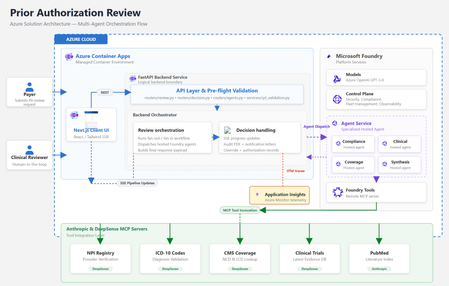
By Amit Mukherjee · Principal Solutions Engineer, Microsoft Health & Life Sciences Lindsey Craft-Goins · Technology Leader - Cloud & AI Platforms, Health & Life Sciences Joel Borellis · Director Solutions Engineering - Cloud & AI Platforms, Health & Life Sciences Prior authorization (PA) is one of the most expensive bottlenecks in U.S. healthcare. Physicians complete an average of 39 PA requests per week, spending roughly 13 hours of physician-and-staff time on PA-related work (AMA 2024 Prior Authorization Physician Survey). Turnaround averages 5–14 business days, and PA alone accounts for an estimated $35 billion in annual administrative spending (Sahni et al., Health Affairs Scholar, 2024). The regulatory clock is now ticking. CMS-0057-F mandates electronic PA with 72-hour urgent response starting in 2026. Forty-nine states plus DC already have PA laws on the books, and at least half of all U.S. state legislatures introduced new PA reform bills this year, including laws specifically targeting AI use in PA decisions (KFF Health News, April 2026). Today we’re making the Prior Authorization Multi-Agent Solution Accelerator available as a Microsoft Foundry template. Health plan payers can deploy a working, four-agent PA review pipeline to Azure using the Azure Developer CLI (“azd”) with a single command in supported environments, then customize it to their policies, workflows, and EHR environment. Try it now: Find the template in the Foundry template gallery, or clone directly from github.com/microsoft/Prior-Authorization-Multi-Agent-Solution-Accelerator What the template delivers The accelerator deploys four specialist Foundry hosted agents (Compliance, Clinical Reviewer, Coverage, and Synthesis), each independently containerized and managed by Foundry. In internal testing with synthetic demo cases, the pipeline reduced review workflow, from beginning to completion in under 5 minutes per case. Agent Role Key capability Compliance Documentation check 10-item checklist with blocking/non-blocking flags Clinical Reviewer Clinical evidence ICD-10 validation, PubMed + ClinicalTrials.gov search Coverage Policy matching CMS NCD/LCD lookup, per-criterion MET/NOT_MET mapping Synthesis Decision rubric 3-gate APPROVE/PEND with weighted confidence scoring Compliance and Clinical run in parallel. Coverage runs after clinical findings are ready. Synthesis evaluates all three outputs through a three-gate rubric. The result is a structured recommendation with per-criterion confidence scores and a full audit trail, not a black-box answer. Solution architecture The accelerator runs entirely on Azure. The frontend and backend deploy as Azure Container Apps. The four specialist agents are hosted by Microsoft Foundry. Real-time healthcare data flows through third-party MCP servers. Figure 1: Azure solution architecture How the pipeline works The four agents execute in a structured parallel-then-sequential pipeline. Compliance and Clinical run simultaneously in Phase 1. Coverage runs after clinical findings are ready. The Synthesis agent applies a three-gate decision rubric over all prior outputs. Figure 2: Agentic architecture, hosted agent pipeline Compliance and Clinical run in parallel via asyncio.gather, since neither depends on the other. Coverage runs sequentially after Clinical because it needs the structured clinical profile for criterion mapping. Synthesis evaluates all three outputs through a three-gate rubric (Provider, Codes, Medical Necessity) with weighted confidence scoring: 40% coverage criteria + 30% clinical extraction + 20% compliance + 10% policy match. The total pipeline time is bound by the slowest parallel agent plus the sequential agents, not the sum. In internal testing with synthetic demo cases, this architecture indicated materially reduced processing time compared to sequential manual workflows. Under the hood For the architect in the room, here are four design decisions worth knowing about: Foundry hosted agents: Each agent is independently containerized, versioned, and managed by Foundry’s runtime. The FastAPI backend is a pure HTTP dispatcher. All reasoning happens inside the agent containers, and there are no code changes between local (Docker Compose) and production (Foundry); the environment variable is the only switch. Structured output: Every agent uses MAF’s response_format enforcement to produce typed Pydantic schemas at the token level. No JSON parsing, no malformed fences, no free-form text. The orchestrator receives typed Python objects; the frontend receives a stable API contract. Keyless security: DefaultAzureCredential throughout, so no API keys are stored anywhere. Managed Identity handles production; azd tokens handle local development. Role assignments are provisioned automatically by Bicep at deploy time. Observability: All agents emit OpenTelemetry traces to Azure Application Insights. The Foundry portal shows per-agent spans correlated by case ID. End-to-end latency, per-agent contribution, and error rates are visible from day one with no additional configuration. For the full architecture documentation, agent specifications, Pydantic schemas, and extension guides, see the GitHub repository. Why this matters now Human-in-the-loop by design The system runs in LENIENT mode by default: it produces only APPROVE or PEND and is not designed to produce automated DENY outcomes in its default configuration. Every recommendation requires a clinician to Accept or Override with documented rationale before the decision is finalized. Override records flow to the audit PDF, notification letters, and downstream systems. This directly addresses the emerging wave of state legislation governing AI use in PA decisions. Domain experts own the rules Agent behavior is defined in markdown skill files, not Python code. When CMS updates a coverage determination or a plan changes its commercial policy, a clinician or compliance officer edits a text file and redeploys. No engineering PR required. Real-time healthcare data via MCP Agents connect to five MCP servers for real-time data: ICD-10 codes, NPI Registry, CMS Coverage policies, PubMed, and ClinicalTrials.gov. This incorporates real‑time clinical reference data sources to inform agent recommendations. Third-party MCP servers are included for demonstration with synthetic data only. Their inclusion does not constitute an endorsement by Microsoft. See the GitHub repository for production migration guidance. Audit-ready from day one Every case generates an 8-section audit justification PDF with per-criterion evidence, data source attribution, timestamps, and confidence breakdowns. Clinician overrides are recorded in Section 9. Notification letters (approval and pend) are generated automatically. These artifacts are designed to support CMS-0057-F documentation requirements. Deploy in under 15 minutes From the Foundry template gallery or from the command line: git clone https://github.com/microsoft/Prior-Authorization-Multi-Agent-Solution-Accelerator cd Prior-Authorization-Multi-Agent-Solution-Accelerator azd up That single command provisions Foundry, Azure Container Registry, Container Apps, builds all Docker images, registers the four agents, and runs health checks. The demo is live with a synthetic sample case as soon as deployment completes. What’s included What you customize 4 Foundry hosted agents Payer-specific coverage policies FastAPI orchestrator + Next.js frontend EHR/FHIR integration for clinical notes 5 MCP healthcare data connections Self-hosted MCP servers for production PHI Audit PDF + notification letter generation Authentication (Microsoft Entra ID) Full Bicep infrastructure-as-code Persistent storage (Cosmos DB / PostgreSQL) OpenTelemetry + App Insights observability Additional agents (Pharmacy, Financial) Built on Microsoft Foundry + Foundry hosted agents · Microsoft Agent Framework (MAF) · Azure OpenAI gpt-5.4 · Azure Container Apps · Azure Developer CLI + Bicep · OpenTelemetry + Azure Application Insights · DefaultAzureCredential (keyless, no secrets) Full architecture documentation, agent specifications, and extension guides are in the GitHub repository. Get started Foundry template gallery: Search “AI-Powered Prior Authorization for Healthcare” in the Foundry template section GitHub: github.com/microsoft/Prior-Authorization-Multi-Agent-Solution-Accelerator Disclaimers Not a medical device. This solution accelerator is not a medical device, is not FDA-cleared, and is not intended for autonomous clinical decision-making. All AI recommendations require qualified clinical review before any authorization decision is finalized. Not production-ready software. This is an open-source reference architecture (MIT License), not a supported Microsoft product. Customers are solely responsible for testing, validation, regulatory compliance, security hardening, and production deployment. Performance figures are illustrative. Metrics cited (including processing time reductions) are based on internal testing with synthetic demo data. Actual results will vary based on case complexity, infrastructure, and configuration. Third-party services included for demonstration only; not endorsed by Microsoft. Customers should evaluate providers against their compliance and data residency requirements. The demo uses synthetic data only. Customers deploying real patient data are responsible for HIPAA compliance and establishing appropriate Business Associate Agreements. This accelerator is intended to help customers align documentation workflows with CMS‑0057‑F requirements but has not been independently validated or certified for regulatory compliance.2.9KViews3likes0CommentsIntroducing OpenAI's GPT-image-2 in Microsoft Foundry
Take a small design team running a global social campaign. They have the creative vision to produce localized imagery for every market, but not the resources to reshoot, reformat, or outsource that scale. Every asset needs to fit a different platform, a different dimension, a different cultural context, and they all need to ship at the same time. This is where flexible image generation comes in handy. OpenAI's GPT-image-2 is now generally available and rolling out today to Microsoft Foundry, introducing a step change in image generation. Developers and designers now get more control over image output, so a small team can execute with the reach and flexibility of a much larger one. What is new in GPT-image-2? GPT-image-2 brings real world intelligence, multilingual understanding, improved instruction following, increased resolution support, and an intelligent routing layer giving developers the tools to scale image generation for production workflows. Real world intelligence GPT-image-2 has a knowledge cut off of December 2025, meaning that it is able to give you more contextually relevant and accurate outputs. The model also comes with enhanced thinking capabilities that allow it to search the web, check its own outputs, and create multiple images from just one prompt. These enhancements shift image generation models away from being simple tools and runs them into creative sidekicks. Multilingual understanding GPT-image-2 includes increased language support across Japanese, Korean, Chinese, Hindi, and Bengali, as well as new thinking capabilities. This means the model can create images and render text that feels localized. Increased resolution support GPT-image-2 introduces 4K resolution support, giving developers the ability to generate rich, detailed, and photorealistic images at custom dimensions. Resolution guidelines to keep in mind: Constraint Detail Total pixel budget Maximum pixels in final image cannot exceed 8,294,400 Minimum pixels in final image cannot be less than 655,360 Requests exceeding this are automatically resized to fit. Resolutions 4K, 1024x1024, 1536x1024, and 1024x1536 Dimension alignment Each dimension must be a multiple of 16 Note: If your requested resolution exceeds the pixel budget, the service will automatically resize it down. Intelligent routing layer GPT-image-2 also includes an expanded routing layer with two distinct modes, allowing the service to intelligently select the right generation configuration for a request without requiring an explicitly set size value. Mode 1 — Legacy size selection In Mode 1, the routing layer selects one of the three legacy size tiers to use for generation: Size tier Description smimage Small image output image Standard image output xlimage Large image output This mode is useful for teams already familiar with the legacy size tiers who want to benefit from automatic selection without making any manual changes. Mode 2 — Token size bucket selection In Mode 2, the routing layer selects from six token size buckets — 16, 24, 36, 48, 64, 96 — which map roughly to the legacy size tiers: Token bucket Approximate legacy size 16, 24 smimage 36, 48 image 64, 96 xlimage This approach can allow for more flexibility in the number of tokens generated, which in turn helps to better optimize output quality and efficiency for a given prompt. See it in action GPT-image-2 shows improved image fidelity across visual styles, generating more detailed and refined images. But, don’t just take our word for it, let's see the model in action with a few prompts and edits. Here is the example we used: Prompt: Interior of an empty subway car (no people). Wide-angle view looking down the aisle. Clean, modern subway car with seats, poles, route map strip, and ad frames above the windows. Realistic lighting with a slight cool fluorescent tone, realistic materials (metal poles, vinyl seats, textured floor). As you can see, when using the same base prompt, the image quality and realism improved with each model. Now let’s take a look at adding incremental changes to the same image: Prompt: Populate the ad frames with a cohesive ad campaign for “Zava Flower Delivery” and use an array of flower types. And our subway is now full of ads for the new ZAVA flower delivery service. Let's ask for another small change: Prompt: In all Zava Flower Delivery advertisements, change the flowers shown to roses (red and pink roses). And in three simple prompts, we've created a mockup of a flower delivery ad. From marketing material to website creation to UX design, GPT-image-2 now allows developers to deliver production-grade assets for real business use cases. Image generation across industries These new capabilities open the door to richer, more production-ready image generation workflows across a range of enterprise scenarios: Retail & e-commerce: Generate product imagery at exact platform-required dimensions, from square thumbnails to wide banners, without post-processing. Marketing: Produce crisp, rich in color campaign visuals and social assets localized to different markets. Media & entertainment: Generate storyboard panels and scene at resolutions suited to production pipelines. Education & training: Create visual learning aids and course materials formatted to exact display requirements across devices. UI/UX design: Accelerate mockup and prototype workflows by generating interface assets at the precise dimensions your design system requires. Trust and safety At Microsoft, our mission to empower people and organizations remains constant. As part of this commitment, models made available through Foundry undergo internal reviews and are deployed with safeguards designed to support responsible use at scale. Learn more about responsible AI at Microsoft. For GPT-image-2, Microsoft applied an in-depth safety approach that addresses disallowed content and misuse while maintaining human oversight. The deployment combines OpenAI’s image generation safety mitigations with Azure AI Content Safety, including filters and classifiers for sensitive content. Pricing Model Offer type Pricing - Image Pricing - Text GPT-image-2 Standard Global Input Tokens: $8 Cached Input Tokens: $2 Output Tokens: $30 Input Tokens: $5 Cached Input Tokens: $1.25 Note: All prices are per 1M token. There is no billing for output tokens for the GPT-image-2 model. Getting started Whether you’re building a personalized retail experience, automating visual content pipelines or accelerating design workflows. GPT-image-2 gives your team the resolution control and intelligent routing to generate images that fit your exact needs. Try the GPT-image-2 in Microsoft Foundry today! Deploy the model in Microsoft Foundry Experiment with the model in the Image playground Read the documentation to learn more18KViews3likes3CommentsAzure OpenAI Decisions API: Now generally available in Microsoft Foundry
AI applications and agents do more than generate content. They constantly make decisions about what should happen next. Which model should handle this request? Is a customer issue urgent? Did an agent’s output meet the required criteria? Should a workflow continue, try another approach, or involve a person? As agents become more sophisticated, these decisions can happen hundreds or even thousands of times across a workflow, and not every one of them requires a full generative response. On October 22, we brought the OpenAI Decisions API to Microsoft Foundry, giving developers a purpose-built way to make fast, focused decisions across AI applications and agentic workflows. The Decisions API evaluates text, images, and structured inputs and turns them into actionable choices, probabilities, and scores. It brings intelligence directly into the control flow of an application, helping developers determine what should happen next without relying on traditional generative inference for every step. This represents an important evolution in how models can be used within AI systems. Sometimes you need a model to create. Sometimes you need it to reason deeply across a complex problem. And sometimes, the most valuable thing a model can do is make a focused decision that helps the rest of the system move forward. Decision-making is becoming a core part of agentic applications Consider an AI customer service agent handling an incoming request. Before it generates a response, the application may need to understand what the customer is asking about, determine how urgent the issue is, identify which model or tool is best suited to handle it, and decide whether specialized expertise is required. Once a response has been generated, the application may need to evaluate it again, determining whether it adequately addressed the customer's issue, met the application's requirements, or should be escalated for human review. For an agentic workflow, that distinction can be significant. Before work begins, an application can evaluate an incoming request and route it to the right model or tool. During execution, an agent can assess possible actions and choose the appropriate next step. After another model completes a task, the application can evaluate the output against defined criteria and decide whether to continue, retry, take a different path, or bring a person into the workflow. Before work begins: Evaluate an incoming request and route it to the right model or tool. During execution: Assess possible actions and choose the appropriate next step. After a task completes: Evaluate the output against defined criteria and decide whether to continue, retry, take a different path, or bring a person into the workflow. These decisions may be small individually, but collectively they shape how an agent behaves. Giving developers a model designed specifically for these moments creates an opportunity to build systems that can make these choices efficiently while reserving more computationally intensive reasoning and generation for the parts of the experience that need them. Turn inputs into decisions your application can use The Decisions API gives developers a dedicated endpoint for evaluating inputs against questions they define. Each question supports one of three focused outcomes: a probability, a choice from a predefined set of options, or a score against a defined rubric. Instead of parsing generated text to determine what a model meant, application code can work with defined values designed to inform what happens next. Probability: Determine whether a condition is true and return a confidence value. Multiple choice: Select from a predefined set of options. Rubric scoring: Score an input against defined criteria. Instead of parsing generated text to determine what a model meant, application code can work with defined values designed to inform what happens next. Use the right model for the right moment What makes this especially powerful is the impact on real-world agentic applications. As agents become more sophisticated, they make hundreds or even thousands of decisions across workflows. The latency and cost of each decision can quickly compound. With the Decisions API, developers can bring intelligence directly into these critical decision points, from dynamically routing requests and prioritizing customer issues to evaluating agent outputs and deciding when human intervention is needed. This is an important shift from using AI primarily to generate content toward using AI to drive responsive, efficient, and intelligent systems. For developers, the opportunity isn't simply to build agents capable of doing more. It's to make those agents faster, more cost-efficient, and practical to operate at enterprise scale. That could mean routing a request to the appropriate model rather than automatically using a larger model, prioritizing customer issues before an agent begins working on them, or evaluating an agent's output before deciding whether a workflow can continue autonomously. In each of these cases, the model isn't responsible for producing the final experience. It's helping the application intelligently decide how that experience should unfold. Building AI systems that can decide what comes next The broader shift here is from thinking about AI primarily as something that generates an answer to thinking about intelligence as something that can be embedded throughout an application. Generative models remain essential for creating, reasoning, and interacting with users, but increasingly sophisticated agents also need intelligence between those moments to continuously determine what to do next. Developers can use it alongside other models to create workflows where reasoning, generation, evaluation, routing, and decision-making each happen where they make the most sense. As those workflows become longer and more autonomous, having a focused way to make the many smaller decisions along the way can become just as important as the models performing the largest tasks. Get started with the Decisions API For developers, the Decisions API is available through a dedicated /openai/v1/decisions endpoint on an Azure OpenAI resource and is available with GPT-6 Luna. Developers can call the endpoint using OpenAI SDKs or REST, pass their GPT-6 Luna deployment name in the model field, and authenticate using an API key or Microsoft Entra ID. Learn more about the Decisions API → Learn how it works here. Try the Decisions API in Microsoft Foundry → https://ai.azure.com As we continue expanding the models and capabilities available through Microsoft Foundry, I'm particularly excited about what this unlocks for developers building the next generation of AI applications. The opportunity isn't simply to give agents access to increasingly capable models. It's to build systems that can apply the right intelligence at the right moment, from the complex reasoning and generation that users see to the many decisions happening behind the scenes. The next generation of AI applications won't just be defined by how well they generate. They'll also be defined by how intelligently and efficiently they decide what to do next. Pricing (per 1M tokens) Decision API supported model Input Output Cached input 30-minute cached write GPT-6 Luna $0.10 N/A $0.01 $0.125 Start building with the Azure OpenAI Decisions API in Microsoft Foundry today to bring reliable, structured decision-making to your apps and agents.3.2KViews2likes0CommentsFoundry Fine-Tuning: open-source model expansion, MAI-Code, and shared multi-LoRA deployments
Today, Microsoft Foundry Managed Fine-Tuning expands its collection with four new open-source models and brings MAI-Code-1.1-Flash to Foundry resources, all in public preview. Alongside them, Multi-LoRA Managed Compute deployments enter public preview, letting compatible adapters share base-model weights and GPU capacity instead of each needing a separate serving allocation. More open-source choice for your next custom model Muse-Glimmer-30B, qwen3.8-27b, qwen3.6-35b-a3b and gpt-oss-120b join Foundry's managed open-source model collection, with supervised fine-tuning (SFT) support across all four. You can now bring your example-driven customization workflow to more backbones, choosing for tool-use reliability, coding efficiency, extended planning or reasoning capacity. Here's what each option brings: Model Why put it on your shortlist? Muse-Glimmer-30B Resilient tool orchestration: precise tool calls, interpreting unexpected results and recovering when a workflow goes off-script. qwen3.8-27b Extended research and planning: a dense backbone for sustained autonomous work that adapts to feedback from its environment. qwen3.6-35b-a3b Repository and frontend coding: a sparse mixture-of-experts backbone for navigating codebases and making coordinated changes. gpt-oss-120b Reasoning headroom: a higher-capacity alternative to the existing gpt-oss-20b option for difficult analytical and problem-solving tasks. Use SFT to tailor these models to your application's needs: Coding conventions: organization-specific library usage and preferred implementation patterns. Structured outputs: JSON schemas and extraction responses used by downstream applications. Domain workflows: product terminology, support tone, and classification or triage decisions. Distillation: use teacher-generated example responses to specialize a smaller model for your task. All four also support reinforcement fine-tuning (RFT) if your workflow calls for more advanced, reward-based optimization. MAI makes its fine-tuning debut in Foundry In addition to the open-source models above, we're introducing MAI-Code-1.1-Flash, the first Microsoft model available for Managed Fine-Tuning on Foundry resources. With the base model already available in GitHub Copilot, this compact, coding-focused model brings particular strengths in software development tasks. Its emphasis on responsiveness and token efficiency makes it a compelling backbone for repeated edit-build-test loops, where inspecting code, proposing edits and responding to compiler or test feedback all contribute to the task's latency and token budget. MAI-Code-1.1-Flash supports RFT only in this preview. Use it to target outcomes you can verify: a change that passes task-specific tests, correctly uses an internal software library, or satisfies your repository's acceptance checks. Build rewards around correctness and the required scope of the change, rather than whether an answer reproduces a reference patch. That leaves room for different valid solutions while keeping the customization anchored to your engineering requirements. Share hardware across adapters to reduce serving costs Previously, Foundry's managed fine-tuning outputs went to serverless pay-as-you-go deployments: input/output token charges plus hosting fees for each fine-tuned deployment. More traffic increased usage charges; more deployed variants added hosting costs. With Multi-LoRA adapter deployment on Managed Compute, compatible adapters share LoRA-enabled base-model deployment and GPU capacity. You pay an hourly rate for that hardware, rather than per-token inference charges, so multiple customizations can use one serving allocation instead of funding separate GPU footprints. Three task-specific qwen3.8-27b adapters, for example, can share a LoRA-enabled base deployment while remaining separately addressable. When their combined traffic fits, adding an adapter doesn't mean another hardware bill. You avoid duplicating base-model serving capacity and can improve utilization by pooling requests across variants, instead of paying separate serverless hosting fees for each one. The tradeoff is utilization: running hardware is billed even when idle, so size for aggregate concurrency and context lengths. More traffic can require additional capacity, while serverless remains an option for intermittent workloads on eligible models. The managed compute deployment path supports Muse-Glimmer-30B, both new Qwen models and gpt-oss-120b. Adapters must match the same base model and version; the base deployment needs a compatible LoRA-enabled template. Accelerator quota is required. Put the new models to work in your agents The expanded model collection helps you pick a backbone suited to your tasks; Multi-LoRA lets compatible customizations share serving capacity. These choices come together in agent applications, where different roles can need different model behavior. A coding assistant and a code-review agent, for example, can use separate adapters on the same supported OSS base model while sharing the hardware that serves them. Fine-tuning customizes model behavior, but the goal is to improve the agent application that uses it. Connect your tuned models to your agent applications in Foundry and evaluate them alongside the instructions, tools and workflows they'll use in production. That keeps customization focused on better application outcomes, not just better training results. Put these new capabilities behind your agent's next iteration. Get started with Foundry Fine-Tuning today.630Views2likes0Comments
Your Agents Need More Than a Place to Run
In architecture reviews with enterprise teams moving their first agentic applications toward production, I often hear the same plan: the team has containerized their agent and intends to run it on the managed Kubernetes cluster the organization already trusts. The reasoning is sensible, since the platform team knows the tooling and security has approved the network model, and for the first use case or two it is often the right call. Having watched this unfold in my years leading AgenticAI customer engineers and forward deployed engineers, and now helping customers reach production on Azure, I want to describe what happens next, before leaders commit rather than after. One thing to note is Azure supports multiple ways to build and operate agents. Foundry Agent Service provides an integrated managed runtime around your agent code. Azure Kubernetes Service supports teams that need Kubernetes-level control or want to extend an established platform, while Azure Container Apps provides managed container hosting. These services can work together. The decision is which capabilities and responsibilities best fit the workload. Where the cluster is the right answer A stateless retrieval application, a document extraction pipeline, or a classification job is a web service that happens to call a model, and a container platform runs web services well. A large retail customer of mine ran an invoice extraction agent on containers for over a year with almost no issues, and I never suggested they move it. The cluster remains the right home for several other situations as well. LLM invocations embedded inside existing microservices, event driven, or batch pipelines fit container platforms naturally. Genuine constraints such as air-gapped or sovereign environment, regions where a managed service is not yet offered are a good reason to run your own stack, and strong engineering team that already operates at that level can be a real asset. Even when the agents themselves move to a managed runtime, the tool servers, business APIs, and data services those agents call, often stay on your cluster, so they are complementary far more often than they are competitors. The problem is that these early wins can make agents seem like just another workload. Where the wheels come off The first failure is the state. A research agent that plans, searches, and synthesizes for ninety minutes is a long-running stateful process, while a Kubernetes pod is a disposable container the scheduler may restart at any time. A financial services team I worked with lost costly research run to a routine node upgrade, and responded as capable engineers do by building checkpointing, a durable store, and a resume mechanism. It worked, but they now owned a piece of infrastructure they had to keep correct as their agent's framework changed beneath it. A managed agent runtime absorbs this. Hosted agents in Foundry Agent Service, as one example, give every session a VM-isolated sandbox with a persistent file system, a durable state store that survives crashes and restarts and can hold checkpoints for frameworks such as LangGraph or Microsoft Agent Framework, and a resilient execution mode that recovers long-running work after a process interruption. The second is the human-in-the-loop. A commercial insurance customer’s claims agent needed sign-off from an adjuster and sometimes a second reviewer, with days between steps. Stopping an agent cleanly at the moment it needs a decision, holding its full session for four days without paying to keep it running, and resuming it correctly when the approval arrives is not something a container orchestrator gives out the box. The team built agent session suspend and resume, a queue, a durable state store, notifications, and an approval interface, and ended up with a small workflow engine nobody had planned to own. In hosted agents, an idle session is deprovisioned with its state persisted and restored onto fresh compute when the same session ID returns, so an agent waiting on an approval cost nothing while it waits, and sessions are retained for up to thirty days of inactivity. The approval experience remains yours to design, which is where your engineers' time should go. The third is multi-turn conversation, which quietly pushes teams into building their own context management system. The first version appends each turn to history, and within few turns the history outgrows the context window while cost and latency climb. So, the team adds truncation, then summarization, then retrieval of earlier turns, then per-user and per-tenant scoping, then expiry and deletion rules for privacy. An industrial customer's safety compliance assistant, with conversations stretching across days, followed exactly this path and ended up with a bespoke thread store and summarization pipeline nobody had budgeted for. Its first serious incident came when a summary silently dropped a compliance-relevant instruction. With the Responses protocol in hosted agents in Foundry, conversation history is a durable, platform-managed record keyed by a conversation ID and reachable from any channel, so the thread store is no longer yours to build, although deciding what to summarize or retrieve remains a design choice for your agent. The fourth is identity. On a cluster, the path of least resistance is a shared service account, and in one review a security architect asked which actions had been taken on behalf of which user, only to learn that the logs could not say. Hosted agents create a dedicated Microsoft Entra agent identity for each agent at deploy time, use on-behalf-of flows to act with the user's delegated permissions in interactive scenarios and the agent's own identity in autonomous ones, and keep the agent identifiable for audit in both cases. The fifth is per-user session isolation, which is the difference between an agent that serves many people and an agent that mixes them up. Agents read files, run code, and hold working data, and on a shared pod the default is that many users share a process, a file system, and often a cache. Giving every user session its own sandboxed environment and storage, so that one person's documents and intermediate results can never surface in another's, means engineering hard isolation boundaries and proving them to your security team. Hosted agents make a VM-isolated sandbox per session the default, and their durable state store can partition items per end user, so one store is safe to share across the users of a multitenant agent. And lastly, Evaluation and optimization are where the gap widens. The largest difference between teams that scale and those that stall is evaluation. Because agents are probabilistic and multi-step, staging tests often miss failures such as a wrong tool choice or a policy violation deep in a task. One customer’s agent passed every offline check but degraded unnoticed for weeks after a model update because evaluation stopped at release. Mature teams continuously evaluate production traces, combine automated judges with sampled human review, and red-team regularly.Once quality is measurable, teams can deliberately balance prompts, models, tools, latency, and cost. One team cut per-task cost by routing simple steps to smaller models after evaluation confirmed quality held. Self-built stacks require teams to assemble and maintain tracing, datasets, judges, and release gates. Hosted agents instead combines default OpenTelemetry traces with continuous evaluation, adversarial testing, and datasets generated from agent instructions. Staged closed-loop optimization uses those traces to improve instructions, tool descriptions, and model selection without extra plumbing. The real cost is the velocity gap Leaders usually expect me to quantify the initial build, and that is the smaller number. A team of four building the first agent often becomes ten or twelve within a year, and a growing share of them are maintaining a runtime for agents rather than building agents that serve the business. The enterprise has quietly created an internal agent infrastructure company in a field where the patterns for memory, tools, evaluation, and safety are rewritten every few months, while hyperscalers put hundreds of engineers on exactly this problem and ship at a cadence no single platform group can match. Foundry Agent Service, for instance, bundle content safety guardrails into the runtime and route outbound traffic through a customer virtual network, capabilities that platform teams otherwise assemble one integration at a time. This plumbing does not differentiate your organization, so the question is whether your scarcest engineers should spend years on it or on the workflows, data, and judgment only your company has. This is also why the technology companies held up as examples are a poor template. Many built their own runtimes because managed options did not yet exist and had large platform organizations to carry the load. Even they tend to invest in a custom runtime for the first handful of use cases and then migrate as managed services mature, because the maintenance burden compounds while the strategic value of owning the plumbing does not. What I would do as the leader I am not arguing against Kubernetes or for moving everything tomorrow. Comparable managed runtimes exist across the hyperscalers, and I use hosted agents as the running example only because it is the one I know best from the inside. Managed agent services are still maturing, some workloads have real data residency or customization needs, and abstraction always constrains something. What I am arguing for is a deliberate choice for each use case, guided by three questions: whether the agent must outlive a single request by running long, waiting on humans, or remembering across sessions whether it must act with its own identity, auditable delegation, and policy enforcement whether your team would be building anything a managed service already provides, and who will still maintain it in two years. Key takeaways Match the runtime to the workload. Containers on your existing cluster suit stateless, short-lived agents, while long-running, human-in-the-loop, and memory-dependent agents need capabilities your platform team was never hired to build. Count the hidden team. The real cost of self-hosting is the growing group of engineers maintaining state, identity, memory, guardrails, and tracing instead of solving business problems. Make evaluation continuous and connected to production traces. Pre-release testing alone will miss the drift and trajectory failures that hurt you, and optimization of quality, cost, and latency depends on that evaluation data. Follow the pattern of the leaders, not their early architecture. Companies that built custom runtimes did so before managed options matured, and most of them move toward managed services as those options improve. A practical place to begin is your roadmap for the next twelve months. Sort each use case into stateless and short-lived or long-running and human-dependent, and for every agent in the second group put a price on the engineers who would maintain the runtime rather than the business logic. I would like to hear how you have drawn this line, and where a managed service was not yet ready for something you needed.949Views2likes0Comments