ai agents
123 TopicsFoundry IQ: Unlocking ubiquitous knowledge for agents
Introducing Foundry IQ by Azure AI Search in Microsoft Foundry. Foundry IQ is a centralized knowledge layer that connects agents to data with the next generation of retrieval-augmented generation (RAG). Foundry IQ includes the following features: Knowledge bases: Available directly in the new Foundry portal, knowledge bases are reusable, topic-centric collections that ground multiple agents and applications through a single API. Automated indexed and federated knowledge sources – Expand what data an agent can reach by connecting to both indexed and remote knowledge sources. For indexed sources, Foundry IQ delivers automatic indexing, vectorization, and enrichment for text, images, and complex documents. Agentic retrieval engine in knowledge bases – A self-reflective query engine that uses AI to plan, select sources, search, rank and synthesize answers across sources with configurable “retrieval reasoning effort.” Enterprise-grade security and governance – Support for document-level access control, alignment with existing permissions models, and options for both indexed and remote data. Foundry IQ is available in public preview through the new Foundry portal and Azure portal with Azure AI Search. Foundry IQ is part of Microsoft's intelligence layer with Fabric IQ and Work IQ.45KViews6likes4CommentsIntegrate Custom Azure AI Agents with Copilot Studio and M365 Copilot
Integrating Custom Agents with Copilot Studio and M365 Copilot In today's fast-paced digital world, integrating custom agents with Copilot Studio and M365 Copilot can significantly enhance your company's digital presence and extend your CoPilot platform to your enterprise applications and data. This blog will guide you through the integration steps of bringing your custom Azure AI Agent Service within an Azure Function App, into a Copilot Studio solution and publishing it to M365 and Teams Applications. When Might This Be Necessary: Integrating custom agents with Copilot Studio and M365 Copilot is necessary when you want to extend customization to automate tasks, streamline processes, and provide better user experience for your end-users. This integration is particularly useful for organizations looking to streamline their AI Platform, extend out-of-the-box functionality, and leverage existing enterprise data and applications to optimize their operations. Custom agents built on Azure allow you to achieve greater customization and flexibility than using Copilot Studio agents alone. What You Will Need: To get started, you will need the following: Azure AI Foundry Azure OpenAI Service Copilot Studio Developer License Microsoft Teams Enterprise License M365 Copilot License Steps to Integrate Custom Agents: Create a Project in Azure AI Foundry: Navigate to Azure AI Foundry and create a project. Select 'Agents' from the 'Build and Customize' menu pane on the left side of the screen and click the blue button to create a new agent. Customize Your Agent: Your agent will automatically be assigned an Agent ID. Give your agent a name and assign the model your agent will use. Customize your agent with instructions: Add your knowledge source: You can connect to Azure AI Search, load files directly to your agent, link to Microsoft Fabric, or connect to third-party sources like Tripadvisor. In our example, we are only testing the CoPilot integration steps of the AI Agent, so we did not build out additional options of providing grounding knowledge or function calling here. Test Your Agent: Once you have created your agent, test it in the playground. If you are happy with it, you are ready to call the agent in an Azure Function. Create and Publish an Azure Function: Use the sample function code from the GitHub repository to call the Azure AI Project and Agent. Publish your Azure Function to make it available for integration. azure-ai-foundry-agent/function_app.py at main · azure-data-ai-hub/azure-ai-foundry-agent Connect your AI Agent to your Function: update the "AIProjectConnString" value to include your Project connection string from the project overview page of in the AI Foundry. Role Based Access Controls: We have to add a role for the function app on OpenAI service. Role-based access control for Azure OpenAI - Azure AI services | Microsoft Learn Enable Managed Identity on the Function App Grant "Cognitive Services OpenAI Contributor" role to the System-assigned managed identity to the Function App in the Azure OpenAI resource Grant "Azure AI Developer" role to the System-assigned managed identity for your Function App in the Azure AI Project resource from the AI Foundry Build a Flow in Power Platform: Before you begin, make sure you are working in the same environment you will use to create your Copilot Studio agent. To get started, navigate to the Power Platform (https://make.powerapps.com) to build out a flow that connects your Copilot Studio solution to your Azure Function App. When creating a new flow, select 'Build an instant cloud flow' and trigger the flow using 'Run a flow from Copilot'. Add an HTTP action to call the Function using the URL and pass the message prompt from the end user with your URL. The output of your function is plain text, so you can pass the response from your Azure AI Agent directly to your Copilot Studio solution. Create Your Copilot Studio Agent: Navigate to Microsoft Copilot Studio and select 'Agents', then 'New Agent'. Make sure you are in the same environment you used to create your cloud flow. Now select ‘Create’ button at the top of the screen From the top menu, navigate to ‘Topics’ and ‘System’. We will open up the ‘Conversation boosting’ topic. When you first open the Conversation boosting topic, you will see a template of connected nodes. Delete all but the initial ‘Trigger’ node. Now we will rebuild the conversation boosting agent to call the Flow you built in the previous step. Select 'Add an Action' and then select the option for existing Power Automate flow. Pass the response from your Custom Agent to the end user and end the current topic. My existing Cloud Flow: Add action to connect to existing Cloud Flow: When this menu pops up, you should see the option to Run the flow you created. Here, mine does not have a very unique name, but you see my flow 'Run a flow from Copilot' as a Basic action menu item. If you do not see your cloud flow here add the flow to the default solution in the environment. Go to Solutions > select the All pill > Default Solution > then add the Cloud Flow you created to the solution. Then go back to Copilot Studio, refresh and the flow will be listed there. Now complete building out the conversation boosting topic: Make Agent Available in M365 Copilot: Navigate to the 'Channels' menu and select 'Teams + Microsoft 365'. Be sure to select the box to 'Make agent available in M365 Copilot'. Save and re-publish your Copilot Agent. It may take up to 24 hours for the Copilot Agent to appear in M365 Teams agents list. Once it has loaded, select the 'Get Agents' option from the side menu of Copilot and pin your Copilot Studio Agent to your featured agent list Now, you can chat with your custom Azure AI Agent, directly from M365 Copilot! Conclusion: By following these steps, you can successfully integrate custom Azure AI Agents with Copilot Studio and M365 Copilot, enhancing you’re the utility of your existing platform and improving operational efficiency. This integration allows you to automate tasks, streamline processes, and provide better user experience for your end-users. Give it a try! Curious of how to bring custom models from your AI Foundry to your Copilot Studio solutions? Check out this blog23KViews3likes11CommentsThe Future of AI: Computer Use Agents Have Arrived
Discover the groundbreaking advancements in AI with Computer Use Agents (CUAs). In this blog, Marco Casalaina shares how to use the Responses API from Azure OpenAI Service, showcasing how CUAs can launch apps, navigate websites, and reason through tasks. Learn how CUAs utilize multimodal models for computer vision and AI frameworks to enhance automation. Explore the differences between CUAs and traditional Robotic Process Automation (RPA), and understand how CUAs can complement RPA systems. Dive into the future of automation and see how CUAs are set to revolutionize the way we interact with technology.16KViews6likes0CommentsIntroducing OpenAI’s GPT-5.4 mini and GPT-5.4 nano for low-latency AI
Imagine you’re a developer building a research assistant agent on top of GPT‑5.4. The agent retrieves documents, summarizes findings, and answers follow‑up questions across multiple turns. In early testing, the reasoning quality is strong, but as the agent chains together retrieval, tool calls, and generation, latency starts to add up. For interactive experiences, those delays matter—so many teams adopt a multi‑model approach, using a larger model to plan and smaller models to execute subtasks quickly at scale. This is where GPT‑5.4 mini and GPT‑5.4 nano come in. These smaller variants of GPT-5.4 are optimized for developer workloads where latency, cost savings, and agentic design are top of mind. GPT-5.4 mini and GPT-5.4 nano will be rolling out today in Microsoft Foundry, so you can evaluate them in the model catalog and deploy the right option for each workload. GPT-5.4 mini: efficient reasoning for production workflows GPT-5.4 mini distills GPT-5.4’s strengths into a smaller, more efficient model for developer workloads where responsiveness matters. It significantly improves over GPT-5 mini across coding, reasoning, multimodal understanding, and tool use while running about 2X faster. Text and image inputs: build multimodal experiences that combine prompts with screenshots or other images. Tool use and function calling: reliably invoke tools and APIs for agentic workflows. Web search and file search: ground responses in external or enterprise content as part of multi-step tasks. Computer use: support software-interaction loops where the model interprets UI state and takes well-scoped actions. Where GPT-5.4 mini thrives Developer copilots and coding assistants: latency-sensitive coding help, code review suggestions, and fast iteration loops where turnaround time matters. Multimodal developer workflows: applications that interpret screenshots, understand UI state, or process images as part of coding and debugging loops. Computer-use sub-agents: fast executors that take well-scoped actions in software (for example, navigating UIs or completing repetitive steps) within a larger agent loop coordinated by a planner model. GPT-5.4 nano: ultra-low latency automation at scale GPT-5.4 nano is the smallest and fastest model in the lineup, designed for low-latency and low-cost API usage at high throughput. It’s optimized for short-turn tasks like classification, extraction, and ranking, plus lightweight sub-agent work where speed and cost are the priority and extended multi-step reasoning isn’t required. Strong instruction following: consistent adherence to developer intent across short, well-defined interactions. Function and tool calling: dependable invocation of tools and APIs for lightweight agent and automation scenarios. Coding support: optimized performance for common coding tasks where fast turnaround is required. Image understanding: multimodal image input support for basic image interpretation alongside text. Low-latency, low-cost execution: designed to deliver responses quickly and efficiently at scale. Where GPT-5.4 nano thrives GPT-5.4 nano is a strong fit when you need predictable behavior at very high throughput and the task can be expressed as short, well-scoped instructions. Classification and intent detection: fast labeling and routing decisions for high-volume requests. Extraction and normalization: pull structured fields from text, validate formats, and standardize outputs. Ranking and triage: reorder candidates, prioritize tickets/leads, and select best-next actions under tight latency budgets. Guardrails and policy checks: lightweight safety and policy classification, prompt gating, and enforcement decisions before dispatching to tools or larger models. High-volume text processing pipelines: batch transformation, cleanup, deduping, and normalization steps where unit cost and throughput dominate. Routing and prioritization at the edge: select the right downstream workflow (template, queue, or model) for each request under tight latency budgets. Choosing the right GPT-5.4 model Microsoft Foundry makes it possible to deploy multiple GPT-5.4 variants side by side, so teams can route requests to the model that best fits each task. Here’s a practical way to think about the lineup: Model Best suited for Typical workloads GPT-5.4 Sustained, multi-step reasoning with reliable follow-through Agentic workflows, research assistants, document analysis, complex internal tools GPT-5.4 Pro Deeper, higher-reliability reasoning for complex production scenarios High-stakes agentic workflows, long-form analysis and synthesis, complex planning, advanced internal copilots GPT-5.4 mini Balanced reasoning with lower latency for interactive systems Real-time agents, developer tools, retrieval-augmented applications GPT-5.4 nano Ultra-low latency and high throughput High-volume request routing, real-time chat, lightweight automation Responsible AI in Microsoft Foundry At Microsoft, our mission to empower people and organizations remains constant. In the age of AI, trust is foundational to adoption, and earning that trust requires a commitment to transparency, safety, and accountability. Microsoft Foundry provides governance controls, monitoring, and evaluation capabilities to help organizations deploy GPT-5.4 models responsibly in production environments, aligned with Microsoft's Responsible AI principles. Pricing Model Deployment Input (USD $/M tokens) Cached input (USD $/M tokens) Output (USD $/M tokens) GPT-5.4 mini Standard Global $0.75 $0.075 $4.5 GPT-5.4 nano Standard Global $0.20 $0.02 $1.25 The models are also available in Data Zone US. It is rolling out to Data Zone EU. Getting started Explore the models in Microsoft Foundry. Sign in to the Foundry portal and browse the model catalog to evaluate GPT-5.4 mini and GPT-5.4 nano alongside other options, then deploy the right model for each workload.16KViews0likes1CommentFoundry Agent Service at Ignite 2025: Simple to Build. Powerful to Deploy. Trusted to Operate.
The upgraded Foundry Agent Service delivers a unified, simplified platform with managed hosting, built-in memory, tool catalogs, and seamless integration with Microsoft Agent Framework. Developers can now deploy agents faster and more securely, leveraging one-click publishing to Microsoft 365 and advanced governance features for streamlined enterprise AI operations.12KViews3likes1CommentBuilding Production-Ready, Secure, Observable, AI Agents with Real-Time Voice with Microsoft Foundry
We're excited to announce the general availability of Foundry Agent Service, Observability in Foundry Control Plane, and the Microsoft Foundry portal — plus Voice Live integration with Agent Service in public preview — giving teams a production-ready platform to build, deploy, and operate intelligent AI agents with enterprise-grade security and observability.11KViews2likes0CommentsIntegrating Azure AI Foundry with Copilot Studio: A Strategic and Technical Overview
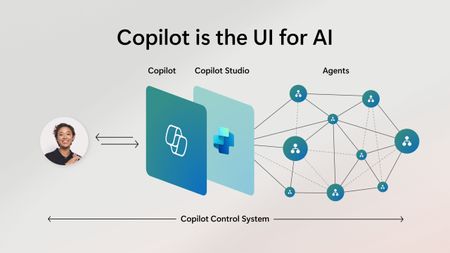
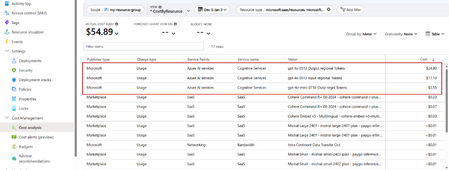
As organizations accelerate their AI adoption, the need for flexible, scalable, and secure platforms becomes paramount. My previous article, Navigating AI Solutions: Microsoft Copilot Studio vs. Azure AI Foundry | Microsoft Community Hub, represented two powerful yet distinct approaches to building AI agents. While Copilot Studio offers a low-code/no-code interface for rapid deployment, targeting any kind of business user, Azure AI Foundry provides a pro-code environment with deep customization and orchestration capabilities, targeting developer audiences. But what if you would not need to decide between one or the other, but benefit from integrating both platforms and unlock transformative business value across all teams? This is exactly the question I got asked increasingly while I was teaching our “Copilot, Copilot Studio and Azure AI Foundry” Instructor Led Training courses as a Microsoft Technical Trainer. This article starts with the business rationale for integration. From there, I will continue with detailing the influence of cost and ROI parameters as part of decision-making. Last, I will guide you through multiple technical integration capabilities available today, and how both platforms can complement each other. Business Rationale for Integration Copilot Studio is primarily designed for business users to build conversational agents quickly. It excels in rapid prototyping, using a graphical workflow-style interface, identical to Power Automate. Users don’t require much development skills to build such agents. Azure AI Foundry, on the other hand, is tailored for developers and data scientists who are typically in need of model orchestration, customized tool integration and enterprise-grade scalability and governance. Integrating both platforms allows organizations to bridge the gap between business agility and technical depth, enabling the ones closer to the business to prototype while developers can focus on custom features, refining and scale. For example, organizations can start with Copilot Studio for customer-facing bots or internal assistants, but then later, transition to Azure AI Foundry for more complex workflows, multi-agent orchestration or custom model integration. This layered approach supports progressive AI maturity, allowing teams to evolve from simple agents to fully sophisticated AI ecosystems. Cost and ROI Considerations Copilot Studio billing vs Azure AI Foundry consumption cost billing As users interact with Copilot Studio agents, or as the agents perform tasks on behalf of users, users consume Copilot Studio messages. Copilot Studio messages are the key component influencing the monthly cost of using Copilot Studio. Capabilities are available via the Copilot Studio pay-as-you-go meter (pay per message) and the Copilot Studio message pack subscription (25,000 messages monthly) license, or a combination of both. These license options are active on tenant-level. Any user with a Microsoft 365 Copilot license gets access to Copilot Studio, with no message-based charge. More details are available in the Microsoft Copilot Studio Licensing Guide. Azure AI Foundry is part of Azure’s consumption-based model, where you do not get charged for Azure AI Foundry itself, but you get charged a consumption cost for the different models your applications use. This charge can be listed as Microsoft (e.g. Azure OpenAI) or charged through the Azure marketplace (e.g. Cohere). Image: Azure AI Foundry model cost consumption overview from within Azure Cost Analysis Depending on the AI solution architecture your application workloads are based on, you should also take other Azure costs into account such as Azure Storage Accounts, Azure AI Search, Azure App Services, Azure Key Vault and alike. Since Azure AI Foundry charges are identical to any other Azure Resource charges, managing these is not different than your current Azure Cost Analysis approach. ROI and Budget alignment From the previous section, it should be clear that allocating the right budget can become complex, depending on the AI platforms used. By integrating both platforms, organizations can achieve cost optimization, by using Copilot Studio for lightweight tasks but scaling via Azure AI Foundry for compute-intensive operations. Given the lower complexity of building applications with Copilot Studio, they tend to result in early ROI, through Copilot Studio’s fast deployment. Azure AI Foundry’s robust and extensible infrastructure could lead to a longer-term value of ROI optimization. Technical Integration Capabilities HTTP Request Trigger One integration method involves using Copilot Studio’s HTTP Request feature to trigger Foundry Agents. This allows for Natural language prompts in Studio to initiate backend processes in Azure AI Foundry. This allows users to benefit from a seamless flow between conversational UI and enterprise logic, to consult business data, run data analytics or retrieve information across different enterprise application backends. Image: HTTP Request setup within Copilot Studio Topic MCP Protocol Azure AI Foundry now supports Model Context Protocol (MCP), an open standard enabling seamless interaction between large language models (LLMs) and external tools, systems or data sources. MCP provides a model-agnostic interface for tasks such as reading files, executing functions, and handling contextual prompts. Its primary goal is to simplify the integration of LLMs with third-party systems by addressing the complexity of building custom connectors for each tool or data source. MCP Tools can be integrated into your AI solutions using Azure AI Foundry Agent Service or through common development language SDKs or REST API. Check this Microsoft Learn module for more technical details on how to configure this or check out MCP-for beginners on YouTube https://aka.ms/MCP-for-beginners. Recently, the Model Context Protocol (MCP) Connector also became available as a new tool directly within Copilot Studio. Image: Model Context Protocol Connector Tool in Copilot Studio By integrating MCP Tools from within either Foundry Agent Service or through Copilot Studio, the organization can benefit from the standardized approach to allow connectivity to different enterprise systems, data endpoints or external applications. Simplifying the complexity and providing a smooth interaction irrespective of the AI platform used, provides major benefits to both business users and developer teams building these applications. Azure AI Foundry Models available to Copilot Studio (preview feature) Azure AI Foundry Models provides +11,000 models for you to choose from, offered by both Microsoft and an extensive range of model providers such as OpenAI, DeepSeek, Black Forest Labs, Meta and many more. On top of existing models offered, organizations can also create their own customized models by fine-tuning from within Azure AI Foundry. For example, imagine an organization building an IT support agent, which interacts with end-users using a chat interface and natural language. Users might be able to provide screenshots of errors, as well as describe technical issues in their own words. Traditional LLMs could struggle with recognizing specific screenshot details or business-specific terminology used by custom in-house developed applications, as they are not trained in this kind of information. That’s where fine-tuned models could be a solution. At the time of writing this article, a new preview feature became available to Copilot Studio customers, allowing them to use any Azure AI Foundry model, both catalog and fine-tuned ones, as the primary model for their Copilot Studio Agents. (FYI, follow this link for all details on the Copilot Studio Roadmap and features list) Image: Copilot Studio New Feature setting to enable AI Foundry model integration Conclusion Integrating Copilot Studio and Azure AI Foundry is not just a technical exercise, but rather a strategic move which aligns business goals, cost efficiency, and adoption readiness. By leveraging the strengths of both platforms, organizations can build AI solutions that are agile, scalable, and secure. Your business can focus on developing (or ‘making’ if not code-based) AI Agents, without facing bottlenecks or unneeded complexity or isolation of workloads. Instead of asking the question of which platform to use for building AI applications, organizations should invest in and benefit from a tight integration between both platforms, quickly enabling teams from both the business side as well as developers, to create AI-influenced applications that provide immediate business value, without compromise. #MicrosoftLearn #SkilledByMTT9.6KViews2likes0CommentsFoundry IQ: boost response relevance by 36% with agentic retrieval
The latest RAG performance evaluations and results for knowledge bases and built-in agentic retrieval engine. Foundry IQ by Azure AI Search is a unified knowledge layer for agents, designed to improve response performance, automate RAG workflows and enable enterprise-ready grounding. These evaluations tested RAG performance for knowledge bases and new features including retrieval reasoning effort and federated sources like web and SharePoint for M365. Foundry IQ and Azure AI Search are part of Microsoft Foundry.9.3KViews5likes0Comments
Azure AI Foundry: Advancing OpenTelemetry and delivering unified multi-agent observability
Microsoft is enhancing multi-agent observability by introducing new semantic conventions to OpenTelemetry, developed collaboratively with Outshift, Cisco’s incubation engine. These additions—built upon OpenTelemetry and W3C Trace Context—establish standardized practices for tracing and telemetry within multi-agent systems, facilitating consistent logging of key metrics for quality, performance, safety, and cost. This systematic approach enables more comprehensive visibility into multi-agent workflows, including tool invocations and collaboration. These advancements have been integrated into Azure AI Foundry, Microsoft Agent Framework, Semantic Kernel, and Azure AI packages for LangChain, LangGraph, and the OpenAI Agents SDK, enabling customers to get unified observability for agentic systems built using any of these frameworks with Azure AI Foundry. The additional semantic conventions and integration across different frameworks equip developers to monitor, troubleshoot, and optimize their AI agents in a unified solution with increased efficiency and valuable insights. “Outshift, Cisco's Incubation Engine, worked with Microsoft to add new semantic conventions in OpenTelemetry. These conventions standardize multi-agent observability and evaluation, giving teams comprehensive insights into their AI systems.” Giovanna Carofiglio, Distinguished Engineer, Cisco Multi-agent observability challenges Multi-agent systems involve multiple interacting agents with diverse roles and architectures. Such systems are inherently dynamic—they adapt in real time by decomposing complex tasks into smaller, manageable subtasks and distributing them across specialized agents. Each agent may invoke multiple tools, often in parallel or sequence, to fulfill its part of the task, resulting in emergent workflows that are non-linear and highly context dependent. Given the dynamic nature of multi-agent systems and the management across agents, observability becomes critical for debugging, performance tuning, security, and compliance for such systems. Multi-agent observability presents unique challenges that traditional GenAI telemetry standards fail to address. Traditional observability conventions are optimized for single-agent reasoning path visibility and lack the semantic depth to capture collaborative workflows across multiple agents. In multi-agent systems, tasks are often decomposed and distributed dynamically, requiring visibility into agent roles, task hierarchies, tool usage, and decision-making processes. Without standardized task spans and a unified namespace, it's difficult to trace cross-agent coordination, evaluate task outcomes, or analyze retry patterns. These gaps hinder white-box observability, making it hard to assess performance, safety, and quality across complex agentic workflows. Extending OpenTelemetry with multi-agent observability Microsoft has proposed new spans and attributes to OpenTelemetry semantic convention for GenAI agent and framework spans. They will enrich insights and capture the complexity of agent, tool, tasks and plans interactions in multi-agent systems. Below is a list of all the new additions proposed to OpenTelemetry. New Span/Trace/Attributes Name Purpose New span execute_task Captures task planning and event propagation, providing insights into how tasks are decomposed and distributed. New child spans under “invoke_agent” agent_to_agent_interaction Traces communication between agents agent.state.management Effective context, short or long term memory management agent_planning Logs the agent’s internal planning steps agent orchestration Capture agent-to-agent orchestration New attributes in invoke_agent span tool_definitions Describes the tool’s purpose or configuration llm_spans Records model call spans New attributes in “execute_tool” span tool.call.arguments Logs the arguments passed during tool invocation tool.call.results Records the results returned by the tool New event Evaluation - attributes (name, error.type, label) Enables structured evaluation of agent performance and decision-making More details can be found in the following pull-requests merged into OpenTelemetry Add tool definition plus tool-related attributes in invoke-agent, inference, and execute-tool spans Capture evaluation results for GenAI applications Azure AI Foundry delivers unified observability for Microsoft Agent Framework, LangChain, LangGraph, OpenAI Agents SDK Agents built with Azure AI Foundry (SDK or portal) get out-of-the box observability in Foundry. With the new addition, agents built on different frameworks including Microsoft Agent Framework, Semantic Kernel, LangChain, LangGraph and OpenAI Agents SDK can use Foundry for monitoring, analyzing, debugging and evaluation with full observability. Agents built on Microsoft Agent Framework and Semantic Kernel get out-of-box tracing and evaluations support in Foundry Observability. Agents built with LangChain, LangGraph and OpenAI Agents SDK can use the corresponding packages and detailed instructions listed in the documentation to get tracing and evaluations support in Foundry Observability. Customer benefits With standardized multi-agent observability and support across multiple agent frameworks, customers get the following benefits: Unified Observability Platform for Multi-agent systems: Foundry Observability is the unified multi-agent observability platform for agents built with Foundry SDK or other agent frameworks like Microsoft Agent Framework, LangGraph, Lang Chain, OpenAI SDK. End-to-End Visibility into multi-agent systems: Customers can see not just what the system did, but how and why—from user request, through agent collaboration, tool usage, to final output. Faster Debugging & Root Cause Analysis: When something goes wrong (e.g., wrong answer, safety violation, performance bottleneck), customers can trace the exact path, see which agent/tool/task failed, and why. Quality & Safety Assurance: Built-in metrics and evaluation events (e.g. task success and validation scores) help customers monitor and improve the quality and safety of their AI workflows. Cost & Performance Optimization: Detailed metrics on token usage, API calls, resource consumption, and latency help customers optimize efficiency and cost. Get Started today with end-to-end agent observability with Foundry Azure AI Foundry Observability is a unified solution for evaluating, monitoring, tracing, and governing the quality, performance, and safety of your AI systems end-to-end— all built into your AI development loop and backed by the power of Azure Monitor for full stack observability. From model selection to real-time debugging, Foundry Observability capabilities empower teams to ship production-grade AI with confidence and speed. It’s observability, reimagined for the enterprise AI era. With the above OpenTelemetry enhancements Azure AI Foundry now provides detailed multi-agent observability for agents built with different frameworks including Azure AI Foundry, Microsoft Agent Framework, LangChain, LangGraph and OpenAI Agents SDK. Learn more about Azure AI Foundry Observability and get end-to-end agent observability today!8.5KViews4likes0Comments