admin
3110 Topics
Inactive Microsoft 365 Business Standard license grants OneDrive?
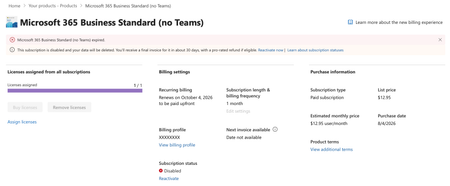
A user with an Exchange Online license temporarily had an active Microsoft 365 Business Standard license. They still have OneDrive even though the M365 subscription was disabled almost 2 months ago. I want to assess whether it is safe to let them keep using OneDrive. My guess is automated deletion simply hasn't happened yet. This tenants' users only ever had Exchange Online Plan 1. One user temporarily needed a desktop Office app, so I added 1 monthly subscription to Microsoft 365 Business Standard. A few weeks later (54 days ago), I cancelled the subscription. I did not unassign the license first, and depending on where you look the license is still tied to the user. They can use OneDrive, admin portal shows me their usage, etc. Admin portal claims other users, who never had an M365 license, do not have a OneDrive. Is this expected? If not, will we get any additional warning before OneDrive data is deleted? Subscription detail view: Licenses view: Users list:Solved169Views0likes2Comments
Conditional formatting
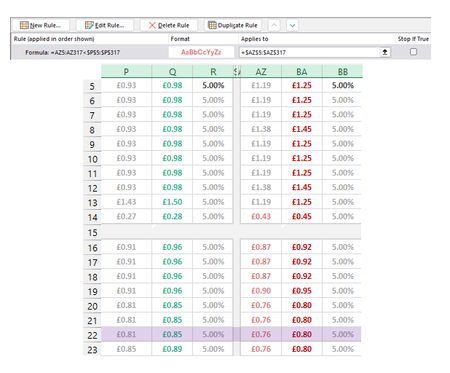
I'm making a rule to Highlight cells in Column AZ when the value is lower than Adjacent cells in Column P. For the most part it works except for two cells in AZ (1 shown as an example) that are higher than P but are being picked up by the conditional formatting. The two cells I'm focusing on here are P14 (£0.27) and AZ14 (£0.43). £0.43 should not be being highlighted pink as it isn't lower than £0.27. This has to be something obvious but I have looked at it too long. Please help if you can :)Solved285Views0likes3CommentsSketchy behaviour from Microsoft on MFA - what gives?
Recently, Microsoft has overwritten our Authentication Method Registration campaign settings, from 'Disabled' to 'Microsoft Managed' for dozens of tenants. Thanks guys. That's not super sketchy at all. /s This was ostensibly done for the Retiring of Voice and SMS based MFA or, as the article puts it 'To help enterprises adopt AI at scale,'.... what? Not because they're garbage MFA methods? But so Microsoft can market-capture MFA? Regardless of that bizarre statement, this article is sub par - like most Microsoft 'help' docs, it appears to have been written by someone in Marketing, with no technical experience. My chief concern is that the term 'OTP' doesn't appear ANYWHERE in here. So, for us and our customers - who block Voice/SMS already - this is alarming. Microsoft's Passkey flow is confusing af to people - and since it includes SYNCED passkeys by default, it faces the same risks as OTP. We specifically HAVEN'T rolled out passkeys because everytime we do, people get confused and frustrated - because they'll have 3-4 different things pop-up, offering to take a sync'd passkey. Really concerned with my 'do not allow microsoft to manage' setting, being explicitly set to 'Microsoft managed', and whatever decisions they're NOT publicly addressing at this point. We've spent years teaching people to use Microsoft Authenticator and password vault-based OTP. Now, Microsoft is pushing everyone to keep using those same tools, but to go through the mess that is the passkey setup interface?183Views0likes1Comment
Microsoft Sign In Loop
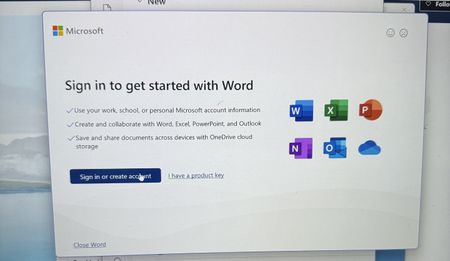
I am trying to sing into Microsoft 365, but every time I do, it takes me back to the login screen. I sing in with my outlook account, but I can't reach the applications. I can sign in on the browser, but not the applications on my computer. I have tried uninstalling and reinstalling M365, but the issue still persists381Views0likes1Comment
I Can't get Microsoft's help
Why is it that it is so difficult to get Microsoft to help me access my account? I have been trying for a few months now and have not had any issues resolved. I can no longer access some of my accounts. My Authenticator app on my iphone is asking for a code from my Authenticator app which is circular reasoning. This is impossible. I have also tried to call Microsoft multiple times but their automated system hangs up on me because they are experimenting technical issues. We'll, guess what! I'M HAVING TECHNICAL ISSUES AS WELL.. I'm hoping someone from Microsoft well see this and reach out. I need to log into my new PC I purchased and I can't.214Views0likes1Comment[Community tool] Find the GPO, registry value and Intune setting for any Office ribbon button
Hi everyone, as a technical service owner for Microsoft 365 Apps, one question comes up for me again and again: which policy actually controls this button or option? The information is all there – in the Office ADMX/ADML templates, the Office Fluent UI control ID lists, the Intune Settings Catalog and many Learn articles. But I never found it in one place, so every answer meant connecting several sources by hand. Especially when onboarding new colleagues, this costs a lot of time. So I built a free community tool for it: Office Admin Explorer https://tools.pascal-donath.de/office-admin-explorer/ How it works It's a clickable mock of Word, Excel, PowerPoint and Outlook (ribbon, File menu, Options, Trust Center). Click any element and you get: idMso and Policy ID (for customUI and the "Disable commands" policy) the ADMX policy with its exact path in Group Policy Management the registry value it writes, with ready-to-copy PowerShell or .reg the matching Intune Settings Catalog entry Cloud Policy notes, step-by-step guides and Microsoft Learn links The search covers all Office ADMX policies (2,400+) and command IDs (8,000+), including elements that aren't part of the mock. Also included Ribbon builder – hide or disable buttons, groups or tabs and export the result as customUI XML, a macro-free add-in (.dotx / .xlam / .ppam) or the "Disable commands" policy for Group Policy and Intune Deployment view – configuration.xml generator for the Office Deployment Tool User Support view – typical user problems: symptom → cause → fix Policy names and registry values are checked against Microsoft's ADMX/ADML files, and the Intune mapping against the Graph settings catalog. It runs in the browser without sign-in and is available in English and German. Please test any configuration on a lab device or pilot group first. I'd like your input How do you handle this today – ADMX search, Group Policy Search, the Intune catalog, your own documentation? Which Office settings do you get asked about most often? I'd like to add the most requested ones next. If you find a wrong or outdated entry, every entry has a "Report it on GitHub" link – corrections are very welcome. Thanks! Pascal --- *Transparency note: The tool was developed with the help of AI. The content is based on my own admin experience, and policy names, registry values and Intune mappings are validated automatically against Microsoft's official sources (ADMX/ADML templates, Fluent UI control lists, Microsoft Graph settings catalog). This is a community project and not affiliated with Microsoft.*
M365 Admin Center Global Administrator Lockout
Hello Microsoft Community, I am seeking urgent assistance and guidance regarding a critical Microsoft 365 tenant lockout that has been ongoing for several days without a resolution or proper communication from the support team. Our organization manages Microsoft 365 services for a business with more than 200 active users who depend on Microsoft 365 for their daily operations. Issue Description We have been locked out of our Microsoft 365 tenant's administrator account. This prevents us from properly managing our Microsoft 365 environment and restoring normal access to essential business services. Our business-critical data, including important documents and operational information, is stored in SharePoint. The inability to access and manage these services has significantly disrupted our business operations. Microsoft Support Ticket References We have raised multiple support tickets and followed up repeatedly, but the issue remains unresolved. Tracking ID: 2610050040001149 Tracking ID: 2610090010001066 Tracking ID: 2610050040001222 Despite these support cases and repeated follow-ups, we have not received a satisfactory resolution or a clear recovery timeline. Support Experience So Far Following a discussion with the support team, we were expecting a call to assist with unlocking the administrator account and providing a temporary password through the appropriate recovery process. However, we have not received the expected call or a meaningful update. Our main concerns are: Complete loss of access to the Microsoft 365 tenant administrator account. More than 200 users affected by the ongoing incident. Critical business data and documents stored in SharePoint. Multiple support tickets without a concrete resolution. Lack of clear communication regarding the root cause and recovery timeline. No clear escalation path or confirmation of the next recovery steps. Our Concerns We understand that technical issues can occur, but leaving a business-critical environment inaccessible for an extended period without meaningful updates is extremely concerning. We purchase Microsoft 365 licenses through a partner and expect appropriate technical support and escalation assistance when critical incidents occur. Our organization previously used Google Workspace and recommended migrating to Microsoft 365 because of its enterprise capabilities. This incident has seriously affected user confidence and business continuity. If access cannot be restored promptly, we may have to consider alternative email hosting arrangements to minimize further disruption. Request for Assistance I would appreciate guidance from Microsoft engineers, Microsoft 365 administrators, and community members who have experienced similar situations. What is the appropriate escalation process when all available tenant administrator accounts are inaccessible? How can we expedite tenant ownership verification and administrator account recovery? Is there a dedicated Microsoft team that handles critical tenant lockout incidents affecting business operations? What is the recommended recovery process when the administrator cannot access the Microsoft 365 Admin Center? How can we obtain urgent assistance when multiple support tickets and repeated follow-ups have not resulted in a clear resolution? Can the three referenced support tickets be escalated for urgent review by the appropriate Microsoft support team? We are not looking for workarounds that compromise tenant security. We need Microsoft's official recovery process to restore authorized administrative access safely. Microsoft Support Team: If any Microsoft support representatives are monitoring this community, we would appreciate your guidance on the appropriate escalation channel for this incident. We can provide additional information privately through the appropriate official channels. Thank you for your time and assistance. Any guidance that helps us restore our services and protect business continuity would be greatly appreciated. Best regards, Microsoft 365 Tenant Administrator264Views0likes1Comment