accessibility
45 Topics
Do SharePoint Online Communication Sites meet WCAG 2.1 standard?
Hi I had a question from my client and found it difficult to find an answer, does anyone know if SharePoint Modern Communication sites meet the WCAG 2.1 standard? They are described within the accessibility documents about the content you enter but not the site itself. Anyone have any clarity or official references? Thanks, Paul BullockSolved7.5KViews0likes2Comments
Accessibility Question about Heading Levels and Heading Styles
Noticed something odd about the heading styles/code which I'm hoping someone could shed some light on. When creating a page in SharePoint, I noticed that the Heading Styles don't match what's in the code. For example, I can have text that I assign with 'Heading 1' from the text editor, but when I look in the code it's an <h2>. The only trouble I see in this is that a person who is trying to create content to meet accessibility requirements may think that the heading styles will assign the right header tag in the code but this isn't the case. The outcome will be confusing for users of screen readers. Does anyone know if this will be addressed or if there is a sound reason behind this approach?2.5KViews0likes3Comments
Integration from ServiceNow to Sharepoint online calendar
I want approved Change Management request from ServiceNow send to SharePoint site Calendar. Is this possible to do in SharePoint? I found this information but flow does not send to calendar: https://us.flow.microsoft.com/en-us/connectors/shared_service-now/servicenow/2KViews0likes2Comments
SP 2019 is section 508 compliant?
I see https://docs.microsoft.com/en-us/sharepoint/accessibility-guidelines for SP 2016 regarding section 508 complaint. But in this article it was mentioned only for 2016 may be because this is belongs to only SP 2016 version. https://i.stack.imgur.com/VXmz2.png But i don't find any information from Microsoft regarding SharePoint 2019 compatibility with Accessibility guidelines. Does anyone know this information?Solved1.4KViews1like1CommentSharePoint Online accessibility compliance (WCAG v2.0)
Hi, Eli Waalkes I was referred by Mark Kashman to check with you on accessibility issues that were reported to us by a firm that we have worked for an Intranet project. I have a document that outlines the issues identified during accessibility testing on the Communication Hub site that we've recently completed. Please confirm whether submitting a Microsoft 365 service request will be a good avenue to reach out to see if those issues are already in the SharePoint roadmap. Note, there are a couple of screenshots in my doc that are specific to our org so I was hesitant to post it here in Tech Community or User voice. Otherwise, I can also be available via Tech Community mail or Twitter handle below. Thanks, Fred Yano https://twitter.com/fredyano1.1KViews0likes0Comments
Recycle Bin and Site Content Hidden for Site Members and Site Visitors
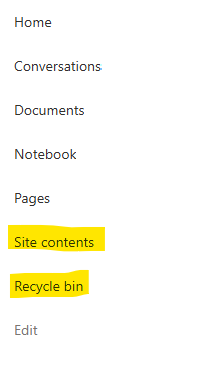
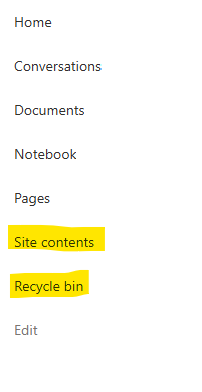
I posted this before but made a mistake with my write up, so I am reposting. I have a requirement that the Recycle bin and Site Contents should be be hidden from the Site Members and Site Visitors. Please how can I achieve this because the Server Infrastructure activation is not working for me. Any workarounds? Please help824Views0likes1Comment
SharePoint Permissions Management
Over the last 3 years of managing permissions across a suite of sites, I have uncovered more new issues with the way SharePoint permissioning is designed at every turn. A few examples, before the question: If I "Share" a file or folder somewhere on the site (breaking permissions inheritance), it is very inconvenient to find it again. If I "copy link" in this one particular way, permissions inheritance is broken. When looking at site-level permissions, I see site-level permissions groups, but there could be hundreds of other users who have been added to my site(s) without my knowing. If I want to reset permissions in an area (set of folders or library), I have to do it file-by-file or folder-by folder. If I want to get an excel snapshot of - anything really - IT has to pull it and it takes a couple days. Not to mention the permissions interface is incredibly clunky. All-in-all, there seem to be a million ways to break permissions inheritance, creating an access tracking and security nightmare. AND there's no easy way to truly see and understand who has access to what or what is broken, without spending hours with IT to pull a bunch of narrow-visibility reports. So my question is: what is the best way to navigate full permissions visibility? Am I doing something wrong? Is anyone else experiencing these issues? We have resorted to having a very strict "no outsides besides a few exceptions" policy and only managing permissions at the site-level, which really hampers on the collaboration benefits that SharePoint is trying to enable. It is also very administratively intensive. One of the benefits to SharePoint is that users don't really need to understand how it works to use it, but that's becoming less and less true with the increasing lack of security we feel in the platform.799Views3likes4CommentsDownload and Access Issues for External Users with SharePoint “Anyone” link sharing option.
Hi All, We are looking for help resolving a recurring issue with file sharing in SharePoint. All files and folders we share with external customers use the “Anyone” sharing link option (Anyone with the link can access). Despite this, we regularly face these problems: Customers can view files but cannot always download them from the browser (for example, using the "Create a Copy”, “Download a Copy" or "Save as" option in the PowerPoint files). Sometimes, sharing the parent folder (containing the file) link allows the external user to download, even though the file link itself does not. The problem is intermittent and not linked to settings or policies—sometimes everything works, sometimes it does not, even when we generate new links. No restrictive site, library, or organizational policies are applied; “Block download” is not set and full link access is confirmed. Using a private/incognito tab sometimes enables the link to work when it otherwise fails in a normal browser session, but not always. We want to understand why this happens and whether there is an underlying issue, known bug, or additional configuration we should review that could make “Anyone” links unpredictable for downloads with external users. Has anyone else experienced similar issues? If so, how did you resolve it, or are you still searching for answers? We’d really appreciate hearing your experiences and suggestions! Thank you for your advice and support!699Views1like3Comments
Unusual Search Results in Sharepoint "PnP Search Results"
Hello, I have created a sharepoint page (.aspx) to use it as a search function for all of the sharepoint pages which exist in one single "site". I have added a "PnP Search Box" and connected it with "PnP Search Results". But when I search a keyword in search box, I only see some of the pages containing that keyword in the search results. I definitely know there are more 'published pages' which contain that keyword. Even with putting the ListId in the Search Results query, I cannot get expected results. What am I missing here? For reference this is the query I have typed: {searchTerms} Path:{Site} FileType:aspx Thanks in advance!Solved600Views0likes9CommentsRecycle Bin and Site Content Hidden for Site Members and Site Visitors
I have a requirement that the Recycle bin and Site Contents should not be be hidden from the Site Members and Site Visitors. Please how can I achieve this because the Server Infrastructure activation is not working for me. Any workarounds? Please help599Views0likes2Comments