2019
63 Topics
Can we allow SharePoint 2019 OneDrive to sync outside of domain/intranet?
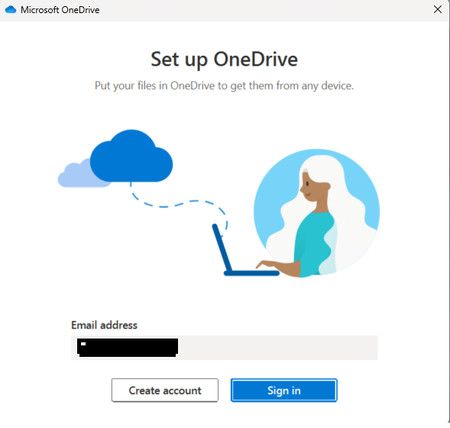
I want to sync SharePoint 2019 site library to local file system via OneDrive using Sync option of SharePoint library and User should be able to sync outside of intranet/Domain register PC. Like we can do that using office 365 OneDrive. I have setup the configuration as per https://learn.microsoft.com/en-us/sharepoint/install/configure-syncing-with-the-onedrive-sync-app. OneDrive work fine and user can be able to access my site and one drive using web browser outside of intranet. How ever when I tried to sync folder it's open OneDrive popup to login then it not able to login. After Click on sync button, it will open this window. After click on sign in it will fail It will work fine in intranet network (domain register PC) and after click sign in it will open window popup to ask credential. Once sign in I was able to sync. Any help would be appreciated.693Views0likes0Comments
Content type created but not finding in file properties content type dropdown - SharePoint 2019
I'm in SharePoint 2019 On-Premise, and I've created a site content type. Added it to list form settings. However, I can't locate it in the file properties dropdown. The other existing content types display correctly within the document properties, but the recently created one only appears only at the document set folder level. My goal is to have it included in the file content type dropdown. Can someone provide assistance?473Views0likes0CommentsSharePoint 2019 Server Failure - Convert from MinRole to Custom - Can it be reverted?
Hello all, We have a two-server SP2019 farm using MinRole with Server 1 Application with Search and Server 2 Front-end with Distributed Cache. Server 2 is down, and our network team said possibly corrupted. I need to get SharePoint up and running on Server 1 so am considering converting Server 1 to custom so sites can run from there. If the network team is able to bring Server 2 back on-line, would I be able to return to the prior MinRole configuration? Anyone see any possible issues with this plan? Thanks in advance!437Views0likes0Comments
SharePoint 2019 cannot open document in client office application on search result page
I already active feature to open document in client application, when click a word document it was opened in client word app. But on the search result page, click office document it will be download, how to set it will be open in client office app when click name on search result page?527Views0likes0Comments
SharePoint 2019 and SSRS
Hi All, I know SSRS SharePoint integrated mode is not supported with SharePoint 2019 anymore. I have a situation where SharePoint was migrated from 2016 to 2019 using the database attach method. They had SSRS reports in a document library. While the reports are still working in 2019 and usable, we are no longer able to update any subscriptions. So we need to know 2 things: 1. is there a way to find the subscriptions so we can document them? 2. is there a way to easily migrate these RDL files out of SharePoint and into SSRS?525Views0likes0CommentsCannot use hyperlink field with modern list
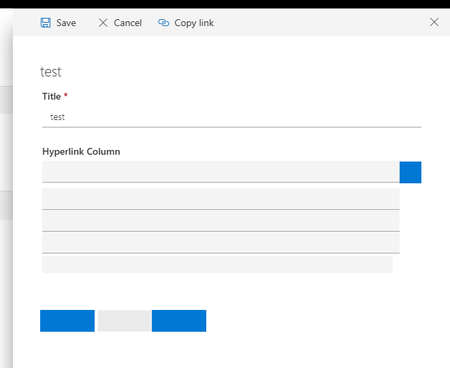
Hi! After installing latest CU of SharePoint (I was late of a couple months), I cannot edit or create new item in modern list when a hyperlink column is used. It works when I change libraries to classic mode but as soon as I configure it in modern, it doesn't work. When I click on new item, library "fade out" and no menu appear at right. Also, when I try to edit an item, menu at right appears but hyperlink field is broken. I cannot edit the field and save the item. When I try to edit an item... Any idea what can be the problem or what I can try to fix the problem? Thank you!4.9KViews0likes8CommentsSharePoint 2019 on-premises custom theme using a PowerShell script
I am on SharePoint 2019 on-premises with May 2023 CU. I see Gear, Change the Look. Current theme. I want to set COMPANYTHEMEHERE as the theme. I have done so in SharePoint Online however I have to use PNP and I do NOT have that on-premises. I go to help on the SharePoint 2019 on-premises site and it takes me to - https://docs.microsoft.com/en-us/sharepoint/dev/declarative-customization/site-theming/sharepoint-site-theming-overview. https://learn.microsoft.com/en-us/sharepoint/dev/declarative-customization/site-theming/sharepoint-site-theming-overview I have gone to the Theme Generator Tool - https://aka.ms/themedesignerand I have a basic theme. I am only changing the color of our site from SharePoint teal to our company branded color. I go to the SharePoint site theming: PowerShell cmdlets: https://learn.microsoft.com/en-us/sharepoint/dev/declarative-customization/site-theming/sharepoint-site-theming-powershell THIS is taking me to information about SharePoint ONLINE and NOT on-premises, which in SharePoint 2019 I am on-premises! What am I missing as I would like for a way to update the color of the theme on-premises.2.7KViews0likes2Comments
incomplete search results?
I have a question about the validity of search results being returned in a SharePoint Server 2019 environment. Here is an example of the scenario: I've created a list with about 10 columns. There is a single line of text column that includes a series of 1 or more 6-character, alpha-numeric codes which are used to uniquely identify people. When there is more than one code, the codes are currently separated by space. They were previously separated by a semi-colon, and I had the same issue I'm having now as described below. If I search the list's All Items view using one of the 6-character codes, the search does not return all list items that match the search criteria. It will only return partial results -- some where the specified code is the only code in the column and others where the specified code is one of several codes in the column. I've created a column index for this single line of text column, and I created a view filtered to only include list items that contain a specific code. The view results do include all of the matching list items. This is good. However, if I search the list view (using the "Find an item" box) by the same value that it is filtered by in the view design, then again it only finds partial results and thus decreases the number of list items shown in the view even though the search criteria is exactly the same as the view's filter criteria. I'm stumped trying to figure out how to make sense of this or how to make the searching actually work and find all results. On more than on occasion, I've clicked the list's "Reindex" button, and/or re-crawled the entire site, and/or reset the index at the site-collection level followed by full crawl, but none of this seems to help. We've even built a separate / clean environment to test this with, and have the same issue on both servers. What's going on?2.2KViews0likes2Comments
SharePoint 2019 Problem when setting Default open behavior for browser-enabled documents
SharePoint 2019 On-premise I setting "Default open behavior for browser-enabled documents " and select Open in the client application but when I new file in root library it open on website but when I new file in sub-folder it open on Client application instead Why On the root library and folder are different when New file935Views0likes0Comments
Implementing Sharepoint 2019 Search
Dears, I do have a production environment with 6 servers as below 1. 2 front end servers. 2. 2 application servers. 3. 2 database servers. i have to configure a custom search topology. So what is the recommended approach to implement the same as its a running production environment considering the down time and other factors. thanks, Ammar753Views0likes0Comments