.NET
420 TopicsHost remote MCP servers on Azure Functions
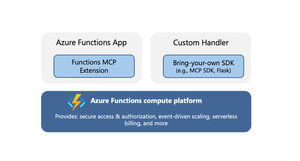
Model Context Protocol (MCP) servers allow AI agents to access external tools, data, and systems, greatly extending the capability and power of agents. When you’re ready to expose your MCP servers externally, within your organization or to the world, it’s important that the servers are run in a secure, scalable, and reliable environment. Azure Functions provides such a robust platform for hosting your remote MCP servers, offering high scalability with the Flex Consumption plan, built‑in authentication feature for Microsoft Entra and OAuth, and a serverless billing model. The platform also offers two hosting options for added flexibility and convenience. The options allow for hosting of MCP servers built with Azure Functions MCP extension or the official MCP SDKs. Azure Functions MCP Extension (GA) The MCP extension allows you to build and host servers using Azure Functions programming model, i.e. using triggers and bindings. The MCP tool trigger allows you to focus on implementing tools you want to expose, instead of worrying about handling protocol and server logistics. The MCP extension launched as public preview back in April and is now generally available, with support for .NET, Java, JavaScript, Python, and Typescript. New features in the extension Support for streamable-http transport Support for the newer streamable-http transport is added to the extension. Unless your client specifically requires the older Server-Sent Events (SSE) transport, you should use the streamable-http. The two transports have different endpoints in the extension: Transport Endpoint Streamable HTTP /runtime/webhooks/mcp Server-Sent Events (SSE) /runtime/webhooks/mcp/sse Defining server information You can use the extensions.mcp section in host.json to define MCP server information. { "version": "2.0", "extensions": { "mcp": { "instructions": "Some test instructions on how to use the server", "serverName": "TestServer", "serverVersion": "2.0.0", "encryptClientState": true, "messageOptions": { "useAbsoluteUriForEndpoint": false }, "system": { "webhookAuthorizationLevel": "System" } } } } Built-in server authentication and authorization The built-in feature implements the requirements of the MCP authorization protocol, such as issuing 401 challenge and hosting the Protected Resource Metadata document. You can configure it to use identity providers like Microsoft Entra for server authentication. In addition to server authenticating, you can also leverage this feature to implement on-behalf-of (OBO) auth flows where the client invokes a tool that accesses some downstream services on-behalf-of the user. Learn more about the built-in authentication and authorization feature. Mavin Build Plugin for Java For Java applications, the Maven Build Plugin (version 1.40.0) parses and verifies MCP tool annotations during build time. This process automatically generates the correct MCP extension configuration, ensuring that the MCP tool defined by the user is properly set up. The build-time analysis is especially beneficial for Java apps, as it allows developers to utilize the MCP extension without concerns about increased cold start times. We'll continuously enhance the plugin’s capabilities. Upcoming improvements, such as property type inference, will reduce manual configuration and make it even easier to use the McpToolTrigger. Get started Checkout the quickstarts to get an MCP extension server deployed in minutes: C# (.NET) remote-mcp-functions-dotnet Python remote-mcp-functions-python TypeScript (Node.js) remote-mcp-functions-typescript Java remote-mcp-functions-java References Learn more about the MCP extension and tool trigger in official documentations. Self‑hosted MCP server (public preview) In addition to the MCP extension, Azure Functions also supports hosting MCP servers implemented with the official SDKs. This is a suitable option for teams that have existing SDK‑based servers or who favor the SDK experience over the Functions programming model. There is no need to modify your server code; you can lift and shift these MCP servers to Azure Functions— which is why they are termed self‑hosted. The hosting capability supports the following features: Stateless servers that use the streamable-http transport. If you need your server to be stateful, consider using the Functions MCP extension for now. Servers implemented with Python, TypeScript, C#, or Java MCP SDK. Built-in server authentication and authorization like the MCP extension Hosting requirement Self-hosted MCP servers are deployed to the Azure Functions platform as custom handlers. You can think of custom handlers as lightweight web servers that receive events from the Functions host. The only requirement for hosting the MCP server is a file called host.json. Add this file to your project root to tell Functions how to run the server. An example host.json for a Python server looks like: { "version": "2.0", "configurationProfile": "mcp-custom-handler", "customHandler": { "description": { "defaultExecutablePath": "python", "arguments": ["path to main python script, e.g. hello.py"] }, "port": "8000" } } Get started Check out quickstarts to get your self-hosted MCP server deployed in minutes: C# (.NET) mcp-sdk-functions-hosting-dotnet Python mcp-sdk-functions-hosting-python TypeScript (Node.js) mcp-sdk-functions-hosting-node Java Coming soon! References Read the official documentation of self-hosted MCP servers and learn about integrations with Azure services like Foundry and API Center. For .NET developers - check out the overview of self-hosted MCP servers from the recent .NET Conference! We’d love to hear from you! Let us know your thoughts about hosting remote MCP server on Azure Functions. Does either of the options meet your needs? What other MCP features are you looking for? Let us know what you’d like us to prioritize next!650Views3likes1CommentBackground tasks in .NET
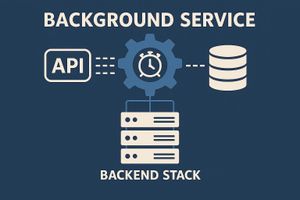
What is a Background Task? A background task (or background service) is work that runs behind the scenes in an application without blocking the main user flow and often without direct user interaction. Think of it as a worker or helper that performs tasks independently while the main app continues doing other things. Problem Statement - What do you do when your downstream API is flaky or sometimes down for hours or even days , yet your UI and main API must stay responsive? Solution - This is a very common architecture problem in enterprise systems, and .NET gives us excellent tools to solve it cleanly: BackgroundService and exponential backoff retry logic. In this article, I’ll walk you through: A real production-like use case The architecture needed to make it reliable Why exponential backoff matters How to build a robust BackgroundService A full working code example The Use Case You have two APIs: API 1 : called frequently by the UI (hundreds or thousands of times). API 2 : a downstream system you must call, but it is known to be unstable, slow, or completely offline for long periods. If API 1 directly calls API 2: * Users experience lag * API 1 becomes slow or unusable * You overload API 2 with retries * Calls fail when API 2 is offline * You lose data What do we do then? Here goes the solution The Architecture Instead of calling API 2 synchronously, API 1 simply stores the intended call, and returns immediately. A BackgroundService will later: Poll for pending jobs Call API 2 Retry with exponential backoff if API 2 is still unavailable Mark jobs as completed when successful This creates a resilient, smooth, non-blocking system. Why Exponential Backoff? When a downstream API is completely offline, retrying every 1–5 seconds is disastrous: It wastes CPU and bandwidth It floods logs It overloads API 2 when it comes back online It burns resources Exponential backoff solves this. Examples retry delays: Retry 1 → 2 sec Retry 2 → 4 sec Retry 3 → 8 sec Retry 4 → 16 sec Retry 5 → 32 sec Retry 6 → 64 sec (Max delay capped at 5 minutes) This gives the system room to breathe. Complete Working Example (Using In-Memory Store) 1. The Model public class PendingJob { public Guid Id { get; set; } = Guid.NewGuid(); public string Payload { get; set; } = string.Empty; public int RetryCount { get; set; } = 0; public DateTime NextRetryTime { get; set; } = DateTime.UtcNow; public bool Completed { get; set; } = false; } 2. The In-Memory Store public interface IPendingJobStore { Task AddJobAsync(string payload); Task<List<PendingJob>> GetExecutableJobsAsync(); Task MarkJobAsCompletedAsync(Guid jobId); Task UpdateJobAsync(PendingJob job); } public class InMemoryPendingJobStore : IPendingJobStore { private readonly List<PendingJob> _jobs = new(); private readonly object _lock = new(); public Task AddJobAsync(string payload) { lock (_lock) { _jobs.Add(new PendingJob { Payload = payload, RetryCount = 0, NextRetryTime = DateTime.UtcNow }); } return Task.CompletedTask; } public Task<List<PendingJob>> GetExecutableJobsAsync() { lock (_lock) { return Task.FromResult(_jobs.Where(j => !j.Completed && j.NextRetryTime <= DateTime.UtcNow).ToList()); } } public Task MarkJobAsCompletedAsync(Guid jobId) { lock (_lock) { var job = _jobs.FirstOrDefault(j => j.Id == jobId); if (job != null) job.Completed = true; } return Task.CompletedTask; } public Task UpdateJobAsync(PendingJob job) => Task.CompletedTask; } 3. The BackgroundService with Exponential Backoff using System.Text; public class Api2RetryService : BackgroundService { private readonly IHttpClientFactory _clientFactory; private readonly IPendingJobStore _store; private readonly ILogger<Api2RetryService> _logger; public Api2RetryService(IHttpClientFactory clientFactory, IPendingJobStore store, ILogger<Api2RetryService> logger) { _clientFactory = clientFactory; _store = store; _logger = logger; } protected override async Task ExecuteAsync(CancellationToken stoppingToken) { _logger.LogInformation("Background retry service started."); while (!stoppingToken.IsCancellationRequested) { var jobs = await _store.GetExecutableJobsAsync(); foreach (var job in jobs) { var client = _clientFactory.CreateClient("api2"); try { var response = await client.PostAsync("/simulate", new StringContent(job.Payload, Encoding.UTF8, "application/json"), stoppingToken); if (response.IsSuccessStatusCode) { _logger.LogInformation("Job {JobId} processed successfully.", job.Id); await _store.MarkJobAsCompletedAsync(job.Id); } else { await HandleFailure(job); } } catch (Exception ex) { _logger.LogError(ex, "Error calling API 2."); await HandleFailure(job); } } await Task.Delay(TimeSpan.FromSeconds(5), stoppingToken); } } private async Task HandleFailure(PendingJob job) { job.RetryCount++; var delay = CalculateBackoff(job.RetryCount); job.NextRetryTime = DateTime.UtcNow.Add(delay); await _store.UpdateJobAsync(job); _logger.LogWarning("Retrying job {JobId} in {Delay}. RetryCount={RetryCount}", job.Id, delay, job.RetryCount); } private TimeSpan CalculateBackoff(int retryCount) { var seconds = Math.Pow(2, retryCount); var maxSeconds = TimeSpan.FromMinutes(5).TotalSeconds; return TimeSpan.FromSeconds(Math.Min(seconds, maxSeconds)); } } 4. The API 1 — Public Endpoint using System.Runtime.InteropServices; using System.Text.Json; [ApiController] [Route("api1")] public class Api1Controller : ControllerBase { private readonly IPendingJobStore _store; private readonly ILogger<Api1Controller> _logger; public Api1Controller(IPendingJobStore store, ILogger<Api1Controller> logger) { _store = store; _logger = logger; } [HttpPost("process")] public async Task<IActionResult> Process([FromBody] object data) { var payload = JsonSerializer.Serialize(data); await _store.AddJobAsync(payload); _logger.LogInformation("Stored job for background processing."); return Ok("Request received. Will process when API 2 recovers."); } } 5. The API 2 (Simulating Downtime) using System.Runtime.InteropServices; [ApiController][Route("api2")] public class Api2Controller: ControllerBase { private static bool shouldFail = true; [HttpPost("simulate")] public IActionResult Simulate([FromBody] object payload) { if (shouldFail) return StatusCode(503, "API 2 is down"); return Ok("API 2 processed payload"); } [HttpPost("toggle")] public IActionResult Toggle() { shouldFail = !shouldFail; return Ok($"API 2 failure mode = {shouldFail}"); } } 6. The Program.cs var builder = WebApplication.CreateBuilder(args); builder.Services.AddControllers(); builder.Services.AddSingleton<IPendingJobStore, InMemoryPendingJobStore>(); builder.Services.AddHttpClient("api2", c => { c.BaseAddress = new Uri("http://localhost:5000/api2"); }); builder.Services.AddHostedService<Api2RetryService>(); var app = builder.Build(); app.MapControllers(); app.Run(); Testing the Whole Flow #1 API 2 starts in failure mode All attempts will fail and exponential backoff kicks in. #2 Send a request to API 1 POST /api1/process { "name": "hello" } Job is stored. #3 Watch logs You’ll see: Retrying job in 2 seconds... Retrying job in 4 seconds... Retrying job in 8 seconds... ... #4 Bring API 2 back online: POST /api2/toggle Next retry will succeed: Job {id} processed successfully. Conclusion This pattern is extremely powerful for: Payment gateways ERP integrations Long-running partner APIs Unstable third-party services Internal microservices that spike or go offline References Background tasks with hosted services in ASP.NET Core.NET MAUI on Linux with Visual Studio Code
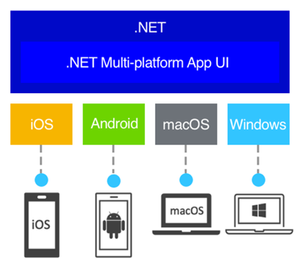
Explore Cross-Platform Development with .NET MAUI on Linux! Dive into the latest release of the .NET MAUI extension for Visual Studio Code, enabling Linux users to develop apps for Android, Windows, iOS, and macOS. This guide offers a step-by-step tutorial on setting up your Linux system for .NET MAUI development, including installation of essential tools and leveraging the C# Dev Kit extension. Whether you're working on Ubuntu or another Linux distribution, this article, enriched with a video walkthrough by Gerald Versluis, simplifies the journey to creating powerful, versatile applications with .NET MAUI.98KViews4likes12CommentsFrom Concept to Code: Building Production-Ready Multi-Agent Systems with Microsoft Foundry
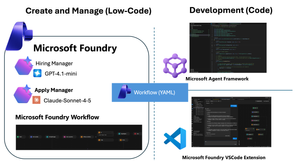
We have reached a critical inflection point in AI development. Within the Microsoft Foundry ecosystem, the core value proposition of "Agents" is shifting decisively—moving from passive content generation to active task execution and process automation. These are no longer just conversational interfaces. They are intelligent entities capable of connecting models, data, and tools to actively execute complex business logic. To support this evolution, Microsoft has introduced a powerful suite of capabilities: the Microsoft Agent Framework for sophisticated orchestration, the Agent V2 SDK, and integrated Microsoft Foundry VSCode Extensions. These innovations provide the tooling necessary to bridge the gap between theoretical research and secure, scalable enterprise landing. But how do you turn these separate components into a cohesive business solution? That is the challenge we address today. This post dives into the practical application of these tools, demonstrating how to connect the dots and transform complex multi-agent concepts into deployed reality. The Scenario: Recruitment through an "Agentic Lens" Let’s ground this theoretical discussion with a real-world scenario that perfectly models a multi-agent environment: The Recruitment Process. By examining recruitment through an agentic lens, we can identify distinct entities with specific mandates: The Recruiter Agent: Tasked with setting boundary conditions (job requirements) and preparing data retrieval mechanisms (interview questions). The Applicant Agent: Objective is to process incoming queries and synthesize the best possible output to meet the recruiter's acceptance criteria. Phase 1: Design Achieving Orchestration via Microsoft Foundry Workflows To bridge the gap between our scenario and technical reality, we start with Foundry Workflows. Workflows serves as the visual integration environment within Foundry. It allows you to build declarative pipelines that seamlessly combine deterministic business logic with the probabilistic nature of autonomous AI agents. By adopting this visual, low-code paradigm, you eliminate the need to write complex orchestration logic from scratch. Workflows empowers you to coordinate specialized agents intuitively, creating adaptive systems that solve complex business problems collaboratively. Visually Orchestrating the Cycle Microsoft Foundry provides an intuitive, web-based drag-and-drop interface. This canvas allows you to integrate specialized AI agents alongside standard procedural logic blocks, transforming abstract ideas into executable processes without writing extensive glue code. To translate our recruitment scenario into a functional workflow, we follow a structured approach: Agent Prerequisites: We pre-configure our specialized agents within Foundry. We create a Recruiter Agent (prompted to generate evaluation criteria) and an Applicant Agent (prompted to synthesize responses). Orchestrating the Interaction: We drag these nodes onto the board and define the data flow. The process begins with the Recruiter generating questions, piping that output directly as input for the Applicant agent. Adding Business Logic: A true workflow requires decision-making. We introduce control flow logic, such as IF/ELSE conditional blocks, to evaluate the recruiter's questions based on predefined criteria. This allows the workflow to branch dynamically—if satisfied, the candidate answers the questions; if not, the questions are regenerated. Alternative: YAML Configuration For developers who prefer a code-first approach or wish to rapidly replicate this logic across environments, Foundry allows you to export the underlying YAML. kind: workflow trigger: kind: OnConversationStart id: trigger_wf actions: - kind: SetVariable id: action-1763742724000 variable: Local.LatestMessage value: =UserMessage(System.LastMessageText) - kind: InvokeAzureAgent id: action-1763736666888 agent: name: HiringManager input: messages: =System.LastMessage output: autoSend: true messages: Local.LatestMessage - kind: Question variable: Local.Input id: action-1763737142539 entity: StringPrebuiltEntity skipQuestionMode: SkipOnFirstExecutionIfVariableHasValue prompt: Boss, can you confirm this ? - kind: ConditionGroup conditions: - condition: =Local.Input="Yes" actions: - kind: InvokeAzureAgent id: action-1763744279421 agent: name: ApplyAgent input: messages: =Local.LatestMessage output: autoSend: true messages: Local.LatestMessage - kind: EndConversation id: action-1763740066007 id: if-action-1763736954795-0 id: action-1763736954795 elseActions: - kind: GotoAction actionId: action-1763736666888 id: action-1763737425562 id: "" name: HRDemo description: "" Simulating the End-to-End Process Once constructed, Foundry provides a robust, built-in testing environment. You can trigger the workflow with sample input data to simulate the end-to-end cycle. This allows you to debug hand-offs and interactions in real-time before writing a single line of application code. Phase 2: Develop From Cloud Canvas to Local Code with VSCode Foundry Workflows excels at rapid prototyping. However, a visual UI is rarely sufficient for enterprise-grade production. The critical question becomes: How do we integrate these visual definitions into a rigorous Software Development Lifecycle (SDLC)? While the cloud portal is ideal for design, enterprise application delivery happens in the local IDE. The Microsoft Foundry VSCode Extension bridges this gap. This extension allows developers to: Sync: Pull down workflow definitions from the cloud to your local machine. Inspect: Review the underlying logic in your preferred environment. Scaffold: Rapidly generate the underlying code structures needed to run the flow. This accelerates the shift from "understanding" the flow to "implementing" it. Phase 3: Deploy Productionizing Intelligence with the Microsoft Agent Framework Once the multi-agent orchestration has been validated locally, the final step is transforming it into a shipping application. This is where the Microsoft Agent Framework shines as a runtime engine. It natively ingests the declarative Workflow definitions (YAML) exported from Foundry. This allows artifacts from the prototyping phase to be directly promoted to application deployment. By simply referencing the workflow configuration libraries, you can "hydrate" the entire multi-agent system with minimal boilerplate. Here is the code required to initialize and run the workflow within your application. Note - Check the source code https://github.com/microsoft/Agent-Framework-Samples/tree/main/09.Cases/MicrosoftFoundryWithAITKAndMAF Summary: The Journey from Conversation to Action Microsoft Foundry is more than just a toolbox; it is a comprehensive solution designed to bridge the chasm between theoretical AI research and secure, scalable enterprise applications. In this post, we walked through the three critical stages of modern AI development: Design (Low-Code): Leveraging Foundry Workflows to visually orchestrate specialized agents (Recruiter vs. Applicant) mixed with deterministic business rules. Develop (Local SDLC): Utilizing the VSCode Extension to break down the barriers between the cloud canvas and the local IDE, enabling seamless synchronization and debugging. Deploy (Native Runtime): Using the Microsoft Agent Framework to ingest declarative YAML, realizing the promise of "Configuration as Code" and eliminating tedious logic rewriting. By following this path, developers can move beyond simple content generation and build adaptive, multi-agent systems that drive real business value. Learning Resoures What's Microsoft Foundry (https://learn.microsoft.com/azure/ai-foundry/what-is-azure-ai-foundry?view=foundry) Work with Declarative (Low-code) Agent workflows in Visual Studio Code (preview) (https://learn.microsoft.com/azure/ai-foundry/agents/how-to/vs-code-agents-workflow-low-code?view=foundry) Microsoft Agent Framework(https://github.com/microsoft/agent-framework) Microsoft Foundry VSCode Extension(https://marketplace.visualstudio.com/items?itemName=TeamsDevApp.vscode-ai-foundry)6.7KViews1like0Comments
The .NET News daily newsletter for C# developers
Hi everyone! I'd like to invite you to my C# and Azure newsletter that I launched a little over a year ago: https://dotnetnews.co/ Its a labor of love project I use to help my fellow C# devs keep up on all the latest developer articles. We finally hit over 2,000 subscribers! Most importantly, If anyone has any ideas on how to make it better, I'd love to hear from you.38Views0likes0CommentsDurable Task Extension for Microsoft Agent Framework で、堅牢なエージェントを構築する
(これは 2025/11/13 に出された製品チームの記事『Bulletproof agents with the durable task extension for Microsoft Agent Framework』を日本語に翻訳したものです。) 本日 (2025/11/13)、Durable Task Extension for Microsoft Agent Framework のパブリックプレビューを発表できることを大変うれしく思います。 この拡張機能は、Azure Durable Functions の 実績ある 耐久性のある実行 (durable execution) (クラッシュや再起動に耐える) と分散実行 (複数インスタンスで動作する) 機能を、Microsoft Agent Framework に直接組み込むことで、本番環境対応の、堅牢でスケーラブルな AI エージェントの構築方法を一新します。 これにより、セッション管理、障害復旧、スケーリングを自動的に処理する、ステートフルで堅牢な AI エージェントを Azure にデプロイでき、開発者はエージェントのロジックに完全に集中できるようになります。 たとえば、複数日にわたる会話でコンテキストを維持するカスタマーサービスエージェント、人間による承認 (human-in-the-loop approval workflow) を含むコンテンツパイプライン、または専門的な AI モデルを連携させる完全自動化されたマルチエージェントシステムを構築する場合でも、この Durable Task Extension for Microsoft Agent Framework は、サーバーレスのシンプルさで本番レベルの信頼性、スケーラビリティ、そして調整機能を提供します。 Durable Task Extension の主な機能: サーバーレスホスティング (Serverless Hosting):Azure Functions 上にエージェントをデプロイし、数千のインスタンスからゼロまで自動スケーリングを実現しながら、サーバーレスアーキテクチャの利点を維持したまま完全な制御を保持します。 自動セッション管理 (Automatic Session Management):エージェントは、プロセスのクラッシュや再起動、インスタンス間の分散実行に耐える、完全な会話コンテキストを保持した永続的なセッションを維持します。 決定的なマルチエージェントオーケストレーション (Deterministic Multi-Agent Orchestrations): コードで制御された、予測可能かつ再現性のある実行パターンで、特化した (specialized) durable agents を組み合わせて動作させる。 (訳註1:「決定的な (deterministic)」とは、同じ入力に対しては常に同じ結果を返すもので、その動作が予測可能なものを指します) (訳註2:「durable agent」とは、このフレームワークのエージェントをそう呼んでおり、普通のエージェントと違ってDurable な性質を持っているエージェントのことを指します) サーバーレスによるコスト削減を伴う Human-in-the-Loop (Human-in-the-Loop with Serverless Cost Savings): 人間の入力を待つ間、コンピュートリソースを消費せず、コストも発生しません。 Durable Task Scheduler による組み込みの可観測性 (Built-in Observability with Durable Task Scheduler):Durable Task Scheduler の UI ダッシュボードを通じて、エージェントの操作やオーケストレーションを深く可視化できます。 Durable Agent を作成して実行してみる 公式ドキュメント https://aka.ms/create-and-run-durable-agent コードサンプル (Python/C#) # Python endpoint = os.getenv("AZURE_OPENAI_ENDPOINT") deployment_name = os.getenv("AZURE_OPENAI_DEPLOYMENT_NAME", "gpt-4o-mini") # 標準的な Microsoft Agent Framework パターンに従って AI エージェントを作成します agent = AzureOpenAIChatClient( endpoint=endpoint, deployment_name=deployment_name, credential=AzureCliCredential() ).create_agent( instructions="""あなたは、どんなテーマに対しても読みやすく構造化された、 魅力的なドキュメントを作成するプロフェッショナルなコンテンツライターです。 テーマが与えられたら、次の手順で進めてください。 1. Web 検索ツールを使ってテーマをリサーチする 2. ドキュメントのアウトラインを生成する 3. 適切な書式で説得力のあるドキュメントを書く 4. 関連する例と出典(引用)を含める""", name="DocumentPublisher", tools=[ AIFunctionFactory.Create(search_web), AIFunctionFactory.Create(generate_outline) ] ) # Durable なセッション管理でエージェントをホストするように Function アプリを構成します app = AgentFunctionApp(agents=[agent]) app.run() // C# var endpoint = Environment.GetEnvironmentVariable("AZURE_OPENAI_ENDPOINT"); var deploymentName = Environment.GetEnvironmentVariable("AZURE_OPENAI_DEPLOYMENT") ?? "gpt-4o-mini"; // 標準的な Microsoft Agent Framework パターンに従って AI エージェントを作成します AIAgent agent = new AzureOpenAIClient(new Uri(endpoint), new DefaultAzureCredential()) .GetChatClient(deploymentName) .CreateAIAgent( instructions: """ あなたは、どんなテーマに対しても読みやすく構造化された、 魅力的なドキュメントを作成するプロフェッショナルなコンテンツライターです。 テーマが与えられたら、次の手順で進めてください。 1.Web 検索ツールを使ってテーマをリサーチする 2.ドキュメントのアウトラインを生成する 3.適切な書式で説得力のあるドキュメントを書く 4.関連する例と出典(引用)を含める """, name: "DocumentPublisher", tools: [ AIFunctionFactory.Create(SearchWeb), AIFunctionFactory.Create(GenerateOutline) ]); // Durable なスレッド管理でエージェントをホストするように Functions アプリを構成します // これにより、HTTP エンドポイントが自動で作成され、状態の永続化が管理されます using IHost app = FunctionsApplication .CreateBuilder(args) .ConfigureFunctionsWebApplication() .ConfigureDurableAgents(options => options.AddAIAgent(agent) ) .Build(); app.Run(); なぜ Durable Task Extension が必要なのか AI エージェントが、単純なチャットボットから、複雑で長時間実行されるタスクを処理する高度なシステムへと進化するにつれて、新たな課題が浮上します。 会話が数日から数週間にわたるため、プロセスの再起動やクラッシュ、障害を超えて状態を保持する必要があります。 ツール呼び出しが通常のタイムアウトを超える時間を要する場合があり、自動チェックポイントと復旧が必要です。 大量のワークロードに対応するため、数千のエージェント会話を同時に処理できるよう、分散インスタンス間での弾力的なスケーリングが求められます。 複数の専門エージェントを、信頼性の高いビジネスプロセスのために、予測可能で再現可能な実行パターンで調整する必要があります。 エージェントは、処理を進める前に人間の承認を待つ必要がある場合があり、その間は理想的にはリソースを消費しない (課金されない) ことが望まれます。 Durable Extension は、Azure Durable Functions の機能を Microsoft Agent Framework に拡張することで、これらの課題に対応します。これにより、障害に耐え、弾力的にスケールし、耐久性と分散実行によって予測可能に動作する AI エージェントを構築できます。 4 つの柱 : 4D この拡張機能は、4 つの基本的な価値の柱、通称「4D」に基づいて構築されています。 Durability (耐久性) すべてのエージェントの状態変更(メッセージ、ツール呼び出し、意思決定)は、自動的に耐久性のあるチェックポイントとして保存されます。エージェントは、インフラ更新やクラッシュから復旧し、長時間の待機中にメモリからアンロードされてもコンテキストを失わずに再開できます。これは、長時間実行される処理や外部イベントを待機するエージェントに不可欠です。 Distributed (分散型の) エージェントの実行はすべてのインスタンスで利用可能であり、弾力的なスケーリングと自動フェイルオーバーを実現します。正常なノードは、障害が発生したインスタンスの作業をシームレスに引き継ぎ、継続的な運用を保証します。この分散実行モデルにより、数千のステートフルエージェントがスケールアップし、並列で動作できます。 Deterministic (決定性) エージェントのオーケストレーションは、通常のコードとして記述された命令型ロジックを使用して予測可能に実行されます。実行パスを定義することで、自動テスト、検証可能なガードレール、ステークホルダーが信頼できるビジネスクリティカルなワークフローを実現します。必要に応じて明示的な制御フローを提供し、エージェント主導のワークフローを補完します。 Debuggability (デバッグしやすさ) IDE、デバッガー、ブレークポイント、スタックトレース、単体テストなどの馴染みのある開発ツールやプログラミング言語を使用して開発・デバッグできます。エージェントとそのオーケストレーションはコードとして表現されるため、テスト、デバッグ、保守が容易です。 実際の機能の動作 サーバーレス ホスティング (Serverless hosting) エージェントを Azure Functions (近日中に他の Azure サービスにも拡張予定)にデプロイし、使用していないときはゼロまで、使用時は数千インスタンスまで自動スケーリングします。消費したコンピューティング リソースに対してのみ料金を支払います。このコードファーストのデプロイ手法により、サーバーレス アーキテクチャの利点を維持しながら、コンピュート環境 (compute environment) を完全に制御できます。 # Python endpoint = os.getenv("AZURE_OPENAI_ENDPOINT") deployment_name = os.getenv("AZURE_OPENAI_DEPLOYMENT_NAME", "gpt-4o-mini") # 標準的な Microsoft Agent Framework パターンに従って AI エージェントを作成します agent = AzureOpenAIChatClient( endpoint=endpoint, deployment_name=deployment_name, credential=AzureCliCredential() ).create_agent( instructions="""あなたは、どんなテーマに対しても読みやすく構造化された、 魅力的なドキュメントを作成するプロフェッショナルなコンテンツライターです。 テーマが与えられたら、次の手順で進めてください。 1. Web 検索ツールを使ってテーマをリサーチする 2. ドキュメントのアウトラインを生成する 3. 適切な書式で説得力のあるドキュメントを書く 4. 関連する例と出典(引用)を含める""", name="DocumentPublisher", tools=[ AIFunctionFactory.Create(search_web), AIFunctionFactory.Create(generate_outline) ] ) # Durable なセッション管理でエージェントをホストするように Function アプリを構成します app = AgentFunctionApp(agents=[agent]) app.run() Automatic session management(自動セッション管理) エージェントのセッションは、Function アプリで構成した耐久性のあるストレージに自動的にチェックポイントされ、複数インスタンス間での耐久性と分散実行を可能にします。中断やプロセス障害の後でも、どのインスタンスからでもエージェントの実行を再開でき、継続的な運用が保証されます。 内部的には、エージェントは Durable Entities として実装されています。これらは、実行間で状態を保持するステートフルなオブジェクトです。このアーキテクチャにより、各エージェントセッションは、会話履歴とコンテキストを保持した信頼性の高い長寿命のエンティティとして機能します。 シナリオ例: 複数日から数週間にわたる複雑なサポート案件を処理するカスタマーサービスエージェント。エージェントが再デプロイされたり、別のインスタンスに移動した場合でも、会話履歴、コンテキスト、進捗は保持されます。 # 最初の対話 - ドキュメント作成用の新しいスレッドを開始 curl -X POST https://your-function-app.azurewebsites.net/api/agents/DocumentPublisher/threads \ -H "Content-Type: application/json" \ -d '{"message": "Azure Functions の利点についてのドキュメントを作成してください"}' # レスポンスにはスレッド ID と初期のドキュメントのアウトライン/下書きが含まれます # {"threadId": "doc789", "response": "Azure Functions の利点に関する網羅的なドキュメントを作成します。最新情報を検索します… [ドキュメント下書き] # Azure Functions の利点\n\n## はじめに\nAzure Functions は、インフラ管理なしでイベント駆動のコードを実行できるサーバーレスのコンピュートサービスです…\n\n## コスト効率\n- 実行時間に対してのみ支払う\n- アイドル状態のリソースには料金がかからない\n- 自動スケーリングにより過剰プロビジョニングを削減…\n\n## 開発者の生産性\n- 複数言語のサポート(C#, Python, JavaScript, Java)\n- 統合開発ツールと CI/CD …\n\n## スケーラビリティ\n- 需要に基づく自動スケーリング\n- 何百万ものリクエストをシームレスに処理…\n\n参考文献: [Azure ドキュメント、サーバーレス計算に関する研究]"} # 2 回目の対話 - 同じスレッドでドキュメントを改善 curl -X POST https://your-function-app.azurewebsites.net/api/agents/DocumentPublisher/threads/doc789 \ -H "Content-Type: application/json" \ -d '{"message": "他の Azure サービスとの統合に関するセクションを追加してもらえますか?"}' # エージェントは Azure Functions ドキュメントのコンテキストを保持し、要求されたセクションを追加します # {"threadId": "doc789", "response": "Azure Functions ドキュメントに、包括的な統合セクションを追加しました:\n\n## Azure サービスとの統合\n\n### Azure Storage\nBlob Storage、Queue Storage、Table Storage へのトリガーとバインディングにより、イベント駆動アーキテクチャをシームレスに実現…\n\n### Azure Event Grid と Event Hubs\nリアルタイムのイベントストリームを処理し、スケール可能な Pub/Sub パターンを実装…\n\n### Azure Cosmos DB\nドキュメントデータベース操作向けの組み込みバインディングと、変更フィードの自動処理…\n\n### Azure Service Bus\nエンタープライズメッセージング機能による信頼性の高いメッセージ処理…\n\n### Azure AI Services\nOpenAI、Cognitive Services、AI Search を容易に統合してインテリジェントなアプリケーションを実現…\n\nこのセクションはスケーラビリティのセクションの後に追加されています。ユースケースやデプロイのベストプラクティスも追加しましょうか?"} (訳者注:11/20 現在、上記のエンドポイント URL やリクエスト、レスポンスの形式は変更されています。この記事ではオリジナル記事の時のままの記載にしていますが、今後も (現在まだ preview 版で) 変わる可能性があるため、最新の情報は公式ドキュメントを参照してください:https://aka.ms/create-and-run-durable-agent ) Deterministic multi-agent orchestrations(決定的なマルチエージェントオーケストレーション) 命令型コードを使用して、複数の専門的な durable agents を調整します。この場合、制御フローは開発者が定義します。これは、エージェントが次のステップを決定するエージェント主導のワークフローとは異なります。 決定的オーケストレーションは、自動チェックポイントと復旧を備えた予測可能で再現可能な実行パターンを提供します。 シナリオ例: メール処理システムで、まずスパム検出エージェントを使用し、その分類に基づいて条件付きで異なる専門エージェントにルーティングします。オーケストレーションは、どのステップで障害が発生しても自動的に復旧し、完了済みのエージェント呼び出しは再実行されません。 # Python app.orchestration_trigger(context_name="context") def document_publishing_orchestration(context: DurableOrchestrationContext): """複数の専門エージェントを協調させる決定的オーケストレーション。""" doc_request = context.get_input() # オーケストレーションのコンテキストから専門エージェントを取得 research_agent = context.get_agent("ResearchAgent") writer_agent = context.get_agent("DocumentPublisherAgent") # ステップ 1:Web 検索でトピックを調査する research_result = yield research_agent.run( messages=f"次のトピックを調査し、主要な情報を収集してください:{doc_request.topic}", response_schema=ResearchResult ) # ステップ 2:調査結果に基づいてアウトラインを生成する outline = yield context.call_activity("generate_outline", { "topic": doc_request.topic, "research_data": research_result.findings }) # ステップ 3:調査結果とアウトラインに基づいてドキュメントを作成する document = yield writer_agent.run( messages=f"""以下のトピックについて、網羅的なドキュメントを作成してください:{doc_request.topic} 調査結果: {research_result.findings} アウトライン: {outline} 適切な書式で、構造化され読みやすく、魅力的なドキュメントにしてください。必要に応じて出典(引用)も含めてください。""", response_schema=DocumentResponse ) # ステップ 4:生成したドキュメントを保存して公開する return yield context.call_activity("publish_document", { "title": doc_request.topic, "content": document.text, "citations": document.citations }) Human-in-the-loop(人間を介在させる仕組み) オーケストレーションやエージェントは、人間の入力、承認、レビューを待つ間、コンピュートリソースを消費せずに一時停止できます。アプリケーションがクラッシュや再起動したとしても、耐久性のある実行 (durable execution) により、数日から数週間にもわたる人間の応答をオーケストレーションが待機することが可能です。サーバーレスホスティングと組み合わせることで、待機期間中はすべてのコンピュートリソースが停止し、人間が入力を提供するまでコンピュートコストが完全に排除されます。 シナリオ例: コンテンツ公開エージェントが下書きを生成し、人間のレビュー担当者に送信して、承認を数日間待機するケース。この間、レビュー期間中はコンピュートリソースを実行(または課金)しません。人間の応答が届くと、オーケストレーションは会話コンテキストと実行状態を完全に保持したまま自動的に再開します。 # Python app.orchestration_trigger(context_name="context") def content_approval_workflow(context: DurableOrchestrationContext): """人間を介在させるワークフロー(待機中はコストゼロ)""" topic = context.get_input() # ステップ 1:エージェントを使ってコンテンツを生成 content_agent = context.get_agent("ContentGenerationAgent") draft_content = yield content_agent.run(f"{topic} についての記事を書いてください") # ステップ 2:人間によるレビューを依頼 yield context.call_activity("notify_reviewer", draft_content) # ステップ 3:承認を待機(待機中はコンピュートリソースを消費しない) approval_event = context.wait_for_external_event("ApprovalDecision") timeout_task = context.create_timer(context.current_utc_datetime + timedelta(hours=24)) winner = yield context.task_any([approval_event, timeout_task]) if winner == approval_event: timeout_task.cancel() approved = approval_event.result if approved: result = yield context.call_activity("publish_content", draft_content) return result else: return "コンテンツは却下されました" else: # タイムアウト時:レビューをエスカレーション result = yield context.call_activity("escalate_for_review", draft_content) return result Built-in agent observability(エージェントの組み込み可観測性) Function App を Durable Task Scheduler を耐久バックエンドとして構成します(エージェントとオーケストレーションの状態を永続化する仕組み)。Durable Task Scheduler は、durable agents に推奨されるバックエンドであり、最高のスループット性能、完全に管理されたインフラ、そして UI ダッシュボードによる組み込みの可観測性を提供します。 Durable Task Scheduler ダッシュボードは、エージェントの操作を深く可視化します: 会話履歴 (Conversation history): 各エージェントセッションの完全な会話スレッドを表示し、すべてのメッセージ、ツール呼び出し、任意時点のコンテキストを確認可能 マルチエージェントの可視化 (Multi-agent visualization): 複数の専門エージェントを呼び出す際の実行フローを、エージェント間のハンドオフ、並列実行、条件分岐を含む視覚的な表現で表示 パフォーマンス指標 (Performance metrics): エージェントの応答時間、トークン使用量、オーケストレーションの実行時間を監視 実行履歴 (Execution history): デバッグ用に完全なリプレイ機能を備えた詳細な実行ログにアクセス可能 Demo Video Language support The Durable Task Extension は以下の言語をサポートしています: C# (.NET 8.0+) with Azure Functions Python (3.10+) with Azure Functions Support for additional computes coming soon. 今日から始めてみましょう Click here to create and run a durable agent Learn more Overview documentation C# Samples Python Samples 原文 Bulletproof agents with the durable task extension for Microsoft Agent Framework | Microsoft Community Hub
Unlocking Client-Side Configuration at Scale with Azure App Configuration and Azure Front Door
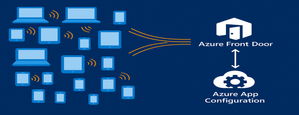
As modern apps shift more logic to the browser, Azure App Configuration now brings dynamic configuration directly to client-side applications. Through its integration with Azure Front Door, developers can deliver configuration to thousands or millions of clients with CDN-scale performance while avoiding the need to expose secrets or maintain custom proxy layers. This capability is especially important for AI-powered and agentic client applications, where model settings and behaviors often need to adjust rapidly and safely. This post introduces the new capability, what it unlocks for developers, and how to start building dynamic, configuration-driven client experiences in Azure. App Configuration for Client Applications Centralized Settings and Feature Management App Configuration gives developers a single, consistent place to define configuration settings and feature flags. Until now, this capability was used almost exclusively by server-side applications. With Azure Front Door integration, these same settings can now power modern client experiences across: Single Page Applications (React, Vue, Angular, Next.js, and others using JavaScript) Mobile/ and desktop applications with .Net MAUI JavaScript-powered UI components or embedded widgets running in browser Any browser-based application that can run JavaScript This allows developers to update configuration without redeploying the client app. CDN-Accelerated Configuration Delivery with Azure Front Door Azure Front Door enables client applications to fetch configuration using a fast, globally distributed CDN path. Developers benefit from: High-scale configuration delivery to large client populations Edge caching for fast, low-latency configuration retrieval Reduced load on your backend configuration store through CDN offloading Dedicated endpoint that exposes only the configuration subset it is scoped for. Secure and Scalable Architecture App Configuration integrates with Azure Front Door to deliver configuration to client-side apps using a simple, secure, and CDN-accelerated flow. How it works The browser calls Azure Front Door anonymously, like any CDN asset. Front Door uses managed identity to access App Configuration securely. Only selected key-values, feature flags or snapshots are exposed through Azure Front Door. No secrets or credentials are shipped to the client. Edge caching enables high throughput and low latency configuration delivery. This provides a secure and efficient design for client applications and eliminates the need for custom gateway code or proxy services. Developer Scenarios: What You Can Build CDN-delivered configuration unlocks a range of rich client application scenarios: Client-side feature rollouts for UI components A/B testing or targeted experiences using feature flags Control AI/LLM model parameters and UI behaviors through configuration Dynamically control client-side agent behavior, safety modes, and guardrail settings through configuration Consistent behavior for clients using snapshot-based configuration references These scenarios previously required custom proxies. Now, they work out-of-the-box with Azure App Configuration + Azure Front Door. End-to-End Developer Journey The workflow for enabling client-side configuration with App Configuration is simple: Define key values or feature flags in Azure App Configuration Connect App Configuration to Azure Front Door in the portal Scope configuration exposed by Front Door endpoint with key value or snapshot filter. Use the updated AppConfig JavaScript or .NET provider to connect to Front Door anonymously. Client app fetches configuration via Front Door with CDN performance Update your configuration centrally, no redeployment required To see this workflow end-to-end, check out this demo video. The video shows how to connect an App Configuration store to Azure Front Door and use the Front Door endpoint in a client application. It also demonstrates dynamic feature flag refresh as updates are made in the store. Portal Experience to connect Front Door Once you create your App Configuration store with key values and/or feature flags, you can configure the Front Door connection directly in the Azure portal. The App Configuration portal guides you through connecting a profile, creating an endpoint, and scoping which keys, labels, or snapshots will be exposed to client applications. A detailed “How-To” guide is available in the App Configuration documentation. Using the Front Door Endpoint in Client Applications JavaScript Provider Minimum version for this feature is 2.3.0-preview, get the provider from here. Add below snippet in your code to fetch the key values and/or feature flags from App Configuration through front door. import { loadFromAzureFrontDoor } from "@azure/app-configuration-provider"; const appConfig = await loadFromAzureFrontDoor("https://<your-afd-endpoint>", { featureFlagOptions: { enabled: true }, }); const yoursetting = appConfig.get("<app.yoursetting>"); .NET Provider Minimum version supporting this feature is 8.5.0-preview, get the provider from here builder.Configuration.AddAzureAppConfiguration(options => { options.ConnectAzureFrontDoor(new Uri("https://<your-afd-endpoint>")) .UseFeatureFlags(featureFlagOptions => { featureFlagOptions.Select("<yourappprefix>"); }); }); See our GitHub samples for JavaScript and .NET MAUI for complete client application setups. Notes & Limitations Feature flag scoping requires two key prefix filters, startsWith(".appconfig.featureflag") and ALL keys. Portal Telemetry feature does not reflect client-side consumption yet. This feature is in preview, and currently not supported in Azure sovereign clouds. Conclusion By combining Azure App Configuration with Azure Front Door, developers can now power a new generation of dynamic client applications. Configuration is delivered at CDN speed, securely and at scale letting you update experiences instantly, without redeployment or secret management on client side. This integration brings App Configuration’s flexibility directly to the browser, making it easier to power AI-driven interfaces, agentic workflows, and dynamic user experiences. Try client-side configuration with App Configuration today and update your apps’ behavior in real time, without any redeployments.392Views2likes0CommentsBulletproof agents with the durable task extension for Microsoft Agent Framework
Today, we're thrilled to announce the public preview of the durable task extension for Microsoft Agent Framework. This extension transforms how you build production-ready, resilient and scalable AI agents by bringing the proven durable execution (survives crashes and restarts) and distributed execution (runs across multiple instances) capabilities of Azure Durable Functions directly into the Microsoft Agent Framework. Now you can deploy stateful, resilient AI agents to Azure that automatically handle session management, failure recovery, and scaling, freeing you to focus entirely on your agent logic. Whether you're building customer service agents that maintain context across multi-day conversations, content pipelines with human-in-the-loop approval workflows, or fully automated multi-agent systems coordinating specialized AI models, the durable task extension gives you production-grade reliability, scalability and coordination with serverless simplicity. Key features of the durable task extension include: Serverless Hosting: Deploy agents on Azure Functions with auto-scaling from thousands of instances to zero, while retaining full control in a serverless architecture. Automatic Session Management: Agents maintain persistent sessions with full conversation context that survives process crashes, restarts, and distributed execution across instances Deterministic Multi-Agent Orchestrations: Coordinate specialized durable agents with predictable, repeatable, code-driven execution patterns Human-in-the-Loop with Serverless Cost Savings: Pause for human input without consuming compute resources or incurring costs Built-in Observability with Durable Task Scheduler: Deep visibility into agent operations and orchestrations through the Durable Task Scheduler UI dashboard Click here to create and run a durable agent # Python endpoint = os.getenv("AZURE_OPENAI_ENDPOINT") deployment_name = os.getenv("AZURE_OPENAI_DEPLOYMENT_NAME", "gpt-4o-mini") # Create an AI agent following the standard Microsoft Agent Framework pattern agent = AzureOpenAIChatClient( endpoint=endpoint, deployment_name=deployment_name, credential=AzureCliCredential() ).create_agent( instructions="""You are a professional content writer who creates engaging, well-structured documents for any given topic. When given a topic, you will: 1. Research the topic using the web search tool 2. Generate an outline for the document 3. Write a compelling document with proper formatting 4. Include relevant examples and citations""", name="DocumentPublisher", tools=[ AIFunctionFactory.Create(search_web), AIFunctionFactory.Create(generate_outline) ] ) # Configure the function app to host the agent with durable session management app = AgentFunctionApp(agents=[agent]) app.run() // C# var endpoint = Environment.GetEnvironmentVariable("AZURE_OPENAI_ENDPOINT"); var deploymentName = Environment.GetEnvironmentVariable("AZURE_OPENAI_DEPLOYMENT") ?? "gpt-4o-mini"; // Create an AI agent following the standard Microsoft Agent Framework pattern AIAgent agent = new AzureOpenAIClient(new Uri(endpoint), new DefaultAzureCredential()) .GetChatClient(deploymentName) .CreateAIAgent( instructions: """You are a professional content writer who creates engaging, well-structured documents for any given topic. When given a topic, you will: 1. Research the topic using the web search tool 2. Generate an outline for the document 3. Write a compelling document with proper formatting 4. Include relevant examples and citations""", name: "DocumentPublisher", tools: [ AIFunctionFactory.Create(SearchWeb), AIFunctionFactory.Create(GenerateOutline) ]); // Configure the function app to host the agent with durable thread management // This automatically creates HTTP endpoints and manages state persistence using IHost app = FunctionsApplication .CreateBuilder(args) .ConfigureFunctionsWebApplication() .ConfigureDurableAgents(options => options.AddAIAgent(agent) ) .Build(); app.Run(); Why the durable task extension? As AI agents evolve from simple chatbots to sophisticated systems handling complex, long-running tasks, new challenges emerge: Conversations span multiple days and weeks, requiring persistent state across process restarts, crashes, and disruptions. Tool calls might take longer than typical timeouts allow, needing automatic checkpointing and recovery. High-volume workloads require elastic scaling across distributed instances to handle thousands of concurrent agent conversations. Multiple specialized agents need coordination with predictable, repeatable execution for reliable business processes. Agents sometimes must wait for human approval before proceeding, ideally without consuming resources. The Durable Extension addresses these challenges by extending Microsoft Agent Framework with capabilities from Azure Durable Functions, enabling you to build AI agents that survive failures, scale elastically, and execute predictably through durable and distributed execution. The extension is built on four foundational value pillars, which we refer to as the 4D’s: Durability Every agent state change (messages, tool calls, decisions) is durably checkpointed automatically. Agents survive and automatically resume from infrastructure updates, crashes, and can be unloaded from memory during long waiting periods without losing context. This is essential for agents that orchestrate long-running operations or wait for external events. Distributed Agent execution is accessible across all instances, enabling elastic scaling and automatic failover. Healthy nodes seamlessly take over work from failed instances, ensuring continuous operation. This distributed execution model allows thousands of stateful agents to scale up and run in parallel. Deterministic Agent orchestrations execute predictably using imperative logic written as ordinary code. Define the execution path, enabling automated testing, verifiable guardrails, and business-critical workflows that stakeholders can trust. This complements agent-directed workflows by providing explicit control flow when needed. Debuggability Use familiar development tools (IDEs, debuggers, breakpoints, stack traces, and unit tests) and programming languages to develop and debug. Your agent and agent orchestrations are expressed as code, making them easily testable, debuggable, and maintainable. Features in action Serverless hosting Deploy agents to Azure Functions (with expansion to other Azure computes soon) with automatic scaling to thousands of instances or down to zero when not in use. Pay only for the compute resources you consume. This code-first deployment approach gives you full control over the compute environment while maintaining the benefits of a serverless architecture. # Python endpoint = os.getenv("AZURE_OPENAI_ENDPOINT") deployment_name = os.getenv("AZURE_OPENAI_DEPLOYMENT_NAME", "gpt-4o-mini") # Create an AI agent following the standard Microsoft Agent Framework pattern agent = AzureOpenAIChatClient( endpoint=endpoint, deployment_name=deployment_name, credential=AzureCliCredential() ).create_agent( instructions="""You are a professional content writer who creates engaging, well-structured documents for any given topic. When given a topic, you will: 1. Research the topic using the web search tool 2. Generate an outline for the document 3. Write a compelling document with proper formatting 4. Include relevant examples and citations""", name="DocumentPublisher", tools=[ AIFunctionFactory.Create(search_web), AIFunctionFactory.Create(generate_outline) ] ) # Configure the function app to host the agent with durable session management app = AgentFunctionApp(agents=[agent]) app.run() Automatic session management Agent sessions are automatically checkpointed in durable storage that you configure in your function app, enabling durable and distributed execution across multiple instances. Any instance can resume an agent's execution after interruptions or process failures, ensuring continuous operation. Under the hood, agents are implemented as durable entities. These are stateful objects that maintain their state across executions. This architecture enables each agent session to function as a reliable, long-lived entity with preserved conversation history and context. Example scenario: A customer service agent handling a complex support case over multiple days and weeks. The conversation history, context, and progress are preserved even if the agent is redeployed or moves to a different instance. # First interaction - start a new thread to create a document curl -X POST https://your-function-app.azurewebsites.net/api/agents/DocumentPublisher/threads \ -H "Content-Type: application/json" \ -d '{"message": "Create a document about the benefits of Azure Functions"}' # Response includes thread ID and initial document outline/draft # {"threadId": "doc789", "response": "I'll create a comprehensive document about Azure Functions benefits. Let me search for the latest information... [Document Draft] # Benefits of Azure Functions\n\n## Introduction\nAzure Functions is a serverless compute service that enables you to run event-driven code without managing infrastructure...\n\n## Cost Efficiency\n- Pay only for execution time\n- No charges for idle resources\n- Automatic scaling reduces over-provisioning...\n\n## Developer Productivity\n- Multiple language support (C#, Python, JavaScript, Java)\n- Integrated development tools and CI/CD...\n\n## Scalability\n- Automatic scaling based on demand\n- Handle millions of requests seamlessly...\n\nReferences: [Azure documentation, serverless computing studies]"} # Second interaction - continue the same thread to refine the document curl -X POST https://your-function-app.azurewebsites.net/api/agents/DocumentPublisher/threads/doc789 \ -H "Content-Type: application/json" \ -d '{"message": "Can you add a section about integration with other Azure services?"}' # Agent remembers the Azure Functions document context and adds the requested section # {"threadId": "doc789", "response": "I've added a comprehensive integration section to your Azure Functions document:\n\n## Integration with Azure Services\n\n### Azure Storage\nSeamless triggers and bindings for Blob Storage, Queue Storage, and Table Storage enable event-driven architectures...\n\n### Azure Event Grid & Event Hubs\nProcess real-time event streams and implement publish-subscribe patterns at scale...\n\n### Azure Cosmos DB\nBuilt-in bindings for document database operations with automatic change feed processing...\n\n### Azure Service Bus\nReliable message processing with enterprise messaging features...\n\n### Azure AI Services\nEasily integrate OpenAI, Cognitive Services, and AI Search for intelligent applications...\n\nThe document now includes this section after the Scalability section. Would you like me to add use cases or deployment best practices?"} Deterministic multi-agent orchestrations Coordinate multiple specialized durable agents using imperative code where you define the control flow. This differs from agent-directed workflows where the agent decides the next steps. Deterministic Orchestrations provide predictable, repeatable execution patterns with automatic checkpointing and recovery. Example scenario: An email processing system that uses a spam detection agent, then conditionally routes to different specialized agents based on the classification. The orchestration automatically recovers if any step fails and completed agent calls are not re-executed. # Python app.orchestration_trigger(context_name="context") def document_publishing_orchestration(context: DurableOrchestrationContext): """Deterministic orchestration coordinating multiple specialized agents.""" doc_request = context.get_input() # Get specialized agents from the orchestration context research_agent = context.get_agent("ResearchAgent") writer_agent = context.get_agent("DocumentPublisherAgent") # Step 1: Research the topic using web search research_result = yield research_agent.run( messages=f"Research the following topic and gather key information: {doc_request.topic}", response_schema=ResearchResult ) # Step 2: Generate outline based on research findings outline = yield context.call_activity("generate_outline", { "topic": doc_request.topic, "research_data": research_result.findings }) # Step 3: Write the document with the research and outline document = yield writer_agent.run( messages=f"""Create a comprehensive document about {doc_request.topic}. Research findings: {research_result.findings} Outline: {outline} Write a well-structured, engaging document with proper formatting and citations.""", response_schema=DocumentResponse ) # Step 4: Save and publish the generated document return yield context.call_activity("publish_document", { "title": doc_request.topic, "content": document.text, "citations": document.citations }) Human-in-the-loop Orchestrations and agents can pause for human input, approval, or review without consuming compute resources. Durable execution enables orchestrations to wait for days or even weeks while waiting for human responses, even if the app crashes or restarts. When combined with serverless hosting, all compute resources are spun down during the wait period, eliminating compute costs until the human provides their input. Example scenario: A content publishing agent that generates drafts, sends them to human reviewers, and waits days for approval without running (or paying for) compute resources during the review period. When the human response arrives, the orchestration automatically resumes with full conversation context and execution state intact. # Python app.orchestration_trigger(context_name="context") def content_approval_workflow(context: DurableOrchestrationContext): """Human-in-the-loop workflow with zero-cost waiting.""" topic = context.get_input() # Step 1: Generate content using an agent content_agent = context.get_agent("ContentGenerationAgent") draft_content = yield content_agent.run(f"Write an article about {topic}") # Step 2: Send for human review yield context.call_activity("notify_reviewer", draft_content) # Step 3: Wait for approval - no compute resources consumed while waiting approval_event = context.wait_for_external_event("ApprovalDecision") timeout_task = context.create_timer(context.current_utc_datetime + timedelta(hours=24)) winner = yield context.task_any([approval_event, timeout_task]) if winner == approval_event: timeout_task.cancel() approved = approval_event.result if approved: result = yield context.call_activity("publish_content", draft_content) return result else: return "Content rejected" else: # Timeout - escalate for review result = yield context.call_activity("escalate_for_review", draft_content) return result Built-in agent observability Configure your Function App with the Durable Task Scheduler as the durable backend (what persists agents and orchestration state). The Durable Task Scheduler is the recommended durable backend for your durable agents, offering the best throughput performance, fully managed infrastructure, and built-in observability through a UI dashboard. The Durable Task Scheduler dashboard provides deep visibility into your agent operations: Conversation history: View complete conversation threads for each agent session, including all messages, tool calls, and conversation context at any point in time Multi-agent visualization: See the execution flow when calling multiple specialized agents with visual representation of agent handoffs, parallel executions, and conditional branching Performance metrics: Monitor agent response times, token usage, and orchestration duration Execution history: Access detailed execution logs with full replay capability for debugging Demo Video Language support The Durable Extension supports: C# (.NET 8.0+) with Azure Functions Python (3.10+) with Azure Functions Support for additional computes coming soon. Get started today Click here to create and run a durable agent Learn more Overview documentation C# Samples Python Samples6.2KViews3likes7Comments