Recent Discussions

Need quick help counting values from a list for presentation.
Hi All I could usually work this out by searching google and the forum if I had time but its run out so looking for some quick community assistance to get me through the day. I need to count how many times we went to specific locations that are "In area". there is a list of 47 locations and 13 of them are considered "In area" I have a list of jobs in sperate sheets named based on years (2024, 2025, 2026) in those sheets I have a column that lists the location the job was in, which is pulled from a list of locations as a list in the sheet "DataLists". Each year there are approximately 250 jobs and of that 150 are probably in area. In the DataList sheet where the list of locations are pulled from, next to each location listed in column E I have a 1 or 0, in column D, 1 for "in area" and 0 for "out of area". I also have a "Report" sheet that generates a report based on the selected year as a drop down in cell C2 I want to count how many times we went to jobs the were "in area". I tried a quick solution to get me through today and generated a new list in column Q in the DataList sheet with: =IF(D2=1,E2,"") this made a list of only "in area" locations in column Q. Then in one of the year sheets I tried the following formula =SUMPRODUCT(COUNTIF(H3:H200, DataLists!Q2:Q47)) where H3:H200 is the locations of the jobs and DataList!Q2:Q7 is the list of "in Area" and got 3335 which is very wrong as there are only 97 jobs so far in 2026 and maybe 50-60 of those are "In Area" I was going to then expand it to the following in the "Report" sheet. =SUMPRODUCT(COUNTIF(INDIRECT("'"&$C$2&"'!h:h"),DataLists!Q2:Q50)) so it pulls the data from the selected year entered into cell c2 What am I doing wrong here, am I using the wrong function. Sorry only have a few hours before presentation. Ideally I would like the formula in the "Report" sheet, to sum the total number of occurrences from the "year" sheet column H:H for any match from "Datalist" sheet column E:E but only if D:D = 1 I'll take any quick fix at this stage. Cheers Al21Views0likes1Comment
XLOOKUP using 3 unique criteria
I have almost completed my pet project, but I have one final piece that I cannot figure out. First off, I work in insurance where I audit incoming (uploaded) spreadsheets from insurance reps. The auditing I do mainly is to be sure that all the data in the uploaded spreadsheet imports into our db accurately and completely. These uploaded spreadsheets list any new, cancelled or adjusted policy information. The policy could be one carrier or it could be multiple carriers. I built a dashboard (sorta) that sorts the rows of data in a way that makes it a TON easier to audit. My main focus here is to list out all the carriers of a policy and to show their cost related columns for each carrier's part. I am using a FILTER formula to list the carriers based off a policy # that is a Data Validation list in cell (Dashboard!A4). The carriers are then listed in cells (Dashboard!AN4 - AN25). Then, in columns (Dashboard!AO - AS) are the cost related columns. The Data Validation list, Carriers and cost related columns are all pulled from the Transactions worksheet. So far, this is working MOSTLY as intended, but because some policies use the same carriers, the cost related columns are not filtering by policy and will then therefor show the first available entry for each carrier (kinda like what VLOOKUP does). I am using the following formulas so far. List of carriers: =FILTER(Transactions!H:H, Transactions!A:A=A4, "No matches found"). This works as intended. Cost related columns: =XLOOKUP(AN5,Transactions!$H$3:$H$1000,XLOOKUP(Transactions!$O$2,Transactions!$A$2:$BA$2,Transactions!$A$3:$BA$1000)). This too works as (mostly) intended, but as you can see, I need an additional filter to sort by policy #. This should be the last step to finishing this pet project. I would appreciate it if anyone can help me add the additional formula criteria that would now filter out by specific policy. I tried adding another XLOOKUP to the formula to add the additional criteria based on policy # with no luck. For additional reference, the Transaction worksheet will list the same policy for each row that contains a unique carrier. So if a policy has 5 unique carriers, there will be 5 rows to list each unique carrier and their cost related amounts associated with each carrier (row). What I need is to add the additional filter based off the policy # to be sure that the cost related columns are specific to the policy # and individual carriers? Any help would be GREATLY appreciated. Thanks31Views0likes1Comment
Cannot turn off Copilot in MS Word for Windows as "Enable Copilot" is missing...
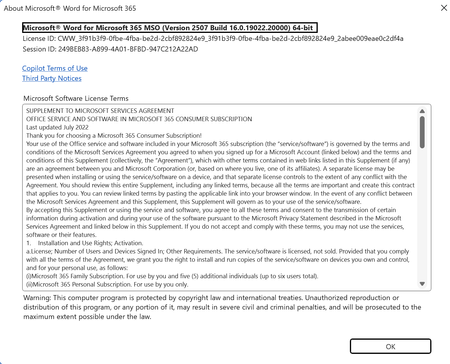
This is ridiculous. I have spent over 2 hours trying to turn off Copilot in MS Word O365 version. I am running MS Word in I I Windows 11 (updated) and running what I believe is the most current version. I have been able to go into Excel => Options and uncheck the "Enable Copilot". I do not see such a box in Powerpoint (thank God - I don't see it in the app at all) and have been able to turn it off on my Mac Office Apps. I have an O365 account. When I open Word in Windows and then select the Options I get what is displayed below. Do not see the enable coPilot option, but CoPilot is on. This is ridiculous. I have cleaned the registry and I have seen hacks on how to turn off coPilot by butchering the registry, which I refuse to do. I even removed the coPolite App. MS, I DO NOT WANT TO USE AI TO WRITE. How do I get rid of this? I am EXTREMELY frustrated with this. Bryan3.9KViews4likes7Comments
Office Scripts
i have a business microsoft office account and am signed in with it. when i try running a script in excel i keep getting the error saying it requires a work or school account. my microsoft account says the following: your work or school account belongs to your home organisation. what do i need to do to get scripts working.129Views1like2Comments
Conditional formatting cannot be displayed when pasting using the camera method.
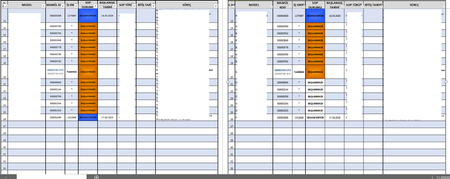
When I paste the table into a different area (using the camera method), the formatting for some cells is not properly displayed. These cells have “Conditional Formatting” applied, and their colors change based on their content. When I make changes to the original table, I can see that there is no issue and the colors update correctly. This problem also occurred when I used the table as a “linked image.” Visual Explanation; (The original table is on the left; on the right is the same table pasted using the camera method. Both are in the same file and tab.) When I copy and paste the hidden rows separately (using the camera method again), the conditional formatting appears. In other words, there is no specific issue with the rows where the “formatting styles” cannot be displayed properly: Unfortunately, I didn’t get any results when I tried the “shake” method. When I tried it on a new worksheet, the result remained the same. I also tried the “Repair Office” option, but the problem persists. Could there be a row height limit when copying this type of table using the “camera tool” (when capturing screenshots of conditional formatting) When the total row height in the tables exceeds a certain value, the “conditional formatting” properties of the table I move to another location using the “camera tool” do not display. When I copy 26 rows to another location with each row set to 32.75 units in height, all properties are displayed; however, when I change it to 33 units in height, the formatting starts to break. And this total value (26 × 32.75 = 851) isn’t consistent either. When I try to set individual height values for the cells to reach a total height of 851, the issue isn’t resolved. Sometimes I get proper display when the total height is 777, and sometimes when it’s 661. What do you think is the root cause of this problem I’m facing? How can I solve it? Office Version Information: Ref: https://learn.microsoft.com/tr-tr/answers/questions/5861040/excelde-tabloyu-ba-l-resim-olarak-yap-t-ramama-sor47Views0likes1Comment
Why Businesses Choose Rackspace to Office 365 Migration
Businesses are increasingly adopting Rackspace to Office 365 Migration to improve collaboration, scalability, and security in modern work environments. As organizations grow, they require cloud platforms that offer advanced communication tools, centralized management, and seamless accessibility across devices and locations. One major reason companies prefer Rackspace to Office 365 Migration is access to Microsoft’s integrated productivity suite. Applications such as Outlook, Teams, SharePoint, OneDrive, Excel, and Word provide businesses with powerful collaboration capabilities. Employees can communicate, share files, and manage projects efficiently from virtually anywhere, supporting both remote and hybrid work models. Another advantage of migrating from Rackspace to Office 365 is enhanced security and compliance. Microsoft 365 includes advanced threat protection, multi-factor authentication, data encryption, and compliance management tools that help businesses secure sensitive information. These features are especially valuable for industries with strict regulatory requirements. Scalability is also a key factor driving Rackspace email to Office 365 migration projects. Organizations can easily add users, expand storage, and integrate additional Microsoft services as business demands evolve. This flexibility helps companies avoid costly infrastructure upgrades while maintaining operational efficiency. Businesses also benefit from improved reliability and uptime with Microsoft’s global cloud infrastructure. A properly planned migration ensures minimal disruption while transferring emails, contacts, calendars, and other business-critical data securely. For organizations seeking professional migration assistance, Apps4Rent provides expert support to ensure a smooth and secure transition with reduced downtime. Overall, Rackspace to Office 365 migration enables businesses to modernize communication systems, strengthen security, improve collaboration, and build a scalable foundation for long-term growth and productivity.11Views0likes0Comments
Issues with Creating of Shared Booking Page in MS Bookings
Hey everyone, Can you please advise us on our latest problem? I wanted to create a new Shared booking page in Bookings, and after I finished the creation process and the screen was loading, an error window showed up with information that there was a problem while creating a booking page.251Views1like4CommentsIs it really impossible to break workbook protection?
Hi, I process personal data and need strict protection (GDPR). My raw data from a survey is copied to several worksheets in a workbook and the processed anonymous data (dashboards) is in other worksheets in the same workbook. Before sending the whole workbook with the visible dashboards to my customers I delete some of the raw data worksheets and hide others. After that I protect the structure of the workbook with a code. Now only the worksheets with the dashboards are visible. Will it at all be possible for my customers to break the protection and get access to the sensitive raw personal data or am I completely safe? Thanks in advance to your reply! Best regards PerSolved5.7KViews14likes25Comments
Why is Microsoft 365 setup (Groups + SharePoint + Domains) still so complex?
Microsoft 365 Setup Feedback Summary Summary of Experience: Setting up two small business workspaces (Cork & Clarity and Stone Clarity Consulting) in Microsoft 365 required navigating multiple disconnected systems including the Admin Center, Outlook, SharePoint, and an external DNS provider. The process was significantly more complex than expected and not intuitive for a non-technical user. Key Issues Encountered: 1. Identity and Account Confusion - Unclear whether to create separate users or use one account with aliases - Creating multiple users caused login confusion, broken permissions, and access issues 2. Domain and DNS Setup Complexity - Required switching between Microsoft and external DNS (Looka) - Instructions were unclear and required manual troubleshooting - No clear distinction between required and optional DNS records 3. Default Domain Confusion - New groups defaulted to the wrong domain - No visible option to change domain during group creation - Required changing global default domain (non-intuitive) 4. Inconsistent Group Behavior - Outlook groups and Teams-backed groups behave differently - No indication of differences or consequences - Groups appeared in some places but not others 5. Membership and Ownership Issues - Group creator was not consistently added as member - Ownership did not always persist after changes - Groups existed but were inaccessible or invisible 6. Outlook UI Limitations - Groups not visible despite existing and being correctly configured - No clear instructions on how to 'activate' or 'follow' groups 7. SharePoint Site Not Created Automatically - SharePoint sites were not created when groups were created - Required hidden steps: Outlook → Files → Open in SharePoint - No indication that the site did not exist yet 8. SharePoint Discovery Issues - Sites do not appear until manually accessed or followed - No onboarding or guidance for discovering sites 9. Ghost/Deleted Items Still Visible - Deleted group (Cork & Clarity Hub) remained visible - No clear distinction between deleted vs followed sites 10. Fragmented User Experience - Required switching between multiple platforms - No single place to manage or understand setup status - High cognitive load for basic configuration Conclusion: While Microsoft 365 is a powerful platform, the initial setup experience is overly complex and fragmented, especially for small businesses. Simplifying group creation, making SharePoint provisioning automatic and visible, and improving UI consistency across apps would significantly improve usability and adoption.7Views0likes0Comments
Running engagement surveys through M365 without buying another tool?
HR asked me if we can run quarterly employee engagement surveys using our existing M365 stack. We have E3 licenses. I tried setting up something with Forms but the analytics are super basic and theres no way to track trends over time or slice by department without a bunch of manual Excel work. Before I go back to HR and tell them we need to buy a dedicated survey tool, has anyone gotten something workable going with just M365?45Views0likes2CommentsBest way to enforce manager check-ins across the org using M365 tools?
Our CHRO wants every manager to have at least bi-weekly check-ins with directs and wants visibility into whether its actually happening. Right now theres zero tracking. Some managers do it, some dont, and leadership has no idea. I looked at Viva Insights but it only shows meeting frequency, not whether there was an actual structured conversation. Is there a way to get reporting on this through admin center or do we need something separate?56Views0likes2CommentsWhat is the best OKR Software for Microsoft 365?
So... It is finally happening. Viva Goals is less than two months from shutting down. With Viva Goals having been built by Microsoft for Microsof users, it had a certain advantage over other apps in the app store. So now, what do you all think is the best OKR Software for Microsoft 365? Because I'm pretty sure even though they were warned well in advance, there are probably some organizations still using Viva Goals that will need to switch fast!Solved670Views0likes3Comments
Change default font organisation wide and over all software?
Hey Is it anyhow possible to set the Default font for all users / Software (Excel, Word, PowerPoint,...) I found this: https://support.office.com/en-us/article/Change-the-default-font-2f50603b-9886-47e4-a483-48ac5ab80163 What does it direct in Word for example. But I want to set it over Office 365 console (if possible) THXSolved35KViews2likes2CommentsMS Word and Excel Mail Merge Certificates (advanced)
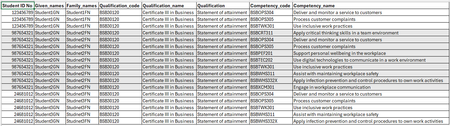
I need to run a mail merge (using Word and Excel) for certificates where per Course each student has a unique number of competencies they have achieved, example code attached. I cant manipulate or add data to the excel content with additional columns. I need one certificate per student each with their related competency achievement(s). Has anyone else found a solution without having to use an add in? Ive seen a template where the creator used the "next if" rule and the "if" condition is if the student ID is equal to, but i cant recreate it.38Views0likes2CommentsPowerPoint NEW Image Editing Tools Explained — Remove Background, Upscale & Edit Images Instantly!
🚀 PowerPoint just received one of its most powerful updates ever! Microsoft has introduced a brand‑new built‑in image editing experience, allowing you to enhance visuals without leaving PowerPoint. In my latest YouTube video, I walk through all the new capabilities now rolling out in Microsoft 365, including: ✨ Remove background 🧽 Erase unwanted objects 🔄 Move elements inside an image 🔍 Upscale low‑resolution pictures ⚡ Auto‑enhance lighting & contrast 📝 Add or edit text directly on images All of this happens directly inside PowerPoint, making slide creation faster and more intuitive than ever. These features are now available on: 💻 Windows 🍎 Mac 🌐 PowerPoint for the Web If you work with presentations daily, this update is a real productivity boost. 📹 Watch the full breakdown and demo here ➡️ https://youtu.be/OZzfFi2qpAk Let me know what feature you find the most useful! 👇 #Microsoft365 #PowerPoint #Productivity #AI #Presentations #Microsoft365Insider #Creators932Views0likes13CommentsExport mixed text and tabular Excel to PDF
I have a sheet that I need to export from Excel to PDF. The sheet contains text and tabular data. Ideally, I'd like large bold text to export as heading tags, text as paragraph tags, and the tabular data as a table. Currently, any group of cells containing data that are surrounded with blank cells export as a table, even if they don't contain what a human would consider tabular data. I haven't selected the tabular data and chosen Import > Table. I'm not sure if that would help or not. How can I export mixed text and tabular data from Excel and have it be tagged as desired in the resulting PDF?147Views0likes4CommentsWeb-signin 3rd party IDP not working
We have a working Entra ID SAML federation to a third-party IdP that uses FIDO2/WebAuthn (IdP as Relying Party) for browser sign-in, and we are trying to use the same federation through Windows Web sign-in on an Entra-joined Windows 11 device — but the IdP page loads blank in the WebView and Microsoft-Windows-WebAuthN/Operational records zero events, while the same security key works fine for FIDO2 sign-in with login.microsoft.com as RP on the same device. Questions: - Is WebAuthn brokering to third-party Relying Parties inside the Web sign-in WebView supported? - If not, is it on the roadmap? - What is the supported architectural path for delivering passwordless Windows sign-in using a federated IdP's own FIDO2/WebAuthn credentials, given Graph API passkey provisioning is Beta-only?17Views0likes1Comment


Events
Recent Blogs
- Edits made with the help of Copilot are now visible to users and collaborators, bringing transparency to the changes made in your workbook.May 12, 2026123Views0likes0Comments
- The ability for Copilot to better connect to your content when using a keyboard and screen readers has evolved.May 11, 20261.1KViews4likes8Comments