Forum Discussion

starman2heven
Jun 08, 2025Brass Contributor
Copy & paste permission error after Win11 23H2
I have a file share that has very specific permissions due to regulations. Users are only allowed to read and write files, but they are not allowed to delete or modify the files in any way once they ...

vihargadhesariya
Jun 08, 2025Iron Contributor
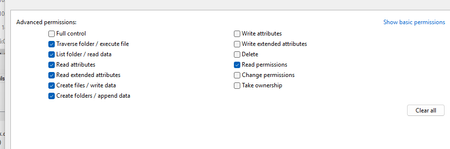
- Explorer in 23H2 invokes SetFileInformation to write file attributes on copy → fails without Write attributes/extended attributes
- Confirm with ProcMon: look for ACCESS_DENIED on FileBasicInfo calls
- Fix: grant those two permissions on the share’s ACL
- Or disable the new copy UI via GPO:
Computer Config → Admin Templates → Windows Components → File Explorer → Turn off enhanced copy/move dialogs → Enabled
- Or use Robocopy in backup mode to bypass metadata writes:
robocopy \\share\path C:\dest /B /COPY:DT
 rjg23Jun 12, 2025Copper Contributor
I have the same issue and can replicate, also due to regulations we have the folder set to 'write once'. I had to also enable the "Create Folder / Append Data" to get it to work. This wouldn't be an acceptable solution as the users could then modify files. It would seem file copies are now creating files then writing data in separate operations, even basic txt files. It only works when copying in an empty file.