Forum Discussion

Link to a lookup a column by using json formatting
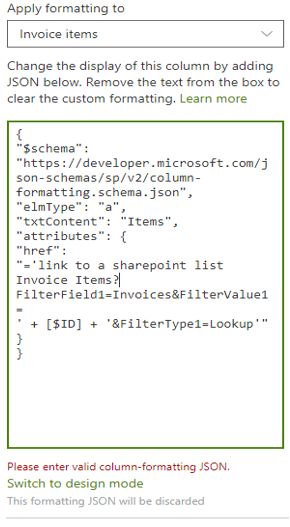

Walter Fuentes : Lookup field any way take you to the original list item from the current list item. It's by default gives link to the item in another list.
Even though following is the code I tried and it worked:
{
"$schema": "https://developer.microsoft.com/json-schemas/sp/v2/column-formatting.schema.json",
"elmType": "a",
"txtContent": "@currentField.lookupValue",
"attributes": {
"href": {
"operator": "+",
"operands": [
"/sites/Test21/Lists/TestList/DispForm.aspx?ID=",
"@currentField.lookupId"
]
},
"target": "_blank"
},
"style": {
"color": "#796BB1",
"font-weight": "bold"
}
}

Thanks for supporting me with this request, I still need your help, I am not familiar with this feature.
1. By using the script the text or link in the column disappear.
2.Not sure how use "@currentField.lookupId", if I put it exactly the same this will makes blank my text or link in the column, and I use "Invoice.lookupId" this will take me to an empty display form.
Thanks my friend.
- Ashish_KohaleJun 08, 2020Iron Contributor
Walter Fuentes : @currentField.lookupId use as it is ... and check