Forum Discussion

Configure conditional formatting for SharePoint list gallery view
 Nov 15, 2021
Hey everyone,
I've resolved this thanks to https://twitter.com/techan_k/status/1457664410042785802 on Twitter!
Just writing out the solution on here as well so it's easy to follow for anyone else.
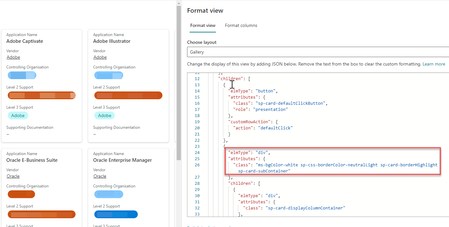
From the class section, delete the ms-bgcolour value but keep the rest of the values as that gives the card its look and feel!
Add the following style value in between elmType and attribute section. I've included the code below to make it easier to copy and paste in. Decide on the colours you would like! Add additional if values if more than two are required. The last hex colour code is an else colour if your values don't match any of your if statements.
"style": {
          "background-color": "=if ([$ColumnName] == 'Nintex' , '#F5F9FD' , if ([$ColumnName] == 'Oracle' , '#EBF9EC' , '#FFF1EF'))"
        },

This is great. Any ideas on how to change the text color to go along with the background?

Jason1900 Add color property inside style as given below:
"style": {
    "background-color": "=if ([$ColumnName] == 'Nintex' , '#F5F9FD' , if ([$ColumnName] == 'Oracle' , '#EBF9EC' , '#FFF1EF'))",
    "color": "=if ([$ColumnName] == 'Nintex' , '#FFFFFF' , if ([$ColumnName] == 'Oracle' , '#FF00FF' , '#FFF1EF'))"
},
You can change the hex color values as per your requirements.
Please consider giving a Like if my post helped you in any way.
- Jason1900Sep 14, 2022Copper Contributorganeshsanap that worked to change the text of one column but I'm looking to change the text of the entire card from black to white. Thank you for the suggestion.
- ganeshsanapSep 14, 2022MVP
Jason1900 Use "color" property inside "style" of outer most "elmType" in your JSON.
If above approach does not work, you can use "style" and "color" property for all "elmType" in your JSON as well.
Please consider giving a Like if my post helped you in any way.
- Jason1900Sep 14, 2022Copper ContributorThat worked, just had to apply to each "elmType" in the JSON. Thank you so much!