Forum Discussion

Richard_W_01
May 28, 2020Copper Contributor
Colour transparency issue in formatted columns since in the SP Update
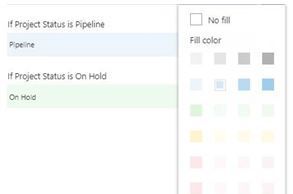
As of a week ago... for a random reason, all the colours apart from Blue and Grey are set to very high transparency but this only applies for formatting a column in a list... as you can see from the...

Vikram_Samal
May 28, 2020MCT
Richard_W_01 You can always select your own color codes to and use them instead of their as shown below:
Go to the advanced mode of the format column
Then add the json format logic and use your own color codes from here:https://htmlcolorcodes.com/
In the below example we have shown how to color code the columns on the basis of value similarly you can use your logic.
{
  "$schema": "https://developer.microsoft.com/json-schemas/sp/v2/column-formatting.schema.json",
  "elmType": "div",
  "txtContent": "@currentField",
  "style": {
    "background-color": "=if(@currentField<50, '#F5B7B1', '#82E0AA')"
  }
}
Mark the response appropriately if it help you finding the solution.
Thanks,
Vik

Richard_W_01
May 28, 2020Copper Contributor
thank youVikram_Samal worked perfectly 🙂
- Vikram_SamalMay 28, 2020MCT
Richard_W_01 Thanks Richard for the confirmation. If you can mark the response as best solution it will help others to get to the solution as well.
Thanks
Vik