Forum Discussion

Searching Audit log Strange Behavior
 Mar 03, 2021Just thought I would give you an update on the response I got back from Microsoft Support.
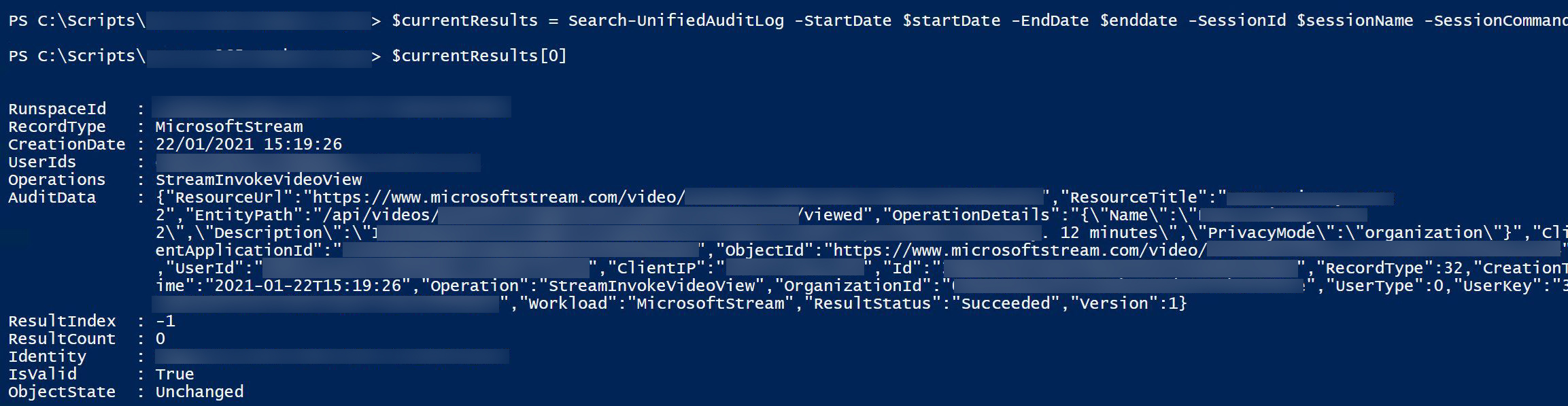
"When the ResultCount is 0 or ResultIndex is -1, the search faced internal timeout.
Please ignore the results returned when the internal timeout occurs, and (wait 5 minutes then) try search again."
Pretty generic response but oh well.
TonyRedmond I have opened a ticket with Microsoft, will update if they come back with anything. In the mean time I have just updated my code to check for this -1 ResultIndex and if it detects it, it waits 2 mins and tries the command again.

swhitestrath Just to be sure I understand, you see -1 returned in the search results as in $currentresults[0].resultindex?
This makes sense because ResultIndex tracks the position of the search in terms of retrieved results... So -1 gives you an indication that the search results returned aren't good.
Question: When you resume, does ResultIndex recommence at the right value? For instance, let's assume that you have retrieved 3000 records so far, the first record returned by the next successful call should have a value of 3001 in ResultIndex. Is that what you see?
- swhitestrathJan 26, 2021Brass Contributor
TonyRedmond I just reset everything and try again so the index returns to 1. The second time is usually successful.
if($currentResults[0].ResultIndex -eq "-1" -or $currentResults -eq $null){ $sessionName = (get-date -Format 'u')+'streamauditlog'+ $i $aggregateResults =@() if($currentResults[0].ResultIndex -eq "-1"){ $logmsg = "-1 Index Found Loop Restarted" } if($currentResults -eq $null){ $logmsg = "No Results returned, retrying..." } $errorCount++ LogToFile -EntryType "ERROR" -Message $logmsg -Logfile $lgfile Start-Sleep -s 120 continue }- Frank SmithAug 03, 2021Brass ContributorHi,
I found this thread by chance and I too have noticed duplicate records when exporting an audit log search into a spreadsheet
On a separate cheeky note, I want to monitor User creation, modification and deletion of Microsoft Teams and as I'm not familiar with building scripts I was wondering if you might share your script that loads audit log records into a csv file ?
- Frank agaskellJun 01, 2022Tin Contributor
Well its June 2022 and I am seeing the same issue with duplicate results. I implemented a simple while loop to check for it and repeat the run until the data is good. I set a max of 10 loops, but I have noticed that the data is OK on the 2nd query (but not always!).
#Attempt 1.
$AuditResults = Search-UnifiedAuditLog -StartDate $startOfMonth -EndDate $endOfMonth -SessionCommand ReturnLargeSet -resultsize 1000 -Operations FileDownloaded -SiteID "<Insert Site ID>" -FreeText Certification
#Additional Attempts
if ( $AuditResults.Count -gt 0 )
{
#We have some results. Check if the data is good.
while($AuditResults[0].ResultIndex -eq -1)
{
$AuditResults = Search-UnifiedAuditLog -StartDate $startOfMonth -EndDate $endOfMonth -SessionCommand ReturnLargeSet -resultsize 1000 -Operations FileDownloaded -SiteID "<insertSiteID>" -FreeText Certification
$loop++
#Prevent an infinite or very high loop by setting a max. of 10 iterations.
if($loop -gt 10) {
break
}
}
}
- TonyRedmondJan 26, 2021MVP
swhitestrath OK, so you basically conclude that -1 says that the search is bad and irrecoverable and therefore needs to be restarted. That's fair. I wonder if you throw away the page of duplicate results, pause, and then restart the same search it might restart properly. Did you try that?
- swhitestrathJan 26, 2021Brass Contributor
TonyRedmond I thought I would just run the command bare bones with no loops or other code and still get this -1 ResultIndex