Forum Discussion

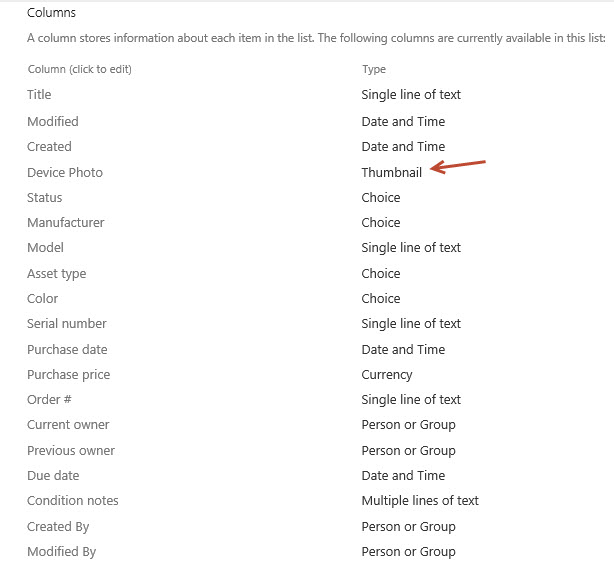
Microsoft List template Asset Manager Column type "Thumbnail"
 Sep 08, 2020
Hi all,
I found out what happened - you can see from here, the "Improve Image column" with under development, for release some time in September.
https://www.microsoft.com/en-gb/microsoft-365/roadmap?filters=&searchterms=64872
Alvin

Mine looks like this:
},
"attributes": {
"src": "=[$DevicePhoto.serverUrl] + [$DevicePhoto.serverRelativeUrl]",
"title": "[$DevicePhoto.fileName]",
"class": "sp-card-imagePreview"
}
Should I replace it with :
"src": "=if([$DevicePhoto] == '', '', [$DevicePhoto.serverRelativeUrl])",

Hi, Sara Laidlaw
Your code looks a little different from the default code in the Asset manager Asset gallery, but I think you could set that line as just:
"src": "[$DevicePhoto.serverRelativeUrl]",
(The If statement should work also, it's just a check for if there is an image provided.)
- Sara LaidlawNov 04, 2020Brass Contributor
Odd, I used the Asset Manager list template today.
Maybe they are working on it. But it isn't right yet.
Thanks!
- Joe GasperNov 04, 2020Brass Contributor
Sara Laidlaw Here's the exact JSON (from my tenant) on a freshly minted Asset manager's Asset gallery view with the updated line to fix the device photo.
https://gist.github.com/joegasper/d3ac1f29a5eebe06e1435cff56f9e828
- pnthrzruleNov 13, 2020Iron Contributor
So....it would appear that you may have had issues because the updated "image" column type was not yet available in your tenant. The road map didn't do a great job of saying that there will be an ENTIRELY NEW column type called image as shown in the screen shot below. I hope this helps...or maybe you already knew.