Forum Discussion

kittenmeants
Feb 06, 2024Brass Contributor
SUMIF Error when the range changes dynamically
I have a data set that generates weekly of raw data. I am trying to use the following formula to 'clean' and organize it so others can actually understand what is going on. This is what I am star...
- Feb 06, 2024

HansVogelaar
Feb 06, 2024MVP
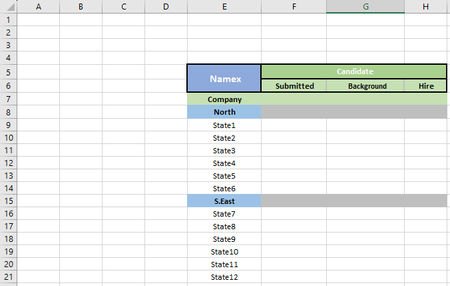
 kittenmeantsFeb 06, 2024Brass ContributorWhat am I doing wrong if I want to match it to the state? i.e. State1 would show 4 in the submitted category if I chose namex. I was trying to use a similar formula but receive an error.
=SUM(IF(ISNUMBER(MATCH(Hiring!$E$7:$E$325, Candidate!$AK$5:$AK$1000, 0)), IF(Candidate!$AU$5:$AU$1000=Hiring!$E$4, Candidate!$O$5:$O$1000, 0), 0))- HansVogelaarFeb 06, 2024MVP
In a cell in row 9:
=SUMIFS(Candidate!$O$5:$O$1000, Candidate!$AU$5:$AU$1000, "*"&Hiring!$E$5, Candidate!$AK$5:$AK$1000, Hiring!$E9)
- kittenmeantsFeb 06, 2024Brass ContributorHow are you so smart. Thank you!!!!