Forum Discussion

Reorder Cell Data Using Power Query
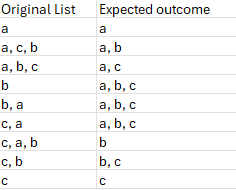

It can be done using a single formula:
=SORT(BYROW(A2:A10, LAMBDA(s, TEXTJOIN(", ", TRUE, SORT(TEXTSPLIT(s, ", "), , , TRUE)))))
or
=SORT(BYROW(A2:A10, LAMBDA(s, TEXTJOIN(", ", TRUE, SORT(TEXTSPLIT(s, , ", "))))))

HansVogelaar , that's not exactly asked order
- PeterBartholomew1Nov 28, 2024Silver Contributor
I am not convinced that the asked-for outcome doesn't itself contain an error. Anyway, studiously avoiding any temptation to go for brevity, how about
= SORTLISTITEMSλ(original) SORTLISTITEMSλ = LAMBDA(list, // Sort overall list alphabetically SORT( MAP(list, LAMBDA(string, // Sort comma-separated strings and reassemble LET( split, TRIM(TEXTSPLIT(string, ",")), sorted, SORT(split, , 1, TRUE), ARRAYTOTEXT(sorted) ) ) ) ) );- SergeiBaklanNov 28, 2024Diamond Contributor
PeterBartholomew1 , I also don't know which exactly logic shall be behind. But if we change letter on word, e.g. "c" on "com", and assume expected outcome shall be the same, we have different results
- PeterBartholomew1Nov 29, 2024Silver Contributor
I think the positioning of a,c in the original is simply an error. Your implied challenge of replacing the letters with words would present a significant challenge because the sort would need a 2D array which is still a Microsoft fail. The steps should be:
- Split comma-separated lists by row to 2D-array [MS fail]
- Sort by row, returning a 2D-array [MS fail]
- Sort array by columns {1,2,3} [OK]
- Concatenate rows [OK]
That leaves Microsoft with a score of 2 out of 4; COULD DO BETTER!😛
