Forum Discussion

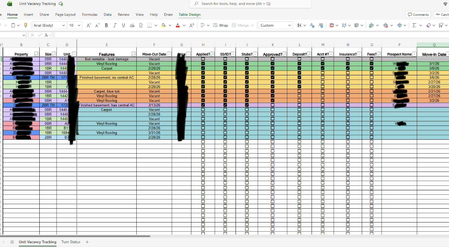
Link 2 sheets, then sort column A on sheet 2 alphabetically and match correct data
 Feb 18, 2026
I just wanted to update that upon posting in another forum, I was given a solution to the problem, which I then was able to breakdown and modify with help. The first code, followed by the final code.
=LET( a, CHOOSECOLS(FILTER('Unit Vacancy Tracking'!B2:Q20,BYROW('Unit Vacancy Tracking'!B2:Q20<>"",LAMBDA(r, OR(r)))),1,3,15,16), SORT(IF(a<>"",a,""),1,1))=LET(a,CHOOSECOLS(FILTER(Vacancy,(LEN(Vacancy[Unit])>0)*(INDEX(Vacancy,,5)="Vacant")),1,3,15,16),SORT(IF(a<>"",a,""),1,1))
I just wanted to update that upon posting in another forum, I was given a solution to the problem, which I then was able to breakdown and modify with help. The first code, followed by the final code.
=LET( a, CHOOSECOLS(FILTER('Unit Vacancy Tracking'!B2:Q20,BYROW('Unit Vacancy Tracking'!B2:Q20<>"",LAMBDA(r, OR(r)))),1,3,15,16), SORT(IF(a<>"",a,""),1,1))=LET(a,CHOOSECOLS(FILTER(Vacancy,(LEN(Vacancy[Unit])>0)*(INDEX(Vacancy,,5)="Vacant")),1,3,15,16),SORT(IF(a<>"",a,""),1,1))

Hi MeretrixRex
Thanks much for updating the case with your solution 👍- too few people do this 🙁. Couple of comments if I may:
- With CHOOSECOLS(..., 1, 3, 15, 16) the column indexes are hard-coded
==> If you later insert/move/delete column(s) before column index #16 in your table the formula won't work anymore - INDEX(Vacancy,,5) - does the same as CHOOSECOLS(Vacancy, 5)
==> Same comment as above - CHOOSECOLS is done after FILTERing all table columns
==> A bit inefficient
If you're interested & provide the current names of columns 1, 3, 15, 16 in table Vacancy, a more flexible solution exists...
- MeretrixRexFeb 20, 2026Tin Contributor
Sure! I do like learning new formulas. Column 1 = "Property", Column 3 = "Unit", Column 15 = "Prospect Name", Column 16 = "Move-In Date"
- LorenzoFeb 27, 2026Silver Contributor
Apologies for the delay - I wasn't notified of your reply (a random issue on this site currently)
=LET(
  desired_cols,   HSTACK(
                    Vacancy[[#Headers],[Property]], Vacancy[[#Headers],[Unit]],
                    Vacancy[[#Headers],[Prospect Name]], Vacancy[[#Headers],[Move-In Date]]
                  ),
  selected_cols,  CHOOSECOLS( Vacancy, XMATCH(desired_cols, Vacancy[#Headers]) ),
  filtered_data,  FILTER(selected_cols,
                    NOT( ISBLANK(Vacancy[Unit]) ) * (Vacancy[Move-Out Date] = "vacant")
                  ),
  sorted_on_col1, SORT(filtered_data, 1),
  blanked_zero,   IF( ISBLANK(sorted_on_col1), "", sorted_on_col1),
  VSTACK(desired_cols, blanked_zero)
)
It returns headers (same as the Vacancy table headers) + the filtered data as a single array - sample attached