Forum Discussion

IF function
 Nov 21, 2023
=IF(AND(A2="",B2=""),"",IF(B2<>"",B2+7*15+6,A2+7*15+6))
You can use this formula for the intended result.
=IF(B4<>"",B4+7*15+6,A4+7*15+6)
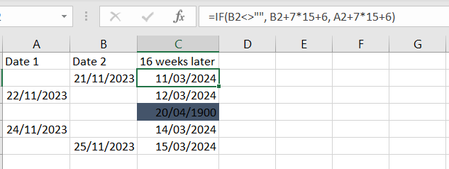
This formula returns 20.04.1900 or 111 in cell C4. B4 isn't <>"" therefore the formula calculates A4+7*15+6. Since A4 is 0 the calculation is 0+7*15+6 and the result is 111. The format of cell C4 is date and 20.04.1900 is the 111th day since 01.01.1900.
For example today's date 21.11.2023 in number format would be 45251 which means it's the 45251st day since 01.01.1900.
=IF(AND(A2="",B2=""),"",IF(B2<>"",B2+7*15+6,A2+7*15+6))
You can use this formula for the intended result.
=IF(B4<>"",B4+7*15+6,A4+7*15+6)
This formula returns 20.04.1900 or 111 in cell C4. B4 isn't <>"" therefore the formula calculates A4+7*15+6. Since A4 is 0 the calculation is 0+7*15+6 and the result is 111. The format of cell C4 is date and 20.04.1900 is the 111th day since 01.01.1900.
For example today's date 21.11.2023 in number format would be 45251 which means it's the 45251st day since 01.01.1900.
 HannahKingNov 21, 2023Copper ContributorOliverScheurich thank you so much that was really helpful!