Forum Discussion

How to fill multiple cell one after another in one column refer to adjacent cell
- Apr 03, 2018
Hi
Use combined IF and LEN functions
=IF(LEN(B2)=9,A1,B2) ect

Hi Tomasz,
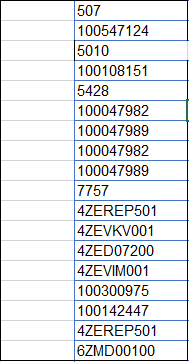
how to deal with the following in table.
The formula worked until characters of supplier no was different that product no. but afterwards you find in the table given at the end product and supplier no are same in character.
Can you please help!
Thanks in advance!

Hi Ubaid
Please see the file
The best solution for that it could be to create a table with all suppliers number if you know them (or you can update every time if appears a new one)
=IF(COUNTIF(Table1[SupMatNr],B3),B3,A2)
I guess what you are trying to do, but first, I will have to see the source of the data, you can do that with the PivotChart Wizard, it is potentially the quicker way
- Ubaid ur RahmanApr 11, 2018Brass ContributorHallo Tomasz,
I think its working now. Thanks alot!
Can you please explain a bit what can we do with PivotChart Wizard?- Tomasz KocurApr 12, 2018Brass Contributor
Please read my post here and try applying to your data (ALT, D, P)
https://techcommunity.microsoft.com/t5/Formulas-and-Functions/Transposing-problem/m-p/182022#M4732
- Ubaid ur RahmanApr 16, 2018Brass ContributorThank you for your help! :)