Forum Discussion

Divide the value from month granularity in one table to daily granularity in another table
- Feb 27, 2024

Hi SergeiBaklan
Thanks for your quick response!
The dax measure you gave for number of days is awesome Sir!
Also, thanks for simplifying the Target unit rate measure
We like to show 'Target Unit' and 'Target Cost' also as a dax measure
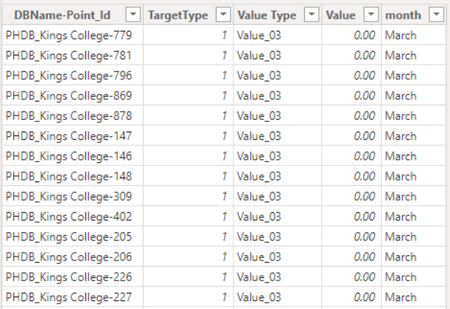
The Target Unit in target table comes under Target Type(Column) = 0,
The Target Cost in target table has Target Type = 1.
Thanks in advance!

Not sure I understood entire logic of the model. Here is variant.
Relationships are:
In Accrual table we add calculated column
MonthID = YEAR( Accruals[Date] )*100 + MONTH( Accruals[Date] )to separate, for example, January 2023 and January 2024.
Since Accruals is filtered both by Points and Calendar we calculate number of days based on that table
no of days in Accruals = COUNTROWS( 'Accruals' )Month Lookup we use as bridge table between Accruals and Target, for both 1:many. Thus we use CROSSFILTER in measures.
For Total Units
3-Target units Total = SUMX (
    VALUES ( 'Accruals'[MonthID]  ),
    CALCULATE (
        SUM ( 'Target'[Value] ),
        'Target'[TargetType] = 0,
        CROSSFILTER ( 'Month Lookup'[Month ], 'Accruals'[Month], BOTH )
    )
)
//////
3-Target units = DIVIDE (
    [3-Target units Total],
    [no of days in Accruals]
)
Visuals for testing are on Page 4
Didn't do Target Cost, too late today. Guess it shall be similar.
File is here TechComm - OneDrive (live.com) . Good luck!
- Excellove15Feb 27, 2024Iron Contributor
Hi SergeiBaklan
Many thanks for the lovely solution sir!
This solution has worked like a gem and as always you & your quick solution rocks!
you made my day!
We need your help in resolving the below issue:
we are trying to dynamically change between profile,direct and target units by referencing them in below measures that point to field parameters
Priority 1 units measures point to Parameter 4 field parameter tablePriority 2 units measures point to Parameter 5 tablePriority 3 units measures point to Parameter 6 tableWhen I drag them in below visual it shows blank for INSE-100:But in data view there is a value for target but not showing in visual:
PFA file here https://1drv.ms/u/s!AhUFhM5jR1jqkDlvecc-0Sz09Dr8?e=edTAsd
Please help in resolving this Sir!
Thanks in advance!
- SergeiBaklanFeb 27, 2024Diamond Contributor
- Excellove15Feb 28, 2024Iron Contributor
Hi SergeiBaklan
Many thanks for this amazing quick solution Sir!
I tried the same in my file, but still i am getting blanks.
If you don't mind, can you please send me the file so that i can have a look into changes and update my file for other measures as well
Also, i have marked your solution as the best response!
Thanks in advance!