Forum Discussion

Alona_Ch
Dec 28, 2022Copper Contributor
DataManager (How to add new names in down list)
Hi. I want to add two new names in down list, but cannot understand how to do this. How I can add two another name in this list?
- Dec 28, 2022
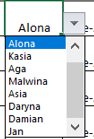
The named range TEAMMEMBER refers to data!$I$4:$I$12.
Enter the new name in data!I13, and in Name Manager, edit TEAMMEMBER to refer to data!$I$4:$I$13.
Two ways to make this automatic:
- Assuming that there is a header in data!I3, select data!I3:I12 and convert the range to a table. Use the name of the table as source for data validation.
- Alternatively, change the definition of TEAMMEMBER to =OFFSET(data!$I$4, 0, 0, COUNTA(data!$I$4:$I$1000, 1)
Both will make the range expand automatically as names are added.

Alona_Ch
Dec 28, 2022Copper Contributor
Dear HansVogelaar I don't have table "TEAMMEMBER" in workbook (and this list using in many lists of this workbook). That is why cannot change in this table anything. If you can help me resolve it I would be happy

HansVogelaar
Dec 28, 2022MVP
If you want to add entries to the dropdown list but don't want to add entries to the TEAMMEMBER list you're stuck.
What is the objection to that?
- Alona_ChJan 03, 2023Copper Contributor
Hi HansVogelaar . Thank for your help. Trouble was with hidden sheet. Issue resolved. Thank for you answers