Forum Discussion

Mel_G_01
May 31, 2021Copper Contributor
Count of Date in Pivot Table
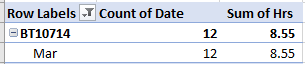
Hi All, I would like to COUNT the number of days worked within this pivot table, but it is counting every line entry date. For example this Job number is showing 12 days where it should be showing ...
- Jun 01, 2021
Creating PivotTable add data to data model
and next in Value Field Setting select Distinct Count
Without data model this option is not available.


tusharm10
May 31, 2021Brass Contributor
I'm not sure how to get what you want from a PivotTable.
However, Excel has made several improvements over the past few years so you can do the needful on your own (assuming you have the appropriate version of Excel).
Suppose that
* your data are in a table as Excel understands it (Insert | Table) and
* that the job of interest is in H2.
Then the 1st formula will give you a list of unique dates for the job and the 2nd formula will give you a count of the unique dates.
=UNIQUE(FILTER(Table1[Date],Table1[Job No]=H2))
=COUNTA(UNIQUE(FILTER(Table1[Date],Table1[Job No]=H2)))