Forum Discussion

calcul
- Jan 10, 2023
Hi gaiachris
if I understand you correctly, you want to count how many numbers are in that column.
For this, you can use the COUNT function. For example:
=COUNT(H2:H65)
will count only numbers in that range. If there is a text, it is not counted. If you also need to include texts, you can use COUNTA
=COUNTA(H2:H65)
I hope this helps.

Hi gaiachris
if I understand you correctly, you want to count how many numbers are in that column.
For this, you can use the COUNT function. For example:
=COUNT(H2:H65)
will count only numbers in that range. If there is a text, it is not counted. If you also need to include texts, you can use COUNTA
=COUNTA(H2:H65)
I hope this helps.
 gaiachrisJan 11, 2023Copper Contributor
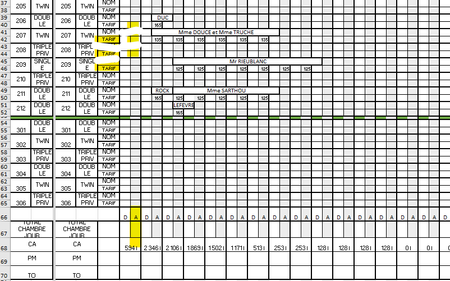
Martin_Weiss thanks for answer, but I've already done the count what I want is to have the number of rooms occupied without the price. So if there is a number and a name on the block it's made 1 room occupied if not 0 of course. Which meant in the A block a maximum total of 30 or less.!
I'm sorry for my English !!!
- Martin_WeissJan 12, 2023Bronze Contributor
Hi gaiachris
ok, you need both: name and price.
When I look at your screenshot, this will be a problem, because you have merged cells, where a name spans across multiple columns. This is something you cannot count. You would need the name in every column in individual cells, not merged ones.
If that's the case, then you could do just a COUNTA and divide the result by 2. For example:
=COUNTA(H2:H65)/2
- gaiachrisJan 15, 2023Copper Contributorhello thanks so much. you have it right the fist time it was count ! so thanks ! the translation wasn't go on google trad ! that"s why I try to find an other answer! count in french excell is NB and it's exactly my need!!!! thanks again ! and sorry for my english !!!