Recent Discussions
How to wrap table, not vector (WRAPCOLS for tables)
Dear colleagues I have a long table of 5 columns and maybe 200 rows. The task is to wrap the table after a specified number of rows to see the table in landscape on a new sheet. I was thinking about WRAPCOLS, but it works only for vector (one column). Is there a way to wrap whole table using M365 functions? If not, the next option can be Power Query. See example attached. Thank You very much for any hint. Zdenek Moravec Cesky Krumlov, CzechiaSolved3.4KViews0likes13Comments
Msgbox or Modal window Crash on PC Sleep
This has been an issue for a couple of years, but I haven't spent too much time trying to solve it because I thought it would eventually go away. It hasn't and it is becoming worse as I develop other parts of my application. Situation: When a msgbox (or modal window) is open and the PC sleeps, the application hangs upon PC awake. There's no way to get out it with ending the process. To replicate: Create and save blank database Create one module with a single public test function Enter msgbox "Hang Test", vbOkOnly Hit F5 to run the code. The message box pops up. Leave it. Put PC to sleep manually with windows | power | sleep Awaken PC, Access is now frozen. GPT provides a lot of explanations for this behavior, but it doesn't make sense and must be something that can be addressed. Windows 11, Version 2606 (Build 20131.20126 Click-to-Run)25Views0likes1Comment
Office.js: Is there any supported way to retrieve multiple non-contiguous text selections in Word?
Hi everyone, I'm developing a Word Office Add-in using Office.js. In Microsoft Word (Windows Desktop), users can select multiple non-contiguous text ranges by holding Ctrl while selecting text. However, when I use: context.document.getSelection() It only returns a single Word.Range, and I couldn't find any API to detect or retrieve all the selected ranges. I came across this related discussion: Microsoft Tech Community – Support for Retrieving Multiple Selected Ranges in Word via Office.js My questions are: 1. As of 2026, is there any supported Office.js API to retrieve multiple non-contiguous text selections? 2. Is there any workaround to detect that the user has selected multiple ranges? 3. Or is this still a platform limitation? Our use case is an AI-powered legal research add-in, where users may want to select multiple clauses from different parts of a document and send them together as context. Any guidance would be appreciated. Thanks!24Views0likes3Comments
Markdown and OneNote
2025 and still no markdown support in OneNote(touch supported version). This is Post ChatGPT era and all the LLMs generate text in markdown format. And I am pretty sure, a lot of people out there nowadays generate quick and concise notes through LLMs. But no, OneNote does not wanna render markdown. However, keeping source formatting can format text somewhere close to LLMs output. But not perfectly. The code snippets and tables does not render and appear as a mess. In simple words, I cannot copy LLM output for "Give me code examples of Rust's thread::spawn() function" directly into OneNote because it will be just appear gibberish. NOTE: There are two types of copying. 1) Select text and copy 2) Dedicated copy button in LLM output. So when I say copy I mean *2 as it preserves the markdown syntax.9KViews15likes6CommentsExcel Protect Workbook feature not working
As I have done in the past, I am trying to protect sensitive information via Info/ 'Protect Workbook' /Encrypt with Password. After entering the password twice, it gives me the message 'A password is required to open this workbook'. When I close the file (after saving changes), file can be opened again without a password. Thank you for your help!Solved119KViews0likes9Comments
Excel Copilot fails when local workbook filename contains #
Excel Copilot does not work with locally stored workbooks whose filename contains the '#' character. The same workbook works correctly after renaming the file to remove '#'. The same workbook also works when stored on OneDrive with '#' in the filename. The issue appears specific to local files and filename parsing. Specifically, when clicking on Copilot in Excel, Copilot says "This file type is not supported for editing with Copilot. Please save this file as a modern file format, such as ".xlsx", to be able to edit it with Copilot." Interestingly, Copilot works fine if the Excel file name contains, for example, % or &, the problem only occurs if the name contains #. We suspect this is a bug. In our workflows, we work a lot with files that have # in their names and we would be very happy if this was indeed a bug and if it was fixed. Tnx.62Views0likes8Comments
Office Home & Business 2019 license no longer recognized after reinstall ("No license found")
Hello everyone, I'm looking for some help because Microsoft Support has not been able to solve this issue. I own a genuine perpetual license of Office Home & Business 2019 for Mac, linked to my Microsoft account since August 2019. The license is still listed under Services & Subscriptions, but Office no longer activates. My hardware MacBook Pro (Retina, 13-inch, Late 2012) Model: MacBookPro10,2 Intel Core i5 8 GB RAM macOS Ventura 13.7.8 Installed using OpenCore Legacy Patcher Office version originally working: 16.78 Later tested with 16.101 and 16.93 Same result on every version What happened Office had already been successfully activated and worked normally. I was able to: create documents edit documents save documents After restarting the Mac, Office suddenly requested activation again. Since then it has never activated successfully. Initially Office failed to activate with an unknown error. After completely uninstalling and reinstalling Office using Microsoft's installer, the activation process changed. I can now successfully sign in with my Microsoft account, but after authentication Office displays: "No license found for this account." My Office Home & Business 2019 license is still present in my Microsoft account under Services & Subscriptions. Even though my Microsoft account clearly owns Office Home & Business 2019 for Mac. Microsoft account The license appears correctly under: Services & Subscriptions Office Home & Business 2019 for Mac Added to my account on August 7, 2019. The website instructs me to open an Office application and sign in to activate. Everything I've already tried Uninstalled Office completely Installed Office again using Microsoft's installer Installed Office 16.78 Installed Office 16.93 Updated to Office 16.101 Removed Office containers Removed Group Containers Deleted OneAuth cache Deleted Entrabroker cache Removed activation tokens Cleared Office preferences Signed out and signed back into Microsoft account Deleted Office credentials from Keychain Reinstalled Microsoft AutoUpdate Verified no MDM profile exists Verified Internet Accounts Verified Microsoft account Microsoft Support remotely accessed my Mac and repeated all troubleshooting steps Nothing solved the issue. Additional information Running: defaults read com.microsoft.office returns: OfficeActivationLicense = NoLicense although: OfficeActivationEmailAddress = email address removed for privacy reasons is correctly detected. The activation window successfully reaches Microsoft's login page. Office now asks for my Microsoft account credentials. Authentication completes successfully. After a few seconds Office reports: "No license found for this account." It then offers only two options: Buy Microsoft 365 Use another account Microsoft Support remotely connected to my Mac, completely removed Office, installed a newer official installer, and the problem remained exactly the same. My question Has anyone experienced this after reinstalling Office 2019? Could this be: a licensing server issue? an incompatibility introduced after Office 2019 reached end of support? an activation problem related to OpenCore Legacy Patcher? something else? I would really appreciate any suggestions. Thank you very much. Additional notes: The Office license has been associated with the same Microsoft account since 2019. The same installation was successfully activated and worked normally before the problem started. The issue only appeared after restarting the Mac. Microsoft Support has already remotely accessed my computer and could not resolve the problem.How to target Azure VPN (Microsoft-Registered) app with Conditional Access Policies?
I have an Azure Point-to-Site VPN Gateway configured using the Microsoft-registered Azure VPN Client App ID (Audience value: c632b3df-fb67-4d84-bdcf-b95ad541b5c8). Everything is working correctly for our users. The issue I am having is that anyone with an Entra account can connect to the VPN and I want to restrict this with a blocking Conditional access policy. I do not want to create a custom app registration, because then I will have to change the 'audience' value on the app gateway and all user's will need to modify their VPN clients. The problem is I need to target the Microsoft-registered Azure VPN app in a Conditional Access policy but it does not appear in my Enterprise Applications list or in the CA app picker when searching. My questions: Why does the Microsoft-registered app not automatically create a service principal in my tenant the way other Microsoft apps do? Is there a supported way to make it appear in the CA app picker without creating a custom app registration or changing the gateway Audience value? Has anyone successfully targeted c632b3df-fb67-4d84-bdcf-b95ad541b5c8 in a CA policy while keeping it as the gateway Audience value? Thanks for the assistance here109Views0likes2Comments
Calculate downtime
Hello all, I am looking for help. I would like to calculate the downtime of a machine in Excel. for this I need the difference in minutes between the start time and stop time. The only exception is that the machine produces on working days from Monday to Friday from 6am to 11pm. so if the machine breaks down on Friday 10:50 PM and the fault is resolved on Monday 6:10 AM, 20 minutes of downtime must be calculated. I have tried everything but I cannot find the right combination of formulas. does anyone know if this is possible? example: Start: 9/1/2023 6:00:00 PM Stop: 9/1/2023 8:13:00 PM Result: 133 Start: 9/1/2023 9:15:00 PM Stop: 9/2/2023 8:13:00 PM Result: 105 Start: 9/3/2023 9:00:00 AM Stop: 9/3/2023 8:30:00 PM Result: 0 Start: 9/1/2023 10:15:00 PM Stop: 9/4/2023 8:00:00 AM Result: 165Solved9.9KViews1like18CommentsHow Permissions Creep Can Halt the Microsoft Graph PowerShell SDK
The Microsoft Graph PowerShell Command Line tools app is how people run Microsoft Graph PowerShell SDK cmdlets. The app can suffer from permissions creep, meaning that over time, the app accrues a set of delegated permissions used by people to access different types of Microsoft 365 and Entra ID information. All is fine until an internal limit is reached, at which point authentication fails and some permissions must be pruned. https://office365itpros.com/2026/07/23/permissions-creep-sdk/14Views0likes0CommentsWelcome to the Excel Community
The Excel Community is a place we've built for all of you. You can learn more about how to do something with Excel, discuss your work, and connect with experts that build and use the product. With over half a billion Excel customers, we want to engage with you in fundamentally different ways and the community is a starting point for that. Our community helps answer your product questions with responses from other knowledgeable community members. We love hearing feedback and feature requests from you which helps us build the best version of Excel ever. If you have found an outage or a bug please post at our Answers forum. We look forward to getting to know you! Sangeeta Mudnal & Olaf Hubel on behalf of the Excel Team66KViews30likes102Comments
Add filters/ grouping to microsoft authenticator app accounts
Hello! Hope you are all well! I would like to see filters of personal/ Work and school accounts or by domain. Or even the ability to organise accounts manually into groups. Currently have a long list of personal accounts and work account.9.8KViews12likes11Comments
Which postal codes are available on cartogram chart
I want to show some data on the cartogram chart - thousands of records which belong to certain postal codes. Basically this works fine using the cartogram chart. I have a Country row, postal code row and a value row. The problem is that some postal codes are not known (Germany and Austria) but they are found in e.g. USA (even though I do use the country row). This makes the chart impossible to use because instead of Germany I see nearly the whole world. Land PLZ Wert Deutschland 80331 20 Deutschland 80333 20 Deutschland 80335 20 Deutschland 80336 20 Deutschland 80337 20 Deutschland 80339 20 Deutschland 80469 20 Deutschland 80538 20 Deutschland 80539 20 Deutschland 80634 20 Deutschland 80636 20 Deutschland 80637 20 Deutschland 80638 20 Deutschland 80639 20 Deutschland 80686 20 Deutschland 80687 20 Deutschland 80689 20 Deutschland 80796 20 Deutschland 80797 20 Deutschland 80798 20 Deutschland 80799 20 Deutschland 80801 20 Deutschland 80802 20 Deutschland 80803 20 Deutschland 80804 20 Deutschland 80805 20 Deutschland 80807 20 Deutschland 80809 20 Deutschland 80933 20 Deutschland 80935 20 Deutschland 80937 20 Deutschland 80939 20 Deutschland 80992 20 Deutschland 80993 20 Deutschland 80995 20 Deutschland 80997 20 Deutschland 80999 20 Deutschland 81241 2 Deutschland 81243 2 Deutschland 81245 2 The above data works nice - but change the postal code from e.g. 81243 to 81242... Any hint how to either remove not working postal codes or show just Germany/Austria on the cartogram chart?520Views1like2Comments
If formula based on cell value
Not sure if an "IF" formula is the right one needed here, but this is what I am trying to do. In cell B9, I want text to display based on what is in cell I6. I have I6 set up as a list of one of the following AS, EA and PI (acronyms for Assemblies, Each and Per Install) I am trying to get the worksheet to do the following If I6 is blank, I want B9 to read "Select Unit" if I6 is AS, I want B9 to read "Assemblies" if I6 is EA, I want B9 to read "EACH" if I6 is PI, I want B9 to read "Installs" This is what I started with, but I cannot figure out how to include the rest of the conditions - =IF(I6="AS","Assemblies","Select Unit") Any help would be appreciated. Thanks,32Views0likes4CommentsNot For Profit Licence suddenly disappeared and then deleted
Hi All Have a big issue. Have a not for profit account for our charity. Renewed licence earlier in the year and all was ok and working. Then a few days ago I had reports of not being able to access data. After much hunting I found the below. Seems account was suddenly and without warning disabled and then reported as deleted a few days later. What do I do? I desperately need to recover the files that were on the associated teams? Any help would be much appreciated310Views0likes14CommentsDoes Agent 365's governance cover app-only/service-principal agents, or only delegated-user agents?
I've been digging through the Agent 365 documentation trying to understand the enforcement model for autonomous agents — specifically ones running under app-only/service-principal auth rather than a signed-in user session. For Copilot Studio and Foundry agents built on Purview today, my understanding is that policy enforcement is tied to a human user token, and drops to audit-only when there's no delegated session behind the call. Does Agent 365's registry and governance layer change that specifically for the app-only case, or is it still primarily oriented around agents acting on behalf of a signed-in user? Trying to understand whether this is a gap that's being actively closed or whether it's still open for headless/autonomous agent scenarios. Any docs, product team clarification, or real-world experience welcome.19Views0likes2CommentsAccess 365 Issues
I’m running Windows 11 pro, dual monitors (200% laptop and 100% external). Quick repair did not work. Issue 1: When I open Access 365, the navigation bar is only about and inch wide. I can close it, but it only opens to an inch wide. How do I fix this. Issue 2: I opened the Contact template in Access then save copy. I want to customize the saved copy. The copy seems to be locked. I can’t make any edits like add fields and unfreeze pane. How can I edit copies of the templates include in my Access 365?24Views0likes1CommentCurrency Formatting adding additional periods to number
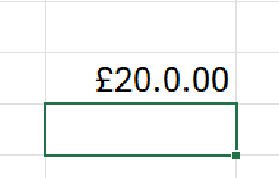
Hi, This has started happening on Excel and its baffling me so I thought I'd reach out to the community to see anyone can help. This is Excel v2606 (M365) with latest updates. Issue: I have a new work book and in a cell I simply add the number 20 I right click the cell with the 20 in it and select "Format Cells.." and change it to currency and this happens If I go back into "Format Cells" the selection has moved from Currency to Custom and it shows this: And clicking on Currency the format is shown as this: No matter what I do I can't get it to format correctly, if I change the format back to "General" it goes back to being 20. I've tried doing an online repair and that hasn't had any affect. Any help gratefully received. Rob43Views0likes2Commentshow to ignore conditional formatting for a cell that is not empty but invisible (cell format ;;;)
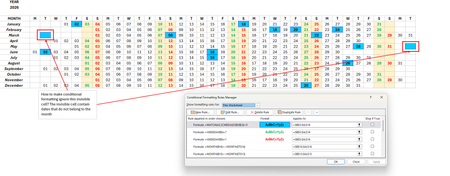
hi, i need help with a conditional formatting of cells that are not empty but invisible (cell format to ;;; (invisible)). I have a calendar where the dates are invisible (outside of the month) but the cell formatting applies to it (cuz it is that date, i.e., public holiday). i have attached the screenshots and i hope someone can help me out. thank you so much. regards, angel98Views0likes4Comments
chart change
I have an excel spreadsheet with several tabs. 4 of those tabs have charts. On my first chart, the information is no longer displaying correctly. I have deleted and readded, compared formating, used google. I cannot figure out why it is different. Only one of my chart lines is showing, the rest are so small I can barely see them and the heading color key won't display. - If I post this twice, apologies, I backed out accidentally44Views0likes2Comments


Events
Recent Blogs
- SharePoint Online is introducing a new tenant-level setting that allows organizations to choose whether heading permalinks should appear on SharePoint pages.Jul 14, 2026866Views1like1Comment
- 2 MIN READPowerPoint is getting easier to use with new SmartArt, fresh themes, a cleaner Design ribbon, and a more modern file open experience.Jul 13, 20261.2KViews2likes0Comments