Recent Discussions
Upcoming change: disabling Teams meeting recording expiration notification emails
UPDATE: Please see the updated post on this topic here: Update: You can now control Teams Meeting Recording expiration notification emails | Microsoft Commu… Hello, We wanted to share an important update regarding email notifications for expired Microsoft Teams meeting recordings. Based on valuable feedback from our community, we’ve decided to make a change to how notifications are handled. What’s changing: Starting June 1st, we will stop sending email notifications for expired Microsoft Teams meeting recordings. We are making this change due to complaints we received from many customers about the high volume of notifications which they deemed low value. This change allows us to respect your preferences while ensuring critical communications remain accessible. Recording expiration and deletion policies remain unchanged and items that expire will be deleted even when notifications are not being sent. How to keep receiving notifications: For those customers that would like to continue receiving email notifications, we will create a new setting and make it available before June 1st. This will be a per-tenant setting. We will send another message center post once this setting is available and update our documentation in this discussion and on our support page. After June 1st: If you didn’t change notification settings before the deadline, you can still re-enable them at any time by running the PowerShell command. Note: Our original message center post incorrectly asked recipients to fill out a survey and failed to include a link to the survey. We are committed to providing options that work for your organization, and we would like to hear from you. If you have questions or additional feedback about this change, please complete this survey and join the discussion: Teams Meeting Recording Notification Changes – Fill out form Thank you for being part of our community.
Guest users removed from Teams Group Chat
Our users are sharing a group chat with an external organization, users were invited by the creator of the group chat. Today all of the external users were removed from the group, we have no idea why. We have a guess that it happened because the user who created the group chat left the organization and his user was disabled in Entra-ID. This is the second time this has happened to this group of users, last week, in a similar way, all of our users were removed from a group created by a user in the other organization. Any explanation or more information as to how to prevent/debug this situation is welcome. Thanks! HemedSolved3.2KViews1like7CommentsUpdate: You can now control Teams Meeting Recording expiration notification emails
Hey Teams community, We've heard the feedback. For admins and users managing a high volume of meetings, TMR expiration emails can pile up fast. We've been working on giving you control, and that control is now here. What's new Tenant admins can now use a PowerShell cmdlet to suppress Teams Meeting Recording expiration and deletion notification emails across their organization. Notifications stay on by default (no change if you do nothing), but if you'd like to turn them off, here's how. Prerequisites Latest version of SharePoint Online Management Shell (download here). Note, it's Windows-only, so you'll need a Windows machine or Azure Virtual Desktop SharePoint Admin or Global Admin permissions Steps 1. Connect to your tenant powershell Connect-SPOService -Url https://<your-tenant>-admin.sharepoint.com 2. Check the current value powershell Get-SPOTenant | Format-List *Recording* False = notifications currently on (default). True = notifications suppressed. 3. Suppress notifications powershell Set-SPOTenant -DisableTeamsMeetingRecordingDeletedNotification $true You'll see a confirmation prompt — enter Y to proceed. 4. Verify powershell (Get-SPOTenant).DisableTeamsMeetingRecordingDeletedNotification True means you're all set. No more expiration emails for your tenant. Want to turn them back on later? Just run the same command with $false. What doesn't change Recordings still expire and delete on the same schedule No per-user settings, no UI changes. This is purely a tenant-level admin toggle We'll keep monitoring feedback, and as always, drop your questions below.
'New Teams' - DOES NOT Remember Window Positions
Can anyone tell me if there is a FIX for this??? Ever since I upgraded to the NEW and IMPROVED [and I choke on those words] Teams, DOES NOT remember my previous window positions for either the main window or individual chats. The Classic Teams did this. When can we expect this be FIXED? This is HIGHLY annoying. It is bad enough that Microsoft feels the need to have this fill nearly your entire screen [as if it was the only application you used]. The very least you could do is check these sorts of issues before the app went to production and in my opinion this app is nowhere near production worthy. Please FIX this immediately or provide a workaround that can be utilized as soon as possible. I wish I could use the old 'classic' Teams, but it will no longer let me. At least it would remember my previous Window Positions.850Views2likes1Comment
Teams app window keeps jumping back to main Window
I'm using three monitors, on one monitor I usually have the Teams app window. That monitor is not my main display. I can move the Teams app windows to any of my three monitors and it stays there but as soon as I switch focus to the Teams app windows it pops back to my main display. Very annoying. Anyone experienced this behavior?Solved25KViews12likes17Comments
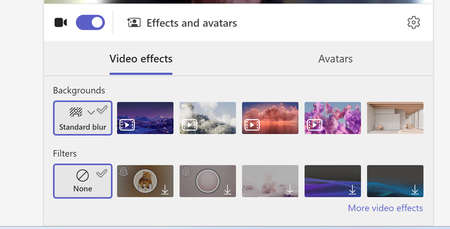
"None" option missing from Teams background options
Hi, Our teams "none" background option is missing. Forcing users to use a background or the blur backgrounds. I have tried to revert back to classic teams to see if that is a fix, but I am unable to toggle it off and it takes me to download the classic teams which is just the new teams download. I do see this message "Your org sets background to blur unless something else is selected" when trying to update the background in a call. We are not disabling this option as an organization. And I can switch to other backgrounds.1.7KViews1like6Comments
How much should Teams presence influence call routing
One thing I've noticed recently is that many Teams Phone environments still treat presence as a destination state rather than a routing input. A typical flow might look like: Caller selects an option Call is transferred User is unavailable Caller ends up in voicemail or another queue Technically the routing worked. From the caller's perspective, it often didn't. I'm curious how others are approaching this. Are you using Teams presence as part of your call-routing logic? For example: Available → transfer immediately Busy → offer an alternative path In a meeting → capture context Offline → route elsewhere Or are traditional queues and escalation paths still sufficient for most scenarios? Interested to hear what people are doing in real deployments.32Views1like0Comments
Is anyone building individual development plans inside Teams?
So hear me out. I discovered that if something is in a live document, sharepoint, etc, I've found that employees dont really check up on it or follow through with it unless they are regularly reminded. Same goes for any software we try to implement that requires a seperate login and lives in another app completely. Our employees spend most of their time communicating in Teams so I want to take our IDP process into Teams. Are there any decent talent or employee development apps for Teams that anyone can recommend for IDPs?22Views0likes0CommentsAnyone found a good way to run performance reviews inside Teams?
Our company just switched to doing everything in Teams and the one thing that still lives outside is performance reviews. We use a separate web app that nobody logs into until the last minute and managers hate it. Is there anything that actually handles the full review cycle with self assessments, manager ratings, maybe even 360 feedback? Our IT team said they'd prefer something that uses our existing M365 directory so we dont have to manage another user list.87Views0likes2Comments
Allow muting a person only for me
Sometimes I am in a meeting where one of the persons in the meeting is actually near me in the world outside the screen. In this case the sound is a bit maddening since there is a small delay between the sound from the person and the sound through the teams interface. In these cases, I would like to mute the person only for me since I am sitting near and can hear the person fine without headphones. Right now I need to takeoff headphones when the person is talking and putting it back as the person finishes talking.131KViews207likes157CommentsStop Automatic Calling when Screensharing
I screenshare a lot in my position; I call the coworker (Phone/Headset) and train them on what I need them to look at. I am in a large office building, and the automatic calling of the receivers' PC is disruptive, as I do not was the whole office to hear my conversation or have people hear my trainee. I see no way to disable the team auto-call once I start to screen share or in the Options. All my coworkers feel this frustration as well. I do use the computer microphone/speaks aspect when working from home, but would disable it totally, if it would stop the auto-call. I do not want it to affect meeting invites to others, as others around the country can use their PC speak/microphone, if they want. Please advise.11Views0likes0CommentsCopilot Studio in Teams sometimes wraps user input with HTML tags (e.g., <div>)
I’m using Copilot Studio deployed to Microsoft Teams, and I noticed that user messages are occasionally received with HTML tags. For example, when a user sends "get me the onboarding status", sometimes it displays in the dialog box as "<div>get me the onboarding status</div>" This does not happen consistently. I’m not sure whether this is caused by how Teams renders or sends messages (e.g., HTML vs plain text), or if it is something specific to Copilot Studio. Is this expected behavior for the Teams channel? Any clarification or recommended handling would be appreciated.271Views0likes5Comments
Issue Sideloading Word Extension into Word Online via GoDaddy M365 Account
Hi everyone, We’re currently facing an issue while trying to sideload a Word extension into Word Online. From what we understand, the standard process is to upload the add-in through the Microsoft 365 Admin Center, after which users within the organisation can access it through the “Add-ins” section in Word Online. However, our organisation’s Microsoft 365 account was purchased through GoDaddy instead of directly from Microsoft. Because of this, attempts to access certain Microsoft 365 Admin Center features appear to get redirected to the GoDaddy Admin Center instead. We suspect this may be preventing us from accessing the required deployment/app management options needed for sideloading the extension. Has anyone faced a similar issue with GoDaddy-managed Microsoft 365 accounts? Any guidance or workaround suggestions would be greatly appreciated. Thanks in advance.28Views0likes1Comment
Teams for Android Auto - Receive Messages but Replies always Fail
I have a Pixel 10 with all latest OS and Patches as well as latest MS Teams App. For months now I've had a problem where all my incoming work messages on Teams come through fine, but when I attempt to reply it never sends the message. When I look at my Teams App there is a red retry icon because the message failed to send. When I send a new message in the app it works fine but the previous reply through Android auto remains in retry status ie Failed. Is anyone able to reply to a Work account teams message using Android Auto? It has never worked for me.60Views0likes1Comment
Microsoft teams personal package
Dear community I am looking for a Microsoft package with Teams that supports 300 users. Can the personal package work out for this? I was trying to pay for one month, but it was not allowing me to change the country, only the US. Kindly help out if anyone can.45Views0likes1Commentsmall white window that opens during sharing in a meeting
Hi, I've Teams vers. 26120.3106.4722.3411. For some time when I access to a meeting and sharing the screen, a window or a presentation, a small white windows appears at the bottom right and I cannot close it. To close this window and to prevent it from opening again I need to disconnect to Teams also for 2-3 times. Well, how could I solve a such issue permanently? Thanks This is the window image that I can capture:147Views1like1Comment




Events
Recent Blogs
- It's hard to believe May is over already! You may have noticed this edition of What's new in Teams is landing a few days later than usual — that's intentional. We're publishing alongside Microsoft Bu...Jun 02, 20262.4KViews0likes0Comments
- Voice isolation is designed to reduce noise and separate your voice from other sounds and voices in Teams calls and meetings. In simple terms, it helps Teams recognize who you are trying to hear and ...Jun 01, 2026124Views0likes0Comments