Exchange 2003 background and behavior
In Exchange 2003, Recipient Policies (now Email Address Policies – EAP) were a bit ineffective in some cases. It was quite possible to create a Recipient Policy designed to manage the email addresses stamped onto your mailboxes, specify the "filter" which defined the mailboxes to be included, and then choose not to "apply" this new Recipient Policy.
When creating the Recipient policy in Exchange 2003, you could just dismiss this dialog and ignore it – never evaluating the full impact of the new policy. Newly created mailboxes which match the policy will get the proper email addresses applied, but any existing mailboxes will remain with their old policy (even though they now match the new policy instead).
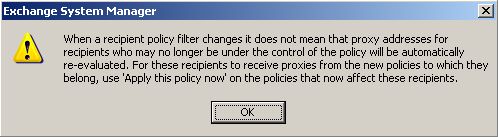
Figure 1: "Don't forget to manually apply the new policy" dialog box
The standard, expected behavior is that the policy will be explicitly "applied" shortly after it is created. The wiggle room around not forcing it to be immediately applied when it's created is to allow the administrator to "schedule" the application for an opportune time (an evening, a weekend, etc) to ensure minimal disruption to system performance.
If the policy is applied
If the policy is applied (Right click on the policy -> Apply this policy now...), the behavior is that:
- All recipient objects are reevaluated to see if they match the new policy
- Any that do match have their policy membership updated (msExchPoliciesIncluded) to the new policy – remember that a recipient can only be a member of one recipient policy at a time, so becoming part of this new policy means the recipient is necessarily leaving their old policy.
- No proxy addresses are removed from the recipient, but if the new policy defines a new primary email address (reply address), then the old primary address is demoted to a secondary email address so that the new primary can be set.
Yes, you did read that correctly. The primary email address for these affected users will quite likely be updated/changed, since one of the key reasons for a separate Recipient Policy is to define a different primary (reply) address.
So far, so good. If you apply a new policy that defines a different primary proxy address format, it stands to reason that the users to whom the policy applies will end up with a different primary proxy address.
If the policy is NOT applied
So what happens if you DON'T ever apply the policy? Well, as I alluded before, the recipients who are newly created after the new policy is in effect will all get the address templates of the new recipient policy. And recipients who existed before the new policy will not ever be reevaluated for the new address templates and will retain their original email addresses unchanged.
Whoops. Now you've got a recipient policy defined – a POLICY – that is not explicitly enforced. That's bad, and bypasses the point of having a policy. Might as well just call it a Recipient Suggestion instead!
Further, you now have the looming problem that every day that goes by without applying the new recipient policy means you're another day further along on borrowed time. Sooner or later, someone will probably apply the policy. Following a PSS KB article, or a blog post they've read to solve some other problem related to the RUS, etc. This inevitably happens when you least expect it – while you're on vacation, over the holidays, or 2:30am on a Monday morning.
And then, what's the result? Without warning all of the email addresses for these users under the new (now probably not so "new") recipient policy are updated to match the policy template. Reply addresses are changed, former primary addresses are demoted to secondaries, end-users are confused, etc. As mentioned above, this would happen only on users that were created before the new (now probably not so "new") policy was created and never applied.
Of course, since you defined the recipient policy filter and address templates, none of this should come as a surprise. But it always does – and it's worse the longer it's been since the policy was created, since the surprise of having these addresses changed will only bigger the longer it's been since you made the recipient policy change!
The Exchange 2007 behavior
Ok, enough background. Why this particular blog post? Well, in Exchange 2007 we've finally closed this loophole and made the Email Address Policy (EAP ) work like an actual policy.
Any time you create a new EAP in Exchange 2007 you're given much less wiggle room to get out of applying it (either immediately or as a scheduled action). Any time you write a recipient object in Exchange 2007 (from the GUI console or the PowerShell), the policy membership is synchronously evaluated and reapplied if necessary.
The net effect – Exchange 2007 actions on recipients will make sure that any lagging Exchange 2003 Recipient Policies that have not yet been applied, *WILL* be applied to those recipients.
One area where this may cause some initial confusion is Exchange 2007 mailbox move. Since you need to move the mailboxes to Exchange 2007 mailbox servers using the Exchange 2003 console or PowerShell, this counts as an "Exchange 2007 action"... and will ensure that the correct policies are applied to this mailbox.
This means that if you have a bunch of "unapplied policy" mailboxes on an Exchange 2003 server and you bulk-move them to Exchange 2007 mailbox server, quite possibly you will find that as part of the mailbox move process they all have been configured with new email proxy addresses, perhaps even a different primary SMTP address (all depending on what the new policy defines)! As explained above, this is expected behavior and is by design.
That said, it may also be unexpected and undesirable. Perhaps you really DO want to exclude these mailboxes from all automatic email address policy management, or perhaps you just need to get the mailboxes moved without changing their email address and will eventually fine tune the recipient policy to exclude these particular users. There are a number of reasons why you might want to ensure you can move these mailboxes without applying the new policy as part of the process.
The easiest workaround is to ensure before the mailbox move that you have excluded these mailboxes from "Automatic Update" of their recipient policy information. This can be done fairly easily in Exchange 2003 ADUC (since you've not moved the mailbox to Exchange 2007 yet) or using Exchange 2007 at either the GUI console or with the Windows PowerShell:
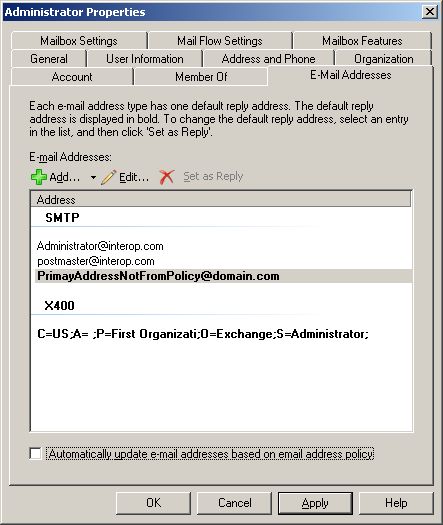
Figure 2: Unchecking "Automatically Update" in the GUI console.
PowerShell One-Liner examples:
Get-Mailbox < mailbox ID> | Set-Mailbox –EmailAddressPolicyEnabled:$false
Get-Mailbox –Server SRV1 | Set-Mailbox –EmailAddressPolicyEnabled:$false
Be sure that once you've corrected the email address policy filter or templates, you don't forget to re-enable the policy for these recipients or you will lose out on benefits of managing email addresses through email address policy benefits for the recipient in the future.

