In Exchange Server 2007 RTM and SP1, the Exchange team has published guidance for using a CNAME record in DNS as part of the provisioning process for the file share witness (FSW) component of a Majority Node Set (MNS) quorum on Windows Server 2003, and a Node and Share Majority quorum on Windows Server 2008. Specifically, we state the following in the documentation:
"We also recommend that you create a CNAME record in the Domain Name System (DNS) for the server hosting the share, instead of the actual server name. When creating the share for the file share witness, use the fully qualified domain name (FQDN) for the CNAME record instead of the server name because this practice assists with site resilience."Upon review of this guidance, we have learned that its effects and success can be unpredictable in some environments. As a result, we decided to revisit this guidance, and after working closely with the Windows Cluster team on various site resilience scenarios, we have decided to revise our configuration guidance. In summary, we no longer recommend using a CNAME record as part of the FSW provisioning process. Instead of using a CNAME record and changing the FQDN for the target host to point to a server with a replacement FSW, in a backup site activation process, or in the reactivation process for a primary site, we now recommend using the Cluster service's built in "force quorum" capabilities. Background To illustrate exactly how this guidance is changing, consider a topology in which a two-node cluster continuous replication (CCR) environment is deployed across two physical sites: a primary datacenter and a backup datacenter, as shown below.
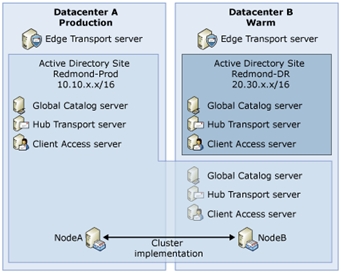 In this example, the Active Directory Site named Redmond-Prod is stretched across two datacenters, Datacenter A, the production datacenter, and Datacenter B, a warm backup datacenter that has dedicated resources (global catalog, Client Access, Hub Transports) for the Redmond-Prod site. Datacenter B also contains a second Active Directory Site named Redmond-DR, which contains dedicated resources that can be moved from the Redmond-DR site to the Redmond-Prod site in Datacenter B.
Focusing just on the cluster implementation, we have a two-node CCR environment that during normal production hours has the clustered mailbox server (CMS) hosted on NodeA in Datacenter A, and NodeB is the passive node residing in Datacenter B.
The CCR environment is configured to use an MNS quorum with FSW. In this configuration, there are two options for the location of the file share used for the FSW: (1) locate the share on a server in Datacenter A, or (2) locate the share on a server in Datacenter B. The general recommendation in this configuration is to use a share on a Hub Transport server in Datacenter A that is in the same Active Directory Site as the CMS. In addition, to save time during the process of activating Datacenter B, we also recommend staging a replacement share for the FSW on a Hub Transport server in Datacenter B, as shown below.
In this example, the Active Directory Site named Redmond-Prod is stretched across two datacenters, Datacenter A, the production datacenter, and Datacenter B, a warm backup datacenter that has dedicated resources (global catalog, Client Access, Hub Transports) for the Redmond-Prod site. Datacenter B also contains a second Active Directory Site named Redmond-DR, which contains dedicated resources that can be moved from the Redmond-DR site to the Redmond-Prod site in Datacenter B.
Focusing just on the cluster implementation, we have a two-node CCR environment that during normal production hours has the clustered mailbox server (CMS) hosted on NodeA in Datacenter A, and NodeB is the passive node residing in Datacenter B.
The CCR environment is configured to use an MNS quorum with FSW. In this configuration, there are two options for the location of the file share used for the FSW: (1) locate the share on a server in Datacenter A, or (2) locate the share on a server in Datacenter B. The general recommendation in this configuration is to use a share on a Hub Transport server in Datacenter A that is in the same Active Directory Site as the CMS. In addition, to save time during the process of activating Datacenter B, we also recommend staging a replacement share for the FSW on a Hub Transport server in Datacenter B, as shown below.
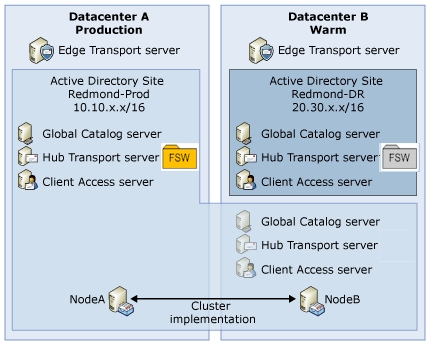 If Datacenter A fails or is otherwise unavailable, and Datacenter B is to be activated, our original guidance called for quickly switching over to a replacement share for the FSW by changing the FQDN of the target host for the FSW CNAME record in DNS from that of the Hub Transport server in Datacenter A to the Hub Transport server in Datacenter B.
For example, say you have the following:
If Datacenter A fails or is otherwise unavailable, and Datacenter B is to be activated, our original guidance called for quickly switching over to a replacement share for the FSW by changing the FQDN of the target host for the FSW CNAME record in DNS from that of the Hub Transport server in Datacenter A to the Hub Transport server in Datacenter B.
For example, say you have the following:
- A CMS named EXMBX1 in a CCR environment in the Redmond-Prod Site located in Datacenter A.
- EXHUB1 in the Redmond-Prod Site located in Datacenter A. It has been provision with a file share named FSW_EXMBX1, which will be used for the FSW for EXMBX1.
- EXHUB2 in the Redmond-DR Site located in Datacenter B. It has been provision with a file share named FSW_EXMBX1, which will be used for the FSW for EXMBX1 when Datacenter B takes over for Datacenter A.
- Configure a CNAME record in DNS, using an alias of EXMBX1FSW.
- Configure the CNAME record to initially point to EXHUB1.
- Configure a file share on EXHUB1 and on EXHUB2 called FSW_EXMBX1.
- Configure the MNS quorum with FSW to point to \\EXMBX1FSW\FSW_EXMBX1.
- When Datacenter B is being activated, reconfigure the CNAME record to point to EXHUB2.
- Provision a new share for FSW on EXHUB2 in Datacenter B (if this is not already done).
- Force quorum on NodeB in Datacenter B by adding the following registry value to the node: HKLM\System\CurrentControlSet\Services\ClusSvc\Parameters REG_SZ: ForceQuorum Value: NodeB
- Start the Cluster service on NodeB in Datacenter B by running the following command: net start clussvc
- Reconfigure the cluster quorum to use the FSW share on EXHUB2.
- Take the clustered mailbox server offline.
- Remove the registry value, and then reboot NodeB.
- Start the clustered mailbox server.
- Provision a new share on EXHUB1 in Datacenter A.
- Bring NodeA online.
- Reconfigure the cluster quorum to use the FSW share on EXHUB1.
- Stop the clustered mailbox server.
- Move the Cluster Group from NodeB to NodeA.
- Move the clustered mailbox server from NodeB to NodeA.
- Start the clustered mailbox server.
- Provision a new share for FSW on EXHUB2 in Datacenter B (if this is not already done).
- Force quorum on NodeB in Datacenter B by running the following command on NodeB: net start clussvc /forcequorum
- Use the Configure Cluster Quorum Settings wizard to configure the Node and Share Majority to use the FSW share on EXHUB2.
- Reboot NodeB.
- Start the clustered mailbox server.
- Provision a new share on EXHUB1 in Datacenter A.
- Bring NodeA online.
- Use the Configure Cluster Quorum Settings wizard to configure the Node and Share Majority to use the FSW share on EXHUB1.
- Stop the clustered mailbox server.
- Move the Cluster Group from NodeB to NodeA.
- Move the clustered mailbox server from NodeB to NodeA.
- Start the clustered mailbox server.
- Planning for Cluster Continuous Replication - http://technet.microsoft.com/en-us/library/bb123996(EXCHG.80).aspx
- How to Configure the Node and File Share Majority Quorum - http://technet.microsoft.com/en-us/library/bb676490(EXCHG.80).aspx
- How to Configure the File Share Witness - http://technet.microsoft.com/en-us/library/bb124922(EXCHG.80).aspx
- Cluster Continuous Replication - http://technet.microsoft.com/en-us/library/bb124521(EXCHG.80).aspx
Updated Jul 01, 2019
Version 2.0
The_Exchange_Team
Platinum Contributor
Joined April 19, 2019
Exchange Team Blog
You Had Me at EHLO.
